Content
# whoop-ai-mcp
[](https://www.npmjs.com/package/whoop-ai-mcp)
[](https://opensource.org/licenses/MIT)
[](https://nodejs.org)
[](https://www.typescriptlang.org/)
[](https://modelcontextprotocol.io/)
[](https://registry.modelcontextprotocol.io/)
An [MCP (Model Context Protocol)](https://modelcontextprotocol.io/) server that connects AI assistants like Claude to your [WHOOP](https://www.whoop.com/) health and fitness data. Ask questions about your recovery, sleep, workouts, and more — all through natural conversation.
> 📦 **Published on the [MCP Registry](https://registry.modelcontextprotocol.io/)** as `io.github.shashankswe2020-ux/whoop` — discoverable by any MCP-compatible client.
## Features
- 🏋️ **6 health data tools** — recovery, sleep, workouts, cycles, body measurements, and profile
- 🔐 **Secure OAuth2** — browser-based authentication with automatic token refresh
- 🔄 **Resilient** — automatic retry on rate limits, token refresh on expiry, clear error messages
- 💾 **Secure token storage** — tokens stored at `~/.whoop-mcp/tokens.json` with `0600` permissions
- ⚡ **Zero config** — just add your WHOOP app credentials and go
- 📦 **Lightweight** — only two runtime dependencies (`@modelcontextprotocol/sdk` + `zod`)
## Quick Comparison (WHOOP MCP packages on npm)
_Based on npm search results for `whoop mcp` on 2026-04-17._
| Package | Latest version | Last publish (UTC) | MCP Registry metadata (`mcpName`) | Runtime deps | npm |
|------|-----------------|--------------------|------------------------------------|--------------|-----|
| **whoop-ai-mcp (this repo)** | **0.2.1** | **2026-04-16** | **✅ `io.github.shashankswe2020-ux/whoop`** | **2** | https://www.npmjs.com/package/whoop-ai-mcp |
| whoop-mcp-server | 0.0.5 | 2026-03-13 | — | 2 | https://www.npmjs.com/package/whoop-mcp-server |
| whoop-mcp | 0.1.2 | 2026-03-11 | — | 2 | https://www.npmjs.com/package/whoop-mcp |
| @alacore/whoop-mcp-server | 1.0.1 | 2025-10-09 | — | 2 | https://www.npmjs.com/package/@alacore/whoop-mcp-server |
| @iflow-mcp/nissand-whoop-mcp-server | 1.0.3 | 2026-03-24 | — | 3 | https://www.npmjs.com/package/@iflow-mcp/nissand-whoop-mcp-server |
| @roebot0/whoop-mcp | 1.0.0 | 2026-04-06 | — | 3 | https://www.npmjs.com/package/@roebot0/whoop-mcp |
**Why this package stands out**
- Published to npm **and** the official MCP Registry (via `mcpName` metadata)
- Most recently published among listed WHOOP MCP packages (as of 2026-04-17)
- Minimal runtime footprint (2 dependencies)
### Deep comparison ratings (WHOOP MCP packages on npm)
_Evidence basis: npm registry metadata + npm-hosted README signals + package manifest fields (`dependencies`, `repository`, `mcpName`) collected on 2026-04-17._
**Scoring dimensions (0–5):**
- **Security & resilience (35%)**: documented OAuth, token refresh, retry/backoff, and explicit secure token file permissions (`0600`)
- **Freshness (25%)**: recency of latest npm publish
- **Docs & verification signals (25%)**: README coverage for OAuth, testing, changelog/release notes, and MCP Inspector usage
- **Discoverability & portability (15%)**: MCP Registry metadata (`mcpName`), repository metadata present, and lean runtime dependency count (<=2)
> Ratings are documentation/metadata-driven and are **not** a source-code security audit.
| Package | Security & resilience | Freshness | Docs & verification | Discoverability | **Overall rating** | Key observed gap vs `whoop-ai-mcp` |
|------|------------------------|-----------|---------------------|-----------------|--------------------|-------------------------------------|
| **whoop-ai-mcp (this repo)** | **5.0/5** | **5.0/5** | **5.0/5** | **5.0/5** | **5.0/5** | Baseline |
| whoop-mcp-server | 3.8/5 | 4.0/5 | 2.5/5 | 3.3/5 | **3.4/5** | No explicit `0600` token permission docs; no `mcpName`; no Inspector/changelog signal in npm README |
| @roebot0/whoop-mcp | 2.5/5 | 5.0/5 | 1.3/5 | 1.7/5 | **2.7/5** | No `0600` docs; no `mcpName`; no explicit Inspector/changelog/testing signal in npm README |
| @alacore/whoop-mcp-server | 2.5/5 | 2.0/5 | 2.5/5 | 3.3/5 | **2.5/5** | Older publish cadence; no explicit `0600` docs; no `mcpName`; retry/backoff not explicitly documented |
| @iflow-mcp/nissand-whoop-mcp-server | 2.5/5 | 4.0/5 | 1.3/5 | 1.7/5 | **2.4/5** | No explicit token-refresh/`0600` docs; no repository metadata in npm manifest; no `mcpName` |
| whoop-mcp | 0.0/5 | 4.0/5 | 0.0/5 | 3.3/5 | **1.5/5** | OAuth/refresh/retry/`0600` behavior not explicitly documented in npm README; no `mcpName` |
## 🎥 Video Walkthrough
Watch a detailed walkthrough of setting up and using whoop-ai-mcp with Claude Desktop:
[](https://youtu.be/2vwxEjctcWs?si=ncIr0fmXT0MUarYL)
> Covers: creating a WHOOP Developer App, configuring Claude Desktop, OAuth authentication, and querying your health data through natural conversation.
## Prerequisites
1. A [WHOOP](https://www.whoop.com/) account with an active membership
2. A WHOOP Developer App — create one at [developer.whoop.com](https://developer.whoop.com)
- Set the redirect URI to `http://localhost:3000/callback`
3. [Node.js](https://nodejs.org/) >= 20
## Get a WHOOP
Don't have a WHOOP yet? Here's how to get started:
- 🛒 **Buy a WHOOP on Amazon** — [WHOOP peak on Amazon](https://amzn.to/4st9B2r)
- 🔗 **Join WHOOP directly** — [whoop.com/membership](https://join.whoop.com/63E6C805)
## Quickstart (MCP Registry)
This server is published on the official [MCP Registry](https://registry.modelcontextprotocol.io/). MCP clients that support the registry can discover and install it automatically:
```
Server name: io.github.shashankswe2020-ux/whoop
```
You can also browse it via the registry API:
```bash
curl "https://registry.modelcontextprotocol.io/v0.1/servers?search=io.github.shashankswe2020-ux/whoop"
```
## Quickstart (Claude Desktop)
Add this to your Claude Desktop configuration file:
**macOS:** `~/Library/Application Support/Claude/claude_desktop_config.json`
**Windows:** `%APPDATA%\Claude\claude_desktop_config.json`
```json
{
"mcpServers": {
"whoop": {
"command": "npx",
"args": ["whoop-ai-mcp"],
"env": {
"WHOOP_CLIENT_ID": "your_client_id",
"WHOOP_CLIENT_SECRET": "your_client_secret"
}
}
}
}
```
Replace `your_client_id` and `your_client_secret` with the credentials from your [WHOOP Developer App](https://developer.whoop.com).
On first launch, a browser window will open for you to authorize access to your WHOOP data. After authorizing, tokens are cached locally and refresh automatically.
Then ask Claude something like:
> *"How was my recovery this week?"*
>
> *"Show me my sleep data from the last 3 days"*
>
> *"What workouts did I do this month?"*
**whoop-mcp connected in Claude Desktop:**

**Chatting with WHOOP data through Claude:**

## Installation
### Via npx (recommended)
No installation needed — Claude Desktop runs it automatically with the config above.
### Global install
```bash
npm install -g whoop-ai-mcp
```
### From source
```bash
git clone https://github.com/shashankswe2020-ux/whoop-mcp.git
cd whoop-mcp
npm install
npm run build
```
## Configuration
### Environment Variables
| Variable | Required | Description |
|----------|----------|-------------|
| `WHOOP_CLIENT_ID` | Yes | Your WHOOP Developer App client ID |
| `WHOOP_CLIENT_SECRET` | Yes | Your WHOOP Developer App client secret |
Set these in your Claude Desktop config (see [Quickstart](#quickstart-claude-desktop)) or as shell environment variables:
```bash
export WHOOP_CLIENT_ID=your_client_id
export WHOOP_CLIENT_SECRET=your_client_secret
```
### Creating a WHOOP Developer App
1. Go to [developer.whoop.com](https://developer.whoop.com)
2. Create a new application
3. Set the **Redirect URI** to `http://localhost:3000/callback`
4. Set the **Privacy Policy URL** (required by WHOOP) — you can use `https://github.com/shashankswe2020-ux/whoop-mcp` or your own URL
5. Enable the following scopes:
- `read:profile`
- `read:recovery`
- `read:sleep`
- `read:workout`
- `read:cycles`
- `read:body_measurement`
6. Copy the **Client ID** and **Client Secret**
## Tools
### `get_profile`
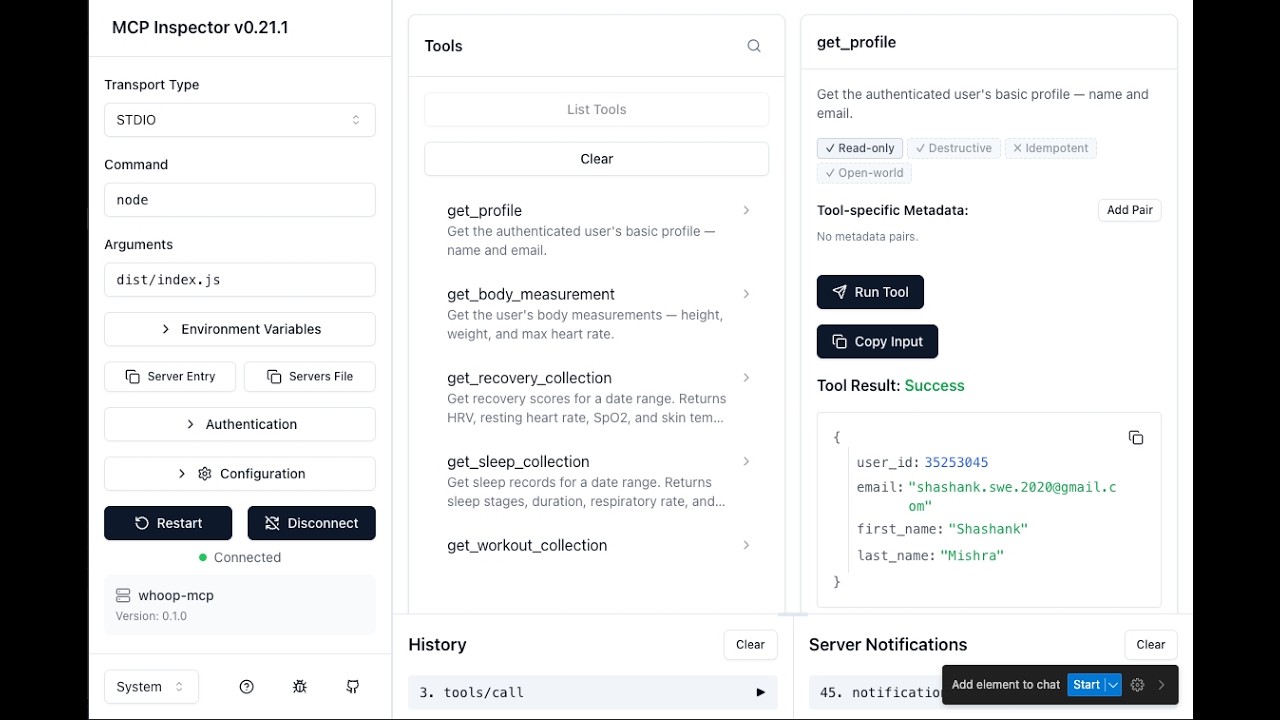
Get the authenticated user's basic profile — name and email.
**Parameters:** None
---
### `get_body_measurement`
Get the user's body measurements — height, weight, and max heart rate.
**Parameters:** None
---
### `get_recovery_collection`
Get recovery scores for a date range. Returns HRV, resting heart rate, SpO2, and skin temp for each day.
**Parameters:**
| Parameter | Type | Required | Description |
|-----------|------|----------|-------------|
| `start` | string | No | Return records after this time (inclusive). ISO 8601 format. |
| `end` | string | No | Return records before this time (exclusive). Defaults to now. |
| `limit` | number | No | Max records to return (1–25). Defaults to 10. |
| `nextToken` | string | No | Pagination token from a previous response. |
---
### `get_sleep_collection`
Get sleep records for a date range. Returns sleep stages, duration, respiratory rate, and performance scores.
**Parameters:**
| Parameter | Type | Required | Description |
|-----------|------|----------|-------------|
| `start` | string | No | Return records after this time (inclusive). ISO 8601 format. |
| `end` | string | No | Return records before this time (exclusive). Defaults to now. |
| `limit` | number | No | Max records to return (1–25). Defaults to 10. |
| `nextToken` | string | No | Pagination token from a previous response. |
---
### `get_workout_collection`
Get workout records for a date range. Returns strain, heart rate zones, calories, and sport type.
**Parameters:**
| Parameter | Type | Required | Description |
|-----------|------|----------|-------------|
| `start` | string | No | Return records after this time (inclusive). ISO 8601 format. |
| `end` | string | No | Return records before this time (exclusive). Defaults to now. |
| `limit` | number | No | Max records to return (1–25). Defaults to 10. |
| `nextToken` | string | No | Pagination token from a previous response. |
---
### `get_cycle_collection`
Get physiological cycles for a date range. Returns strain, calories, and heart rate data per cycle.
**Parameters:**
| Parameter | Type | Required | Description |
|-----------|------|----------|-------------|
| `start` | string | No | Return records after this time (inclusive). ISO 8601 format. |
| `end` | string | No | Return records before this time (exclusive). Defaults to now. |
| `limit` | number | No | Max records to return (1–25). Defaults to 10. |
| `nextToken` | string | No | Pagination token from a previous response. |
## Authentication
`whoop-ai-mcp` uses OAuth2 Authorization Code flow with PKCE:
1. **First run:** A browser window opens for you to authorize with WHOOP
2. **Token caching:** Access and refresh tokens are saved to `~/.whoop-mcp/tokens.json`
3. **Auto-refresh:** When the access token expires, it's automatically refreshed using the stored refresh token
4. **Re-authentication:** If the refresh token expires, you'll be prompted to authorize again
Token files are stored with `0600` permissions (user-only read/write).
## Troubleshooting
### "Missing required environment variable: WHOOP_CLIENT_ID"
Your WHOOP credentials aren't set. Add them to your Claude Desktop config or set them as environment variables. See [Configuration](#configuration).
### "Network error: Unable to reach the WHOOP API"
Check your internet connection. The WHOOP API must be reachable at `https://api.prod.whoop.com`.
### "WHOOP API returned 429"
You've hit the rate limit. The server retries automatically with exponential backoff (up to 3 attempts). If this persists, reduce the frequency of your requests.
### "WHOOP API returned 401"
Your access token has expired. The server attempts an automatic refresh. If that fails, delete `~/.whoop-mcp/tokens.json` and restart to re-authenticate:
```bash
rm ~/.whoop-mcp/tokens.json
```
### Browser doesn't open during authentication
If the browser doesn't open automatically, check the terminal output for the authorization URL and open it manually.
## Testing with MCP Inspector
You can interactively test the server using the [MCP Inspector](https://github.com/modelcontextprotocol/inspector) — a browser-based tool for exploring and invoking MCP tools.
```bash
WHOOP_CLIENT_ID=your_client_id \
WHOOP_CLIENT_SECRET=your_client_secret \
WHOOP_REDIRECT_URI=http://localhost:3000/callback \
npx @modelcontextprotocol/inspector node dist/index.js
```
Then open `http://localhost:6274` in your browser. The Inspector connects to the server, lists all available tools, and lets you invoke them with custom parameters.
**OAuth grant access screen (first-run authorization):**

**Testing `get_profile` tool in MCP Inspector:**

## Development
### Setup
```bash
git clone https://github.com/shashankswe2020-ux/whoop-mcp.git
cd whoop-mcp
npm install
```
### Commands
| Command | Description |
|---------|-------------|
| `npm run build` | Build TypeScript |
| `npm test` | Run tests (Vitest) |
| `npm run typecheck` | Type check (`tsc --noEmit`) |
| `npm run lint` | Lint (ESLint) |
| `npm run lint:fix` | Lint + auto-fix |
| `npm run format` | Format (Prettier) |
| `npm run dev` | Run in dev mode (tsx) |
### Project Structure
```
src/
├── index.ts # Entry point — auth, client, server, stdio
├── server.ts # MCP server + tool registration
├── auth/
│ ├── oauth.ts # OAuth2 Authorization Code flow
│ ├── token-store.ts # Secure token persistence
│ └── callback-server.ts # Local OAuth callback server
├── api/
│ ├── client.ts # HTTP client with retry + refresh
│ ├── types.ts # WHOOP API response types
│ └── endpoints.ts # API URL constants
└── tools/
├── get-profile.ts
├── get-recovery.ts
├── get-sleep.ts
├── get-workout.ts
├── get-cycle.ts
├── get-body-measurement.ts
└── collection-utils.ts
```
## Releases & npm Package
This project is published on npm as [`whoop-ai-mcp`](https://www.npmjs.com/package/whoop-ai-mcp).
```bash
npm install -g whoop-ai-mcp
```
Or run directly with `npx`:
```bash
npx whoop-ai-mcp
```
### Release Process
1. Update the version in `package.json` and add a new entry in `CHANGELOG.md`
2. Commit the changes: `git commit -am "Release vX.Y.Z"`
3. Tag the release: `git tag vX.Y.Z`
4. Push the commit and tag: `git push origin main vX.Y.Z`
5. The [Release workflow](.github/workflows/release.yml) automatically creates a GitHub Release with notes extracted from the changelog
6. The [npm publish workflow](.github/workflows/npm-publish.yml) automatically publishes the new version to npm
### Changelog
See [CHANGELOG.md](CHANGELOG.md) for a full list of changes in each release.
## Contributing
See [CONTRIBUTING.md](CONTRIBUTING.md) for development workflow, coding conventions, and the project's Copilot agent/skill configuration.
## License
[MIT](LICENSE)



