Content
# Anki MCP Server
A Model Context Protocol (MCP) server that enables LLMs to interact with Anki flashcard software through AnkiConnect.

## Features
### Tools
- `anki_check_connection` - Check whether AnkiConnect is reachable
- `anki_list_decks` - List all available Anki decks, optionally with deck IDs
- `anki_create_deck` - Create a new Anki deck
- `anki_list_tags` - List all tags currently used in the collection
- `anki_add_note_tags` - Add tags to one or more notes
- `anki_remove_note_tags` - Remove tags from one or more notes
- `anki_create_note` - Create a new note
- `anki_batch_create_notes` - Create multiple notes at once
- `anki_search_notes` - Search for notes using Anki query syntax
- `anki_get_note_info` - Get detailed information about a note
- `anki_update_note` - Update an existing note's fields and/or tags
- `anki_delete_note` - Delete one or multiple notes
- `anki_list_note_types` - List all available note types
- `anki_create_note_type` - Create a new note type
- `anki_get_note_type_info` - Get detailed structure of a note type
- `anki_sync` - Trigger AnkiWeb sync (fire-and-forget; success means Anki accepted the request, not that AnkiWeb received the data; a blocking dialog in Anki can silently keep the sync queued)
Legacy unprefixed tool names such as `create_note` and `list_decks` remain callable for existing clients, but new agent integrations should use the `anki_*` names.
### Resources
- `anki://decks/all` - Complete list of available decks with deck IDs
- `anki://tags/all` - Complete list of tags
- `anki://note-types/all` - List of all available note types
- `anki://note-types/all-with-schemas` - Detailed structure information for all note types
- `anki://note-types/{modelName}` - Detailed structure information for a specific note type
## Prerequisites
1. [Anki](https://apps.ankiweb.net/) installed on your system
2. [AnkiConnect](https://ankiweb.net/shared/info/2055492159) add-on installed in Anki
3. Node.js 20.11 or newer
## Configuration
### Install via Desktop Extension (.mcpb)
This repository supports Anthropic Desktop Extensions (MCPB). The easiest way to use this server in Claude Desktop is by installing the packaged `.mcpb` bundle.
1. Generate the `.mcpb` file locally using the provided script:
```bash
npm run mcpb
```
2. Open Claude Desktop Settings → Extensions and drag the generated `.mcpb` file in, then click Install.
This validates `manifest.json` and outputs a `.mcpb` archive you can install as above. Learn more about Desktop Extensions in Anthropic's announcement: [Desktop Extensions: One-click MCP server installation for Claude Desktop](https://www.anthropic.com/engineering/desktop-extensions).
### Usage with Claude Desktop
Add the server to your claude_desktop_config.json:
```json
{
"mcpServers": {
"anki": {
"command": "npx",
"args": ["--yes", "anki-mcp-server"]
}
}
}
```
#### Using Custom AnkiConnect Port
If your AnkiConnect is running on a different port, you can specify it using the `--port` parameter:
```json
{
"mcpServers": {
"anki": {
"command": "npx",
"args": ["--yes", "anki-mcp-server", "--port", "8080"]
}
}
}
```
### Configuration for Cline
Add the server to your Cline MCP settings file inside VSCode's settings `cline_mcp_settings.json`
```json
{
"mcpServers": {
"anki": {
"command": "npx",
"args": ["--yes", "anki-mcp-server"]
}
}
}
```
#### Using Custom AnkiConnect Port
For Cline, you can also specify a custom port:
```json
{
"mcpServers": {
"anki": {
"command": "npx",
"args": ["--yes", "anki-mcp-server", "--port", "8080"]
}
}
}
```
## Agent Skills (Claude Code)
Install the Anki skill to give Claude Code built-in knowledge of all Anki tools and workflows:
```bash
npx skills add nailuoGG/anki-mcp-server@anki
```
Once installed, Claude Code will automatically use the skill when you ask it to create flashcards, manage decks, or batch import notes.
> **Note:** Do not use the `.mcpb` packaged version as the MCP server — it outputs Electron metadata to stdout which breaks the MCP stdio protocol. Use `npx -y anki-mcp-server` instead.
## Development
### Packaging a Desktop Extension (.mcpb)
Create a distributable Desktop Extension bundle for Claude Desktop:
```bash
npm run mcpb
```
This will build the project and generate a `.mcpb` archive from the current repository, validating `manifest.json`. Test by dragging it into Claude Desktop's Extensions settings. Reference: [Desktop Extensions: One-click MCP server installation for Claude Desktop](https://www.anthropic.com/engineering/desktop-extensions).
### Publishing to MCP Registry
This server is automatically published to the MCP Registry when a new version is released. The publishing process includes:
1. **Automated CI/CD**: GitHub Actions automatically publishes to both NPM and MCP Registry on successful releases
2. **Schema Validation**: The `server.json` file is validated against the MCP schema before publishing
3. **Version Synchronization**: Versions are kept in sync between `package.json`, `manifest.json`, and `server.json`
4. **Comprehensive Testing**: Multi-version Node.js testing, linting, and validation before publishing
5. **Beta Support**: Automated beta releases for testing new features
#### Manual Validation
You can validate the MCP server configuration locally:
```bash
npm run validate-mcp
```
This will download the latest MCP schema and validate your `server.json` file.
#### Manual Publishing
If you need to publish manually, you can use the MCP Publisher CLI:
```bash
# Install MCP Publisher
curl -L "https://github.com/modelcontextprotocol/registry/releases/download/v1.1.0/mcp-publisher_1.1.0_$(uname -s | tr '[:upper:]' '[:lower:]')_$(uname -m | sed 's/x86_64/amd64/;s/aarch64/arm64/').tar.gz" | tar xz mcp-publisher
chmod +x mcp-publisher
sudo mv mcp-publisher /usr/local/bin/
# Login to MCP Registry
mcp-publisher login github-oidc
# Publish to MCP Registry
mcp-publisher publish
```
### Setup
1. Install dependencies:
```bash
npm install
```
2. Build the server:
```bash
npm run build
```
3. For development with auto-rebuild:
```bash
npm run watch
```
### Testing
Run the test suite:
```bash
npm test
```
This executes unit tests for MCP tool schemas, structured tool results, note creation, search/update/delete workflows, and error handling. These tests use mocked AnkiConnect clients; use MCP Inspector with a running Anki instance for manual integration checks.
### MCP Evaluations
Read-only agent evaluation assets live in `evals/`. Load the fixture into a disposable Anki profile, then run the XML questions against the MCP server to verify that agents can discover decks, tags, note type schemas, resources, and structured tool results.
### Debugging
Since MCP servers communicate over stdio, we recommend using the [MCP Inspector](https://github.com/modelcontextprotocol/inspector):
```bash
npm run inspector
```
This provides a browser-based interface for:
- Monitoring MCP messages
- Testing tool invocations
- Viewing server logs
- Debugging communication issues
## Example Usage
1. Create a new deck:
```
Create a new Anki deck called "Programming"
```
2. Add a basic card:
```
Create an Anki card in the "Programming" deck with:
Front: What is a closure in JavaScript?
Back: A closure is the combination of a function and the lexical environment within which that function was declared.
```
3. Add a cloze deletion card:
```
Create a cloze card in the "Programming" deck with:
Text: In JavaScript, {{c1::const}} declares a block-scoped variable that cannot be {{c2::reassigned}}.
```
4. Delete a single note:
```
Delete note ID 1234567890
```
5. Delete multiple notes at once:
```
Delete note IDs 1234567890, 9876543210, and 1122334455
```
6. Add tags to notes:
```
Add tags "review" and "mcp" to note IDs 1234567890 and 9876543210
```
## Contributing
1. Fork the repository
2. Create your feature branch
3. Run tests: `npm test`
4. Submit a pull request
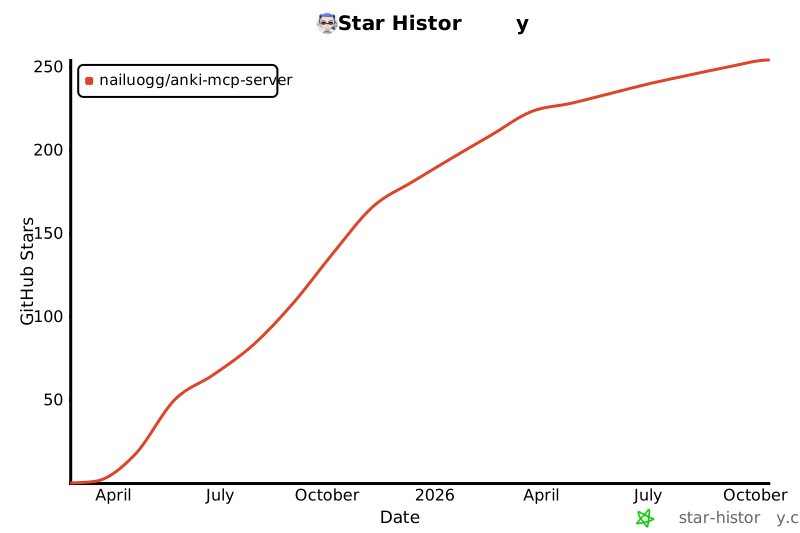
## Star History
[](https://star-history.com/#nailuoGG/anki-mcp-server&Date)
## Credits
Icon courtesy of [macOS Icons](https://macosicons.com/#/?icon=mWDBpVXqbc)
## License
MIT License - see LICENSE file for details



