

内容
# Desktop Commander MCP
[](https://www.npmjs.com/package/@wonderwhy-er/desktop-commander)
[](https://smithery.ai/server/@wonderwhy-er/desktop-commander)
[](https://www.buymeacoffee.com/wonderwhyer)
[](https://discord.gg/kQ27sNnZr7)
简短版本。两个关键点。终端命令和基于差异的文件编辑。

<a href="https://glama.ai/mcp/servers/zempur9oh4">
<img width="380" height="200" src="https://glama.ai/mcp/servers/zempur9oh4/badge" alt="Claude Desktop Commander MCP server" />
</a>
## 目录
- [功能](#features)
- [安装](#installation)
- [使用](#usage)
- [处理长时间运行的命令](#handling-long-running-commands)
- [进行中的工作和待办事项](#work-in-progress-and-todos)
- [媒体链接](#media)
- [用户评价](#testimonials)
- [常见问题](#frequently-asked-questions)
- [贡献](#contributing)
- [许可证](#license)
这是一个允许Claude桌面应用程序在您的计算机上执行长时间运行的终端命令并通过模型上下文协议(Model Context Protocol,MCP)管理进程的服务器 + 基于[MCP文件系统服务器](https://github.com/modelcontextprotocol/servers/tree/main/src/filesystem)提供额外的搜索和替换文件编辑功能。
## 功能
- 执行终端命令并进行输出流传输
- 支持命令超时和后台执行
- 进程管理(列出和终止进程)
- 长时间运行命令的会话管理
- 完整的文件系统操作:
- 读/写文件
- 创建/列出目录
- 移动文件/目录
- 搜索文件
- 获取文件元数据
- 代码编辑功能:
- 小改动的精确文本替换
- 大改动的完整文件重写
- 支持多个文件
- 基于模式的替换
- 基于vscode-ripgrep的文件夹递归代码或文本搜索
## 安装
首先,确保您已下载并安装[Claude Desktop app](https://claude.ai/download),并且您已安装[npm](https://docs.npmjs.com/downloading-and-installing-node-js-and-npm)。
### 选项 1:本地检出
1. 克隆并构建:
```bash
git clone https://github.com/yotamfeitelson/DesktopCommanderMCP.git
cd ClaudeComputerCommander
npm run setup
```
如果正在运行,请重启Claude。
setup命令将:
- 安装依赖项
- 构建服务器
- 配置Claude的桌面应用程序
- 如有需要,将MCP服务器添加到Claude的配置中
## 使用
该服务器提供以下工具类别:
### 终端工具
- `execute_command`:运行具有可配置超时的命令
- `read_output`:获取长时间运行命令的输出
- `force_terminate`:停止正在运行的命令会话
- `list_sessions`:查看活动命令会话
- `list_processes`:查看系统进程
- `kill_process`:通过PID终止进程
- `block_command`/`unblock_command`:管理命令黑名单
### 文件系统工具
- `read_file`/`write_file`:文件操作
- `create_directory`/`list_directory`:目录管理
- `move_file`:移动/重命名文件
- `search_files`:基于模式的文件搜索
- `get_file_info`:文件元数据
- `code_search`:基于ripgrep的递归文本和代码搜索
### 编辑工具
- `edit_block`:应用精确文本替换(适合文件大小小于20%的更改)
- `write_file`:完整文件重写(适合大于20%的更改或当edit_block失败时)
搜索/替换块格式:
```
filepath.ext
<<<<<<< SEARCH
existing code to replace
=======
new code to insert
>>>>>>> REPLACE
```
示例:
```
src/main.js
<<<<<<< SEARCH
console.log("old message");
=======
console.log("new message");
>>>>>>> REPLACE
```
## 处理长时间运行的命令
对于可能需要较长时间的命令:
1. `execute_command`在超时后返回初始输出
2. 命令在后台继续执行
3. 使用`read_output`和PID获取新输出
4. 如有需要,使用`force_terminate`停止
## 模型上下文协议集成
该项目扩展了MCP文件系统服务器,以启用:
- Claude Desktop中的本地服务器支持
- 完整的系统命令执行
- 进程管理
- 文件操作
- 带有搜索/替换块的代码编辑
作为探索Claude MCP的一部分创建:https://youtube.com/live/TlbjFDbl5Us
## 完成
- **2025年3月28日 修复“Watching /” JSON错误** - 实现了自定义stdio传输以处理非JSON消息并防止服务器崩溃
- **2025年3月25日 更好的代码搜索** ([合并](https://github.com/wonderwhy-er/ClaudeDesktopCommander/pull/17)) - 增强了上下文感知结果的代码探索
## 进行中的工作和待办事项
以下功能目前正在开发或计划中:
- **更好的配置** ([进行中](https://github.com/wonderwhy-er/ClaudeDesktopCommander/pull/16)) - 改进允许路径、命令和Shell环境的设置
- **Windows环境修复** ([进行中](https://github.com/wonderwhy-er/ClaudeDesktopCommander/pull/13)) - 解决特定于Windows平台的问题
- **Linux改进** ([进行中](https://github.com/wonderwhy-er/ClaudeDesktopCommander/pull/12)) - 增强与各种Linux发行版的兼容性
- **支持WSL** - Windows子系统Linux集成
- **支持SSH** - 远程服务器命令执行
- **安装故障排除指南** - 针对设置问题的全面帮助
## 网站
访问我们的官方网站 [https://desktopcommander.app/](https://desktopcommander.app/) 获取最新信息、文档和更新。
## 媒体
通过以下资源了解更多关于该项目的信息:
### 文章
[Claude与MCP替代了Cursor和Windsurf。这是怎么发生的?](https://wonderwhy-er.medium.com/claude-with-mcps-replaced-cursor-windsurf-how-did-that-happen-c1d1e2795e96) - 详细探讨Claude与模型上下文协议能力如何改变开发者工作流程。
### 视频
[Claude Desktop Commander视频教程](https://www.youtube.com/watch?v=ly3bed99Dy8) - 观看如何有效设置和使用Commander。
### AnalyticsIndiaMag的出版物
[
这位开发者使用Claude与MCP放弃了Windsurf和Cursor](https://analyticsindiamag.com/ai-features/this-developer-ditched-windsurf-cursor-using-claude-with-mcps/)
### 社区
加入我们的[Discord服务器](https://discord.gg/kQ27sNnZr7),获取帮助、分享反馈并与其他用户联系。
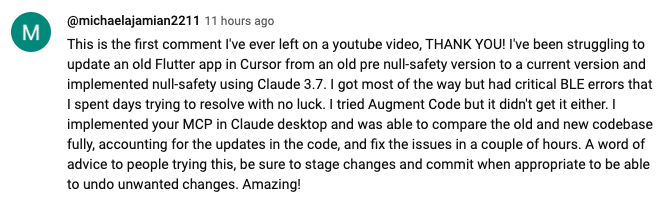
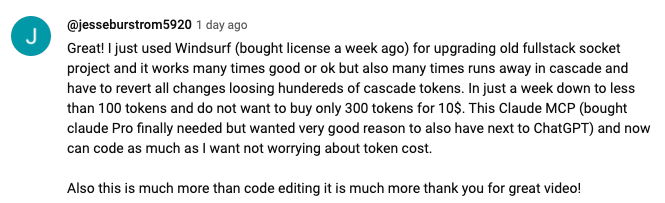
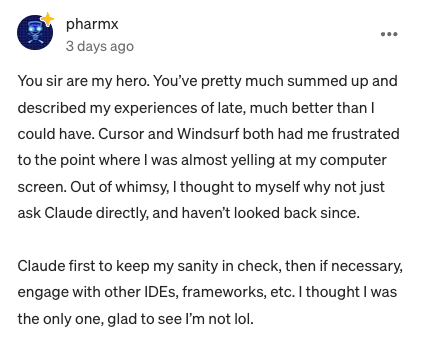
## 用户评价
[ https://www.youtube.com/watch?v=ly3bed99Dy8&lc=UgyyBt6_ShdDX_rIOad4AaABAg
](https://www.youtube.com/watch?v=ly3bed99Dy8&lc=UgyyBt6_ShdDX_rIOad4AaABAg
)
[
https://www.youtube.com/watch?v=ly3bed99Dy8&lc=UgztdHvDMqTb9jiqnf54AaABAg](https://www.youtube.com/watch?v=ly3bed99Dy8&lc=UgztdHvDMqTb9jiqnf54AaABAg
)
[
https://www.youtube.com/watch?v=ly3bed99Dy8&lc=UgyQFTmYLJ4VBwIlmql4AaABAg](https://www.youtube.com/watch?v=ly3bed99Dy8&lc=UgyQFTmYLJ4VBwIlmql4AaABAg)
[
https://www.youtube.com/watch?v=ly3bed99Dy8&lc=Ugy4-exy166_Ma7TH-h4AaABAg](https://www.youtube.com/watch?v=ly3bed99Dy8&lc=Ugy4-exy166_Ma7TH-h4AaABAg)
[
https://medium.com/@pharmx/you-sir-are-my-hero-62cff5836a3e](https://medium.com/@pharmx/you-sir-are-my-hero-62cff5836a3e)
## 贡献
如果您觉得这个项目有用,请考虑在GitHub上给它一个⭐星标!这有助于其他人发现该项目,并鼓励进一步开发。
我们欢迎社区的贡献!无论您发现了一个错误、想要提出功能请求,还是想贡献代码,您都可以通过以下方式帮助我们:
- **发现了一个错误?** 在[github.com/wonderwhy-er/ClaudeComputerCommander/issues](https://github.com/wonderwhy-er/ClaudeComputerCommander/issues)上打开一个问题
- **有功能想法?** 在问题部分提交功能请求
- **想贡献代码?** Fork该仓库,创建一个分支,并提交一个拉取请求
- **有问题或讨论?** 在GitHub讨论标签中发起讨论
所有贡献,无论大小,都非常感谢!
如果您发现这个工具对您的工作流程有价值,请考虑[支持该项目](https://www.buymeacoffee.com/wonderwhyer)。
## 常见问题
以下是一些常见问题的答案。有关更全面的常见问题,请参见我们的[详细常见问题文档](FAQ.md)。
### 什么是Claude Desktop Commander?
它是一个MCP工具,使Claude Desktop能够访问您的文件系统和终端,将Claude变成一个多功能的编码、自动化、代码库探索等助手。
### 这与Cursor/Windsurf有什么不同?
与专注于IDE的工具不同,Claude Desktop Commander提供了一种以解决方案为中心的方法,适用于整个操作系统,而不仅仅是在编码环境中。Claude可以完整读取文件,而不是分块读取,可以同时处理多个项目,并一次性执行更改,而不需要不断审查。
### 我需要为API积分付费吗?
不需要。该工具与Claude Desktop的标准Pro订阅($20/月)一起使用,而不是通过API调用,因此您不会产生超出订阅费用的额外成本。
### 最常见的用例是什么?
- 探索和理解复杂的代码库
- 生成图表和文档
- 自动化系统中的任务
- 同时处理多个项目
- 进行精确的代码更改
### 我在安装或使用该工具时遇到问题。在哪里可以获得帮助?
加入我们的[Discord服务器](https://discord.gg/kQ27sNnZr7)以获得社区支持,查看[GitHub问题](https://github.com/wonderwhy-er/ClaudeComputerCommander/issues)以了解已知问题,或查看[完整常见问题](FAQ.md)以获取故障排除提示。您还可以访问我们的[网站常见问题部分](https://desktopcommander.app#faq)以获得更友好的体验。如果您遇到新问题,请考虑[在GitHub上打开一个问题](https://github.com/wonderwhy-er/ClaudeComputerCommander/issues/new),并提供有关您问题的详细信息。
### 这是一个测试mcp - 它在设置脚本中包含一个fetch函数到localhost
## 许可证
MIT
连接信息
猜你喜欢
暂无推荐服务器