内容
# Lite-MCP-Client
## 📝 项目介绍
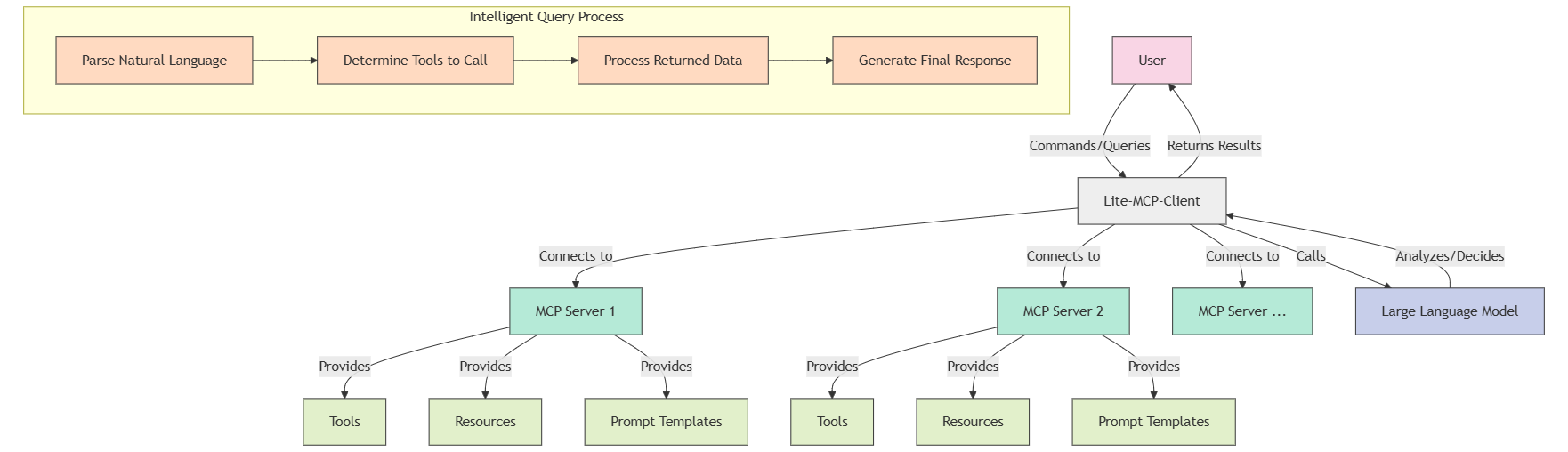
Lite-MCP-Client是一个基于命令行的轻量级MCP客户端工具,可以连接到多种MCP(Model-Chat-Prompt)服务器,帮助用户轻松调用服务器提供的工具、资源和提示模板。该客户端支持与大型语言模型集成,实现智能化查询和处理。
## ✨ 主要特点
- **多服务器连接管理**:同时连接并管理多个MCP服务器
- **支持多种服务器类型**:兼容STDIO和SSE类型的服务器
- **工具调用**:轻松调用服务器提供的各种工具
- **资源获取**:访问服务器提供的资源
- **提示模板使用**:使用服务器定义的提示模板
- **智能查询**:通过自然语言查询,自动决定使用哪些工具和资源
- **灵活的交互模式**:支持命令行参数和交互式终端界面
- **智能化对话历史管理**:维护会话上下文,实现连续对话
## 🚀 安装指南
### 前提条件
- Python 3.11+
- pip 或 uv 包管理器
### 安装方式
#### 方式一:从PyPI安装
```bash
# 使用pip安装
pip install lite-mcp-client
# 或使用uv安装
uv pip install lite-mcp-client
```
#### 方式二:从源代码安装
```bash
# 克隆仓库
git clone https://github.com/sligter/lite-mcp-client
cd lite-mcp-client
# 使用uv安装依赖
uv sync
```
### 配置环境变量
```bash
cp .env.example .env
```
## 📖 使用说明
### 基本使用
#### 使用pip安装后的命令行工具
```bash
# 启动交互式模式
lite-mcp-client --interactive
# 使用特定服务器
lite-mcp-client --server "服务器名称"
# 连接所有默认服务器
lite-mcp-client --connect-all
# 执行智能查询
lite-mcp-client --query "查询微博热点新闻并总结"
# 或者直接
lite-mcp-client "查询微博热点新闻并总结"
# 调用特定工具
lite-mcp-client --call "服务器名.工具名" --params '{"参数1": "值1"}'
# 获取资源
lite-mcp-client --get "服务器名.资源URI"
# 使用提示模板
lite-mcp-client --prompt "服务器名.提示名" --params '{"参数1": "值1"}'
# 执行操作后显示结果并保持交互模式
lite-mcp-client --query "获取微博热搜" --interactive
```
#### 从源码直接运行
```bash
# 启动交互式模式
uv run lite_mcp_client.main --interactive
# 或
python -m lite_mcp_client.main --interactive
# 使用特定服务器
uv run lite_mcp_client.main --server "服务器名称"
# 连接所有默认服务器
uv run lite_mcp_client.main --connect-all
# 执行智能查询
uv run lite_mcp_client.main --query "查询微博热点新闻并总结"
# 或者直接
uv run lite_mcp_client.main "查询微博热点新闻并总结"
# 调用特定工具
uv run lite_mcp_client.main --call "服务器名.工具名" --params '{"参数1": "值1"}'
# 获取资源
uv run lite_mcp_client.main --get "服务器名.资源URI"
# 使用提示模板
uv run lite_mcp_client.main --prompt "服务器名.提示名" --params '{"参数1": "值1"}'
# 执行操作后显示结果并保持交互模式
uv run lite_mcp_client.main --query "获取微博热搜" --interactive
```
### 高级使用
```bash
# 执行复杂任务,自动选择工具(使用安装版)
lite-mcp-client "获取今日科技新闻,并分析其中的AI相关内容,最后生成一份摘要报告"
# 使用配置文件
lite-mcp-client --config custom_config.json --query "分析最新数据"
# 结果重定向
lite-mcp-client --get "Fetch.webpage" --params '{"url": "https://example.com"}' > webpage.html
```
### 配置文件
默认配置文件为`mcp_config.json`,格式如下:
```json
{
"mcp_servers": [
{
"name": "各平台热搜查询",
"type": "stdio",
"command": "uvx",
"args": ["mcp-newsnow"],
"env": {},
"description": "热点话题查询"
},
{
"name": "Fetch",
"type": "stdio",
"command": "uvx",
"args": ["mcp-server-fetch"],
"env": {},
"description": "访问指定链接"
},
{
"name": "其他服务",
"type": "sse",
"url": "http://localhost:3000/sse",
"headers": {},
"description": "其他服务描述"
}
],
"default_server": ["各平台热搜查询", "Fetch"]
}
```
### 交互式命令
在交互式模式下,支持以下命令:
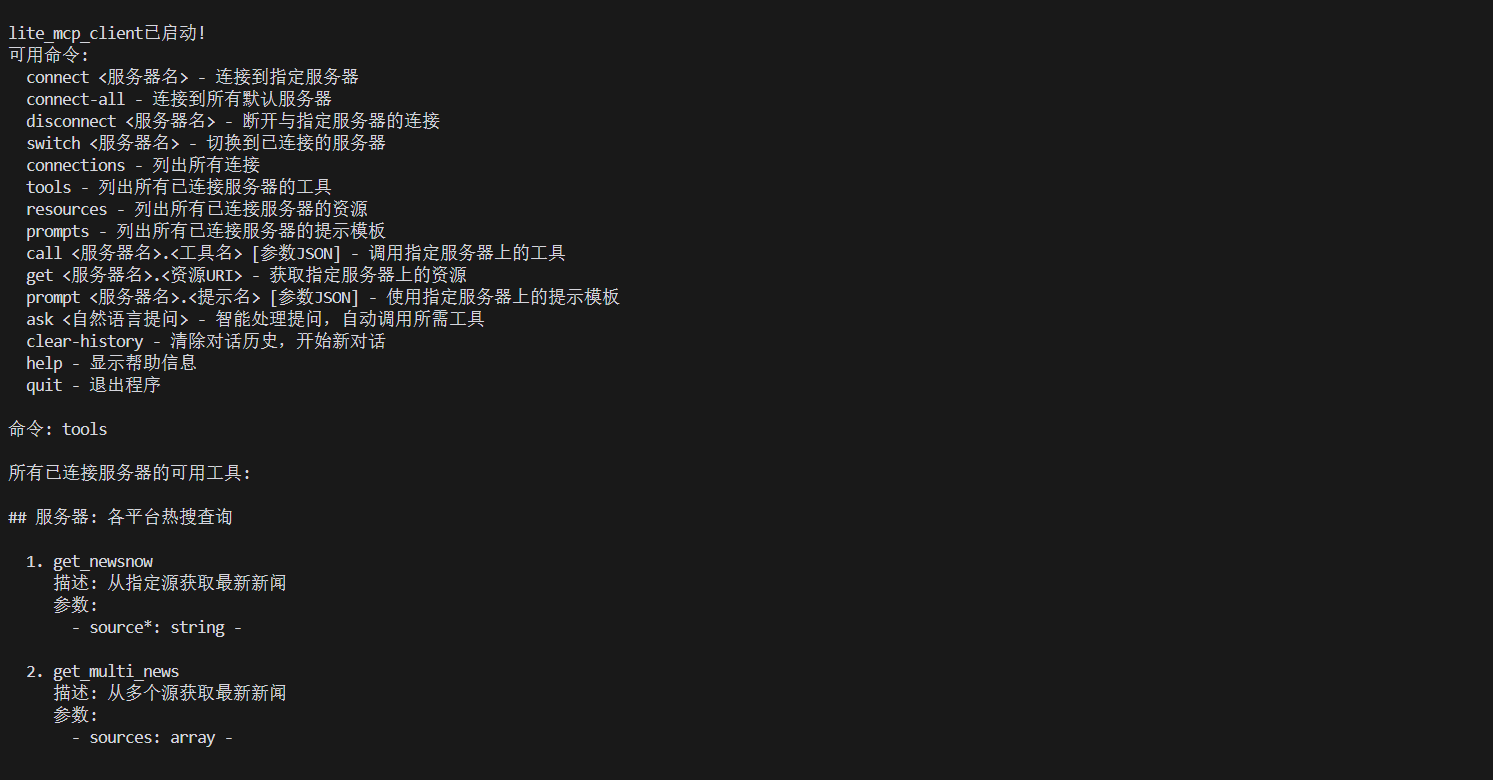
- `connect <服务器名>` - 连接到指定服务器
- `connect-all` - 连接到所有默认服务器
- `disconnect <服务器名>` - 断开与指定服务器的连接
- `switch <服务器名>` - 切换到已连接的服务器
- `connections (conn)` - 列出所有连接及其状态
- `tools [服务器名]` - 列出所有或指定服务器的可用工具
- `resources (res) [服务器名]` - 列出所有或指定服务器的可用资源
- `prompts [服务器名]` - 列出所有或指定服务器的可用提示模板
- `call <srv.tool> [参数]` - 调用指定服务器上的工具
- `call <tool> [参数]` - 调用当前服务器上的工具
- `get <srv.uri>` - 获取指定服务器上的资源
- `get <uri>` - 获取当前服务器上的资源
- `prompt <srv.prompt> [参数]` - 使用指定服务器上的提示模板
- `prompt <prompt> [参数]` - 使用当前服务器上的提示模板
- `ask <自然语言问题>` - LLM处理提问,自动选择并调用工具
- `clear-history (clh)` - 清除 'ask' 命令的对话历史记录
- `help` - 显示帮助信息
- `quit / exit` - 退出程序
## 🔧 高级配置
### 服务器配置选项
| 参数 | 类型 | 描述 |
|------|------|------|
| name | 字符串 | 服务器名称 |
| type | 字符串 | 服务器类型("stdio"或"sse") |
| command | 字符串 | 启动STDIO服务器的命令 |
| args | 列表 | 命令行参数 |
| env | 对象 | 环境变量 |
| url | 字符串 | SSE服务器URL |
| headers | 对象 | HTTP请求头 |
| description | 字符串 | 服务器描述 |
## 📚 依赖项
- `asyncio`: 异步IO支持
- `mcp`: MCP协议客户端库
- `langchain_openai`: OpenAI模型集成
- `langchain_google_genai`: Google生成式AI模型集成
- `langchain_anthropic`: Anthropic Claude模型集成
- `langchain_aws`: AWS Bedrock模型集成
- `dotenv`: 环境变量管理
- `json`: JSON数据处理:
## 📄 许可证
此项目采用MIT许可证 - 详情请参阅 [LICENSE](LICENSE) 文件。
*注:本客户端仅提供与MCP服务的接口,具体功能取决于所连接服务器提供的工具和资源。*

 MCP 市场