

内容
# AuditLuma - 高级代码审计AI系统 🔍
<div align="center">



</div>
AuditLuma是一个智能代码审计系统,采用创新的**层级RAG架构**,结合多个AI代理和先进技术,包括Haystack-AI编排器、txtai知识检索、R2R上下文增强和Self-RAG验证,为代码库提供全面、精准的安全分析。
## 🌟 架构亮点
- 🏗️ **层级RAG架构** - 四层智能架构:Haystack编排 + txtai检索 + R2R增强 + Self-RAG验证
- 🚀 **Haystack-AI编排器** - 智能任务分解和结果整合,支持传统编排器回退
- 🔍 **智能知识检索** - txtai驱动的语义检索和上下文理解
- 🎯 **精准验证** - Self-RAG多模型交叉验证,有效减少假阳性
- 🔄 **自适应架构** - 根据项目规模自动选择最优架构模式
## ✨ 核心特性
### 🏗️ 层级RAG架构
- **Haystack编排层** - 智能任务分解、并行执行和结果整合
- **txtai知识检索层** - 语义检索和上下文理解
- **R2R上下文增强层** - 动态上下文扩展和关联分析
- **Self-RAG验证层** - 多模型交叉验证和假阳性过滤
### 🚀 智能编排系统
- **Haystack-AI编排器** - 基于AI的智能任务编排(推荐)
- **传统编排器** - 规则驱动的稳定编排方案
- **自动回退机制** - AI编排器不可用时自动切换
- **动态架构选择** - 根据项目规模自动选择最优架构
### 🔍 高级分析能力
- 🛡️ **综合安全分析** - 全面检测漏洞并提出有效修复建议
- 🌐 **跨文件安全分析** - 检测传统单文件分析无法发现的跨文件漏洞
- 📊 **全局上下文构建** - 构建代码调用图、数据流图和依赖关系
- 🎯 **污点分析** - 追踪用户输入在代码中的传播路径
- 🔄 **MCP(多代理合作协议)** - 增强代理之间的协调与合作
### 🌐 企业级支持
- **多LLM厂商支持** - 支持OpenAI、DeepSeek、MoonShot、通义千问等多家厂商
- **自动厂商检测** - 根据模型名称自动识别并配置正确的厂商API
- **异步并行处理** - 使用异步并发技术提高性能,加快分析速度
- **可视化功能** - 生成依赖关系图和详细安全报告
## 📋 目录
- [快速开始](#-快速开始)
- [层级RAG架构](#-层级rag架构)
- [文档](#-文档)
- [安装](#-安装)
- [使用](#-使用)
- [配置](#-配置)
- [支持语言](#-支持语言)
- [架构](#-架构)
- [报告格式](#-报告格式)
- [贡献](#-贡献)
- [许可证](#-许可证)
## 🚀 快速开始
```bash
# 1. 克隆项目
git clone https://github.com/Vistaminc/AuditLuma.git
cd AuditLuma
# 2. 安装依赖
pip install -r requirements.txt
# 3. 使用层级RAG架构分析(推荐)
python main.py --architecture hierarchical --haystack-orchestrator ai -d ./your-project
# 4. 查看架构信息
python main.py --show-architecture-info
```
## 🏗️ 层级RAG架构
AuditLuma 2.0引入了创新的四层RAG架构,显著提升分析精度和效率:
```
┌─────────────────────────────────────────────────────────────┐
│ 层级RAG架构 │
├─────────────────────────────────────────────────────────────┤
│ 第一层:Haystack编排层 │
│ ├─ Haystack-AI编排器(推荐)- 智能任务分解和结果整合 │
│ └─ 传统编排器 - 规则驱动的稳定方案 │
├─────────────────────────────────────────────────────────────┤
│ 第二层:txtai知识检索层 │
│ ├─ 语义检索和相似性匹配 │
│ └─ 上下文理解和知识图谱构建 │
├─────────────────────────────────────────────────────────────┤
│ 第三层:R2R上下文增强层 │
│ ├─ 动态上下文扩展 │
│ └─ 关联分析和依赖追踪 │
├─────────────────────────────────────────────────────────────┤
│ 第四层:Self-RAG验证层 │
│ ├─ 多模型交叉验证 │
│ └─ 假阳性过滤和置信度评估 │
└─────────────────────────────────────────────────────────────┘
```
### 架构优势
- **🎯 精准度提升** - 四层验证机制,显著减少假阳性
- **⚡ 性能优化** - 智能缓存和并行处理,提升分析速度
- **🔄 自适应** - 根据项目规模自动选择最优配置
- **🛡️ 可靠性** - 多重回退机制,确保系统稳定运行
## 📚 文档
### 🚀 入门指南
- [安装指南](./docs/installation-guide.md) - 详细的安装步骤和环境配置
- [用户指南](./docs/user-guide.md) - 从入门到精通的完整使用教程
- [快速参考](./docs/quick-reference.md) - 常用命令和配置速查手册
### 🏗️ 核心文档
- [层级RAG架构指南](./docs/hierarchical-rag-guide.md) - 详细的层级RAG架构说明和使用指南
- [配置参考](./docs/configuration-reference.md) - 完整的配置选项和参数说明
- [最佳实践](./docs/best-practices.md) - 使用建议、性能优化和安全配置
### 🔧 技术文档
- [架构设计](./docs/architecture-design.md) - 系统架构和设计理念
- [故障排除指南](./docs/troubleshooting.md) - 常见问题、错误诊断和解决方案
- [项目结构](./项目结构.md) - 详细的项目目录结构和模块说明
### 📖 在线资源
- [AuditLuma 相关文档](https://iwt6omodfh0.feishu.cn/drive/folder/OwWqf7EYblaqTNdaDbtcnQcHnTt) - 完整的在线文档和教程
## 🚀 安装
克隆仓库并安装依赖:
```bash
git clone https://github.com/Vistaminc/AuditLuma.git
cd AuditLuma
pip install -r requirements.txt
```
### 可选依赖
**FAISS向量检索库**
默认情况下,AuditLuma会使用一个简单的内置向量存储实现。如果需要处理大型代码库,建议安装FAISS以提高性能:
```bash
# CPU版本
pip install faiss-cpu
# GPU版本(支持CUDA)
pip install faiss-gpu
```
安装FAISS后,系统将自动检测并使用它进行向量存储和检索,显著提高分析大型项目时的性能。
## 🛠 使用
### 基本用法
```bash
# 使用层级RAG架构(推荐)
python main.py --architecture hierarchical -d ./your-project -o ./reports
# 使用Haystack-AI编排器(默认,推荐)
python main.py --architecture hierarchical --haystack-orchestrator ai -d ./your-project
# 使用传统编排器
python main.py --architecture hierarchical --haystack-orchestrator traditional -d ./your-project
# 自动选择架构(根据项目规模)
python main.py --architecture auto -d ./your-project
# 传统RAG架构(向后兼容)
python main.py --architecture traditional -d ./your-project
```
### 高级用法
```bash
# 启用性能对比模式
python main.py --architecture hierarchical --enable-performance-comparison -d ./your-project
# 查看架构信息和配置
python main.py --show-architecture-info
# 配置迁移(从传统配置升级到层级RAG)
python main.py --config-migrate
# AI增强的跨文件分析
python main.py --architecture hierarchical --enhanced-analysis -d ./your-project
```
### 命令行参数
#### 基础参数
| 参数 | 说明 | 默认值 |
|------|------|--------|
| `-d, --directory` | 目标项目目录 | `./goalfile` |
| `-o, --output` | 报告输出目录 | `./reports` |
| `-w, --workers` | 并行工作线程数 | 配置中的max_batch_size |
| `-f, --format` | 报告格式(html/pdf/json) | 配置中的report_format |
#### 架构选择参数
| 参数 | 说明 | 默认值 |
|------|------|--------|
| `--architecture` | RAG架构模式(traditional/hierarchical/auto) | `auto` |
| `--haystack-orchestrator` | Haystack编排器类型(traditional/ai) | `ai` |
| `--force-traditional` | 强制使用传统RAG架构 | - |
| `--force-hierarchical` | 强制使用层级RAG架构 | - |
| `--enable-performance-comparison` | 启用性能对比模式 | - |
| `--auto-switch-threshold` | 自动切换架构的文件数量阈值 | `100` |
#### 层级RAG特定参数
| 参数 | 说明 | 默认值 |
|------|------|--------|
| `--enable-txtai` | 启用txtai知识检索层 | - |
| `--enable-r2r` | 启用R2R上下文增强层 | - |
| `--enable-self-rag-validation` | 启用Self-RAG验证层 | - |
| `--disable-caching` | 禁用层级缓存系统 | - |
| `--disable-monitoring` | 禁用性能监控 | - |
#### 传统功能参数
| 参数 | 说明 | 默认值 |
|------|------|--------|
| `--no-mcp` | 禁用多智能体协作协议 | 默认启用 |
| `--no-self-rag` | 禁用Self-RAG检索 | 默认启用 |
| `--no-deps` | 跳过依赖分析 | 默认不跳过 |
| `--no-remediation` | 跳过生成修复建议 | 默认不跳过 |
| `--no-cross-file` | 禁用跨文件漏洞检测 | 默认启用 |
| `--enhanced-analysis` | 启用AI增强的跨文件分析 | 默认禁用 |
#### 其他参数
| 参数 | 说明 | 默认值 |
|------|------|--------|
| `--verbose` | 启用详细日志记录 | 默认禁用 |
| `--dry-run` | 试运行模式(不执行实际分析) | - |
| `--config-migrate` | 迁移配置到层级RAG格式 | - |
| `--show-architecture-info` | 显示当前架构信息并退出 | - |
## ⚙️ 配置
通过编辑`config/config.yaml`文件配置系统。AuditLuma 2.0支持层级RAG架构配置。
### 层级RAG配置
```yaml
# 层级RAG架构模型配置
hierarchical_rag_models:
# 是否启用层级RAG架构
enabled: true
# Haystack编排层配置
haystack:
# 编排器类型选择:traditional(传统)或 ai(Haystack-AI,推荐)
orchestrator_type: "ai" # 默认使用Haystack-AI编排器
# 默认模型(支持 model@provider 格式)
default_model: "qwen3:32b@ollama"
# 任务特定模型配置
task_models:
security_scan: "gpt-4@openai" # 安全扫描使用更强的模型
syntax_check: "deepseek-chat@deepseek" # 语法检查
logic_analysis: "qwen-turbo@qwen" # 逻辑分析
dependency_analysis: "gpt-3.5-turbo@openai" # 依赖分析
# txtai知识检索层模型配置
txtai:
retrieval_model: "gpt-3.5-turbo@openai" # 知识检索模型
embedding_model: "text-embedding-ada-002@openai" # 嵌入模型
# R2R上下文增强层模型配置
r2r:
context_model: "gpt-3.5-turbo@openai" # 上下文分析模型
enhancement_model: "gpt-3.5-turbo@openai" # 增强模型
# Self-RAG验证层模型配置
self_rag_validation:
validation_model: "gpt-3.5-turbo@openai" # 主验证模型
cross_validation_models: # 交叉验证使用的多个模型
- "gpt-4@openai"
- "deepseek-chat@deepseek"
- "gpt-3.5-turbo@openai"
```
### 模型规范格式
AuditLuma支持使用统一的模型规范格式 `model@provider` 来指定模型和提供商:
```
deepseek-chat@deepseek # 指定使用DeepSeek提供商的deepseek-chat模型
gpt-4-turbo@openai # 指定使用OpenAI提供商的gpt-4-turbo模型
qwen-turbo@qwen # 指定使用通义千问提供商的qwen-turbo模型
```
如果不指定提供商(不使用@符号),系统将自动根据模型名称推断提供商。
### 架构选择配置
```yaml
# 全局设置
global:
# 默认架构模式:traditional, hierarchical, auto
default_architecture: "hierarchical"
# 自动切换阈值(文件数量)
auto_switch_threshold: 100
# 是否启用性能对比
enable_performance_comparison: false
```
### 多厂商支持
AuditLuma支持多家LLM厂商,并能根据模型名称自动检测厂商:
| 模型前缀 | 厂商 |
|---------|------|
| `gpt-` | OpenAI |
| `deepseek-` | DeepSeek |
| `qwen-` | 通义千问 |
| `glm-`或`chatglm` | 智谱AI |
| `baichuan` | 百川 |
| `ollama-` | ollama |
-注意:openai厂商可以对接所有openai格式的中转平台
## 💻 支持语言
AuditLuma支持分析以下编程语言:
### 主要语言(包括排名前10)
- Python (.py)
- JavaScript (.js, .jsx)
- TypeScript (.ts, .tsx)
- Java (.java)
- C# (.cs)
- C++ (.cpp, .cc, .hpp)
- C (.c, .h)
- Go (.go)
- Ruby (.rb)
- PHP (.php)
- Lua (.lua)
### 其他支持的语言
- Rust (.rs)
- Swift (.swift)
- Kotlin (.kt)
- Scala (.scala)
- Dart (.dart)
- Bash (.sh, .bash)
- PowerShell (.ps1, .psm1)
### 标记和配置语言
- HTML (.html, .htm)
- CSS (.css)
- JSON (.json)
- XML (.xml)
- YAML (.yml, .yaml)
- SQL (.sql)
## 🏛 架构
AuditLuma使用多代理架构,包含以下组件:

1. **Agent Orchestrator** - 协调工作流中的所有代理
2. **代码分析代理** - 分析代码结构并提取依赖关系
3. **安全分析代理** - 识别安全漏洞
4. **修复建议代理** - 生成针对性漏洞修复方案
5. **可视化组件** - 生成直观的报告和依赖关系图
## 📊 报告格式
AuditLuma支持以下报告格式:
- 📋 **HTML报告** - 包含漏洞详情、统计图表和交互式可视化
- 📄 **PDF报告** - 适合打印和分享的格式
- 🔄 **JSON报告** - 适合进一步处理和集成的机器可读格式
## 💬 贡献
欢迎贡献代码和建议!请遵循以下步骤:
1. Fork 仓库
2. 创建特性分支 (`git checkout -b feature/amazing-feature`)
3. 提交更改 (`git commit -m 'Add some amazing feature'`)
4. 推送到分支 (`git push origin feature/amazing-feature`)
5. 创建Pull Request
## 📞 交流方式
-QQ:1047736593
## 🤝 合作伙伴
- [棉花糖网络安全圈](https://vip.bdziyi.com/?ref=711)
## 支持与赞赏
如果您觉得AuditLuma对您有帮助,欢迎通过以下方式支持我们:
- 您的赞助将用于帮助我们持续改进和完善 AuditLuma!
<div style="display: flex; justify-content: space-between; max-width: 600px; margin: 0 auto;">
<div style="flex: 1; margin-right: 20px;">
<img src="https://github.com/Vistaminc/Miniluma/blob/main/ui/web/static/img/zanshang/wechat.jpg"/>
</div>
<div style="flex: 1;">
<img src="https://github.com/Vistaminc/Miniluma/blob/main/ui/web/static/img/zanshang/zfb.jpg"/>
</div>
</div>
## Star History
[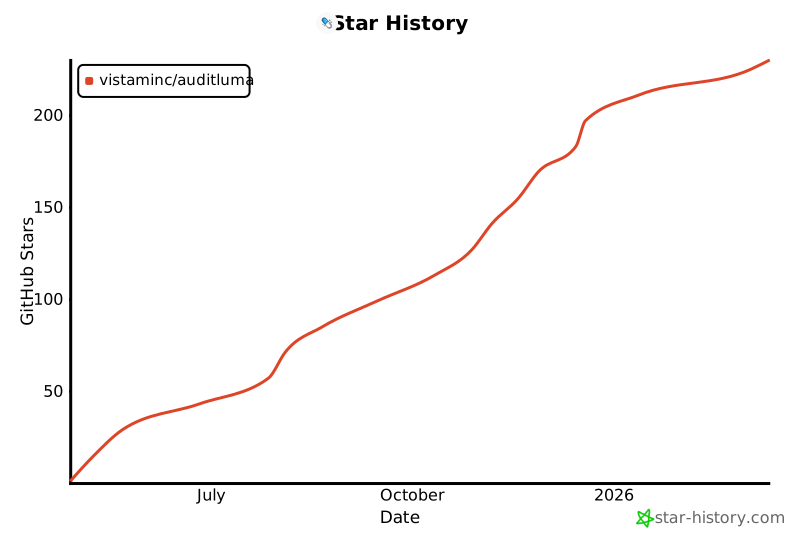](https://www.star-history.com/#)
## 📜 许可证
MIT
---
<div align="center">
<sub>Built with ❤️ by AuditLuma Team</sub>
</div>
连接信息
猜你喜欢
暂无推荐服务器