Content
# Telegram Bot MCP
MCP (Multi-purpose Computing Platform) for working with Telegram Bot API. Provides functions for sending and receiving messages through Telegram bot.
## Features
- Send text messages to chats
- Send media content (photos, documents, videos, audio)
- Create and send polls
- Get bot information
- Get updates (messages, events) from users
- Delete messages
## Installation
```bash
git clone https://github.com/coderroleggg/telegram-bot-mcp
cd telegram-bot-mcp
uv venv
source .venv/bin/activate
uv pip install -e .
```
## Connecting to Claude Desktop, Cursor
Add the telegram-bot block to your mcp.json or claude_desktop_config.json or completely replace the file content with:
```json
{
"mcpServers": {
"telegram-bot": {
"type": "stdio",
"command": "uv",
"args": [
"run",
"--directory",
"/Users/yourusername/Downloads/telegram-bot-mcp", // path to the bot code folder
"server"
],
"name": "Telegram Bot API",
"description": "MCP for working with Telegram Bot API. Send messages, media and work with bot.",
"config": {
"token": "YOUR_BOT_TOKEN_HERE"
}
}
}
}
```
## Available Functions
- `sendMessage` - send text message
- `sendPhoto` - send photo
- `deleteMessage` - delete message
- `getMe` - get bot information
- `getUpdates` - get new messages and events
## Usage Examples
### Sending a Message
```python
response = mcp.call("sendMessage", {"chatId": "12345678", "text": "Hello, world!"})
print(response)
```
### Getting Updates
```python
updates = mcp.call("getUpdates", {})
for update in updates["updates"]:
print(update)
```
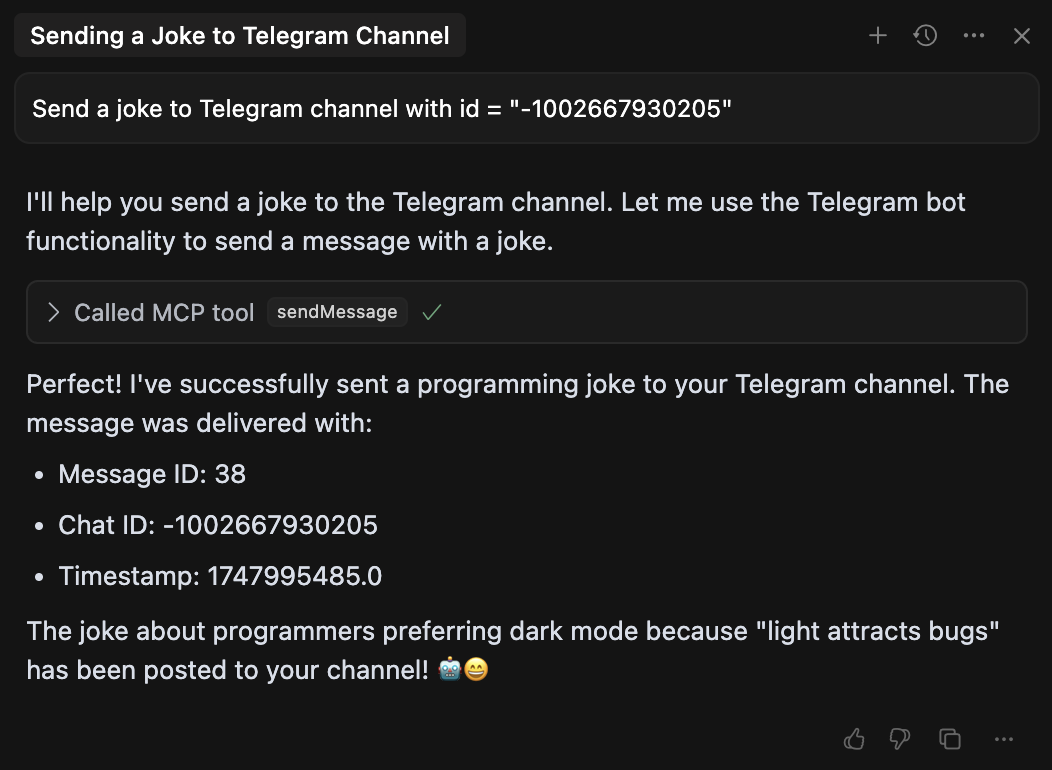
### Example Usage in Cursor
Here's how to use the Telegram Bot MCP in Cursor:
<!-- Images hosted in assets branch for reliable public access -->
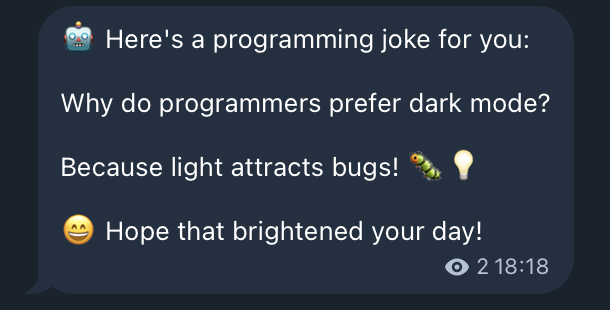
### Result Message
Example of a message sent through the bot:
## License
MIT
## API Tools
### initialize
Initializes configuration for Telegram Bot MCP.
**Parameters:**
- `token`: Your Telegram bot token obtained from @BotFather
### sendMessage
Sends a text message to the specified chat.
**Parameters:**
- `chatId`: Chat ID where to send the message (string or number)
- `text`: Message text to send
### sendPhoto
Sends a photo to the specified chat.
**Parameters:**
- `chatId`: Chat ID where to send the photo (string or number)
- `photoUrl`: Photo URL or path to local file
- `caption`: Photo caption (optional)
### sendDocument
Sends a document to the specified chat.
**Parameters:**
- `chatId`: Chat ID where to send the document (string or number)
- `documentUrl`: Document URL or path to local file
- `caption`: Document caption (optional)
- `filename`: File name (optional)
### sendVideo
Sends a video to the specified chat.
**Parameters:**
- `chatId`: Chat ID where to send the video (string or number)
- `videoUrl`: Video URL or path to local file
- `caption`: Video caption (optional)
- `duration`: Video duration in seconds (optional)
- `width`: Video width (optional)
- `height`: Video height (optional)
### sendAudio
Sends audio to the specified chat.
**Parameters:**
- `chatId`: Chat ID where to send the audio (string or number)
- `audioUrl`: Audio URL or path to local file
- `caption`: Audio caption (optional)
- `duration`: Audio duration in seconds (optional)
- `performer`: Performer (optional)
- `title`: Track title (optional)
### sendPoll
Sends a poll message to the specified chat.
**Parameters:**
- `chatId`: Chat ID where to send the poll (string or number)
- `question`: Poll question
- `options`: List of answer options (strings)
- `isAnonymous`: Whether the poll is anonymous (optional, default True)
- `allowsMultipleAnswers`: Whether multiple answers are allowed (optional, default False)
### getMe
Gets information about the bot.
**Parameters:** none
### getUpdates
Gets updates (messages, events) from Telegram Bot API.
**Parameters:**
- `offset`: ID of the first update to return (optional)
- `limit`: Maximum number of updates to return (optional, default 100)
- `timeout`: Timeout in seconds (optional, default 0)
### deleteMessage
Deletes a message from the chat.
**Parameters:**
- `chatId`: Chat ID from which to delete the message (string or number)
- `messageId`: Message ID to delete (number)
## How to Get chatId?
To get a chat or user ID, there are several ways:
1. Use the `getUpdates` tool and find the needed ID after sending a message to your bot
2. Use a bot like @userinfobot: send it a message, and it will return your ID
3. For group chats: add your bot to the group, send a message and use `getUpdates` to find the group ID
4. **For channels**:
- First, add your bot as an administrator to the channel with permission to send messages
- Forward any message from the channel to @userdatailsbot
- The bot will return the channel ID (it will be negative and start with -100)
- Use this ID as `chatId` when sending messages to the channel
## Limitations
- Bot cannot start a conversation with a user first, the user must send a message to the bot first
- Bot can only send messages to chats where it is present
- Some file formats may be restricted by Telegram
- When sending local files, they must be accessible to the process in which MCP is running
## Additional Information
For more information about Telegram Bot API:
- [Official Telegram Bot API Documentation](https://core.telegram.org/bots/api)
- [python-telegram-bot Documentation](https://python-telegram-bot.readthedocs.io/)