内容
# 🚀 MultiAgentPPT
**News**: 当前的版本不再维护,因为PPT内容和模版无法很好的维护,所以采用新的方案重构。 推荐采用PPT的模版的方式,更企业化的版本: https://github.com/johnson7788/TrainPPTAgent
作者微信答疑解惑:

一个基于 A2A + MCP + ADK 的多智能体系统,支持流式并发生成高质量 (可在线编辑)PPT 内容。
## 🧠 一、项目简介
MultiAgentPPT 利用多智能体架构实现从主题输入到完整演示文稿生成的自动化流程,主要步骤包括:
1. **大纲生成 Agent**:根据用户需求生成初步内容大纲。
2. **Topic 拆分 Agent**:将大纲内容细分为多个主题。
3. **Research Agent 并行工作**:多个智能体分别对每个主题进行深入调研。
4. **Summary Agent 汇总输出**:将调研结果汇总生成 PPT 内容,实时流式返回前端。
## 优点
- **多Agent协作**:通过多智能体并行工作,提高内容生成的效率和准确性。
- **实时流式返回**:支持流式返回生成的 PPT 内容,提升用户体验。
- **高质量内容**:结合外部检索和智能体协作,生成高质量的内容大纲和演示文稿。
- **可扩展性**:系统设计灵活,易于扩展新的智能体和功能模块。
## 二、近期升级
### ✅ 已完成(Done)
- ✅ 除 Gemini 以外流的输出 Bug 修复,ADK 和 A2A 的包问题:[查看详情](https://github.com/johnson7788/MultiAgentPPT/blob/stream/backend/birthday_planner/README.md)
- ✅ 图片渲染方面:根据是否为背景图动态切换样式(`object-cover` 或 `object-contain`),并在非背景图下展示说明文字。为保证 PPT 页面唯一性,使用大模型输出中的 `page_number` 作为唯一标识,替代原先基于标题的方式,以支持内容更新与校对。
- ✅ 使用循环 Agent 生成每一页 PPT,代替一次性生成全部内容,方便生成更多页数,避免 LLM 的 token 输出限制。
- ✅ 引入 PPTChecker Agent 检查每一页生成的 PPT 质量。实际测试效果良好,请自行替换为真实图片数据和内容 RAG 数据。
- ✅ 前端显示每个 Agent 的生成过程状态。
- ✅ pptx下载,使用python-pptx下载前端json数据,后端渲染。
- ✅ metadata 数据传输:支持前端向 Agent 传输配置,Agent 返回结果时附带 metadata 信息。
- ✅ [本地模型适配.md](docs/%E6%9C%AC%E5%9C%B0%E6%A8%A1%E5%9E%8B%E9%80%82%E9%85%8D.md)
### 📝 待完成(Todo)
- 🔄 整合编辑可见可下载的pptx前端
## 三、使用界面截图展示
以下是 MultiAgentPPT 项目的核心功能演示:
### 1. 输入主题界面
用户在界面中输入希望生成的 PPT 主题内容:

### 2. 流式生成大纲过程
系统根据输入内容,实时流式返回生成的大纲结构:

### 3. 生成完整大纲
最终系统将展示完整的大纲,供用户进一步确认:

### 4. 流式生成PPT内容
确认大纲后,系统开始流式生成每页幻灯片内容,并返回给前端:

### 5. 对于多Agent生成PPT,slide_agent中,添加进度细节展示


## 📊 并发的多Agent的协作流程(slide_agent + slide_outline)
```mermaid
flowchart TD
A[用户输入研究内容] --> B[调用 Outline Agent]
B --> C[MCP 检索资料]
C --> D[生成大纲]
D --> E{用户确认大纲}
E --> F[发送大纲给 PPT 生成 Agent]
F --> G[Split Outline Agent 拆分大纲]
G --> H[Parallel Agent 并行处理]
%% 并发 Research Agent
H --> I1[Research Agent 1]
H --> I2[Research Agent 2]
H --> I3[Research Agent 3]
I1 --> RAG1[自动知识库检索 RAG]
I2 --> RAG2[自动知识库检索 RAG]
I3 --> RAG3[自动知识库检索 RAG]
RAG1 --> J[SummaryAgent合并结果]
RAG2 --> J
RAG3 --> J
J --> L[Loop PPT Agent 生成幻灯片页]
subgraph Loop PPT Agent
L1[Write PPT Agent<br>生成每页幻灯片]
L2[Check PPT Agent<br>检查每页内容质量,最多重试 3 次]
L1 --> L2
L2 --> L1
end
L --> L1
```
## 🗂️ 项目结构
```bash
MultiAgentPPT/
├── backend/ # 后端多Agent服务目录
│ ├── simpleOutline/ # 简化版大纲生成服务(无外部依赖)
│ ├── simplePPT/ # 简化版PPT生成服务(不使用检索或并发)
│ ├── slide_outline/ # 带外部检索的大纲生成大纲服务(大纲根据MCP工具检索后更精准)
│ ├── slide_agent/ # 并发式多Agent PPT生成主要xml格式的PPT内容
├── frontend/ # Next.js 前端界面
```
---
## ⚙️ 四、快速开始
### 🐍 4.1 后端环境配置(Python)
1. 创建并激活 Conda 虚拟环境(推荐python3.11以上版本,否则可能有bug):
```bash
conda create --name multiagent python=3.12
conda activate multiagent
```
2. 安装依赖:
```bash
cd backend
pip install -r requirements.txt
```
3. 设置后端环境变量:
```bash
# 为所有模块复制模板配置文件
cd backend/simpleOutline && cp env_template .env
cd ../simplePPT && cp env_template .env
cd ../slide_outline && cp env_template .env
cd ../slide_agent && cp env_template .env
```
---
### 🧪 4.2 启动后端服务
| 模块 | 功能 | 默认端口 | 启动命令 |
| --------------- | --------------- | -------------------------- | -------------------- |
| `simpleOutline` | 简单大纲生成 | 10001 | `python main_api.py` |
| `simplePPT` | 简单PPT生成 | 10011 | `python main_api.py` |
| `slide_outline` | 高质量大纲生成(带检索) | 10001(需关闭 `simpleOutline`) | `python main_api.py` |
| `slide_agent` | 多Agent并发生成完整PPT | 10011(需关闭 `simplePPT`) | `python main_api.py` |
---
## 🧱 五、前端数据库设置和安装与运行(Next.js)
数据库存储用户生成的PPT:
1. 使用 Docker 启动 PostgreSQL:
```bash
使用VPN时使用
docker run --name postgresdb -p 5432:5432 -e POSTGRES_USER=postgres -e POSTGRES_PASSWORD=welcome -d postgres
国内使用:
docker run --name postgresdb -p 5432:5432 -e POSTGRES_USER=postgres -e POSTGRES_PASSWORD=welcome -d swr.cn-north-4.myhuaweicloud.com/ddn-k8s/ghcr.io/cloudnative-pg/postgresql:15
```
2. 修改`.env` 示例配置:
```env
DATABASE_URL="postgresql://postgres:welcome@localhost:5432/presentation_ai"
A2A_AGENT_OUTLINE_URL="http://localhost:10001"
A2A_AGENT_SLIDES_URL="http://localhost:10011"
DOWNLOAD_SLIDES_URL="http://localhost:10021"
```
3. 安装依赖并推送数据库模型:
```bash
cp env_template .env
# 安装前端依赖
pnpm install
# 推送数据库模型和插入用户数据
pnpm db:push
# 启动前端
npm run dev
```
4. 打开浏览器访问:[http://localhost:3000/presentation](http://localhost:3000/presentation)
---
## Docker部署
```
# 请自行检查docker-compose.yml和每个目录下的Dockerfile文件
cd frontend
docker compose up
cd backend
docker compose up
```
---
## 🧪 示例数据说明
> 当前系统内置调研示例为:**“电动汽车发展概述”**。如需其他主题调研,请配置对应 Agent 并对接真实数据源。
> 配置真实数据,只需更改prompt和对应的MCP工具即可。
---
## 📎 六、参考来源
前端项目部分基于开源仓库:[allweonedev/presentation-ai](https://github.com/allweonedev/presentation-ai)
## 如果有疑问请联系我

# Star History
[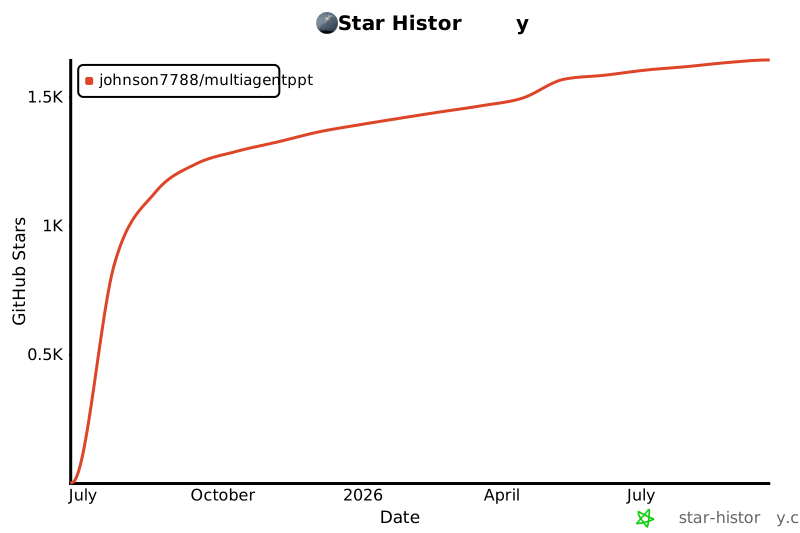](https://www.star-history.com/#johnson7788/MultiAgentPPT&Date)

 MCP 市场