Content
<img width="512" height="128" alt="Screenshot 2025-07-21 at 5 38 29 PM" src="https://github.com/user-attachments/assets/057ec717-a61a-47af-9a54-e711e85ab4dd" />
<a href="https://www.producthunt.com/products/n8n2mcp-n8n-workflow-into-mcp-servers?embed=true&utm_source=badge-featured&utm_medium=badge&utm_source=badge-n8n2mcp" target="_blank"><img src="https://api.producthunt.com/widgets/embed-image/v1/featured.svg?post_id=995941&theme=light&t=1753173693440" alt="N8N2MCP - Turn your N8N workflow to MCP servers with just 3 clicks | Product Hunt" style="width: 250px; height: 54px;" width="250" height="54" /></a>
#### Transform your N8N workflows into MCP servers instantly
A comprehensive platform that converts N8N workflows into Model Context Protocol (MCP) servers, enabling seamless integration with AI assistants like Claude, Cursor, and other MCP-compatible platforms. Build powerful automation tools using N8N's visual workflow editor and deploy them as callable AI functions.

## ✨ How to use
1. Copy the N8N template link/JSON from any workflow
2. Map your credentials through our intuitive interface
3. Deploy with one click!
**Your N8N workflow gets deployed and creates a local hosted MCP server. Just paste the server URL into Claude, Cursor, Super Chain, or any MCP-compatible platform!**
## 🎯 Key Features
### 🤖 **MCP Server Creation**
Convert your N8N workflows into MCP servers that AI assistants can use as custom tools
### 🔄 **Dual Architecture**
- **Agent Marketplace**: Web-based workflow management and deployment platform
- **MCP Router**: High-performance MCP server creation and routing system
### 🛠️ **Comprehensive Workflow Management**
- Browse and deploy pre-built workflow templates
- Upload and manage your custom N8N workflows
- Real-time credential configuration and testing
- One-click deployment to your N8N instance
## 🏗️ Architecture
```mermaid
graph TB
subgraph "AI Assistant Layer"
A[Claude/Cursor/Super Chain]
end
subgraph "N8N 2 MCP"
B[Agent Marketplace<br/>Flask Web App]
C[MCP Router<br/>FastAPI Service]
D[Workflow Parser<br/>Analysis Engine]
end
subgraph "Infrastructure"
E[Supabase Database]
F[N8N Instance]
G[Credential Manager]
end
A -->|MCP Protocol| C
C -->|Dynamic MCP| F
B -->|Workflow Management| E
B -->|Deploy & Configure| F
C -->|User Config| E
B -->|Parse & Analyze| D
D -->|Extract Requirements| G
G -->|Secure Handling| F
```
## 📦 Installation
### Prerequisites
- **Python 3.11+**
- **N8N Instance** (cloud.n8n.io or self-hosted)
- **Supabase Account** (for data storage)
- **Playwright** (required for N8N authentication)
- **Docker** (optional, for containerized deployment)
> ⚠️ **Important**: Playwright installation is **required** for N8N workflow execution. The system will use dummy credentials if Playwright is not properly installed, limiting functionality.
### Quick Start
#### Option 1: Docker Compose (Recommended)
1. **Clone the repository**
```bash
git clone https://github.com/Super-Chain/N8N2MCP.git
cd N8N2MCP
```
2. **Configure environment**
```bash
cp env.example .env
# Edit .env with your actual configuration values
```
3. **Start with Docker Compose**
```bash
docker-compose up -d
```
This starts:
- Flask App (Agent Marketplace) at: http://localhost:5000
- MCP Router at: http://localhost:6545
4. **View logs**
```bash
docker-compose logs -f
```
#### Option 2: Manual Installation
1. **Clone the repository**
```bash
git clone https://github.com/Super-Chain/N8N2MCP.git
cd N8N2MCP
```
2. **Install dependencies**
```bash
pip install -r requirements.txt
```
3. **Install Playwright browsers** (Required)
```bash
playwright install
# This downloads the necessary browser binaries for N8N authentication
```
4. **Configure environment**
```bash
# Copy and edit the .env file (see Environment Configuration section)
cp .env.example .env
```
```.env
# Supabase Configuration
SUPABASE_URL=https://your-project-id.supabase.co
SUPABASE_KEY=your_supabase_anon_key
SUPABASE_SERVICE_KEY=your_supabase_service_role_key
# N8N Configuration
X_N8N_API_KEY=your_n8n_api_key
N8N_BASE_URL=https://your-n8n-instance.com
N8N_USERNAME=your_n8n_username
N8N_PASSWORD=your_n8n_password
# MCP Router Configuration
N8N_BUILDER_URL=http://localhost:6545
# Server Configuration
FLASK_HOST=0.0.0.0
FLASK_PORT=5000
MCP_HOST=0.0.0.0
MCP_PORT=6545
# Optional: Authentication credentials (auto-populated)
N8N_AUTH=
N8N_BROWSER_ID=
```
5. **Start both servers**
```bash
python main.py
```
This starts:
- Flask App (Agent Marketplace) at: http://localhost:5000
- MCP Router at: http://localhost:6545
6. **Access to UI**
Front end : http://localhost:5000
**Configuration Notes:**
- **SUPABASE_URL**: Your Supabase project URL
- **SUPABASE_KEY**: Anon key for client-side operations
- **SUPABASE_SERVICE_KEY**: Service role key for admin operations
- **N8N_BASE_URL**: Your N8N instance URL (must include https://)
- **N8N_BUILDER_URL**: Must include http:// protocol
## 🔧 Usage
### Creating MCP Servers from N8N Workflows
#### Method 1: Import N8N Templates
1. **Browse Templates**: Visit the [N8N template](https://n8n.io/workflows/)
2. **Import Template**: Enter an N8N template URL from n8n.io
3. **Configure Credentials**: Fill in required API keys and service credentials
4. **Deploy Workflow**: Click deploy to create the workflow in your N8N instance
5. **MCP Server Created**: Automatically generates an MCP server endpoint
#### Method 2: Upload Custom Workflows
1. **Upload JSON**: Upload your N8N workflow JSON file / Copy and paste your JSON workflow
2. **Review Analysis**: Check detected nodes and required credentials
3. **Configure & Deploy**: Fill credentials and deploy to N8N
4. **Access MCP Server**: Use the generated MCP endpoint in AI tools
#### Using MCP Servers
```bash
# Example MCP server URL format:
http://localhost:6545/mcp/{workflow_id}/{api_key}
# Test MCP server:
curl http://localhost:6545/list # List all registered MCP servers
```
## 🎨 Use Cases
### 🔍 **Data Processing & Analysis**
- Transform CSV/Excel files using N8N's data manipulation nodes
- Connect to databases and APIs for real-time data analysis
- Generate reports and visualizations from AI conversations
### 🌐 **API Integration Hub**
- Connect AI assistants to external services (Slack, Google, etc.)
- Create custom API endpoints for proprietary systems
- Build unified interfaces for multiple SaaS platforms
### 📧 **Communication & Notifications**
- Send emails, Slack messages, or Discord notifications
- Create automated reporting systems
- Build alert systems triggered by AI interactions
### 🔄 **Workflow Automation**
- Trigger complex business processes from AI conversations
- Create approval workflows and task management systems
- Build custom integrations with enterprise systems
## 🛠️ Development
### Project Structure
```
N8N2MCP/
├── main.py # Unified server startup script
├── requirements.txt # Consolidated Python dependencies
├── .env # Environment configuration (shared)
│
├── agent_marketplace/ # Flask web application
│ ├── app.py # Main Flask app with API endpoints
│ ├── database.py # Supabase integration & data models
│ ├── n8n_workflow_parser.py # Workflow analysis engine
│ ├── setup_supabase.py # Database setup utilities
│ ├── templates/ # HTML templates
│ │ ├── workflows.html # Main marketplace interface
│ │ └── static/ # CSS, JS assets
│ └── __init__.py # Python package marker
│
├── mcp_router/ # FastAPI MCP service
│ ├── mcp_router.py # Main FastAPI application
│ ├── n8n_credential_extractor.py # N8N authentication
│ ├── credential_helper.py # Credential management utilities
│ └── __init__.py # Python package marker
│
└── README.md # This documentation
```
### Database Setup
The system uses **2 main tables** in Supabase:
#### Setup
1. **Create Supabase Project**: Set up a new project at [supabase.com](https://supabase.com)
2. **Run SQL in Supabase SQL Editor**:
```sql
-- Main workflow storage table
CREATE TABLE IF NOT EXISTS public.user_workflows (
id UUID DEFAULT gen_random_uuid() PRIMARY KEY,
user_id TEXT NOT NULL,
template_id TEXT NOT NULL,
template_url TEXT NOT NULL,
workflow_name TEXT NOT NULL,
workflow_json JSONB NOT NULL,
workflow_description TEXT,
n8n_workflow_id TEXT,
source TEXT DEFAULT 'user_upload',
credentials_required JSONB DEFAULT '[]'::jsonb,
mcp_link TEXT,
status TEXT DEFAULT 'pending',
created_at TIMESTAMP WITH TIME ZONE DEFAULT NOW(),
updated_at TIMESTAMP WITH TIME ZONE DEFAULT NOW()
);
-- MCP server configurations
CREATE TABLE IF NOT EXISTS public.mcp_configs (
id UUID DEFAULT gen_random_uuid() PRIMARY KEY,
workflow_id TEXT NOT NULL,
user_apikey TEXT NOT NULL,
code TEXT NOT NULL,
created_at TIMESTAMP WITH TIME ZONE DEFAULT NOW(),
updated_at TIMESTAMP WITH TIME ZONE DEFAULT NOW(),
UNIQUE(workflow_id, user_apikey)
);
-- Enable Row Level Security (recommended)
ALTER TABLE user_workflows ENABLE ROW LEVEL SECURITY;
ALTER TABLE mcp_configs ENABLE ROW LEVEL SECURITY;
```
## 🚀 Running the System
### Unified Startup (Recommended)
```bash
python main.py
```
This automatically starts both services with:
- ✅ Environment validation
- ✅ Database setup verification
- ✅ Graceful shutdown handling
- ✅ Centralized logging
### Individual Services
#### Agent Marketplace (Port 5000)
```bash
cd agent_marketplace
python app.py
```
#### MCP Router (Port 6545)
```bash
cd mcp_router
python mcp_router.py
```
### Verification
```bash
# Test Agent Marketplace
curl http://localhost:5000/api/health
# Test MCP Router
curl http://localhost:6545/list
# View all endpoints
curl http://localhost:5000/api/health | grep endpoints
```
## 🔧 Troubleshooting
### Common Issues
#### Port Already in Use
```bash
# Kill processes on ports 5000 and 6545
fuser -k 5000/tcp 6545/tcp
# Or restart with main.py which handles this automatically
python main.py
```
#### Database Connection Issues
```bash
# Verify Supabase configuration
python -c "from agent_marketplace.database import db_manager; print('✅ Database OK' if db_manager.supabase else '❌ Database connection failed')"
# Reset database tables
python agent_marketplace/setup_supabase.py
```
#### MCP Router Not Responding
```bash
# Check if MCP Router is running
curl http://localhost:6545/list
# View MCP Router logs
# Logs appear in terminal where main.py was started
```
#### N8N Workflow Creation Fails
- Verify `N8N_BASE_URL` includes `https://`
- Check `X_N8N_API_KEY` is valid and has workflow creation permissions
- Ensure N8N instance is accessible from your server
#### Missing Dependencies
```bash
# Install missing packages
pip install playwright
playwright install # For N8N authentication (required)
# Or install all dependencies
pip install -r requirements.txt
```
#### Playwright Browser Issues
```bash
# If playwright browsers fail to download
playwright install --force
# For headless environments (servers)
playwright install chromium
# Check if playwright is working
python -c "from playwright.async_api import async_playwright; print('✅ Playwright OK')"
```
### Development Tips
```bash
# Enable debug mode for Flask
export FLASK_DEBUG=1
# View detailed MCP Router logs
cd mcp_router && python mcp_router.py --log-level debug
# Test individual components
python -m agent_marketplace.n8n_workflow_parser # Test parser
python -m mcp_router.mcp_router # Test MCP Router
```
## 🔐 Security Best Practices
- **Credential Management**: Never store user credentials server-side
- **API Key Rotation**: Regularly rotate N8N API keys and Supabase keys
- **Network Security**: Use HTTPS in production with proper SSL certificates
- **Access Control**: Implement proper authentication and authorization
- **Data Isolation**: Ensure proper user data segregation with RLS policies
## 🤝 Contributing
1. **Fork the repository**
2. **Create a feature branch**: `git checkout -b feature/amazing-feature`
3. **Commit your changes**: `git commit -m 'Add amazing feature'`
4. **Push to the branch**: `git push origin feature/amazing-feature`
5. **Open a Pull Request**
## 📄 License
This project is licensed under the MIT License - see the [LICENSE](LICENSE) file for details.
## 📋 Quick Reference
### API Endpoints
#### Agent Marketplace (Port 5000)
- `GET /` - Main marketplace interface
- `GET /api/health` - Health check and available endpoints
- `POST /api/import-n8n-template-enhanced` - Import N8N template
- `POST /api/deploy-workflow-to-n8n` - Deploy workflow with credentials
- `GET /api/user/uploaded-workflows` - List user workflows
- `GET /api/user/mcp-servers` - List active MCP servers
#### MCP Router (Port 6545)
- `GET /list` - List all registered MCP servers
- `POST /n8n/build` - Create MCP server from N8N workflow
- `GET /n8n/credentials/status` - Check N8N credential status
- `/mcp/{workflow_id}/{api_key}` - MCP server endpoint
### Key File Locations
- **Configuration**: `.env` (root directory)
- **Main Startup**: `main.py`
- **Flask App**: `agent_marketplace/app.py`
- **MCP Router**: `mcp_router/mcp_router.py`
## 🆘 Support
- **Issues**: [GitHub Issues](https://github.com/Super-Chain/N8N-Agent-Marketplace/issues)
- **Documentation**: Check this README and inline code documentation
- **Community**: Join our community discussions for help and feature requests
## 🙏 Acknowledgments
- [N8N](https://n8n.io/) for the amazing workflow automation platform
- [Model Context Protocol](https://modelcontextprotocol.io/) for enabling AI tool integration
- [Supabase](https://supabase.com/) for the robust database infrastructure
- [FastAPI](https://fastapi.tiangolo.com/) and [Flask](https://flask.palletsprojects.com/) for the web frameworks
---
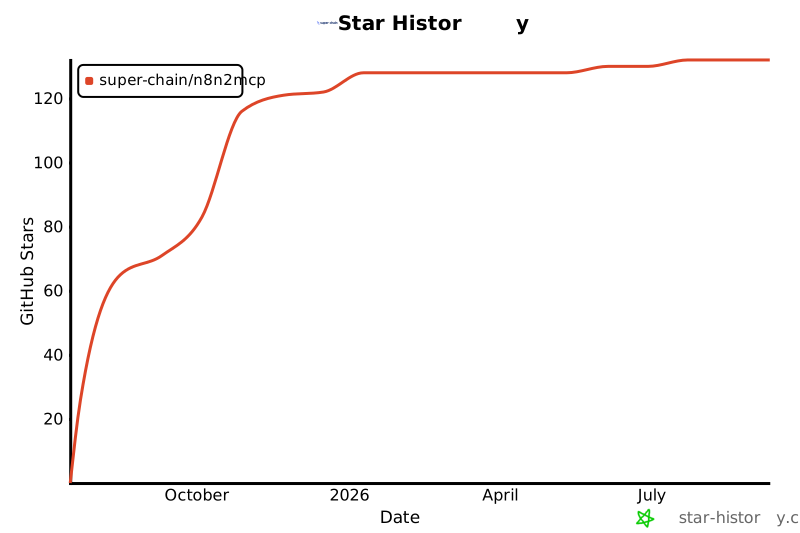
## Star History
[](https://www.star-history.com/#Super-Chain/N8N2MCP&Date)
**Built with ❤️ by the SUPERCHAIN team for the AI automation community**



