

Content
# Tool List
<!-- ALL-CONTRIBUTORS-BADGE:START - Do not remove or modify this section -->
[](#contributors-)
<!-- ALL-CONTRIBUTORS-BADGE:END -->
[](./DONATIONS.md)
[](./DONATIONS.md)
[](https://hub.docker.com/r/xpzouying/xiaohongshu-mcp)
MCP for 小红书 / xiaohongshu.com. Let your AI assistant access 小红书 data directly.
### 🚀 Quick Start: Choose the version that suits you
> [!IMPORTANT]
> #### 🔥 Option A: Openclaw Deep Integration (Recommended for developers)
> - **Openclaw is too popular 🔥🔥🔥 , and Openclaw support is added, which can be divided into two types. Please use them according to your needs:**
> - [xiaohongshu-mcp-skills](https://github.com/autoclaw-cc/xiaohongshu-mcp-skills) (for users who have already deployed this project)
> - [xiaohongshu-skills](https://github.com/autoclaw-cc/xiaohongshu-skills) (ready-to-use version)
> [!TIP]
> #### ✨ Option B: x-mcp Browser Plugin (Recommended for non-technical users / users who pursue simplicity)
> - **Don't want to bother with Docker or deployment environment? Try: [xpzouying/x-mcp](https://github.com/xpzouying/x-mcp)**
> - **Zero configuration**: Install the plugin and use it without any code, proxy, or complex environment configuration.
> - **Safe and stable**: Run directly in the commonly used browser (Chrome/Edge) and local network, without server IP risk, and can solve 90% of deployment errors.
### 📖 Related Resources
- **My blog post**: [haha.ai/xiaohongshu-mcp](https://www.haha.ai/xiaohongshu-mcp)
- **Contribution Guide**: [Contributing Guide](./CONTRIBUTING.md)
### 🛠️ Troubleshooting
If you encounter problems when deploying the traditional Docker version, **make sure to check: [Various troubleshooting (Issues #56)](https://github.com/xpzouying/xiaohongshu-mcp/issues/56)**.
> *Hint: If the environment check takes too much time, switching to [x-mcp plugin version](https://github.com/xpzouying/x-mcp) is usually a more efficient choice.*
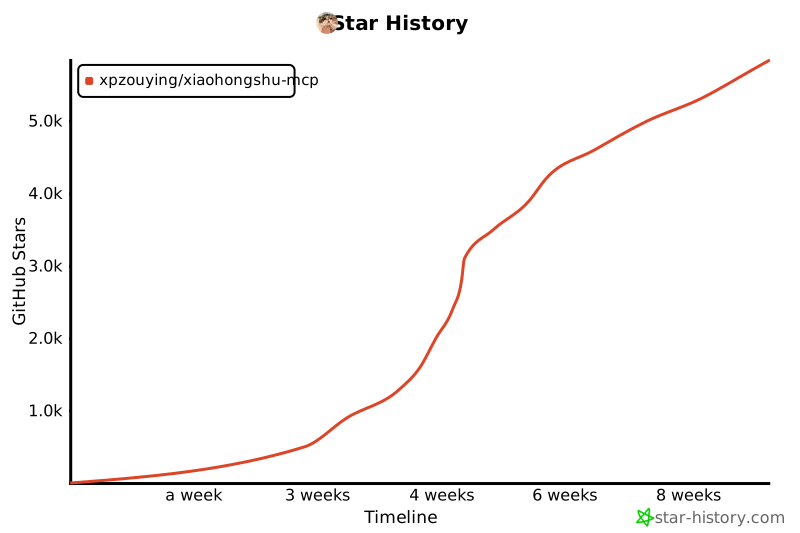
## Star History
[](https://www.star-history.com/#xpzouying/xiaohongshu-mcp&Timeline)
## Donations
All donations for this project will be used for charity. For all charity donation records, please refer to [DONATIONS.md](./DONATIONS.md).
**When donating, please note MCP and your name.**
If you need to correct or withdraw your name, please open an issue or contact us via email.
**Alipay (no QR code displayed):**
Donate to **xpzouying@gmail.com** via Alipay.
**WeChat:**
<img src="donate/wechat@2x.png" alt="WeChat Pay QR" width="260" />
## Project Overview
**Main Features**
> 💡 **Tip:** Click on the function title below to view the video demonstration
<details>
<summary><b>1. Login and check login status</b></summary>
The first step is necessary. 小红书 requires login. You can check the current login status.
**Login demonstration:**
https://github.com/user-attachments/assets/8b05eb42-d437-41b7-9235-e2143f19e8b7
**Check login status demonstration:**
https://github.com/user-attachments/assets/bd9a9a4a-58cb-4421-b8f3-015f703ce1f9
</details>
<details>
<summary><b>2. Publish graphic content</b></summary>
Supports publishing graphic content to 小红书, including title, content description, and images.
**Image support methods:**
Supports two image input methods:
1. **HTTP/HTTPS image links**
```
["https://example.com/image1.jpg", "https://example.com/image2.png"]
```
2. **Local image absolute path** (recommended)
```
["/Users/username/Pictures/image1.jpg", "/home/user/images/image2.png"]
```
**Why recommend using local path:**
- ✅ Better stability, no dependence on the network
- ✅ Faster upload speed
- ✅ Avoid image link expiration issues
- ✅ Support more image formats
**Publish graphic post demonstration:**
https://github.com/user-attachments/assets/8aee0814-eb96-40af-b871-e66e6bbb6b06
</details>
<details>
<summary><b>3. Publish video content</b></summary>
Supports publishing video content to 小红书, including title, content description, and local video files.
**Video support methods:**
Only supports local video file absolute paths:
```
"/Users/username/Videos/video.mp4"
```
**Function characteristics:**
- ✅ Supports local video file upload
- ✅ Automatically processes video format conversion
- ✅ Supports title, content description, and tags
- ✅ Waits for video processing to complete before automatic publishing
**Notes:**
- Only supports local video files, not HTTP links
- Video processing time is longer, please wait patiently
- It is recommended that the video file size does not exceed 1GB
</details>
<details>
<summary><b>4. Search content</b></summary>
Searches 小红书 content based on keywords.
**Search post demonstration:**
https://github.com/user-attachments/assets/03c5077d-6160-4b18-b629-2e40933a1fd3
</details>
<details>
<summary><b>5. Get recommended list</b></summary>
Gets the recommended content list from 小红书 homepage.
**Get recommended list demonstration:**
https://github.com/user-attachments/assets/110fc15d-46f2-4cca-bdad-9de5b5b8cc28
</details>
<details>
<summary><b>6. Get post details (including interaction data and comments)</b></summary>
Gets the complete details of a 小红书 post, including:
- Post content (title, description, images, etc.)
- User information
- Interaction data (likes, collections, shares, comments)
- Comment list and sub-comments
**⚠️ Important tip:**
- Need to provide post ID and xsec_token (two parameters are required)
- These two parameters can be obtained from the feed list or search results
- Must log in to use this function
**Get post details demonstration:**
https://github.com/user-attachments/assets/76a26130-a216-4371-a6b3-937b8fda092a
</details>
<details>
<summary><b>7. Publish comments to posts</b></summary>
Supports automatically publishing comments to 小红书 posts.
**Function description:**
- Automatically locate the comment input box
- Input comment content and publish
- Supports HTTP API and MCP tool invocation
**⚠️ Important tip:**
- Need to log in to use this function
- Need to provide post ID, xsec_token, and comment content
- These parameters can be obtained from the feed list or search results
**Publish comment demonstration:**
https://github.com/user-attachments/assets/cc385b6c-422c-489b-a5fc-63e92c695b80
</details>
<details>
<summary><b>8. Get user personal homepage</b></summary>
Gets the personal homepage information of a 小红书 user, including user basic information and note content.
**Function description:**
- Get user basic information (nickname, introduction, avatar, etc.)
- Get follow, fan, and like count statistics
- Get the list of notes published by the user
- Supports HTTP API and MCP tool invocation
**⚠️ Important tip:**
- Need to log in to use this function
- Need to provide user ID and xsec_token
- These parameters can be obtained from the feed list or search results
**Returned information includes:**
- User basic information: nickname, introduction, avatar, certification status
- Statistics: follow, fan, like count, note count
- Note list: all publicly available notes published by the user
</details>
<details>
<summary><b>9. Reply to comments</b></summary>
Replies to specified comments under notes, supporting precise reply to specific user comments.
**Function description:**
- Reply to specific comments under notes
- Supports locating target comments through comment ID or user ID
- Need to provide feed_id, xsec_token, comment_id/user_id, and reply content
**⚠️ Important tip:**
- Need to log in to use this function
- comment_id and user_id provide at least one
- These parameters can be obtained from the comment list of post details
</details>
<details>
<summary><b>10. Like/unlike</b></summary>
Likes or unlikes notes, intelligently detecting the current status to avoid duplicate operations.
**Function description:**
- Like or unlike specified notes
- Intelligent detection: skip liking if already liked, skip unliking if not liked
- Need to provide feed_id and xsec_token
**⚠️ Important tip:**
- Need to log in to use this function
- Default is like operation, set unlike=true to unlike
</details>
<details>
<summary><b>11. Collect/uncollect</b></summary>
Collects or uncollects notes, intelligently detecting the current status to avoid duplicate operations.
**Function description:**
- Collect specified notes or uncollect
- Intelligent detection: skip collecting if already collected, skip uncollecting if not collected
- Need to provide feed_id and xsec_token
**⚠️ Important tip:**
- Need to log in to use this function
- Default is collect operation, set uncollect=true to uncollect
</details>
**Basic operation knowledge of 小红书**
- **Title: (very important) 小红书 requires titles not to exceed 20 characters**
- **Text: (very important): The text cannot exceed 1000 characters**
- Currently supports sending graphics and videos: from a recommended perspective, graphics traffic will be better than videos and pure text.
- (Low priority) Consider pure text support. 1. Personal feeling pure text will greatly increase operation complexity; 2. Pure text has low value in my usage scenarios.
- Tags: Currently supported. Adding suitable tags can bring more traffic.
- According to personal practice, the daily post limit for 小红书 should be **50 posts**.
- **(Very important) 小红书 does not allow the same account to log in on multiple web pages**, if you log in to xiaohongshu-mcp and then log in to another web page with the same account, it will log out the current MCP account. You can use the mobile app to view the current account information.
- If exposure is low, first check if there are prohibited words in the content, search for many third-party free tools.
**Risk description**
1. This project is open-sourced based on another project, and the original project has been running stably for over a year without any account bans, only cookie expiration requiring re-login.
2. I used Claude Code to access and verify that it was stable and automated for several weeks before open-sourcing.
3. If the account is not verified, especially new accounts, it will generally trigger **real-name authentication** reminders (see below). ⚠️ This is not a ban, and not using MCP will also require real-name authentication. It is recommended to verify before using this project.
<img width="508" height="306" alt="image" src="https://github.com/user-attachments/assets/34383e1b-f666-409f-9870-002655507dc1" />
This project is based on learning purposes and prohibits all illegal activities.
**Practical results**
On the first day, likes and collections reached 999+,
<img width="386" height="278" alt="CleanShot 2025-09-05 at 01 31 55@2x" src="https://github.com/user-attachments/assets/4b5a283b-bd38-45b8-b608-8f818997366c" />
<img width="350" height="280" alt="CleanShot 2025-09-05 at 01 32 49@2x" src="https://github.com/user-attachments/assets/4481e1e7-3ef6-4bbd-8483-dcee8f77a8f2" />
Results after about a week
<img width="1840" height="582" alt="CleanShot 2025-09-05 at 01 33 13@2x" src="https://github.com/user-attachments/assets/fb367944-dc48-4bbd-8ece-934caa86323e" />
## 1. Usage Tutorial
### 1.1. Quick Start (Recommended)
**Method 1: Download pre-compiled binary files**
Directly download the corresponding platform's binary files from [GitHub Releases](https://github.com/xpzouying/xiaohongshu-mcp/releases):
**Main program (MCP service):**
- **macOS Apple Silicon**: `xiaohongshu-mcp-darwin-arm64`
- **macOS Intel**: `xiaohongshu-mcp-darwin-amd64`
- **Windows x64**: `xiaohongshu-mcp-windows-amd64.exe`
- **Linux x64**: `xiaohongshu-mcp-linux-amd64`
**Login tool:**
- **macOS Apple Silicon**: `xiaohongshu-login-darwin-arm64`
- **macOS Intel**: `xiaohongshu-login-darwin-amd64`
- **Windows x64**: `xiaohongshu-login-windows-amd64.exe`
- **Linux x64**: `xiaohongshu-login-linux-amd64`
Usage steps:
```bash
# 1. Run the login tool first
chmod +x xiaohongshu-login-darwin-arm64
./xiaohongshu-login-darwin-arm64
# 2. Then start the MCP service
chmod +x xiaohongshu-mcp-darwin-arm64
./xiaohongshu-mcp-darwin-arm64
```
**⚠️ Important tip**: The first run will automatically download the headless browser (about 150MB), please ensure the network connection is normal. Subsequent runs do not require repeated downloads.
**Method 2: Compile from source**
<details>
<summary>Compile installation details</summary>
Depend on the Golang environment, installation method please refer to [Golang official documentation](https://go.dev/doc/install).
Set up the GOPROXY environment variable, choose one of the following:
# 1. Qianniu CDN
go env -w GOPROXY=https://goproxy.cn,direct
# 2. Alibaba Cloud
go env -w GOPROXY=https://mirrors.aliyun.com/goproxy/,direct
# 3. Official
go env -w GOPROXY=https://goproxy.io,direct
```
</details>
**Method 3: Use Docker container (easiest)**
<details>
<summary>Docker deployment details</summary>
Using Docker deployment is the easiest way, no need to install any development environment.
**1. Pull the latest image from Docker Hub (recommended)**
We provide pre-built Docker images, which can be directly pulled from Docker Hub:
```bash
# Pull the latest image
docker pull xpzouying/xiaohongshu-mcp```
Docker Hub address: [https://hub.docker.com/r/xpzouying/xiaohongshu-mcp](https://hub.docker.com/r/xpzouying/xiaohongshu-mcp)
**2. Use Docker Compose to start (recommended)**
We provide a configured `docker-compose.yml` file, which can be used directly:
```bash
# Download docker-compose.yml
wget https://raw.githubusercontent.com/xpzouying/xiaohongshu-mcp/main/docker/docker-compose.yml
# Or if the project has been cloned, enter the docker directory
cd docker
# Start the service
docker compose up -d
# View logs
docker compose logs -f
# Stop the service
docker compose stop
```
**3. Build the image yourself (optional)**
```bash
# Run in the project root directory
docker build -t xpzouying/xiaohongshu-mcp .
```
**4. Configuration description**
The Docker version will automatically:
- Configure the Chrome browser and Chinese font
- Mount `./data` to store cookies
- Mount `./images` to store published images
- Expose port 18060 for MCP connection
Detailed usage instructions please refer to: [Docker deployment guide](./docker/README.md)
</details>
Windows encounter problems, first look here: [Windows installation guide](./docs/windows_guide.md)
### 1.2. Login
The first time you need to log in manually, you need to save the login status of 小红书.
**Using binary files:**
```bash
# Run the login tool on the corresponding platform
./xiaohongshu-login-darwin-arm64```
**Using source code:**
```bash
go run cmd/login/main.go
```
### 1.3. Start MCP Service
Start the xiaohongshu-mcp service.
**Using Binary File**:
```bash
# Default: Headless mode, no browser interface
./xiaohongshu-mcp-darwin-arm64
# Non-headless mode, with browser interface
./xiaohongshu-mcp-darwin-arm64 -headless=false
```
**Using Source Code**:
```bash
# Default: Headless mode, no browser interface
go run .
# Non-headless mode, with browser interface
go run . -headless=false
```
**Configure Proxy (Optional)**:
If you need to access through a proxy, you can set the `XHS_PROXY` environment variable:
```bash
# Start with proxy configured
XHS_PROXY=http://user:pass@proxy:port ./xiaohongshu-mcp-darwin-arm64
# Or using source code
XHS_PROXY=http://proxy:port go run .
```
Supports HTTP/HTTPS/SOCKS5 proxies, and proxy authentication information will be automatically hidden in the logs.
## 1.4. Verify MCP
```bash
npx @modelcontextprotocol/inspector
```

After running, open the link marked in red, configure MCP inspector, input `http://localhost:18060/mcp`, and click the `Connect` button.
<img width="915" height="659" alt="bf9532dd0b7ba423491accf511a467de" src="https://github.com/user-attachments/assets/08bc3cef-73e7-42d2-b923-7ba9e6c8af30" />
**Note:** Ensure the options in the left border are correct.
After configuring MCP inspector, click the `List Tools` button to view all tools.
## 1.5. Publish Using MCP
### Check Login Status

### Publish Content
The example uses a random image from https://unsplash.com/ for testing.

### Search Content
Use the search function to search for content on Xiaohongshu based on keywords:

## 2. MCP Client Access
This service supports the standard Model Context Protocol (MCP) and can be connected to various AI clients that support MCP.
### 2.1. Quick Start
#### Start MCP Service
```bash
# Start service (default headless mode)
go run .
# Or with interface mode
go run . -headless=false
```
The service will run on: `http://localhost:18060/mcp`
#### Verify Service Status
```bash
# Test MCP connection
curl -X POST http://localhost:18060/mcp \
-H "Content-Type: application/json" \
-d '{"jsonrpc":"2.0","method":"initialize","params":{},"id":1}'
```
#### Claude Code CLI Integration
```bash
# Add HTTP MCP server
claude mcp add --transport http xiaohongshu-mcp http://localhost:18060/mcp
# Check if MCP is added successfully (ensure MCP is started, run the following command)
claude mcp list
```
### 2.2. Supported Clients
<details>
<summary><b>Claude Code CLI</b></summary>
Official command-line tool, demonstrated in the quick start section:
```bash
# Add HTTP MCP server
claude mcp add --transport http xiaohongshu-mcp http://localhost:18060/mcp
# Check if MCP is added successfully (ensure MCP is started, run the following command)
claude mcp list
```
</details>
<details>
<summary><b>Open Code CLI</b></summary>
Use interactive commands to add MCP Server:
```bash
opencode mcp add
```
Example of adding `xiaohongshu-mcp`:
```
┌ Add MCP server
│
◇ Enter MCP server name
│ xiaohongshu-mcp
│
◇ Select MCP server type
│ Remote
│
◇ Enter MCP server URL
│ http://localhost:18060/mcp
│
◇ Does this server require OAuth authentication?
│ No
│
◆ MCP server "xiaohongshu-mcp" added to C:\Users\admin\.config\opencode\opencode.json
│
└ MCP server added successfully
```
Verify if added successfully (ensure MCP is started):
```bash
opencode mcp list
```
```
┌ MCP Servers
│
● ✓ xiaohongshu-mcp connected
```
</details>
<details>
<summary><b>Cursor</b></summary>
#### Configuration File Method
Create or edit the MCP configuration file:
**Project-level configuration** (recommended):
Create `.cursor/mcp.json` in the project root directory:
```json
{
"mcpServers": {
"xiaohongshu-mcp": {
"url": "http://localhost:18060/mcp",
"description": "Xiaohongshu Content Publishing Service - MCP Streamable HTTP"
}
}
}
```
**Global configuration**:
Create `~/.cursor/mcp.json` (with the same content).
#### Steps
1. Ensure the Xiaohongshu MCP service is running
2. Save the configuration file and restart Cursor
3. In the Cursor chat, the tool should be automatically available
4. You can view the connected MCP tools through the chat interface's "Available Tools"
**Demo**
MCP integration plugin:

Calling MCP tool (example: checking login status):

</details>
<details>
<summary><b>VSCode</b></summary>
#### Method 1: Configure Using Command Palette
1. Press `Ctrl/Cmd + Shift + P` to open the command palette
2. Run the `MCP: Add Server` command
3. Select the `HTTP` method
4. Input the address: `http://localhost:18060/mcp`, or modify to the corresponding server address
5. Input the MCP name: `xiaohongshu-mcp`
#### Method 2: Directly Edit Configuration File
**Workspace configuration** (recommended):
Create `.vscode/mcp.json` in the project root directory:
```json
{
"servers": {
"xiaohongshu-mcp": {
"url": "http://localhost:18060/mcp",
"type": "http"
}
},
"inputs": []
}
```
**View configuration**:

1. Confirm the running status
2. View if `tools` are correctly detected
**Demo**
Example of searching post content:

</details>
<details>
<summary><b>Google Gemini CLI</b></summary>
Configure in `~/.gemini/settings.json` or project directory `.gemini/settings.json`:
```json
{
"mcpServers": {
"xiaohongshu": {
"httpUrl": "http://localhost:18060/mcp",
"timeout": 30000
}
}
}
```
For more information, refer to [Gemini CLI MCP documentation](https://google-gemini.github.io/gemini-cli/docs/tools/mcp-server.html)
</details>
<details>
<summary><b>MCP Inspector</b></summary>
Debugging tool for testing MCP connections:
```bash
# Start MCP Inspector
npx @modelcontextprotocol/inspector
# Connect to http://localhost:18060/mcp in the browser
```
Steps:
- Use MCP Inspector to test the connection
- Test the Ping Server function to verify the connection
- Check if List Tools returns 13 tools
</details>
<details>
<summary><b>Cline</b></summary>
Cline is a powerful AI programming assistant that supports MCP protocol integration.
#### Configuration Method
Add the following configuration to Cline's MCP settings:
```json
{
"xiaohongshu-mcp": {
"url": "http://localhost:18060/mcp",
"type": "streamableHttp",
"autoApprove": [],
"disabled": false
}
}
```
#### Steps
1. Ensure the Xiaohongshu MCP service is running (`http://localhost:18060/mcp`)
2. Open MCP settings in Cline
3. Add the above configuration to the MCP server list
4. Save the configuration and restart Cline
5. You can directly use Xiaohongshu-related functions in the conversation
#### Configuration Description
- `url`: MCP service address
- `type`: Use `streamableHttp` type for better performance
- `autoApprove`: Configurable auto-approval tool list (leave blank for manual approval)
- `disabled`: Set to `false` to enable this MCP service
#### Example Usage
After configuration, you can use natural language to operate Xiaohongshu in Cline:
```
Help me check the Xiaohongshu login status
```
```
Help me publish a post about spring on Xiaohongshu, using this image: /path/to/spring.jpg
```
```
Search for content about "food" on Xiaohongshu
```
</details>
<details>
<summary><b>OpenClaw (via MCPorter)</b></summary>
> Ensure xiaohongshu-mcp is locally deployed before use. **Not recommended** to directly provide the GitHub link to OpenClaw for deployment.
Since OpenClaw does not natively support MCP, it is recommended to use **MCPorter** to call the MCP service.
> 💡 **Tip:** MCPorter is not the best solution for calling MCP, and compatibility issues may arise during use.
#### Installation and Configuration Steps
Run the following three commands in OpenClaw (can be done through Control UI, Telegram, Feishu, etc.):
```
npm i -g mcporter
npx mcporter config add xiaohongshu-mcp http://localhost:18060/mcp
npx mcporter list xiaohongshu-mcp
```
After completing the above steps, you can call all functions of xiaohongshu-mcp in OpenClaw using natural language.
</details>
<details>
<summary><b>Other Clients Supporting HTTP MCP</b></summary>
Any client supporting the HTTP MCP protocol can connect to: `http://localhost:18060/mcp`
Basic configuration template:
```json
{
"name": "xiaohongshu-mcp",
"url": "http://localhost:18060/mcp",
"type": "http"
}
```
</details>
### 2.3. Available MCP Tools
After a successful connection, you can use the following MCP tools:
- `check_login_status` - Check Xiaohongshu login status (no parameters)
- `get_login_qrcode` - Get login QR code, return Base64 image and timeout (no parameters)
- `delete_cookies` - Delete cookies file, reset login status, requires re-login (no parameters)
- `publish_content` - Publish content to Xiaohongshu (required: title, content, images)
- `images`: List of image paths (at least 1 image), supports HTTP links or local absolute paths, recommended to use local paths
- `tags`: List of topic tags (optional), e.g., `["food", "travel", "life"]`
- `schedule_at`: Scheduled publication time (optional), ISO8601 format, supports 1 hour to 14 days
- `is_original`: Whether to declare original content (optional), default not declared
- `visibility`: Visible range (optional), supports `publicly visible` (default), `only self-visible`, `only mutual followers visible`
- `products`: List of product keywords (optional), used to bind goods. Fill in the product name or product ID, and the system will automatically search and select the first matching result. The account needs to have the product function enabled. Example: [mask, sunscreen SPF50]
- `publish_with_video` - Publish video content to Xiaohongshu (required: title, content, video)
- `video`: Local video file absolute path (supports only one video file)
- `tags`: List of topic tags (optional), e.g., `["food", "travel", "life"]`
- `schedule_at`: Scheduled publication time (optional), ISO8601 format, supports 1 hour to 14 days
- `visibility`: Visible range (optional), supports `publicly visible` (default), `only self-visible`, `only mutual followers visible`
- `products`: List of product keywords (optional), used to bind goods. Fill in the product name or product ID, and the system will automatically search and select the first matching result. The account needs to have the product function enabled. Example: [mask, sunscreen SPF50]
- `list_feeds` - Get Xiaohongshu homepage recommended list (no parameters)
- `search_feeds` - Search Xiaohongshu content (required: keyword)
- `filters`: Screening options (optional)
- `sort_by`: Sorting basis - `comprehensive` (default) | `latest` | `most likes` | `most comments` | `most collections`
- `note_type`: Note type - `unlimited` (default) | `video` | `图文`
- `publish_time`: Publication time - `unlimited` (default) | `within one day` | `within one week` | `within half a year`
- `search_scope`: Search scope - `unlimited` (default) | `already seen` | `not seen` | `already followed`
- `location`: Location distance - `unlimited` (default) | `same city` | `nearby`
- `get_feed_detail` - Get post details, including interaction data and comments (required: feed_id, xsec_token)
- `load_all_comments`: Whether to load all comments (optional), default false only returns the first 10 level 1 comments
- `limit`: Limit the number of loaded level 1 comments (optional), only when load_all_comments=true takes effect, default 20
- `click_more_replies`: Whether to expand level 2 replies (optional), only when load_all_comments=true takes effect, default false
- `reply_limit`: Skip replies with too many replies (optional), only when click_more_replies=true takes effect, default 10
- `scroll_speed`: Scrolling speed (optional), `slow` | `normal` | `fast`, only when load_all_comments=true takes effect
- `post_comment_to_feed` - Publish comments to Xiaohongshu post (required: feed_id, xsec_token, content)
- `reply_comment_in_feed` - Reply to the specified comment under the note (required: feed_id, xsec_token, content, and comment_id or user_id at least one)
- `like_feed` - Like/cancel like (required: feed_id, xsec_token)
- `unlike`: Whether to cancel like (optional), true to cancel like, default to like
- `favorite_feed` - Collect/cancel collect (required: feed_id, xsec_token)
- `unfavorite`: Whether to cancel collect (optional), true to cancel collect, default to collect
- `user_profile` - Get user homepage information (required: user_id, xsec_token)
### 2.4. Usage Examples
Using Claude Code to publish content to Xiaohongshu:
**Example 1: Using HTTP image link**
```
Help me write a post to publish on Xiaohongshu,
with images: https://cn.bing.com/th?id=OHR.MaoriRock_EN-US6499689741_UHD.jpg&w=3840
The image is: "Ngātoroirangi gorge Maori rock carvings (© Joppi/Getty Images)"
Use xiaohongshu-mcp for publishing.
```
**Example 2: Using local image path (recommended)**
```
Help me write a post about spring to publish on Xiaohongshu,
using these local images:
- /Users/username/Pictures/spring_flowers.jpg
- /Users/username/Pictures/cherry_blossom.jpg
Use xiaohongshu-mcp for publishing.
```
**Example 3: Publish video content```
```
Help me write a video about food preparation to publish on Xiaohongshu,
using this local video file:
- /Users/username/Videos/cooking_tutorial.mp4
Use xiaohongshu-mcp's video publishing function.
```

**Publishing result:**
<img src="./assets/publish_result.jpeg" alt="xiaohongshu-mcp publishing result" width="300">
### 2.5. 💬 MCP Frequently Asked Questions
> ⚠️ The following are known risks when using OpenClaw + MCPorter. Please fully understand them before using:
- OpenClaw's AI automatic deployment behavior is not within the maintenance scope of this project, and the deployment results cannot be guaranteed.
- MCPorter, as an intermediate layer, may introduce additional compatibility issues, which are not related to xiaohongshu-mcp itself.
- If you encounter issues such as connection failure or abnormal tool invocation, please troubleshoot MCPorter's configuration first, rather than submitting an issue.
- Before asking questions in the community or group, please confirm whether the issue can be reproduced without using OpenClaw.
If you do not have a strong demand for OpenClaw, it is strongly recommended to use [Claude Code CLI](#claude-code-cli), [Cursor](#cursor), or [Cline](#cline) and other native HTTP MCP clients, which will provide a more stable experience.
**Q:** Why does the login username display `xiaghgngshu-mcp`?
**A:** The username is hardcoded.
**Q:** The post shows as published successfully, but it doesn't actually appear?
**A:** Troubleshooting steps are as follows:
1. Republish in **non-headless mode**.
2. Try republishing with **different content**.
3. Log in to the web version of Xiaohongshu and check if the account is **restricted from publishing on the web version due to risk control**.
4. Check if the **image size** is too large.
5. Confirm that there are **no Chinese characters in the image path**.
6. If using a network image address, please confirm that the **image link is accessible**.
**Q:** How to solve the crash when running the MCP program on the device?
**A:**
1. It is recommended to **install from source**.
2. Alternatively, use **Docker to install xiaohongshu-mcp**. The tutorial can be found at:
- [Install xiaohongshu-mcp using Docker](https://github.com/xpzouying/xiaohongshu-mcp#:~:text=%E6%96%B9%E5%BC%8F%E4%B8%89%EF%BC%9A%E4%BD%BF%E7%94%A8%20Docker%20%E5%AE%B9%E5%99%A8%EF%BC%88%E6%9C%80%E7%AE%80%E5%8D%95%EF%BC%89)
- [X-MCP Project Page](https://github.com/xpzouying/x-mcp/)
**Q:** Unable to connect when using `http://localhost:18060/mcp` for MCP verification?
**A:**
- In a **Docker environment**, please use
👉 [http://host.docker.internal:18060/mcp](http://host.docker.internal:18060/mcp)
- In a **non-Docker environment**, please use the **local IPv4 address** to access.
## 3. 🌟 Community Showcases
> 💡 **Highly recommended**: These are real usage cases contributed by community members, including detailed configuration steps and practical experience!
### 📚 Complete Tutorial List
1. **[n8n Complete Integration Tutorial](./examples/n8n/README.md)** - Workflow automation platform integration
2. **[Cherry Studio Complete Configuration Tutorial](./examples/cherrystudio/README.md)** - AI client perfect access
3. **[Claude Code + Kimi K2 Access Tutorial](./examples/claude-code/claude-code-kimi-k2.md)** - Claude Code has a high threshold, so let's access Kimi, a domestic large model!
4. **[AnythingLLM Complete Guide](./examples/anythingLLM/readme.md)** - AnythingLLM is an all-in-one multimodal AI client that supports workflow definition and multiple large model and plugin extensions.
> 🎯 **Tip**: Click the above link to view the detailed graphic tutorial and quickly get started with various integration solutions!
>
> 📢 **Contribution welcome**: If you have a new integration case, please submit a PR to share it with the community!
## 4. Xiaohongshu MCP Support Group
**Important: Before asking questions in the group, please make sure to read the README document and check the Issues.**
### WeChat Groups
| WeChat Group 23 | WeChat Group 24 |
| :------------------------------------------------------------------------------------------------: | :------------------------------------------------------------------------------------------------: |
| <img src="https://github.com/user-attachments/assets/d12a2bcc-ecd9-4bc8-8c36-fe5b16112e44" alt="WechatIMG119" width="300"> | <img src="https://github.com/user-attachments/assets/4aa00b70-da08-4867-92f1-99d1394e4338" alt="WechatIMG119" width="300">|
### Feishu Groups
| Feishu Group 2 | Feishu Group 3 | Feishu Group 4 | Feishu Group 5 |
| :-----------------------------------------------------------------------------------------------------------------------: | :-----------------------------------------------------------------------------------------------------------------------: | :-----------------------------------------------------------------------------------------------------------------------: | :-----------------------------------------------------------------------------------------------------------------------: |
| <img src="https://github.com/user-attachments/assets/4983ea42-ce5b-4e26-a8c0-33889093b579" alt="qr-feishu02" width="260"> | <img src="https://github.com/user-attachments/assets/c77b45da-6028-4d3a-b421-ccc6c7210695" alt="qr-feishu03" width="260"> | <img src="https://github.com/user-attachments/assets/c42f5595-71cd-4d9b-b7f8-0c333bd25e2b" alt="qr-feishu04" width="260"> | <img src="https://github.com/user-attachments/assets/c032801c-bf02-4e8e-81ad-fb8471b3d765" alt="qr-feishu05" width="260"> |
> **Note:**
>
> 1. The QR codes of the WeChat groups have a time limit and may not be updated in time. Please wait for the update or submit an issue to remind me to update.
> 2. For Feishu groups, if some groups are full, you can try scanning another group. There will always be a spot available.
## 🙏 Acknowledgements to Contributors ✨
Thanks to all friends who have contributed to this project! (No ranking)
<!-- ALL-CONTRIBUTORS-LIST:START - Do not remove or modify this section -->
<!-- prettier-ignore-start -->
<!-- markdownlint-disable -->
<table>
<tbody>
<tr>
<td align="center" valign="top" width="14.28%"><a href="https://haha.ai"><img src="https://avatars.githubusercontent.com/u/3946563?v=4?s=100" width="100px;" alt="zy"/><br /><sub><b>zy</b></sub></a><br /><a href="https://github.com/xpzouying/xiaohongshu-mcp/commits?author=xpzouying" title="Code">💻</a> <a href="#ideas-xpzouying" title="Ideas, Planning, & Feedback">🤔</a> <a href="https://github.com/xpzouying/xiaohongshu-mcp/commits?author=xpzouying" title="Documentation">📖</a> <a href="#design-xpzouying" title="Design">🎨</a> <a href="#maintenance-xpzouying" title="Maintenance">🚧</a> <a href="#infra-xpzouying" title="Infrastructure (Hosting, Build-Tools, etc)">🚇</a> <a href="https://github.com/xpzouying/xiaohongshu-mcp/pulls?q=is%3Apr+reviewed-by%3Axpzouying" title="Reviewed Pull Requests">👀</a></td>
<td align="center" valign="top" width="14.28%"><a href="http://www.hwbuluo.com"><img src="https://avatars.githubusercontent.com/u/1271815?v=4?s=100" width="100px;" alt="clearwater"/><br /><sub><b>clearwater</b></sub></a><br /><a href="https://github.com/xpzouying/xiaohongshu-mcp/commits?author=esperyong" title="Code">💻</a></td>
<td align="center" valign="top" width="14.28%"><a href="https://github.com/laryzhong"><img src="https://avatars.githubusercontent.com/u/47939471?v=4?s=100" width="100px;" alt="Zhongpeng"/><br /><sub><b>Zhongpeng</b></sub></a><br /><a href="https://github.com/xpzouying/xiaohongshu-mcp/commits?author=laryzhong" title="Code">💻</a></td>
<td align="center" valign="top" width="14.28%"><a href="https://github.com/DTDucas"><img src="https://avatars.githubusercontent.com/u/105262836?v=4?s=100" width="100px;" alt="Duong Tran"/><br /><sub><b>Duong Tran</b></sub></a><br /><a href="https://github.com/xpzouying/xiaohongshu-mcp/commits?author=DTDucas" title="Code">💻</a></td>
<td align="center" valign="top" width="14.28%"><a href="https://github.com/Angiin"><img src="https://avatars.githubusercontent.com/u/17389304?v=4?s=100" width="100px;" alt="Angiin"/><br /><sub><b>Angiin</b></sub></a><br /><a href="https://github.com/xpzouying/xiaohongshu-mcp/commits?author=Angiin" title="Code">💻</a></td>
<td align="center" valign="top" width="14.28%"><a href="https://github.com/muhenan"><img src="https://avatars.githubusercontent.com/u/43441941?v=4?s=100" width="100px;" alt="Henan Mu"/><br /><sub><b>Henan Mu</b></sub></a><br /><a href="https://github.com/xpzouying/xiaohongshu-mcp/commits?author=muhenan" title="Code">💻</a></td>
<td align="center" valign="top" width="14.28%"><a href="https://github.com/chengazhen"><img src="https://avatars.githubusercontent.com/u/52627267?v=4?s=100" width="100px;" alt="Journey"/><br /><sub><b>Journey</b></sub></a><br /><a href="https://github.com/xpzouying/xiaohongshu-mcp/commits?author=chengazhen" title="Code">💻</a></td>
</tr>
<tr>
<td align="center" valign="top" width="14.28%"><a href="https://github.com/eveyuyi"><img src="https://avatars.githubusercontent.com/u/69026872?v=4?s=100" width="100px;" alt="Eve Yu"/><br /><sub><b>Eve Yu</b></sub></a><br /><a href="https://github.com/xpzouying/xiaohongshu-mcp/commits?author=eveyuyi" title="Code">💻</a></td>
<td align="center" valign="top" width="14.28%"><a href="https://github.com/CooperGuo"><img src="https://avatars.githubusercontent.com/u/183056602?v=4?s=100" width="100px;" alt="CooperGuo"/><br /><sub><b>CooperGuo</b></sub></a><br /><a href="https://github.com/xpzouying/xiaohongshu-mcp/commits?author=CooperGuo" title="Code">💻</a></td>
<td align="center" valign="top" width="14.28%"><a href="https://biboyqg.github.io/"><img src="https://avatars.githubusercontent.com/u/125724218?v=4?s=100" width="100px;" alt="Banghao Chi"/><br /><sub><b>Banghao Chi</b></sub></a><br /><a href="https://github.com/xpzouying/xiaohongshu-mcp/commits?author=BiboyQG" title="Code">💻</a></td>
<td align="center" valign="top" width="14.28%"><a href="https://github.com/varz1"><img src="https://avatars.githubusercontent.com/u/60377372?v=4?s=100" width="100px;" alt="varz1"/><br /><sub><b>varz1</b></sub></a><br /><a href="https://github.com/xpzouying/xiaohongshu-mcp/commits?author=varz1" title="Code">💻</a></td>
<td align="center" valign="top" width="14.28%"><a href="https://google.meloguan.site"><img src="https://avatars.githubusercontent.com/u/62586556?v=4?s=100" width="100px;" alt="Melo Y Guan"/><br /><sub><b>Melo Y Guan</b></sub></a><br /><a href="https://github.com/xpzouying/xiaohongshu-mcp/commits?author=Meloyg" title="Code">💻</a></td>
<td align="center" valign="top" width="14.28%"><a href="https://github.com/lmxdawn"><img src="https://avatars.githubusercontent.com/u/21293193?v=4?s=100" width="100px;" alt="lmxdawn"/><br /><sub><b>lmxdawn</b></sub></a><br /><a href="https://github.com/xpzouying/xiaohongshu-mcp/commits?author=lmxdawn" title="Code">💻</a></td>
<td align="center" valign="top" width="14.28%"><a href="https://github.com/haikow"><img src="https://avatars.githubusercontent.com/u/22428382?v=4?s=100" width="100px;" alt="haikow"/><br /><sub><b>haikow</b></sub></a><br /><a href="https://github.com/xpzouying/xiaohongshu-mcp/commits?author=haikow" title="Code">💻</a></td>
</tr>
<tr>
<td align="center" valign="top" width="14.28%"><a href="https://carlo-blog.aiju.fun/"><img src="https://avatars.githubusercontent.com/u/18513362?v=4?s=100" width="100px;" alt="Carlo"/><br /><sub><b>Carlo</b></sub></a><br /><a href="https://github.com/xpzouying/xiaohongshu-mcp/commits?author=a67793581" title="Code">💻</a></td>
<td align="center" valign="top" width="14.28%"><a href="https://github.com/hrz394943230"><img src="https://avatars.githubusercontent.com/u/28583005?v=4?s=100" width="100px;" alt="hrz"/><br /><sub><b>hrz</b></sub></a><br /><a href="https://github.com/xpzouying/xiaohongshu-mcp/commits?author=hrz394943230" title="Code">💻</a></td>
<td align="center" valign="top" width="14.28%"><a href="https://github.com/ctrlz526"><img src="https://avatars.githubusercontent.com/u/143257420?v=4?s=100" width="100px;" alt="Ctrlz"/><br /><sub><b>Ctrlz</b></sub></a><br /><a href="https://github.com/xpzouying/xiaohongshu-mcp/commits?author=ctrlz526" title="Code">💻</a></td>
<td align="center" valign="top" width="14.28%"><a href="https://github.com/flippancy"><img src="https://avatars.githubusercontent.com/u/6467703?v=4?s=100" width="100px;" alt="flippancy"/><br /><sub><b>flippancy</b></sub></a><br /><a href="https://github.com/xpzouying/xiaohongshu-mcp/commits?author=flippancy" title="Code">💻</a></td>
<td align="center" valign="top" width="14.28%"><a href="https://github.com/Infinityay"><img src="https://avatars.githubusercontent.com/u/103165980?v=4?s=100" width="100px;" alt="Yuhang Lu"/><br /><sub><b>Yuhang Lu</b></sub></a><br /><a href="https://github.com/xpzouying/xiaohongshu-mcp/commits?author=Infinityay" title="Code">💻</a></td>
<td align="center" valign="top" width="14.28%"><a href="https://triepod.ai"><img src="https://avatars.githubusercontent.com/u/199543909?v=4?s=100" width="100px;" alt="Bryan Thompson"/><br /><sub><b>Bryan Thompson</b></sub></a><br /><a href="https://github.com/xpzouying/xiaohongshu-mcp/commits?author=triepod-ai" title="Code">💻</a></td>
<td align="center" valign="top" width="14.28%"><a href="http://www.megvii.com"><img src="https://avatars.githubusercontent.com/u/7806992?v=4?s=100" width="100px;" alt="tan jun"/><br /><sub><b>tan jun</b></sub></a><br /><a href="https://github.com/xpzouying/xiaohongshu-mcp/commits?author=tanxxjun321" title="Code">💻</a></td>
</tr>
<tr>
<td align="center" valign="top" width="14.28%"><a href="https://github.com/coldmountein"><img src="https://avatars.githubusercontent.com/u/95873096?v=4?s=100" width="100px;" alt="coldmountain"/><br /><sub><b>coldmountain</b></sub></a><br /><a href="https://github.com/xpzouying/xiaohongshu-mcp/commits?author=coldmountein" title="Code">💻</a></td>
<td align="center" valign="top" width="14.28%"><a href="https://blog.litpp.com/"><img src="https://avatars.githubusercontent.com/u/44826388?v=4?s=100" width="100px;" alt="mamage"/><br /><sub><b>mamage</b></sub></a><br /><a href="https://github.com/xpzouying/xiaohongshu-mcp/commits?author=yqdaddy" title="Code">💻</a> <a href="https://github.com/xpzouying/xiaohongshu-mcp/commits?author=yqdaddy" title="Documentation">📖</a></td>
</tr>
</tbody>
</table>
<!-- markdownlint-enable -->
<!-- prettier-ignore-end -->
<!-- ALL-CONTRIBUTORS-LIST:END -->
<td align="center" valign="top" width="14.28%"><a href="https://runyang.vercel.app/"><img src="https://avatars.githubusercontent.com/u/54588936?v=4?s=100" width="100px;" alt="Runyang YOU"/><br /><sub><b>Runyang YOU</b></sub></a><br /><a href="https://github.com/xpzouying/xiaohongshu-mcp/commits?author=YRYangang" title="Code">💻</a> <a href="https://github.com/xpzouying/xiaohongshu-mcp/commits?author=YRYangang" title="Documentation">📖</a></td>
<td align="center" valign="top" width="14.28%"><a href="https://www.hnfnu.edu.cn/"><img src="https://avatars.githubusercontent.com/u/134906805?v=4?s=100" width="100px;" alt="e0_7"/><br /><sub><b>e0_7</b></sub></a><br /><a href="https://github.com/xpzouying/xiaohongshu-mcp/commits?author=Daily-AC" title="Code">💻</a> <a href="https://github.com/xpzouying/xiaohongshu-mcp/commits?author=Daily-AC" title="Documentation">📖</a></td>
<td align="center" valign="top" width="14.28%"><a href="https://github.com/prehisle"><img src="https://avatars.githubusercontent.com/u/2081344?v=4?s=100" width="100px;" alt="prehisle"/><br /><sub><b>prehisle</b></sub></a><br /><a href="https://github.com/xpzouying/xiaohongshu-mcp/commits?author=prehisle" title="Code">💻</a> <a href="https://github.com/xpzouying/xiaohongshu-mcp/commits?author=prehisle" title="Documentation">📖</a></td>
<td align="center" valign="top" width="14.28%"><a href="https://github.com/blablabiu"><img src="https://avatars.githubusercontent.com/u/123888078?v=4?s=100" width="100px;" alt="Xinhao Chen"/><br /><sub><b>Xinhao Chen</b></sub></a><br /><a href="https://github.com/xpzouying/xiaohongshu-mcp/commits?author=blablabiu" title="Code">💻</a> <a href="https://github.com/xpzouying/xiaohongshu-mcp/commits?author=blablabiu" title="Documentation">📖</a></td>
</tr>
</tbody>
</table>
<!-- markdownlint-restore -->
<!-- prettier-ignore-end -->
<!-- ALL-CONTRIBUTORS-LIST:END -->
### ✨ Special Thanks
<table>
<tbody>
<tr>
<td align="center" valign="top" width="20%"><a href="https://github.com/wanpengxie"><img src="https://avatars.githubusercontent.com/wanpengxie" width="130px;" alt="wanpengxie"/><br /><sub><b>@wanpengxie</b></sub></a></td>
<td align="center" valign="top" width="20%"><a href="https://github.com/tanxxjun321"><img src="https://avatars.githubusercontent.com/u/7806992?v=4" width="130px;" alt="tanxxjun321"/><br /><sub><b>@tanxxjun321</b></sub></a></td>
<td align="center" valign="top" width="20%"><a href="https://github.com/Angiin"><img src="https://avatars.githubusercontent.com/u/17389304?v=4" width="130px;" alt="Angiin"/><br /><sub><b>@Angiin</b></sub></a></td>
</tr>
</tbody>
</table>
This project follows the [all-contributors](https://github.com/all-contributors/all-contributors) specification. Contributions of any kind are welcome!
Connection Info
You Might Also Like

cc-switch
All-in-One Assistant for Claude Code, Codex & Gemini CLI across platforms.

awesome-mcp-servers
A collection of MCP servers.

git
A Model Context Protocol server for Git automation and interaction.

oh-my-opencode
Background agents · Curated agents like oracle, librarians, frontend...

TrendRadar
TrendRadar: Your hotspot assistant for real news in just 30 seconds.

Appwrite
Build like a team of hundreds