内容
<div align="center" markdown="1">
<table>
<tr>
<td align="center" valign="middle">
<a href="https://mseep.ai/app/executeautomation-mcp-playwright">
<img src="https://mseep.net/pr/executeautomation-mcp-playwright-badge.png" alt="MseeP.ai 安全评估徽章" height="80"/>
</a>
</td>
<td align="center" valign="middle">
<a href="https://www.warp.dev/?utm_source=github&utm_medium=referral&utm_campaign=mcp-playwright">
<img alt="Warp 赞助" width="200" src="https://github.com/user-attachments/assets/ab8dd143-b0fd-4904-bdc5-dd7ecac94eae"/>
</a>
</td>
</tr>
<tr>
<td align="center"><sub>MseeP.ai 安全评估</sub></td>
<td align="center"><sub>特别感谢 <a href="https://www.warp.dev/?utm_source=github&utm_medium=referral&utm_campaign=mcp-playwright">Warp,开发者的 AI 终端</a></sub></td>
</tr>
</table>
</div>
<hr>
# Playwright MCP Server 🎭
[](https://smithery.ai/server/@executeautomation/playwright-mcp-server)
一个模型上下文协议(Model Context Protocol)服务器,提供使用 Playwright 的浏览器自动化功能。该服务器使 LLM(大型语言模型)能够与网页交互、截屏、生成测试代码、抓取网页内容并在真实的浏览器环境中执行 JavaScript。
<a href="https://glama.ai/mcp/servers/yh4lgtwgbe"><img width="380" height="200" src="https://glama.ai/mcp/servers/yh4lgtwgbe/badge" alt="mcp-playwright MCP 服务器" /></a>
## 截图

## [文档](https://executeautomation.github.io/mcp-playwright/) | [API 参考](https://executeautomation.github.io/mcp-playwright/docs/playwright-web/Supported-Tools)
## 安装
此分支包含原版中没有的额外 **平滑鼠标控制命令**。安装此增强版本:
### 🎯 **推荐安装(带鼠标命令的此分支)**
#### 对于 Claude Code:
```bash
claude mcp add --scope user playwright -- npx github:yeswecan/mcp-playwright-fork
```
#### 对于 Claude Desktop:
将以下内容添加到您的 MCP 配置中:
```json
{
"mcpServers": {
"playwright": {
"command": "npx",
"args": ["github:yeswecan/mcp-playwright-fork"]
}
}
}
```
#### 替代安装方法:
```bash
# 直接使用 npx
npx github:yeswecan/mcp-playwright-fork
# 从 GitHub 全局安装
npm install -g github:yeswecan/mcp-playwright-fork
```
### 📦 **原版安装**
如果您更喜欢没有鼠标命令的原版:
```bash
# 通过 npm 安装原版
npm install -g @executeautomation/playwright-mcp-server
# 通过 npx 安装原版
npx @executeautomation/playwright-mcp-server
```
## 快速开始
安装后,您可以立即使用所有 Playwright 命令以及新的鼠标控制功能:
```javascript
// 新的平滑鼠标命令
await playwright_mouse_move({ x: 200, y: 200, steps: 10 });
await playwright_smooth_drag({
fromX: 100, fromY: 100,
toX: 300, toY: 300,
steps: 15, delay: 200
});
```
## 测试
该项目使用 Jest 进行测试。测试位于 `src/__tests__` 目录中。
### 运行测试
您可以使用以下命令之一运行测试:
```bash
# 使用自定义脚本运行测试(带覆盖率)
node run-tests.cjs
# 使用 npm 脚本运行测试
npm test # 不带覆盖率运行测试
npm run test:coverage # 带覆盖率运行测试
npm run test:custom # 使用自定义脚本运行测试(与 node run-tests.cjs 相同)
```
测试覆盖率报告将生成在 `coverage` 目录中。
### 运行 evals
evals 包加载一个 mcp 客户端,然后运行 index.ts 文件,因此在测试之间无需重建。您可以通过在 npx 命令前加上环境变量来加载环境变量。完整文档可以在 [这里](https://www.mcpevals.io/docs) 找到。
```bash
OPENAI_API_KEY=your-key npx mcp-eval src/evals/evals.ts src/tools/codegen/index.ts
```
## 贡献
添加新工具时,请注意工具名称的长度。一些客户端,如 Cursor,限制服务器和工具名称的组合长度为 60 个字符(`server_name:tool_name`)。
我们的服务器名称是 `playwright-mcp`。请确保您的工具名称足够简短,以免超过此限制。
## 星标历史
[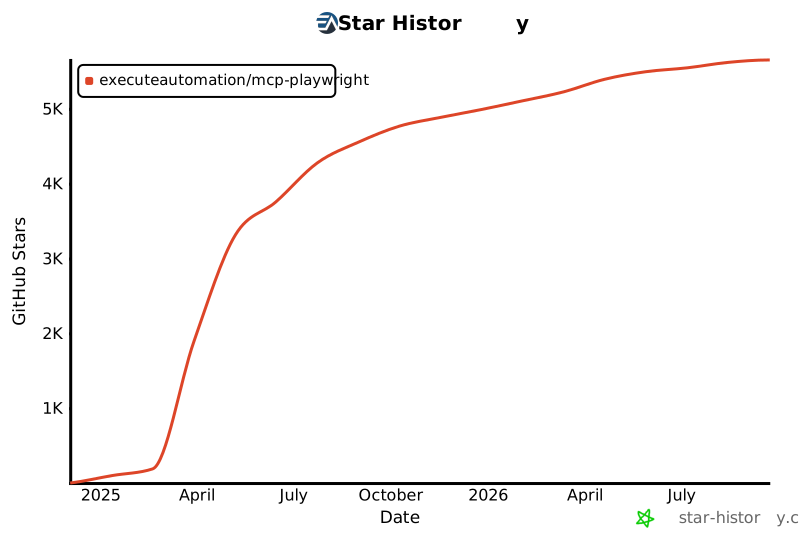](https://star-history.com/#executeautomation/mcp-playwright&Date)

 MCP 市场