Content
<a name="readme-top"></a>
<div align="center">
<img width="406" height="96" alt="HiMarket Logo" src="https://github.com/user-attachments/assets/e0956234-1a97-42c6-852d-411fa02c3f01" />
<h1>HiMarket AI Open Platform</h1>
<p align="center">
<b>English</b> | <a href="README_zh.md">简体中文</a>
</p>
<p>
<a href="https://github.com/higress-group/himarket/blob/main/LICENSE">
<img src="https://img.shields.io/badge/license-Apache%202.0-blue.svg" alt="License" />
</a>
<a href="https://github.com/higress-group/himarket/releases">
<img src="https://img.shields.io/github/v/release/higress-group/himarket" alt="Release" />
</a>
<a href="https://github.com/higress-group/himarket/stargazers">
<img src="https://img.shields.io/github/stars/higress-group/himarket" alt="Stars" />
</a>
<a href="https://deepwiki.com/higress-group/himarket">
<img src="https://deepwiki.com/badge.svg" alt="Ask DeepWiki" />
</a>
</p>
</div>
## Table of Contents
- [What is HiMarket?](#what-is-himarket)
- [System Architecture](#system-architecture)
- [Quick Start](#quick-start)
- [Documentation](#documentation)
- [Community](#community)
- [Contributors](#contributors)
- [Star History](#star-history)
## What is HiMarket?
HiMarket is an enterprise-grade AI open platform built on Higress AI Gateway, helping enterprises build private AI capability marketplace to uniformly manage and distribute AI resources such as LLM, MCP Server, and Agent. The platform encapsulates distributed AI capabilities into standardized API products, supports multi-version management and gray-scale release, provides self-service developer portal, and features comprehensive enterprise-level operation capabilities including security control, observability analysis, metering and billing, making AI resource sharing and reuse efficient and convenient.
<div align="center">
<img src="https://github.com/user-attachments/assets/645a3962-2f0a-412e-b501-e8eb6fc50bb1" alt="HiMarket 核心能力" width="700px" />
<br/>
<b>Capabilities</b>
</div>
## System Architecture
<div align="center">
<img src="https://github.com/user-attachments/assets/ecbb3d2e-138b-4192-992e-9cd4a20b3fc3" alt="HiMarket System Architecture" width="700px" />
<br/>
<b>System Architecture</b>
</div>
HiMarket system architecture consists of three layers:
1. **Infrastructure**: Composed of AI Gateway, API Gateway, Higress and Nacos. HiMarket abstracts and encapsulates underlying AI resources based on these components to form standard API products for external use.
2. **AI Open Platform Admin**: Management platform for administrators to create and customize portals, manage AI resources such as MCP Server, Model, and Agent, including setting authentication policies and subscription approval workflows. The admin portal also provides observability dashboard to help administrators monitor AI resource usage and operational status in real-time.
3. **AI Open Platform Portal**: Developer-facing portal site, also known as AI Marketplace or AI Hub, providing one-stop self-service where developers can complete identity registration, credential application, product browsing and subscription, online debugging, and more.
<table>
<tr>
<td align="center">
<img src="https://github.com/user-attachments/assets/e7a933ea-10bb-457e-a082-550e939a1b58" width="500px" height="200px" alt="HiMarket Admin Portal"/>
<br />
<b>Admin Dashboard</b>
</td>
<td align="center">
<img src="https://github.com/user-attachments/assets/41382502-12fe-45c4-9708-8dd7a103cb73" width="500px" height="200px" alt="HiMarket Developer Portal"/>
<br />
<b>Developer Portal</b>
</td>
</tr>
</table>
## Quick Start
<details open>
<summary><b>Option 1: Local Setup</b></summary>
<br/>
**Requirements:** JDK 17, Node.js 18+, Maven 3.6+, MySQL 8.0+
**Start Backend:**
```bash
# Build project
mvn clean package -DskipTests
# Start backend service
java --add-opens java.base/java.util=ALL-UNNAMED \
--add-opens java.base/java.lang=ALL-UNNAMED \
--add-opens java.base/java.lang.reflect=ALL-UNNAMED \
-Ddb.host=${DB_HOST} \
-Ddb.port=${DB_PORT} \
-Ddb.name=${DB_NAME} \
-Ddb.username=${DB_USERNAME} \
-Ddb.password=${DB_PASSWORD} \
-jar himarket-bootstrap/target/himarket-bootstrap-1.0-SNAPSHOT.jar
# Backend API: http://localhost:8080
```
**Start Frontend:**
```bash
# Start admin portal
cd himarket-web/himarket-admin
npm install
npm run dev
# Admin portal: http://localhost:5174
# Start developer portal
cd himarket-web/himarket-frontend
npm install
npm run dev
# Developer portal: http://localhost:5173
```
</details>
<details>
<summary><b>Option 2: Docker Compose</b></summary>
<br/>
Use the `deploy.sh` script to deploy HiMarket, Higress, and Nacos with data initialization.
```bash
# Clone repository
git clone https://github.com/higress-group/himarket.git
cd himarket/deploy/docker/scripts
# Deploy full stack and initialize
./deploy.sh install
# Or deploy HiMarket only (without Nacos/Higress)
./deploy.sh himarket-only
# Uninstall all services
./deploy.sh uninstall
# Service URLs
# Admin portal: http://localhost:5174
# Developer portal: http://localhost:5173
# Backend API: http://localhost:8081
```
> For detailed Docker deployment instructions, please refer to [Docker Deployment Guide](./deploy/docker/Docker部署脚本说明.md)
</details>
<details>
<summary><b>Option 3: Helm Chart</b></summary>
<br/>
Use the `deploy.sh` script to deploy HiMarket to Kubernetes cluster.
```bash
# Clone repository
git clone https://github.com/higress-group/himarket.git
cd himarket/deploy/helm/scripts
# Deploy full stack and initialize
./deploy.sh install
# Or deploy HiMarket only (without Nacos/Higress)
./deploy.sh himarket-only
# Uninstall
./deploy.sh uninstall
```
> For detailed Helm deployment instructions, please refer to [Helm Deployment Guide](./deploy/helm/Helm部署脚本说明.md)
</details>
<details>
<summary><b>Option 4: Cloud Deployment (Alibaba Cloud)</b></summary>
<br/>
Alibaba Cloud ComputeNest supports out-of-the-box deployment of the community edition with one click:
[](https://computenest.console.aliyun.com/service/instance/create/cn-hangzhou?type=user&ServiceId=service-b96fefcb748f47b7b958)
</details>
## Documentation
For detailed usage instructions, please refer to:
[User Guide](./USER_GUIDE.md)
## Community
### Join Us
<table>
<tr>
<td align="center">
<img src="https://github.com/user-attachments/assets/e74915bb-abf2-4415-99a3-dd7c61a94670" width="200px" alt="DingTalk Group"/>
<br />
<b>DingTalk Group</b>
</td>
<td align="center">
<img src="https://img.alicdn.com/imgextra/i1/O1CN01WnQt0q1tcmqVDU73u_!!6000000005923-0-tps-258-258.jpg" width="200px" alt="WeChat Official Account"/>
<br />
<b>WeChat Official Account</b>
</td>
</tr>
</table>
## Contributors
Thanks to all the developers who have contributed to HiMarket!
<a href="https://github.com/higress-group/himarket/graphs/contributors">
<img alt="contributors" src="https://contrib.rocks/image?repo=higress-group/himarket"/>
</a>
## Star History
[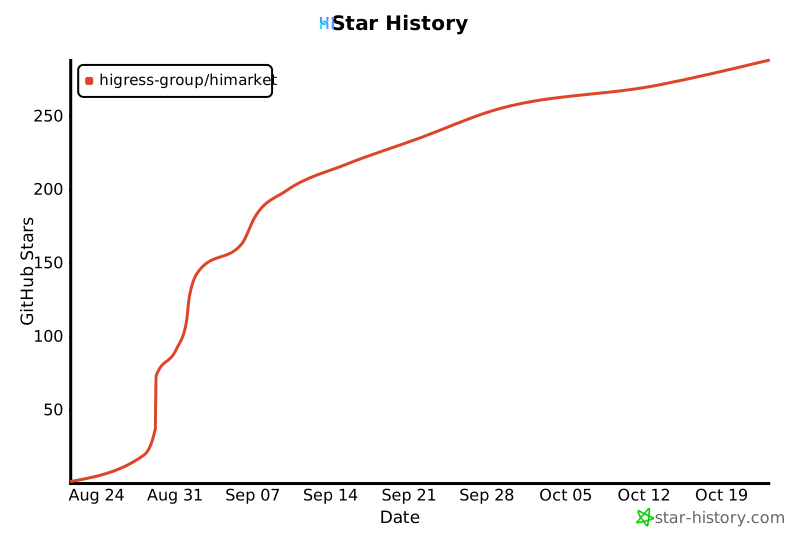](https://star-history.com/#higress-group/himarket&Date)



