Content
# 🚀 X-MCP: Xiaohongshu Automation Assistant
[](https://chromewebstore.google.com/detail/xiaohongshu-mcp-assistant/dklmcgbmpnmkndhapabinagmmdmjhjgl)
[](https://aredink.com/)
**X-MCP** is an enhanced browser extension based on [xiaohongshu-mcp](https://github.com/xpzouying/xiaohongshu-mcp). It utilizes the **MCP (Model Context Protocol)** protocol, allowing AI clients (such as Claude, Cursor) to directly control your browser, achieving safer and simpler automated publishing.
Currently in the **release phase**, welcome to provide feedback on your usage experience.
## 🌟 Why Choose X-MCP?
For non-technical users and high-frequency creators, we have addressed the pain points of the original deployment difficulties:
- **Zero Environment Deployment**: No need to install Python, Docker, or configure complex API proxies.
- **Fully Visible Operations**: All automation processes are displayed in real-time in the browser, with intervention possible at any time.
- **High Account Security**: Reuse your commonly used browser login state, with no risk of remote login or environment anomalies.
### WeChat Group
|WeChat (Group 3)|
|:---:|
| <img src="https://github.com/user-attachments/assets/2ddea744-7130-40a9-941d-05585f8ee3d9" alt="x-mcp-qr02" width="300">|
## 🛠️ Installation Guide
### Method 1: Chrome Web Store (Recommended ✨)
1. Visit [Xiaohongshu MCP Assistant - Chrome Web Store](https://chromewebstore.google.com/detail/xiaohongshu-mcp-assistant/dklmcgbmpnmkndhapabinagmmdmjhjgl).
2. Click **“Add to Chrome”**.
> **Note**: The store version supports automatic updates, making it the most convenient installation method.
### Method 2: Manual Download and Installation
1. Visit [aredink.com](https://aredink.com/), click **“Download Installation Package”** and extract.
2. Open Chrome's extension management interface (`chrome://extensions/`).
3. Enable the **“Developer Mode”** in the top right corner.
4. Click **“Load unpacked”**, select the extracted folder.
<img width="100%" alt="Installation Diagram" src="https://github.com/user-attachments/assets/5e646991-bbcd-4020-9ab0-12cbdc5cddcd" />
## 🚀 Quick Start
### 1. Register and Obtain Token
Go to [aredink.com](https://aredink.com/) to register and log in. Click **【Create Connection】** to obtain the **API Token**.
> ⚠️ **Attention**: The Token will only be displayed once, please save it properly and fill it in the plugin later.
### 2. Bind Plugin
Click the plugin icon, fill in the API Token on the settings page. After successful binding, you can view the plugin's online status in real-time on the official website console.
<p align="center">
<img width="300" src="https://github.com/user-attachments/assets/92e21798-79d9-45fe-9909-009b1fde53b6" />
</p>
### 3. Connection Test
In the plugin panel, you can test the connection with one click by checking the "Check Login Status" to ensure that the Xiaohongshu account is logged in and the MCP connection is normal.
https://github.com/user-attachments/assets/4e1d4348-d268-4fc4-8563-a24a84e309e9
## 🔌 Client Access
### Example with Claude Code
Run the following command in the terminal to complete the addition:
```bash
claude mcp add --transport http x-mcp https://mcp.aredink.com/mcp --header "X-API-Key: <Your API Token>"
```
Video demonstration:
https://github.com/user-attachments/assets/aef73b85-fd8b-4cdb-b156-fd3005a33bbd
Support for general MCP protocol clients to access,
1. Select HTTP protocol
2. Connection address: `https://mcp.aredink.com/mcp`
3. Set authentication: Add a field in the Header: `X-API-Key`, with the value as <Your API Token>.
More clients to be supplemented.
### Example - Publishing
Still using our publishing example,
```
Help me write a post to publish on Xiaohongshu,
With the image: https://cn.bing.com/th?id=OHR.MaoriRock_EN-US6499689741_UHD.jpg&w=3840
The image is: "Ngātoroirangi mineral bay Maori rock carving in New Zealand (© Joppi/Getty Images)"
Use x-mcp to publish.
```
https://github.com/user-attachments/assets/cce5d21c-94e0-4dd0-ba4c-5cfd2c65946a
### Example - Publishing Video
Still using our video publishing example,
```Help me publish a video article 2 hours later, with arbitrary content, and the video has been uploaded to the plugin, don't ask, just operate directly.
The video is: Video uploaded by the creation center
Use x-mcp to publish the video.
```
https://github.com/user-attachments/assets/ef68dd72-8b8b-425b-ad22-7ede050bf125
### Example - Generating Cover Image
https://github.com/user-attachments/assets/a41faf51-0d0f-48ca-bde5-0a92efac4bde
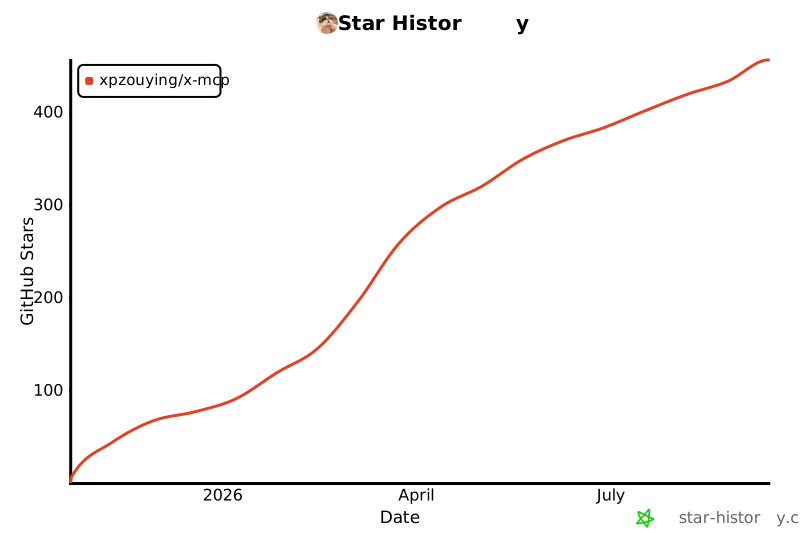
## Star History
[](https://star-history.com/#xpzouying/x-mcp&Date)



