Content
# Autodesk Fusion MCP Server Add-in
**Control Fusion with AI !**
This add-in for Autodesk Fusion connects to the Aura Friday MCP-Link server, making Fusion available as a remote tool that AI agents can control. [Official Store Link](https://apps.autodesk.com/FUSION/en/Detail/Index?id=7269770001970905100)
[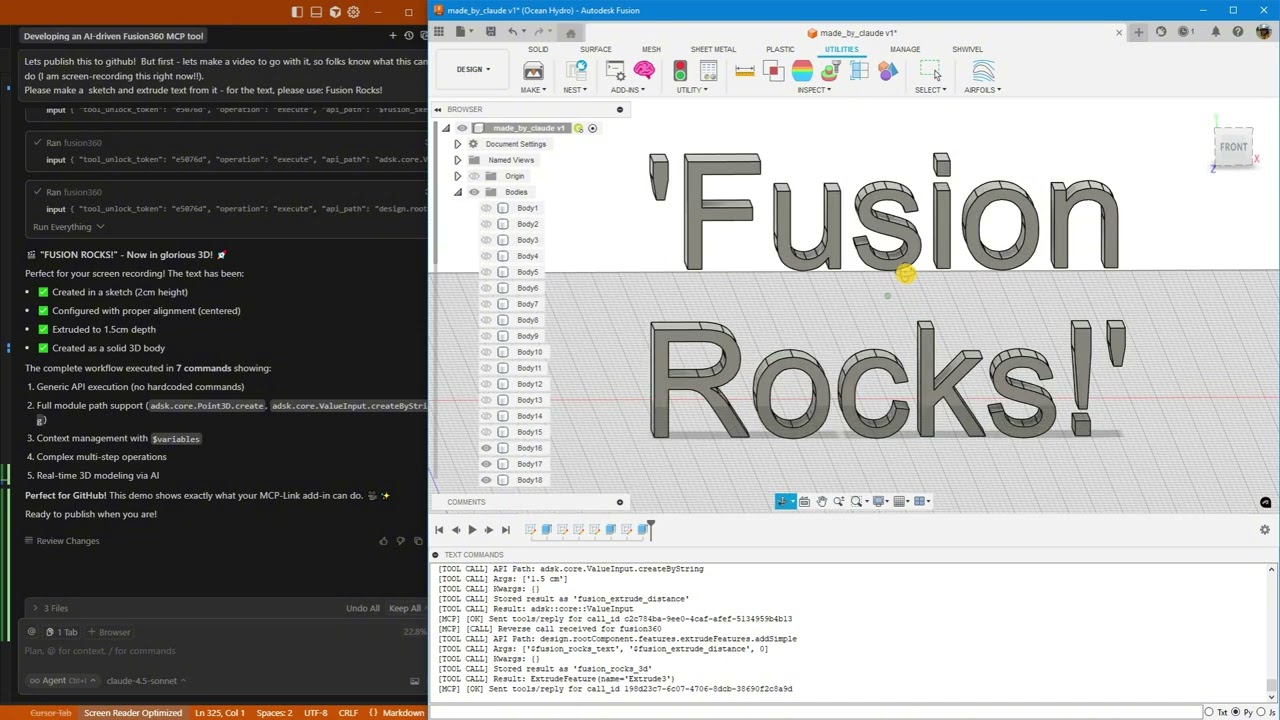](https://www.youtube.com/watch?v=0T2XU4tzudQ)
*Click above to watch AI create "Fusion Rocks!" in 3D*
---
## 🚀 What's New
### Latest: Enhanced Python Integration (January 2026)
- 🔥 **Pre-injected shortcuts** - `app`, `ui`, `design`, `rootComponent` available immediately in Python
- 🔥 **Cross-operation context** - Access objects stored via `store_as` from Python using `fusion_context`
- 🔥 **ValueInput support** - Generic API now constructs ValueInput objects automatically
- 🔥 **Triple documentation sources** - Introspection + Online docs + Best practices
- 🔥 **Rich API docs with samples** - Fetch from Autodesk's cloudhelp with code examples
- 🔥 **Automatic updates** - Secure, signature-verified updates without reinstalling
### Thread-Safe Architecture (November 2025)
- ✅ **Rock-solid stability** - All Fusion API calls now execute on main thread
- ✅ **Zero crashes** - Work queue system prevents threading issues
- ✅ **Centralized logging** - Thread-safe diagnostics from all components
- ✅ **Production ready** - Handles heavy loads without instability
### Python Execution + MCP Tool Integration
**AI can now run arbitrary Python code directly inside Fusion** with full access to:
- ✅ Entire Fusion API (`adsk.core`, `adsk.fusion`, `adsk.cam`)
- ✅ All loaded add-ins (access your custom add-ins automatically!)
- ✅ SQLite databases (store and query design data)
- ✅ Browser automation (open documentation, extract data)
- ✅ User popups (show results, get input)
- ✅ 500+ AI models via OpenRouter
- ✅ Local AI models (offline inference)
- ✅ Desktop automation (Windows control)
**Example**: AI analyzes your AirfoilTools add-in, finds the best airfoil from 1,538 profiles, stores results in SQLite, and shows a popup—all in one command!
---
## What This Is
A Fusion add-in that gives AI **unlimited access** to Fusion through three powerful capabilities:
### 1. 🎯 Generic API Calls
Execute any Fusion API command without custom code:
```python
fusion360.execute({
"api_path": "design.rootComponent.sketches.add",
"args": ["design.rootComponent.xYConstructionPlane"]
})
```
### 2. 🐍 Python Execution (NEW!)
Run arbitrary Python with full Fusion access:
```python
fusion360.execute({
"operation": "execute_python",
"code": """
import adsk.core, adsk.fusion
# Create sketch
sketch = design.rootComponent.sketches.add(design.rootComponent.xYConstructionPlane)
# Store in database
mcp.call('sqlite', {
'input': {'sql': 'INSERT INTO designs (name) VALUES (?)',
'params': [sketch.name]}
})
# Show popup
mcp.call('user', {
'input': {'operation': 'show_popup',
'html': f'<h1>Created {sketch.name}!</h1>'}
})
"""
})
```
### 3. 🔗 MCP Tool Integration (NEW!)
Access 10+ built-in tools from Fusion:
- SQLite databases
- Browser automation
- User popups
- Python execution
- AI models (local & cloud)
- Desktop automation
- And more!
### 4. 📚 Multi-Source Documentation (NEW!)
AI has access to three complementary documentation sources:
**Quick Search (Introspection)**:
```python
fusion360.execute({
"operation": "get_api_documentation",
"search_term": "ExtrudeFeature",
"category": "class_name"
})
```
**Rich Docs with Samples (Online)**:
```python
fusion360.execute({
"operation": "get_online_documentation",
"class_name": "ExtrudeFeatures",
"member_name": "createInput"
})
# Returns: parameter tables, return types, and 8+ working code samples!
```
**Best Practices Guide**:
```python
fusion360.execute({
"operation": "get_best_practices"
})
# Returns: coordinate systems, body naming, PTransaction patterns, etc.
```
---
## 🎯 What AI Can Do
### Basic Operations
- ✅ Create parametric sketches with precise dimensions
- ✅ Add text and extrude it to 3D
- ✅ Generate mounting holes, brackets, mechanical parts
- ✅ Execute any Fusion API command
### Advanced Workflows (NEW!)
- 🔥 **Access your custom add-ins** - AI discovers and uses ANY loaded add-in
- 🔥 **Store design data** - Save analysis results to SQLite
- 🔥 **Query databases** - Find optimal designs from your data
- 🔥 **Show results** - Display popups with charts, tables, forms
- 🔥 **Automate workflows** - Combine Fusion + database + browser + AI
- 🔥 **Call AI models** - Get design suggestions from 500+ models
- 🔥 **Rich documentation** - Access Autodesk's official docs with code samples
- 🔥 **Auto-updates** - Get new features without reinstalling
### Real-World Example
```python
# AI analyzes AirfoilTools add-in (15,000+ users!)
# Finds best airfoil from 1,538 profiles
# Stores in SQLite
# Shows results in popup
# All in one Python command!
```
---
## 🛠️ Built-in MCP Tools
**Everything you need. Nothing you don't.**
These tools ship with MCP-Link and work immediately. No configuration, no API keys, no setup.
| Tool | Description |
|------|-------------|
| 🌐 **Browser** | Automate Chrome: read, click, type, navigate, extract data |
| 🧠 **SQLite** | Database with semantic search and embeddings |
| 🐍 **Python** | Execute code locally with full MCP tool access |
| 🤖 **OpenRouter** | Access 500+ AI models (free and paid) |
| 🤗 **HuggingFace** | Run AI models offline (no internet needed) |
| 📚 **Context7** | Pull live documentation for any library |
| 🖥️ **Desktop** | Control Windows apps (click, type, read) |
| 💬 **User** | Show HTML popups for forms, confirmations |
| 🔗 **Remote** | Let external systems offer tools (like Fusion!) |
| 🔌 **Connector** | Add any 3rd party MCP tools |
**Want more?** Add any third-party MCP tools or build your own!
---
## 📦 Installation
### Prerequisites
1. **Download MCP-Link Server**
Get the latest release: https://github.com/AuraFriday/mcp-link-server/releases/tag/latest
2. **Install the Add-In**
Official link: https://apps.autodesk.com/FUSION/en/Detail/Index?id=7269770001970905100
### Optional manual install
2b. **Clone This Repository**
```bash
git clone https://github.com/AuraFriday/Fusion-360-MCP-Server.git
```
2c. **Load as Fusion Add-in**
- Open Fusion
- Press `Shift+S` to open Scripts and Add-Ins
- Click the **Add-Ins** tab
- Click the green **+** button next to "My Add-Ins"
- Navigate to the cloned repository folder
- Select the folder and click **OK**
- Click **Run** to start the add-in
### Configuration
The add-in auto-connects to the MCP server on startup. Check the **TEXT COMMANDS** window in Fusion to see connection logs.
---
## 🎬 Quick Start Examples
### Example 1: Get API Documentation (NEW!)
```python
# Quick search by class name
fusion360.execute({
"operation": "get_api_documentation",
"search_term": "Sketch",
"category": "class_name",
"max_results": 3
})
# Get rich docs with code samples
fusion360.execute({
"operation": "get_online_documentation",
"class_name": "ExtrudeFeatures",
"member_name": "createInput"
})
# Returns: Full parameter descriptions, return types, and 8 working examples!
# Get best practices guide
fusion360.execute({
"operation": "get_best_practices"
})
# Returns: Coordinate systems, body naming, construction planes, PTransaction patterns
```
### Example 2: Simple Sketch (Generic API)
```python
# Create a sketch
fusion360.execute({
"api_path": "design.rootComponent.sketches.add",
"args": ["design.rootComponent.xYConstructionPlane"],
"store_as": "my_sketch"
})
# Add a rectangle
fusion360.execute({
"api_path": "$my_sketch.sketchCurves.sketchLines.addTwoPointRectangle",
"args": [
{"type": "Point3D", "x": 0, "y": 0, "z": 0},
{"type": "Point3D", "x": 10, "y": 5, "z": 0}
]
})
```
### Example 3: Python with Database (NEW!)
```python
fusion360.execute({
"operation": "execute_python",
"code": """
import adsk.core, adsk.fusion
# Create mounting plate
sketch = design.rootComponent.sketches.add(design.rootComponent.xYConstructionPlane)
lines = sketch.sketchCurves.sketchLines
lines.addTwoPointRectangle(
adsk.core.Point3D.create(0, 0, 0),
adsk.core.Point3D.create(10, 8, 0)
)
# Add mounting holes
circles = sketch.sketchCurves.sketchCircles
for x, y in [(1, 1), (9, 1), (1, 7), (9, 7)]:
circles.addByCenterRadius(adsk.core.Point3D.create(x, y, 0), 0.25)
# Store in database
mcp.call('sqlite', {
'input': {
'sql': 'INSERT INTO parts (name, holes) VALUES (?, ?)',
'params': [sketch.name, 4],
'database': 'designs.db',
'tool_unlock_token': '29e63eb5'
}
})
print(f'Created {sketch.name} with 4 mounting holes')
"""
})
```
### Example 4: Access Custom Add-ins (NEW!)
```python
fusion360.execute({
"operation": "execute_python",
"code": """
import sys
# Find loaded add-ins
addins = [name for name in sys.modules.keys() if 'addin' in name.lower()]
print(f'Found {len(addins)} add-ins')
# Access AirfoilTools (if loaded)
if 'AirfoilTools' in str(addins):
airfoil_main = sys.modules['...AirfoilTools_py']
foildb = airfoil_main.foildb2020.Foildb2020()
# Find best airfoil
best = max(foildb, key=lambda x: x['clcd'])
print(f'Best L/D ratio: {best["clcd"]:.2f}')
# Store in database
mcp.call('sqlite', {
'input': {
'sql': 'INSERT INTO airfoils (name, ld_ratio) VALUES (?, ?)',
'params': [best['Foil_fn'], best['clcd']],
'database': 'airfoils.db',
'tool_unlock_token': '29e63eb5'
}
})
"""
})
```
---
## 🏗️ Architecture
### How It Works
1. **Add-in loads** and connects to local MCP-Link server
2. **Registers itself** as a `fusion360` tool via reverse connection
3. **AI sends commands** with three operation types:
- Generic API calls (simple operations)
- Python execution (complex workflows)
- MCP tool calls (cross-tool integration)
4. **Generic handler** resolves paths, constructs objects, executes API calls
5. **Python executor** runs code with TRUE INLINE access to Fusion environment
6. **Results returned** to AI with full context and type information
### Components
- **MCP-Link Server** - Routes AI requests to the add-in
- **Generic API Handler** - Dynamically executes any Fusion API call
- **Python Executor** (NEW!) - Runs arbitrary Python with full access
- **MCP Bridge** (NEW!) - Allows Python to call other MCP tools
- **Context Manager** - Stores intermediate objects for multi-step operations
- **Enhanced Reporting** - Provides detailed success/error information
- **Thread-Safe Proxy** (NEW!) - Ensures all Fusion API calls happen on main thread
- **Centralized Logger** (NEW!) - Thread-safe logging from any component
- **Documentation System** (NEW!) - Three-tier docs: introspection, online, best practices
- **Auto-Updater** (NEW!) - Secure, signature-verified automatic updates
---
## 🎨 Supported Patterns
### API Paths
```python
"design.rootComponent.sketches.add" # Access via app object
"$sketch.sketchCurves.sketchCircles.addByCenterRadius" # Use stored objects
"adsk.core.Point3D.create" # Full module paths
"adsk.core.ValueInput.createByString" # Static methods
```
### Object Construction
```python
{"type": "Point3D", "x": 5, "y": 10, "z": 0} # Construct from dict
{"type": "Vector3D", "x": 1, "y": 0, "z": 0} # 3D vector
{"type": "ValueInput", "value": 2.5} # Real value (cm)
{"type": "ValueInput", "expression": "2.5 cm"} # String expression
{"type": "ObjectCollection"} # Empty collection
"$my_sketch.originPoint" # Reference stored object
0 # Enum as integer
```
### Context Storage
```python
"store_as": "my_object" # Store result as $my_object
"$my_object.someMethod" # Use in next command
```
### Python Execution
```python
"operation": "execute_python" # Run Python code
"code": "import adsk.core\n..." # Python code string
"session_id": "my_session" # Persistent session
"persistent": true # Variables persist
# Pre-injected variables available in your code:
# - app : adsk.core.Application.get()
# - ui : app.userInterface
# - design : Active design (if document open)
# - rootComponent: design.rootComponent (if document open)
# - fusion_context: Dict of objects stored via store_as
# - mcp : MCP bridge for calling other tools
```
### MCP Tool Calling (NEW!)
```python
"operation": "call_tool" # Call another MCP tool
"tool_name": "sqlite" # Tool to call
"arguments": {"input": {...}} # Tool arguments
```
### Documentation Operations (NEW!)
```python
"operation": "get_api_documentation" # Search API by introspection
"search_term": "ExtrudeFeature" # What to search for
"category": "class_name" # class_name, member_name, description, all
"max_results": 3 # Limit results
"operation": "get_online_documentation" # Fetch rich docs from Autodesk
"class_name": "ExtrudeFeatures" # Required: class name
"member_name": "createInput" # Optional: method/property name
"operation": "get_best_practices" # Get design guidelines
```
---
## 🎨 Advanced Capabilities
### Electronics Design
Fusion 360 includes **complete electronics design capabilities** accessible via API:
**Workspaces Available**:
- ✅ Schematic Editor - Circuit schematic capture
- ✅ PCB Editor - PCB layout with auto-routing
- ✅ 3D PCB - Visualize PCB in mechanical context
- ✅ Symbol/Footprint editors - Create custom components
**Use Cases**:
- Design PCBs and mechanical enclosures together
- 3D visualization of PCB in product design
- Export Gerber files for manufacturing
- Component library management
### CAM/Manufacturing
Full manufacturing capabilities with **280+ CAM classes**:
**Capabilities**:
- 2D/3D milling toolpaths
- Turning operations (lathe)
- Additive manufacturing (3D printing)
- Post-processing for CNC machines
- Toolpath simulation
**Module**: `adsk.cam` fully accessible via Python
### McMaster-Carr Integration
Direct access to **500,000+ industrial components**:
**Command**: `InsertMcMasterCarrComponentCommand`
**Categories**:
- Bearings, fasteners, gears, motors
- Pneumatics, hydraulics, electronics
- Raw materials, tools, safety equipment
**Limitation**: Opens interactive dialog (user must select part)
### Simulation & Analysis
- Static stress analysis
- Modal analysis (vibration)
- Thermal analysis
- Shape optimization
- Event simulation (drop tests)
### Generative Design
- AI-driven design exploration
- Hundreds of design alternatives
- Optimization for weight, strength, manufacturing
- Cloud-based computation
---
## 💡 Use Cases
### AI Design Assistants
- Natural language to CAD: "Create a mounting bracket with 4 holes"
- Design exploration: "Try 10 variations of this part"
- Parameter optimization: "Find the best dimensions for strength"
### Data-Driven Design (NEW!)
- Query databases: "Find the best airfoil for Re=500,000"
- Store analysis: "Save this design's mass and volume"
- Compare designs: "Show me all brackets lighter than 100g"
### Workflow Automation (NEW!)
- Multi-tool workflows: Create design → Store in DB → Show popup
- Access custom add-ins: Use your existing add-ins via AI
- Batch operations: Process 100 designs automatically
### Educational Tools
- Learn Fusion API through AI guidance
- Interactive tutorials with instant feedback
- Explore aerodynamics with AirfoilTools integration
### CAM Automation
- AI-driven toolpath generation
- Optimize cutting parameters
- Batch process manufacturing jobs
---
## 🎯 Real-World Example: AirfoilTools Integration
**Scenario**: You have the AirfoilTools add-in (15,000+ users) loaded in Fusion.
**AI can**:
1. Discover the add-in automatically
2. Access 1,538 airfoil profiles
3. Find the best airfoil (L/D ratio: 505.02!)
4. Store results in SQLite
5. Create geometry in Fusion
6. Show results in popup
**All without any custom integration code!**
See [`AUTODESK_DEMO_AIRFOILTOOLS.md`](AUTODESK_DEMO_AIRFOILTOOLS.md) for the complete demo.
---
## 📚 Documentation
- **[Quick Start Guide](TESTING_PYTHON_INTEGRATION.md)** - 10 comprehensive tests
- **[Python Integration](docs/PYTHON_INTEGRATION_COMPLETE.md)** - Full capabilities
- **[Demo Scripts](demo.md)** - Working examples
- **[AirfoilTools Demo](AUTODESK_DEMO_AIRFOILTOOLS.md)** - Real-world integration
---
## 🔧 Technical Details
### Core Architecture
- Built with Fusion's native Python API
- Uses Server-Sent Events (SSE) for MCP connection
- JSON-RPC protocol for command execution
- TRUE INLINE Python execution (no sandboxing)
- Zero overhead on Fusion performance
- All operations run locally (no cloud dependencies)
- Auto-reconnection with exponential backoff
- Native messaging protocol for server discovery
### Thread Safety & Stability
- **Main Thread Execution**: All Fusion API calls execute on Fusion's main UI thread
- **Work Queue System**: Background threads queue work items for safe main thread processing
- **Custom Event Handler**: Uses Fusion's `CustomEvent` system to safely trigger API calls
- **Centralized Logging**: Thread-safe log buffer ensures reliable diagnostics from any thread
- **Crash Prevention**: Robust architecture prevents crashes even under heavy load
### Documentation System (NEW!)
- **Three-Tier Approach**: Introspection → Online docs → Best practices
- **Introspection**: Live API search using Python's `inspect` module
- **Online Docs**: Fetches from Autodesk's cloudhelp with predictable URLs
- **Best Practices**: Built-in guide covering coordinate systems, body naming, PTransaction patterns
- **Rich Content**: Parameter tables, return types, and working code samples
### Auto-Update System (NEW!)
- **Secure Updates**: RSA signature verification ensures authenticity
- **Static Loader**: Minimal stub that never updates itself
- **Safe Overwrites**: Updates applied before modules load
- **Background Downloads**: Non-blocking update checks
- **Version Tracking**: `VERSION.txt` for reliable version comparison
- **Platform-Specific**: Separate packages for Windows/Mac
---
## ⚠️ Limitations
- Enum values must be passed as integers (e.g., `0` for `NewBodyFeatureOperation`)
- Some complex objects need specific construction patterns
- Context is lost when add-in is reloaded (working as intended for session isolation)
- Python execution has FULL system access (use responsibly!)
---
## 🚀 Future Enhancements
- ~~Semantic search integration for auto-documentation~~ ✅ **DONE** (Multi-source docs)
- ~~Auto-update system~~ ✅ **DONE** (Secure signature-verified updates)
- Batch operation optimization
- Extended enum handling
- More intuitive object construction patterns
- Script library for common operations
- Visual workflow builder
- Electronics design automation (PCB layout, schematic capture)
- CAM toolpath generation via AI
---
## 🤝 Contributing
**Want to contribute?** PRs welcome! This is the future of AI-powered CAD.
### Ideas for Contributors
- Add example workflows
- Improve error messages
- Create tutorial videos
- Test with different add-ins
- Build integration with other CAD tools
---
## 📄 License
Proprietary - See LICENSE file for details
---
## 👤 Author
Created by [AuraFriday](https://github.com/AuraFriday)
With 15,000+ users trusting previous Fusion add-ins
---
## 🔗 Links
- **MCP-Link Server**: https://github.com/AuraFriday/mcp-link-server
- **Offical Store Add-in**: https://apps.autodesk.com/FUSION/en/Detail/Index?id=7269770001970905100
- **Model Context Protocol**: https://modelcontextprotocol.io
- **Fusion API**: https://help.autodesk.com/view/fusion360/ENU/?guid=GUID-A92A4B10-3781-4925-94C6-47DA85A4F65A
---
## ❓ FAQ
**Q: Does this work with my existing add-ins?**
A: Yes! AI can discover and use ANY loaded add-in automatically.
**Q: Do I need to write custom integration code?**
A: No! The generic API handler works with everything.
**Q: Can AI access my databases?**
A: Yes! Use the SQLite tool to store and query design data.
**Q: Is this secure?**
A: Python execution has full system access. Only run code you trust.
**Q: Does this work offline?**
A: Yes! All operations run locally. Optional: use local AI models.
**Q: Can I use this with Claude/ChatGPT/etc?**
A: Yes! Works with any AI that supports MCP protocol.
**Q: Is it stable? Will it crash Fusion?**
A: Very stable! Thread-safe architecture ensures all API calls happen on main thread, preventing crashes.
**Q: Can I use this in production?**
A: Yes! The add-in is production-ready with robust error handling and stability features.
**Q: How do updates work?**
A: Automatic! The add-in checks for updates in the background and applies them on next restart. All updates are cryptographically signed for security.
**Q: Can AI access Fusion's documentation?**
A: Yes! Three ways: (1) Live API introspection, (2) Autodesk's official cloudhelp docs with code samples, (3) Built-in best practices guide.
**Q: Does this work with electronics design?**
A: Yes! Full access to PCB design, schematic capture, 3D PCB visualization, and component libraries.
**Q: Can I use this for manufacturing (CAM)?**
A: Yes! The `adsk.cam` module provides 280+ classes for milling, turning, additive manufacturing, and toolpath generation.
---
## 🌟 Star This Project!
If you find this useful, please star the repository and share with the Fusion community!
**Questions?** Open an issue or check the documentation in [`docs/`](docs/)
---
**This is the future of AI-powered CAD.** 🚀



