Content

<div align="center">
<!-- # Grok Search MCP -->
[English](./docs/README_EN.md) |
**Grok-with-Tavily MCP, providing enhanced web access for Claude Code**
[](https://opensource.org/licenses/MIT) [](https://www.python.org/downloads/) [](https://github.com/jlowin/fastmcp)
</div>
---
## I. Overview
Grok Search MCP is a MCP server built based on [FastMCP](https://github.com/jlowin/fastmcp), adopting a **dual-engine architecture**: **Grok** is responsible for AI-driven intelligent search, and **Tavily** is responsible for high-fidelity web scraping and site mapping, each taking its strengths to provide complete real-time web access capabilities for LLM clients such as Claude Code and Cherry Studio.
```
Claude ──MCP──► Grok Search Server
├─ web_search ───► Grok API(AI search)
├─ web_fetch ───► Tavily Extract → Firecrawl Scrape(content capture, automatic downgrade)
└─ web_map ───► Tavily Map(site mapping)
```
### Features
- **Dual Engine**: Grok search + Tavily capture/mapping, complementary collaboration
- **Firecrawl backup**: Automatically downgrade to Firecrawl Scrape when Tavily extraction fails, supporting automatic retry for empty content
- **OpenAI compatible interface**, supporting any Grok mirror site
- **Automatic time injection** (detecting time-related queries, injecting local time context)
- One-click disable Claude Code's official WebSearch/WebFetch, forcing routing to this tool
- Intelligent retry (supporting Retry-After header parsing + exponential backoff)
- Parent process monitoring (automatically detecting parent process exit under Windows, preventing zombie processes)
### Effect Display
We take configuring this MCP in `cherry studio` as an example to show how the `claude-opus-4.6` model can use this project to achieve external knowledge collection and reduce hallucinations.

As shown in the figure, **for a fair experiment, we enabled the built-in search tool of the claude model**, but opus 4.6 still relies on its internal common sense and does not query the official FastAPI documentation to obtain the latest example.

As shown in the figure, when `grok-search MCP` is enabled, under the same experimental conditions, opus 4.6 actively calls multiple searches to **obtain official documentation and provide more reliable answers**.
## II. Installation
### Prerequisites
- Python 3.10+
- [uv](https://docs.astral.sh/uv/getting-started/installation/)(recommended Python package manager)
- Claude Code
<details>
<summary><b>Install uv</b></summary>
```bash
# Linux/macOS
curl -LsSf https://astral.sh/uv/install.sh | sh
# Windows PowerShell
powershell -ExecutionPolicy ByPass -c "irm https://astral.sh/uv/install.ps1 | iex"
```
> Windows users are **strongly recommended** to run this project in WSL.
</details>
### One-click Installation
If you have installed this project before, use the following command to uninstall the old MCP.
```
claude mcp remove grok-search
```
Replace the environment variables in the following command with your own values and execute. The Grok interface needs to be in OpenAI compatible format; Tavily is an optional configuration, and if not configured, the tools `web_fetch` and `web_map` will not be available.
```bash
claude mcp add-json grok-search --scope user '{
"type": "stdio",
"command": "uvx",
"args": [
"--from",
"git+https://github.com/GuDaStudio/GrokSearch@grok-with-tavily",
"grok-search"
],
"env": {
"GROK_API_URL": "https://your-api-endpoint.com/v1",
"GROK_API_KEY": "your-grok-api-key",
"TAVILY_API_KEY": "tvly-your-tavily-key",
"TAVILY_API_URL": "https://api.tavily.com"
}
}'
```
<details> <summary>If you encounter SSL / certificate verification errors</summary>
In some enterprise networks or proxy environments, you may encounter errors like:
certificate verify failed
self signed certificate in certificate chain
You can add `--native-tls` to the uvx parameters to use the system's certificate library:
claude mcp add-json grok-search --scope user '{
"type": "stdio",
"command": "uvx",
"args": [
"--native-tls",
"--from",
"git+https://github.com/GuDaStudio/GrokSearch@grok-with-tavily",
"grok-search"
],
"env": {
"GROK_API_URL": "https://your-api-endpoint.com/v1",
"GROK_API_KEY": "your-grok-api-key",
"TAVILY_API_KEY": "tvly-your-tavily-key",
"TAVILY_API_URL": "https://api.tavily.com"
}
}'
</details>
In addition to this, you can also configure more environment variables in the `env` field
| Variable | Required | Default Value | Description |
|------|------|--------|------|
| `GROK_API_URL` | ✅ | - | Grok API address (OpenAI compatible format) |
| `GROK_API_KEY` | ✅ | - | Grok API key |
| `GROK_MODEL` | ❌ | `grok-4-fast` | Default model (set after priority than `~/.config/grok-search/config.json`) |
| `TAVILY_API_KEY` | ❌ | - | Tavily API key (for web_fetch / web_map) |
| `TAVILY_API_URL` | ❌ | `https://api.tavily.com` | Tavily API address |
| `TAVILY_ENABLED` | ❌ | `true` | Whether to enable Tavily |
| `FIRECRAWL_API_KEY` | ❌ | - | Firecrawl API key (backup for Tavily) |
| `FIRECRAWL_API_URL` | ❌ | `https://api.firecrawl.dev/v2` | Firecrawl API address |
| `GROK_DEBUG` | ❌ | `false` | Debug mode |
| `GROK_LOG_LEVEL` | ❌ | `INFO` | Log level |
| `GROK_LOG_DIR` | ❌ | `logs` | Log directory |
| `GROK_RETRY_MAX_ATTEMPTS` | ❌ | `3` | Maximum retry attempts |
| `GROK_RETRY_MULTIPLIER` | ❌ | `1` | Retry backoff multiplier |
| `GROK_RETRY_MAX_WAIT` | ❌ | `10` | Maximum wait seconds for retry |
### Verification of Installation
```bash
claude mcp list
```
🍟 After displaying the connection success, we **highly recommend** inputting in Claude conversation
```
Call grok-search toggle_builtin_tools to disable Claude Code's built-in WebSearch and WebFetch tools
```
The tool will automatically modify the project-level `.claude/settings.json` `permissions.deny` to one-click disable Claude Code's official WebSearch and WebFetch, forcing Claude Code to call this project to achieve search!
## III. Introduction to MCP Tools
<details>
<summary>This project provides eight MCP tools (expand to view)</summary>
### `web_search` — AI Web Search
Execute AI-driven web search through Grok API, returning only Grok's answer body by default, and returning `session_id` for subsequent source retrieval.
`web_search` output does not expand sources, only returns `sources_count`; sources will be cached on the server by `session_id`, and can be pulled using `get_sources`.
| Parameter | Type | Required | Default Value | Description |
|------|------|------|--------|------|
| `query` | string | ✅ | - | Search query statement |
| `platform` | string | ❌ | `""` | Focus on platform (e.g., `"Twitter"`, `"GitHub, Reddit"`) |
| `model` | string | ❌ | `null` | Specify Grok model ID by instance |
| `extra_sources` | int | ❌ | `0` | Additional source quantity (Tavily/Firecrawl, can be 0 to close) |
Automatically detect time-related keywords in queries (e.g., "latest", "today", "recent"), and inject local time context to improve timeliness search accuracy.
Return value (structured dictionary):
- `session_id`: Session ID for this query
- `content`: Grok answer body (automatically stripped of sources)
- `sources_count`: Cached source quantity
### `get_sources` — Get Sources
Get all sources for the corresponding `web_search` through `session_id`.
| Parameter | Type | Required | Description |
|------|------|------|------|
| `session_id` | string | ✅ | `web_search` returned `session_id` |
Return value (structured dictionary):
- `session_id`
- `sources_count`
- `sources`: Source list (each item contains `url`, may contain `title`/`description`/`provider`)
### `web_fetch` — Web Content Capture
Capture complete web content through Tavily Extract API, returning Markdown format. Automatically downgrade to Firecrawl Scrape for backup capture when Tavily fails.
| Parameter | Type | Required | Description |
|------|------|------|------|
| `url` | string | ✅ | Target web URL |
### `web_map` — Site Structure Mapping
Map site structure through Tavily Map API, discovering URL and generating site map.
| Parameter | Type | Required | Default Value | Description |
|------|------|------|--------|------|
| `url` | string | ✅ | - | Starting URL |
| `instructions` | string | ❌ | `""` | Natural language filtering instructions |
| `max_depth` | int | ❌ | `1` | Maximum traversal depth (1-5) |
| `max_breadth` | int | ❌ | `20` | Maximum tracked link quantity per page (1-500) |
| `limit` | int | ❌ | `50` | Total link processing quantity upper limit (1-500) |
| `timeout` | int | ❌ | `150` | Timeout seconds (10-150) |
### `get_config_info` — Configuration Diagnosis
No parameters required. Display all configuration status, test Grok API connection, return response time, and available model list (API Key automatically desensitized).
### `switch_model` — Model Switching
| Parameter | Type | Required | Description |
|------|------|------|------|
| `model` | string | ✅ | Model ID (e.g., `"grok-4-fast"`, `"grok-2-latest"`) |
After switching, the configuration persists to `~/.config/grok-search/config.json`, keeping cross-session.
### `toggle_builtin_tools` — Tool Routing Control
| Parameter | Type | Required | Default Value | Description |
|------|------|------|--------|------|
| `action` | string | ❌ | `"status"` | `"on"` disable official tools / `"off"` enable official tools / `"status"` view status |
Modify project-level `.claude/settings.json` `permissions.deny` to one-click disable Claude Code's official WebSearch and WebFetch.
### `search_planning` — Search Planning
Structured search planning scaffold (multi-stage, multi-round), used to generate executable search plans before executing complex searches.
</details>
## IV. Frequently Asked Questions
<details>
<summary>
Q: Must Grok and Tavily be configured simultaneously?
</summary>
A: Grok (`GROK_API_URL` + `GROK_API_KEY`) is required, providing core search capabilities. Tavily and Firecrawl are optional: configuring Tavily makes `web_fetch` prefer Tavily Extract, downgrading to Firecrawl Scrape on failure; if neither is configured, `web_fetch` returns a configuration error prompt. `web_map` depends on Tavily.
</details>
<details>
<summary>
Q: What format does the Grok API address need?
</summary>
A: It needs to be in OpenAI compatible format (supporting `/chat/completions` and `/models` endpoints). If using the official Grok, access through a mirror site compatible with OpenAI format.
</details>
<details>
<summary>
Q: How to verify configuration?
</summary>
A: In Claude conversation, say "Display grok-search configuration information", which will automatically test API connection and display results.
</details>
## License
[MIT License](LICENSE)
---
<div align="center">
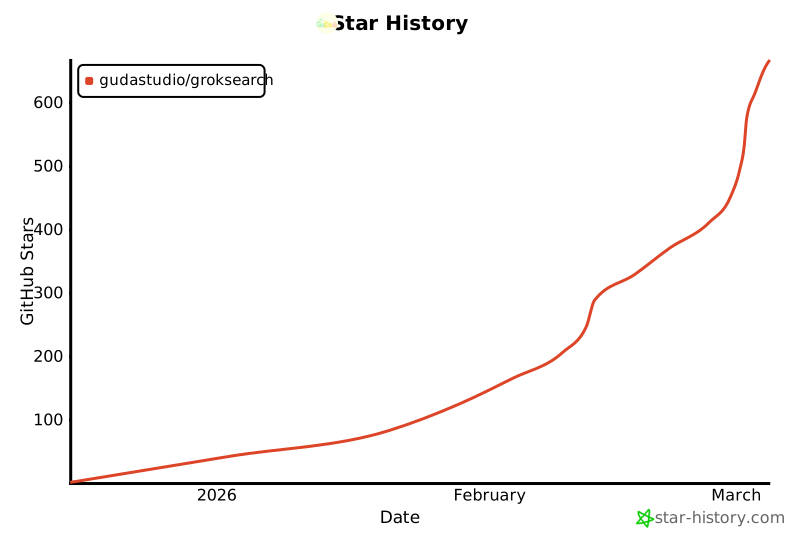
**If this project helps you, give it a Star!**
[](https://www.star-history.com/#GuDaStudio/GrokSearch&type=date&legend=top-left)
</div>



