Content

<div align="center">
**Seamless Collaboration between Claude Code and Gemini CLI**
[](https://opensource.org/licenses/MIT) [](https://www.python.org/downloads/) [](https://modelcontextprotocol.io) [](https://x.com/intent/tweet?text=GeminiMCP:Seamless%20Collaboration%20between%20Claude%20Code%20and%20Gemini%20https://github.com/GuDaStudio/geminimcp%20%23AI%20%23Coding%20%23MCP) [](https://www.facebook.com/sharer/sharer.php?u=https://github.com/GuDaStudio/geminimcp) [](https://www.reddit.com/submit?title=GeminiMCP:Seamless%20Collaboration%20between%20Claude%20Code%20and%20Gemini%20&url=https://github.com/GuDaStudio/geminimcp) [](https://t.me/share/url?url=https://github.com/GuDaStudio/geminimcp&text=GeminiMCP:Seamless%20Collaboration%20between%20Claude%20Code%20and%20Gemini)
⭐ Star us on GitHub! Your support means a lot to us! 🙏😊
[English](./docs/README_EN.md)
</div>
---
## 0. Example Effects
**1.** This evaluation uses **exactly the same** prompts. The effects with and without Gemini-MCP are as follows. It can be seen that the front-end web page after using Gemini-MCP is significantly better than the version that only uses Claude Code for front-end coding, whether in aesthetic layout or animation effects.
<details>
<summary>Click to view prompt details.</summary>
```
Design an extremely beautiful weather card for ultra-high-definition large-screen poster display.
Overall atmosphere: deep winter snow scene, Chinese ink painting style, the picture should have a poetic sense of "static" and "far", as if you can hear the sound of snow falling.
Background: the distant view is a rolling mountain range, using the brushstrokes of Chinese ink painting, layer upon layer, virtual and real, with a sense of hierarchy of atmospheric perspective; there is a thin mist and clouds in the mountains, and a few ancient pines or a small pavilion can be vaguely seen, adding oriental charm and storytelling.
Color scheme: mainly cold blue, ink gray, and pale white, with a little warm light or vermilion seal to make the picture have a bit of human touch in the cold.
Weather card本体:
As the main body of the picture, the layout is slightly to the middle right or left, the size is suitable for large-screen reading, and there is enough breathing space and blank space.
Not a hairy glass style, avoid glass state, frosted glass, strong blur effect.
Adopt a more advanced card texture: similar to Xuan paper, fine matte metal or warm jade, with a soft highlight and subtle shadow on one side, and a traditional Chinese window lattice, return line or fine line border, the overall simplicity, clean.
Information typesetting is restrained and rhythmic: city name and current temperature can use Chinese characters with a bit of running script/regular script style or elegant English fonts that match it, small text for date, weather description, and air quality, etc., Chinese and English mixed typesetting is natural and coordinated.
Snowflake effect (WebGL):
Snowflakes are not simple particle points, but exquisite snowflakes created with WebGL: with a hexagonal symmetrical crystal structure, delicate edges, and micro-light reflection.
Snowflakes are divided into foreground, middle scene, and background layers, with different sizes, transparency, and sharpness changing with distance, creating a strong sense of space.
The falling trajectory of snowflakes has a slight rotation and swing, with slow acceleration and micro-random wind direction changes, and the overall movement is elegant and restrained, not overpowering.
Style requirements:
Overall Chinese style modernization fusion: ink and wash landscape + minimalist UI design.
The picture is high-resolution, adapted to 16:9 large-screen posters.
The composition emphasizes blank space and balance, with a strong oriental charm and a sense of time passing.
```
</details>
**2.** By using Gemini-MCP with Claude Code, you can preview online through [this link](https://codepen.io/Studio-Guda/full/yyOpBVZ)!
https://github.com/user-attachments/assets/1996980b-da6a-43cf-8c02-6c008f54ed18
**3.** Using Claude Code only, you can preview online through [this link](https://codepen.io/Studio-Guda/full/ogxpvGY)!
https://github.com/user-attachments/assets/18d59123-e972-410e-824a-7462d3d95dd5
---
## 1. Project Introduction
**Gemini-MCP** is an MCP server that encapsulates Google's Gemini CLI tool as a standard MCP protocol interface, allowing Claude Code to call Gemini to perform AI-assisted programming tasks.
🍟 This project provides prompts around Gemini's powerful front-end design capabilities [optional], to enrich your usage scenarios. We highly recommend configuring them!
---
## 2. Quick Start
### 0. Prerequisites
- Claude Code has been installed and configured
- Gemini CLI has been installed and configured
- uv tool has been installed [uv installation method](#uv-installation-method)
**uv installation method:**
Windows (PowerShell):
```powershell
powershell -ExecutionPolicy ByPass -c "irm https://astral.sh/uv/install.ps1 | iex"
```
Linux/macOS:
```bash
curl -LsSf https://astral.sh/uv/install.sh | sh
```
> **Note: It is strongly recommended that Windows users run this project in WSL!**
### 1. Installation Steps
**1.1** Install GeminiMCP
```bash
claude mcp add gemini -s user --transport stdio -- uvx --from git+https://github.com/GuDaStudio/geminimcp.git geminimcp
```
**1.2** Verify Installation
```bash
claude mcp list
```
> Seeing `gemini: ... - ✓ Connected` indicates successful installation
**1.3** Optional: Configure Automatic Allowance
Add `mcp__gemini__gemini` to the allow item in `~/.claude/settings.json`

### 2. Configure Claude Code Prompts (Optional)
To make Claude Code better complete collaborative work with Gemini, we **highly recommend you add the following content to `~/.claude/CLAUDE.md`**
<details>
<summary>Expand to view prompts</summary>
```
## Core Instruction for Gemini MCP
At any moment, you must think about how the current process can collaborate with Gemini, and how to call Gemini's MCP tools as **objective and comprehensive analysis** guarantees.
You **must execute** the following steps:
**1** After you **preliminarily analyze** the user's needs,
(1)First, inform Gemini of the user's **original needs (verbatim, no paraphrasing)** and your initial ideas;
(2)Discuss and debate **fully** with Gemini to improve demand analysis and implementation plans. The end of this step is marked by **must** ensuring a thorough understanding of user needs and **generate actionable plans**.
**2** Before implementing specific coding tasks, you **must ask Gemini for code implementation prototypes** (Gemini only provides unified diff patches, and严禁 modifies code). After obtaining the code prototype, you **can only use it as a logical reference, and then rewrite it** to form enterprise-level, highly readable, and maintainable code before implementing specific programming modifications.
- **Note:** Gemini is very good at front-end code and proficient in style, UI component design. When it comes to front-end code, you **must ask it for code prototypes (CSS/React/Vue/HTML, etc. front-end code)**. At any moment, you **must use Gemini's front-end design (prototype code) as the final front-end code base**.
- For example, when you identify that the user provides front-end design requirements, your primary behavior must automatically adjust to forward the user's needs to Gemini verbatim, and let it provide code examples (this stage严禁 modifies user needs). That is, you **must obtain the code base point from Gemini before proceeding with the next behavior**.
## Gemini Tool Invocation Specification
1. Tool Overview
The Gemini MCP provides a tool `gemini` for calling Google Gemini models to perform AI tasks. The tool has strong front-end aesthetics, task planning, and demand understanding capabilities, but is limited by **context length (Effective 32k)**.
2. Usage and Specifications
**Restrictions that must be observed**:
- **Session Management**: Capture the returned `SESSION_ID` for multi-turn dialogue.
- **Back-end avoidance**:严禁让 Gemini write complex back-end business logic code.
**Scenarios where Gemini excels (must call Gemini first)**:
- **Demand clarification**: Assist in generating guiding questions at the beginning of the task.
- **Task planning**: Generate step-by-step implementation plans.
- **Front-end prototype**: Write CSS, HTML, UI component code, and adjust style styles.
```
</details>
---
## 3. Tool Description
<details>
<summary>Expand to view Gemini tool details</summary>
### Gemini Tool
| Parameter | Type | Required | Default Value | Description |
|------|------|------|--------|------|
| `PROMPT` | `str` | ✅ | - | Task instructions sent to Gemini |
| `sandbox` | `bool` | ❌ | `False` | Whether to enable sandbox mode |
| `SESSION_ID` | `str` | ❌ | `""` | Session ID (empty means start a new session) |
| `return_all_messages` | `bool` | ❌ | `False` | Whether to return complete message records |
| `model` | `str` | ❌ | `""` | Specify the model (default uses Gemini CLI configuration) |
### Return Value Structure
**Success:**
```json
{
"success": true,
"SESSION_ID": "session-uuid",
"agent_messages": "Gemini's reply content..."
}
```
**When return_all_messages is enabled:**
```json
{
"all_messages": [...]
}
```
**Failure:**
```json
{
"success": false,
"error": "Error message description"
}
```
</details>
---
## 4. FAQ
<details>
<summary>Q1: What is the difference between direct use of Gemini CLI and Gemini-MCP?</summary>
GeminiMCP encapsulates Gemini CLI as an MCP protocol, allowing Claude Code to programmatically call it, supporting session management and structured return.
</details>
<details>
<summary>Q2: Will sessions conflict?</summary>
No. Each session uses an independent `SESSION_ID`, completely isolated.
</details>
---
## 🤝 Contribution Guide
```bash
# Clone repository
git clone https://github.com/GuDaStudio/geminimcp.git
cd geminimcp
# Install dependencies
uv sync
```
---
## 📄 License
This project is licensed under the [MIT License](LICENSE).
Copyright (c) 2025 [guda.studio](mailto:gudaclaude@gmail.com)
---
<div align="center">
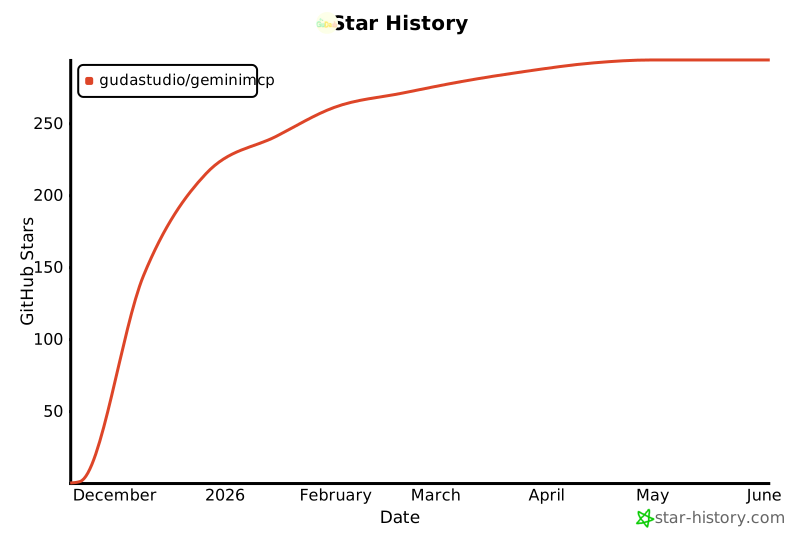
## Support us with 🌟
</div>
[](https://www.star-history.com/#GuDaStudio/geminimcp&type=date&legend=top-left)



