

内容
<div align="center">
# 🚀 DAT (Data Ask Tool)
**用自然语言与数据对话的企业级AI工具**
*Dating with your data*
[](https://github.com/hexinfo/dat/releases/latest)
[](https://github.com/hexinfo/dat)
[](https://github.com/hexinfo/dat/releases/latest)
[](https://github.com/hexinfo/dat/blob/main/LICENSE)
[](https://openjdk.java.net/projects/jdk/17/)
[](https://maven.apache.org/)
[](https://deepwiki.com/hexinfo/dat)
[](https://zread.ai/hexinfo/dat)

</div>
---
> **[🇬🇧 English Version](./README-EN.md)**
---
## 🎯 项目愿景
> 我们正在进入生成式人工智能的新时代,**语言是界面,数据是燃料**。
DAT 致力于解决企业数据查询的最后一公里问题——让业务人员能够用自然语言直接与数据库对话,无需编写复杂的 SQL 查询。通过预建模的语义层,DAT 确保 AI 不仅能自信地表达,更能正确地表达。
DAT 的核心驱动力,并非完全源于大语言模型自身的又一次智力爆炸,而是源于我们为它设计的 Askdata Agent 工作流程。
我们所做的一切,本质上都是在用 `“更精准且完整的知识”`(**目前开发的主要重心点**) 、 `“更多的计算步骤”` 和 `“更长的思考时间”` ,去交换一个在真实商业世界里至关重要的东西 —— 结果的 `“高质量”` 与 `“确定性”`。
## ✨ 核心特性
### 🏗️ 企业级架构设计
- **🔌 可插拔SPI架构** - 支持多种数据库、LLM和嵌入模型的灵活扩展
- **🏭 工厂模式实现** - 标准化的组件创建和管理机制
- **📦 模块化设计** - 清晰的职责分离,便于维护和扩展
### 🗃️ 多数据库支持
- **MySQL** - 完整支持,包含连接池和方言转换
- **PostgreSQL** - 企业级数据库支持
- **Oracle** - 传统企业数据库兼容
- **更多数据库** - 通过SPI机制轻松扩展
### 🤖 智能语义SQL生成
- **自然语言理解** - 基于LLM的语义解析
- **SQL方言转换** - 自动适配不同数据库语法
- **语义模型绑定** - 通过预定义模型确保查询准确性
### 📊 丰富的语义建模
- **实体(Entities)** - 主键、外键关系定义
- **维度(Dimensions)** - 时间、分类、枚举维度支持
- **度量(Measures)** - 聚合函数、计算字段定义
- **YAML配置** - 直观的模型定义方式
### 🔍 向量化检索增强
- **内容存储** - SQL问答对、同义词、业务知识向量化
- **语义检索** - 基于Embedding模型的智能匹配
- **多存储后端** - DuckDB、Weaviate、PGVector等存储选择
---
## 🏗️ 系统架构
```
┌─────────────────────────────────────────────────────────────┐
│ DAT Framework │
├─────────────────────────────────────────────────────────────┤
│ 🎯 DAT Language (创作层) │
│ ├── 📝 语义模型定义 (YAML) │
│ ├── 🗃️ 数据模型配置 │
│ └── 🤖 智能代理配置 │
├─────────────────────────────────────────────────────────────┤
│ ⚙️ DAT Engine (执行层) │
│ ├── 🔤 自然语言理解 │ 📊 语义SQL生成 │ 🗄️ 数据查询执行 │
│ ├── 🧠 LLM调用管理 │ 🔍 向量检索增强 │ 📈 结果格式化 │
│ └── 🔌 SPI组件管理 │ 🏭 工厂模式创建 │ ⚡ 缓存优化 │
└─────────────────────────────────────────────────────────────┘
```
- 1、DAT CLI 用于本地开发、单元测试、调试使用,它可以在本地通过IDE(vscode、idea或eclipse中)开发dat智能问数项目,`将提示(上下文)工程转变成数据工程`。
正因如此,DAT Project 的开发模式天然契合 AI Coding 工具(如 Cursor、Claude Code 等),助力实现更智能、自动化的智能问数开发流程。
- 2、DAT 它不是一个 platform ,而是一个 `framework`;二次开发者可以基于 `dat-sdk` 开发自己的Web UI,可以是web ide、拖拉拽的workflow、列表等交互方式;或将其对外提供 `OpenAPI` 或 `MCP` 的服务。
- 3、这种模式`让数据工程师或数据分析师可以借鉴软件工程师开发应用一般来开发智能问数应用`。
---
## 🚀 快速开始
### 📋 环境要求
- **Java 17+** - 推荐使用OpenJDK
- **数据库** - MySQL / PostgreSQL / Oracle / DuckDB 任选其一
- **LLM API** - OpenAI / Anthropic / Ollama / Gemini 等
### ⚡ 5分钟快速体验
#### 1️⃣ 安装DAT CLI
##### 🐧 Linux/macOS 系统
```bash
# 下载最新版本
wget https://github.com/hexinfo/dat/releases/latest/download/dat-cli-0.7.2-full.tar.gz
# 解压并配置环境变量
tar -xzf dat-cli-x.x.x.tar.gz
mv dat-cli-x.x.x dat-cli
export PATH=$PATH:$(pwd)/dat-cli/bin
```
##### 🪟 Windows 系统
1. 访问 [Releases页面](https://github.com/hexinfo/dat/releases/latest)
2. 下载 `dat-cli-x.x.x.tar.gz` 文件
3. 使用WinRAR、7-Zip或Windows内置解压工具解压
4. 将解压后的 `dat-cli\bin` 目录添加到系统PATH环境变量中:
- 右键"此电脑" → "属性" → "高级系统设置"
- 点击"环境变量" → 编辑"Path"变量
- 添加DAT CLI的bin目录路径
#### 2️⃣ 初始化项目
```bash
# 创建新的DAT项目
dat init
# 按提示输入项目信息
# Project name: my-dat-project
# Description: 我的第一个智能问数项目
# Database type: mysql
```

> 💡 <strong style="color: orange;">提示:</strong> 如果你没有现成的数据库可以访问,或只是想对本地 CSV 数据进行问数,初始化项目时数据库可以选择`duckdb`,默认会在项目的 `.dat` 目录下创建 'duckdb' 前缀的本地内嵌数据存储。
#### 3️⃣ 配置数据源
编辑生成的 `dat_project.yaml`:
```yaml
version: 1
name: my-dat-project
description: 我的第一个智能问数项目
# 数据库配置
db:
provider: mysql
configuration:
url: jdbc:mysql://localhost:3306/mydb
username: your_username
password: your_password
timeout: 1 min
# LLM配置
llm:
provider: openai
configuration:
api-key: your-openai-api-key
model-name: gpt-4
base-url: https://api.openai.com/v1
# 嵌入模型配置
embedding:
provider: bge-small-zh-v15-q
```
> 💡 <strong style="color: orange;">提示:</strong> 更多项目配置,请参考项目下的 `dat_project.yaml.template` 。
> 💡 <strong style="color: orange;">提示:</strong>
>
> 如果你没有现成的数据可以使用,你可以执行`seed`命令加载初始化项目中示例的种子数据入库。
>
> ```
> # 加载种子数据
> dat seed -p ./my-dat-project
> ```
>
> 然后跳过第4️⃣步,使用初始化项目中示例的语义模型,进行第5️⃣步 “开始智能问数”。
#### 4️⃣ 创建语义模型
在 `models/` 目录下创建 `sales.yaml`:
```yaml
version: 1
semantic_models:
- name: sales_data
description: 销售数据分析模型
model: ref('sales_table')
entities:
- name: product_id
description: 产品ID
type: primary
dimensions:
- name: sale_date
description: 销售日期
type: time
type_params:
time_granularity: day
- name: region
description: 销售区域
type: categorical
enum_values:
- value: "North"
label: "北区"
- value: "South"
label: "南区"
measures:
- name: sales_amount
description: 销售金额
agg: sum
- name: order_count
description: 订单数量
agg: count
```
> 💡 <strong style="color: orange;">提示:</strong> 这只是个示例,请根据你真实的数据进行配置。
> 更多语义模型配置说明,请查看项目下的 `MODEL_GUIDE.md` 手册 。
#### 5️⃣ 开始智能问数
```bash
# 启动交互式问数
dat run -p ./my-dat-project -a default
# 或启动API服务
dat server openapi -p ./my-dat-project
```
现在您可以用自然语言查询数据了!
```
💬 请问北区上个月的销售金额是多少?
📊 正在分析您的问题...
🔍 生成语义SQL: SELECT SUM(sales_amount) FROM sales_data WHERE region='North' AND sale_date >= '2024-11-01'
✅ 查询结果: 北区上个月销售金额为 ¥1,234,567
```
### 🌐 多种使用方式
DAT 提供了多种使用方式(CLI主要用于开发与调试),满足不同场景的需求:
#### 1️⃣ 通过 Dify 插件使用(WEB端问答)
如果您需要通过 **WEB 界面**进行智能问答,无需自己开发前端,可以直接使用 **Dify 平台**的 DAT 插件。
🔗 **插件地址**: [https://marketplace.dify.ai/plugins/hexinfo/dat](https://marketplace.dify.ai/plugins/hexinfo/dat)
首先 [启动DAT的OpenAPI服务](#-dat-server---服务部署),然后在 Dify 中安装 DAT 插件后配置 `DAT OpenAPI Base URL` 与其对接,即可在 Dify 的可视化界面中创建智能问数应用,提供友好的 WEB 交互体验。
#### 2️⃣ 集成到自己的项目(流式问答API)
如果您需要在**自己的 WEB 项目**中集成流式问答功能,可以 [启动DAT的OpenAPI服务](#-dat-server---服务部署) 进行对接。
#### 3️⃣ 集成到Agent中(支持MCP工具)
如果您使用的是支持 **MCP (Model Context Protocol)** 的 Agent(如 Claude Desktop、Cline 等),可以 [启动DAT的MCP服务](#-mcp-服务) 将智能问数能力集成到这些 Agent 中。
---
## 🛠️ CLI 命令详解
### 📖 命令概览

### 🎯 核心命令
#### 🚀 `dat init` - 项目初始化
```bash
dat init --help
```

**使用示例**:
```bash
# 交互式初始化DAT项目到当前工作目录下
dat init
# 交互式初始化DAT项目到指定项目工作空间目录下
dat init -w ./my-workspace
```

#### 🤖 `dat run` - 智能问数
```bash
dat run --help
```

**使用示例**:
```bash
# 当前工作目录为DAT项目目录并启动默认代理
dat run
# 当前工作目录为DAT项目目录并启动特定代理
dat run -a sales-agent
# 指定DAT项目目录并启动特定代理
dat run -p ./my-project -a sales-agent
```

#### 🌐 `dat server` - 服务部署
```bash
dat server --help
```

##### 🔌 OpenAPI 服务
```bash
dat server openapi --help
```

**启动服务**:
```bash
# 当前工作目录为DAT项目目录
dat server openapi
# 指定DAT项目目录
dat server openapi -p ./my-project
# 自定义端口
dat server openapi --port=9090
```

**Swagger UI界面**:

**API调用示例**:
```bash
# 流式问答API
curl -X POST http://localhost:8080/api/v1/ask/stream \
-H "Content-Type: application/json" \
-d '{"question": "各个国家的病例总数"}' \
--no-buffer
```
##### 🔗 MCP 服务
```bash
dat server mcp --help
```

**启动服务**:
```bash
# 当前工作目录为DAT项目目录
dat server mcp
# 指定DAT项目目录
dat server mcp -p ./my-project
# 自定义端口
dat server mcp --port=9091
```

#### 🌱 `dat seed` - 加载种子数据
```bash
dat seed --help
```

**使用示例**:
```bash
# 当前工作目录为DAT项目目录并加载种子CSV文件
dat seed
# 指定DAT项目目录并加载种子CSV文件
dat seed -p ./my-project
```

---
## 🏗️ 开发指南
### 📦 模块架构
DAT采用模块化设计,每个模块职责清晰:
```
dat-parent/
├── ❤️ dat-core/ # 核心接口和工厂管理
├── 🔌 dat-adapters/ # 数据库适配器
│ ├── dat-adapter-duckdb/ # 【本地内置数据库】
│ ├── dat-adapter-mysql/
│ ├── dat-adapter-oracle/
│ └── dat-adapter-postgresql/
├── 🧠 dat-llms/ # LLM集成模块
│ ├── dat-llm-anthropic/
│ ├── dat-llm-gemini/
│ ├── dat-llm-ollama/
│ ├── dat-llm-openai/
│ ├── dat-llm-xinference/
│ └── dat-llm-azure-openai/
├── 📍 dat-embedders/ # 嵌入模型集成
│ ├── dat-embedder-bge-small-zh/ # 【本地内置Embedding模型】
│ ├── dat-embedder-bge-small-zh-q/ # 【本地内置Embedding模型】
│ ├── dat-embedder-bge-small-zh-v15/ # 【本地内置Embedding模型】
│ ├── dat-embedder-bge-small-zh-v15-q/ # 【本地内置Embedding模型】
│ ├── dat-embedder-jina/
│ ├── dat-embedder-ollama/
│ ├── dat-embedder-openai/
│ ├── dat-embedder-xinference/
│ └── dat-embedder-azure-openai/
├── ⚖️ dat-rerankers/ # 重排模型集成
│ ├── dat-reranker-onnx-builtin/
│ ├── dat-reranker-ms-marco-minilm-l6-v2/ # 【本地内置Reranking模型】
│ ├── dat-reranker-ms-marco-minilm-l6-v2-q/ # 【本地内置Reranking模型】
│ ├── dat-reranker-ms-marco-tinybert-l2-v2/ # 【本地内置Reranking模型】
│ ├── dat-reranker-ms-marco-tinybert-l2-v2-q/ # 【本地内置Reranking模型】
│ ├── dat-reranker-onnx-local/ # 【本地调用Reranking模型】
│ ├── dat-reranker-jina/
│ └── dat-reranker-xinference/
├── 💾 dat-storers/ # 向量存储后端
│ ├── dat-storer-duckdb/ # 【本地内置向量存储】
│ ├── dat-storer-pgvector/
│ ├── dat-storer-weaviate/
│ ├── dat-storer-qdrant/
│ └── dat-storer-milvus/
├── 🤖 dat-agents/ # 智能代理实现
│ └── dat-agent-agentic/
├── 🌐 dat-servers/ # 服务端组件
│ ├── dat-server-mcp/
│ └── dat-server-openapi/
├── 📦 dat-sdk/ # 开发工具包
└── 🖥️ dat-cli/ # 命令行工具
```
### 🔧 本地开发环境
#### 环境准备
```bash
# 克隆项目
git clone https://github.com/hexinfo/dat.git
cd dat
# 安装依赖并编译
mvn clean install -DskipTests
```
### 🚀 二次开发指南
DAT提供了 `dat-sdk` 开发工具包,方便开发者在自己的Java应用中集成DAT的智能问数能力。您可以基于SDK开发自定义的Web UI、API服务或集成到现有系统中。
#### Maven依赖配置
在您的项目 `pom.xml` 中添加以下依赖:
```xml
<dependency>
<groupId>cn.hexinfo</groupId>
<artifactId>dat-sdk</artifactId>
<version>0.7.2</version>
</dependency>
```
#### 快速开始示例
```java
import ai.dat.boot.ProjectRunner;
import ai.dat.core.agent.data.StreamAction;
import ai.dat.core.agent.data.StreamEvent;
import com.fasterxml.jackson.core.JsonProcessingException;
import com.fasterxml.jackson.databind.ObjectMapper;
import java.nio.file.Path;
import java.nio.file.Paths;
import java.util.Collections;
import java.util.Map;
public class DatProjectRunnerExample {
private static final ObjectMapper JSON_MAPPER = new ObjectMapper();
public static void main(String[] args) {
// 初始化项目运行器
Path projectPath = Paths.get("/path/to/your/dat-project").toAbsolutePath();
String agentName = "default";
Map<String, Object> variables = Collections.emptyMap();
ProjectRunner runner = new ProjectRunner(projectPath, agentName, variables);
// 问数
StreamAction action = runner.ask("每个国家病历总数");
// 处理各种流式事件
for (StreamEvent event : action) {
System.out.println("-------------------" + event.name() + "-------------------");
event.getIncrementalContent().ifPresent(content -> System.out.println(content));
event.getSemanticSql().ifPresent(content -> System.out.println(content));
event.getQuerySql().ifPresent(content -> System.out.println(content));
event.getQueryData().ifPresent(data -> {
try {
System.out.println(JSON_MAPPER.writeValueAsString(data));
} catch (JsonProcessingException e) {
throw new RuntimeException(e);
}
});
event.getToolExecutionRequest().ifPresent(request -> System.out.println("id: " + request.id()
+ "\nname: " + request.name() + "\narguments: " + request.arguments()));
event.getToolExecutionResult().ifPresent(result -> System.out.println("result: " + result));
event.getHitlAiRequest().ifPresent(request -> System.out.println(request));
event.getHitlToolApproval().ifPresent(request -> System.out.println(request));
event.getMessages().forEach((k, v) -> {
try {
System.out.println(k + ": " + JSON_MAPPER.writeValueAsString(v));
} catch (JsonProcessingException e) {
throw new RuntimeException(e);
}
});
}
}
}
```
推荐使用`ai.dat.boot.ProjectRunner`、`ai.dat.boot.ProjectBuilder`、`ai.dat.boot.ProjectSeeder`等高级类。
更多SDK使用示例和最佳实践,请参考:
- [示例1: OpenAPI Server](./dat-servers/dat-server-openapi)
- [示例2: MCP Server](./dat-servers/dat-server-mcp)
按需添加需要的其他已实现的模块,如:
```xml
<!-- DAT Embedding Store -->
<dependency>
<groupId>cn.hexinfo</groupId>
<artifactId>dat-storer-duckdb</artifactId> <!-- In-process -->
</dependency>
<dependency>
<groupId>cn.hexinfo</groupId>
<artifactId>dat-storer-weaviate</artifactId>
</dependency>
<dependency>
<groupId>cn.hexinfo</groupId>
<artifactId>dat-storer-pgvector</artifactId>
</dependency>
<dependency>
<groupId>cn.hexinfo</groupId>
<artifactId>dat-storer-qdrant</artifactId>
</dependency>
<dependency>
<groupId>cn.hexinfo</groupId>
<artifactId>dat-storer-milvus</artifactId>
</dependency>
<!-- DAT Embedding Model -->
<dependency>
<groupId>cn.hexinfo</groupId>
<artifactId>dat-embedder-bge-small-zh</artifactId> <!-- In-process -->
</dependency>
<dependency>
<groupId>cn.hexinfo</groupId>
<artifactId>dat-embedder-bge-small-zh-q</artifactId> <!-- In-process -->
</dependency>
<dependency>
<groupId>cn.hexinfo</groupId>
<artifactId>dat-embedder-bge-small-zh-v15</artifactId> <!-- In-process -->
</dependency>
<dependency>
<groupId>cn.hexinfo</groupId>
<artifactId>dat-embedder-bge-small-zh-v15-q</artifactId> <!-- In-process -->
</dependency>
<dependency>
<groupId>cn.hexinfo</groupId>
<artifactId>dat-embedder-onnx-local</artifactId> <!-- In-process -->
</dependency>
<dependency>
<groupId>cn.hexinfo</groupId>
<artifactId>dat-embedder-openai</artifactId>
</dependency>
<dependency>
<groupId>cn.hexinfo</groupId>
<artifactId>dat-embedder-ollama</artifactId>
</dependency>
<dependency>
<groupId>cn.hexinfo</groupId>
<artifactId>dat-embedder-jina</artifactId>
</dependency>
<dependency>
<groupId>cn.hexinfo</groupId>
<artifactId>dat-embedder-xinference</artifactId>
</dependency>
<dependency>
<groupId>cn.hexinfo</groupId>
<artifactId>dat-embedder-azure-openai</artifactId>
</dependency>
<!-- DAT Reranking Model -->
<dependency>
<groupId>cn.hexinfo</groupId>
<artifactId>dat-reranker-ms-marco-minilm-l6-v2</artifactId> <!-- In-process -->
</dependency>
<dependency>
<groupId>cn.hexinfo</groupId>
<artifactId>dat-reranker-ms-marco-minilm-l6-v2-q</artifactId> <!-- In-process -->
</dependency>
<dependency>
<groupId>cn.hexinfo</groupId>
<artifactId>dat-reranker-ms-marco-tinybert-l2-v2</artifactId> <!-- In-process -->
</dependency>
<dependency>
<groupId>cn.hexinfo</groupId>
<artifactId>dat-reranker-ms-marco-tinybert-l2-v2-q</artifactId> <!-- In-process -->
</dependency>
<dependency>
<groupId>cn.hexinfo</groupId>
<artifactId>dat-reranker-onnx-local</artifactId> <!-- In-process -->
</dependency>
<dependency>
<groupId>cn.hexinfo</groupId>
<artifactId>dat-reranker-jina</artifactId>
</dependency>
<dependency>
<groupId>cn.hexinfo</groupId>
<artifactId>dat-reranker-xinference</artifactId>
</dependency>
<!-- DAT Chat Model -->
<dependency>
<groupId>cn.hexinfo</groupId>
<artifactId>dat-llm-openai</artifactId>
</dependency>
<dependency>
<groupId>cn.hexinfo</groupId>
<artifactId>dat-llm-anthropic</artifactId>
</dependency>
<dependency>
<groupId>cn.hexinfo</groupId>
<artifactId>dat-llm-ollama</artifactId>
</dependency>
<dependency>
<groupId>cn.hexinfo</groupId>
<artifactId>dat-llm-gemini</artifactId>
</dependency>
<dependency>
<groupId>cn.hexinfo</groupId>
<artifactId>dat-llm-xinference</artifactId>
</dependency>
<dependency>
<groupId>cn.hexinfo</groupId>
<artifactId>dat-llm-azure-openai</artifactId>
</dependency>
<!-- DAT Database Adapter -->
<dependency>
<groupId>cn.hexinfo</groupId>
<artifactId>dat-adapter-duckdb</artifactId> <!-- In-process -->
</dependency>
<dependency>
<groupId>cn.hexinfo</groupId>
<artifactId>dat-adapter-mysql</artifactId>
</dependency>
<dependency>
<groupId>cn.hexinfo</groupId>
<artifactId>dat-adapter-oracle</artifactId>
</dependency>
<dependency>
<groupId>cn.hexinfo</groupId>
<artifactId>dat-adapter-postgresql</artifactId>
</dependency>
<!-- DAT Askdata Agent -->
<dependency>
<groupId>cn.hexinfo</groupId>
<artifactId>dat-agent-agentic</artifactId>
</dependency>
```
也可在 `dat-core` 之上自行开发对应的接口类实现。
```xml
<dependency>
<groupId>cn.hexinfo</groupId>
<artifactId>dat-core</artifactId>
</dependency>
```
---
## 🤝 贡献指南
我们欢迎所有形式的贡献!无论是bug报告、功能建议、文档改进还是代码提交。
### 🐛 报告问题
在提交issue之前,请确保:
1. **搜索现有问题** - 避免重复提交
2. **提供详细信息** - 包含错误日志、配置文件、复现步骤
3. **使用问题模板** - 帮助我们快速理解问题
### 💡 提交功能建议
我们鼓励创新想法!提交功能建议时请包含:
- **用例说明** - 解决什么实际问题
- **设计思路** - 初步的实现想法
- **影响范围** - 对现有功能的影响评估
### 🔧 代码贡献
#### 开发流程
1. **Fork项目** 并创建功能分支
```bash
git checkout -b feature/awesome-new-feature
```
2. **遵循代码规范**:
- 使用中文注释解释业务逻辑
- 遵循阿里巴巴Java编码规范
- 保持测试覆盖率 > 80%
3. **提交代码**:
```bash
git commit -m "feat: 添加ClickHouse数据库适配器
- 实现ClickHouse连接和查询功能
- 添加SQL方言转换支持
- 完善单元测试覆盖
- 更新相关文档
Closes #123"
```
4. **创建Pull Request**:
- 详细描述改动内容
- 关联相关issue
- 确保CI检查通过
#### 代码审查标准
- ☑️ **功能完整性** - 实现符合需求规格
- ☑️ **代码质量** - 遵循设计模式和最佳实践
- ☑️ **测试覆盖** - 包含单元测试和集成测试
- ☑️ **文档更新** - 同步更新相关文档
- ☑️ **向后兼容** - 不破坏现有API
### 🎯 开发事项列表
- ✅ 数据模型(表或视图)的配置;
- ✅ 语义模型(与数据模型绑定)的配置,包括:实体、维度、度量等;
- ✅ 基于LLM的生成语义SQL,将语义SQL转真实SQL,最后执行返回数据;
- ✅ 智能问数支持 HITL (Human-in-the-Loop) 交互;
- ✅ 支持将智能问数项目对外提供OpenAPI的服务;
- ✅ 支持将智能问数项目对外提供MCP的服务;
- ✅ 支持seed命令可以将CSV文件初始化加载入数据库;
- ✅ SQL问答对、同义词、业务知识等向量化入库与检索;
- ✅ 数据模型中支持Jinja模板语言,通过命令行传入变量的方式可以实现数据权限的控制;
- ⬜ 提供VSCode、IDEA、Eclipse等IDE的DAT项目辅助开发的插件;
- ⬜ 基于LLM的数据探查辅助生成语义模型;
- ⬜ 数据模型、语义模型、智能问数的单元测试;
- ⬜ 指标的配置(构建语义模型后可以更进一步添加指标);
---
## 🌟 社区与支持
### 💬 交流渠道
- **GitHub Discussions** - 技术讨论和问答
- **微信群** - 添加微信 `slime_liu` 备注 `DAT` 加入社区群
### 🏆 贡献者致谢
感谢所有为DAT项目做出贡献的开发者!
<a href="https://github.com/hexinfo/dat/graphs/contributors">
<img src="https://contrib.rocks/image?repo=hexinfo/dat" />
</a>
---
## 📊 项目统计
### ⭐ Star历史
[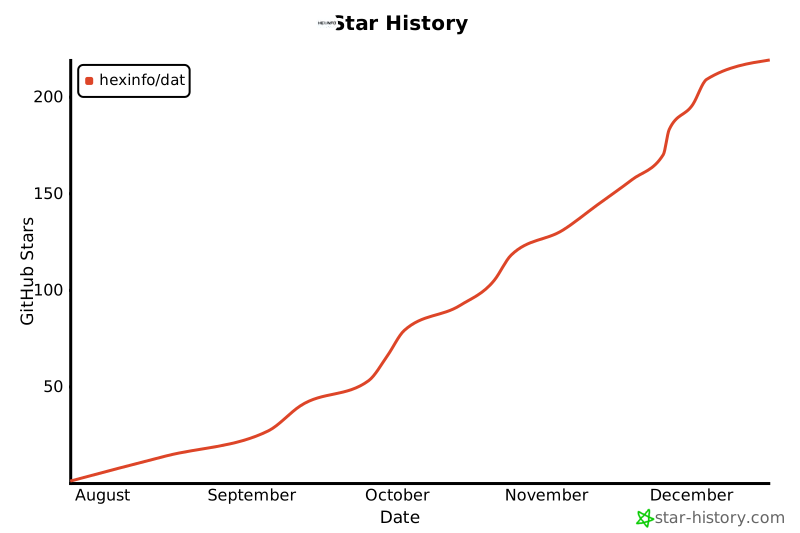](https://star-history.com/#hexinfo/dat&Date)
---
## 📄 许可证
本项目采用 Apache 2.0 许可证。详情请参阅 [LICENSE](https://github.com/hexinfo/dat/blob/main/LICENSE) 文件。
---
<div align="center">
**🎯 让数据查询变得简单自然**
**⭐ 如果这个项目对您有帮助,请给我们一个Star!**
[🚀 快速开始](#-快速开始) • [📖 使用文档](https://github.com/hexinfo/dat) • [💬 加入社区](#-社区与支持) • [🤝 参与贡献](#-贡献指南)
---
*Built with ❤️ by the DAT Community*
</div>
连接信息
猜你喜欢
暂无推荐服务器