Content
# FirstData 🌐
**[English](README.en.md)** | 中文 | **[日本語](README.ja.md)**
---
**The World's Most Comprehensive, Authoritative, and Structured Open Data Source Repository**
[](https://opensource.org/licenses/MIT)
[](firstdata/indexes/statistics.json)
[](firstdata/indexes/statistics.json)
[](#)
[](https://firstdata.deepminer.com.cn/)
---
## 🎯 Why FirstData?
### The Fact Defense in the AI Era: From "Information Overload" to "Scarcity of Truth"
In today's world, where generative AI is reshaping the internet, **"information" has become unprecedentedly abundant, while "truth" is becoming scarce**.
When noise, collages, and hallucinations become the default background, **credible Primary Sources are no longer just reference materials but the foundation of the entire intelligent system**.
### Our Goal: Building a Reliable Foundation for the AI Era
This project aims to build a **global, authoritative, and structured knowledge base of Primary Sources**.
We systematically discover and aggregate high-credibility sources across various fields—covering scientific research, government transparency, laws and regulations, company disclosures and financial reports, standards and industry authoritative materials, etc.—**transforming scattered, non-standard, and difficult-to-reuse original content into traceable, verifiable, and referenceable "Core Facts"**, and retaining complete evidence chains and version history to ensure that every conclusion can "go back to the original text."
### This is a "Fact Defense" for the Era of Large Models
✅ **Provide a reliable foundation for models to resist hallucinations and poisoning**
- Plan to cover 1000+ authoritative data sources (all sources are from Chinese and foreign government departments, international organizations, academic institutions, and authoritative industry associations)
- 100% URL verification to ensure links are available
✅ **Provide a computable and reviewable evidence chain loop for Deep Research**
- Structured metadata system, including complete access paths
- Support programming access to achieve automated evidence tracing
✅ **Upgrade AI from "vaguely summarizing second-hand information" to "rigorous reasoning and citation based on original evidence"**
- MCP intelligent Agent understands complex queries and accurately recommends authoritative data sources
- Provide a complete path to the original data (URL, API, download method)
- Accompanying use cases and citation examples to ensure correct usage
> **In the GenAI era, Clean Data > Big Model.**
>
> **Let every in-depth thought be built on verifiable facts.**
---
## 🚀 Core Advantages
| Feature | Our Unique Selling Points | Value in the AI Era |
| -------------------------------- | ------------------------------------------------------------------------------ | ---------------------------------------------------------- |
| 🇨🇳**Deep Coverage of Chinese Data Sources** | **Globally Exclusive**: Planning to include 500+ Chinese government data sources, covering multiple core areas | Fill the Chinese gap in the global data source directory, providing reliable Chinese data for multinational research |
| 📊**Structured Metadata System** | Complete metadata standards (access URL, API interface, authority level, update frequency, data content, etc.), not just links | Machine-readable, programmable access, supporting automated evidence chain construction |
| ⭐**Authority Level Classification** | Six types of authority levels: government, international organizations, research institutions, market, commercial, etc. | Scientifically assess the credibility of data sources, providing a quality filtering basis for AI |
| 🤖**AI Intelligent Search** | LLM-driven data source query Agent, understanding complex multi-dimensional queries | Obtain authoritative data sources with natural language, eliminating the need for manual screening |
| 🔌**MCP Protocol Integration** | Provide standard MCP Server, which can be integrated into AI applications such as Claude Desktop and Cline | Allow any AI application to access the authoritative data source knowledge base |
| 🌍**Chinese and English Bilingual Support** | All metadata is available in Chinese and English versions | Connect the global data ecosystem and break down language barriers |
| 🔍**100% Verification** | Every URL is tested, every data source has complete documentation, and every authority level has a basis | Ensure that data sources are truly available, avoiding broken links and hallucination references |
---
## 📊 Data Source Overview
### Coverage
Prioritize the inclusion of authoritative data sources at the government and international organization levels, and simultaneously cover top academic institutions and authoritative industry sources:
| Category | Typical Sources |
| ----------------- | ----------------------------------------- |
| 🌍 **International Organizations** | World Bank, IMF, OECD, WHO, FAO... |
| 🇨🇳 **Chinese Government** | People's Bank of China, National Bureau of Statistics, General Administration of Customs, China Securities Regulatory Commission... |
| 🌎 **National Governments** | United States, Canada, Japan, United Kingdom, Australia... |
| 🎓 **Academic Institutions** | NBER, Penn World Table, PubMed... |
| 🏭 **Industry Sectors** | Energy, Finance, Health, Climate... |
### Data Source List
📄 Browse all included data sources: [firstdata/sources/README.md](firstdata/sources/README.md)
### Quality Standards
Each included data source meets the following standards:
- ✅ **100% URL Verification** — Every link is tested and available
- ✅ **Authority Priority** — Primarily includes government and international organization data sources
- ✅ **Metadata Verification** — All JSON files are validated by schema
- ✅ **Bilingual Documentation** — All data sources provide Chinese and English descriptions
- ✅ **Complete Evidence Chain** — Provides a complete path from query to original data
## 📐 Metadata Structure
Each data source contains **structured metadata**, supporting machine-readable and automated evidence chain construction:
### Core Information
- **Unique ID**: Lowercase, hyphen-separated identifier
- **Name**: English, Chinese, and local language names
- **Organization**: Name, type, country, official website
- **Description**: Detailed bilingual description
### Access and Discovery
- **Main URL**: Main data portal
- **API Information**: Availability, documentation, authentication requirements
- **Download Options**: Batch download, supported formats (CSV, Excel, JSON, etc.)
- **Access Level**: Open, registration required, academic, commercial, restricted
### Coverage Details
- **Geographic Scope**: Global, regional, national, sub-national
- **Country/Region**: Specific coverage area
- **Time Range**: Start year, end year, update frequency
- **Domain**: Economy, health, climate, energy, etc.
- **Data Content**: Specific data categories and content descriptions
### Authority Identification - Credibility Guarantee in the AI Era
**authority_level field**: Authority level classification
- `government` - Government agency
- `international` - International organization
- `research` - Research institution
- `market` - Market institution
- `commercial` - Commercial institution
- `other` - Other
**Complete Schema**: View [schemas/datasource-schema.json](schemas/datasource-schema.json)
## 🎯FirstData MCP
**Connecting Natural Language with First-Hand Authoritative Data**
---
We have built a structured knowledge base of authoritative data sources, each with complete metadata, access paths, and authority identification. But for most users, the real challenge lies in: how to quickly find the most suitable one among massive data sources? After finding the data source website, how to accurately locate the target data in the complex official platform? How to seamlessly integrate all of this into daily AI workflows?
**FirstData MCP** is designed for this purpose—transforming a static data source knowledge base into a dynamic intelligent navigation system, allowing everyone to easily access authoritative data.
---
### 📖 Why FirstData MCP?
In the LLM era, we are accustomed to directly asking for answers, but we often face two core pain points:
❌ **Pain Point 1: Unverifiable Data Sources (Hallucination Risk)**
- AI-generated numbers may be outdated, incorrect, or completely fabricated
- Lack of original evidence chain, unable to trace and verify
- Second-hand citations are relayed layer by layer, losing the original context
❌ **Pain Point 2: High Threshold for Professional Databases (Difficult to Retrieve)**
- Government and international organization websites have complex navigation and obscure terminology
- Unsure which data source is the most authoritative and what the coverage is
- Even if you find the official website, you don't know how to locate the target data
### 💡 Our Solution
**This MCP service builds a complete closed loop from "vague intention" to "precise data path":**
It does not directly generate potentially outdated numbers, but instead acts as an **"authoritative data guide"**, guiding users to **credible first-hand sources (Primary Sources)** such as the National Bureau of Statistics, the World Bank, and industry white papers, and providing **detailed retrieval instructions with click-by-click steps**.
> **Let data return to authority, and let retrieval no longer get lost.**
---
### ✨ Core Features
#### 1️⃣ Authoritative Source Locator
**Solving the "Where to Find?" Problem**
Based on the user's natural language question (e.g., "China's export volume of new energy vehicles in 2023"), intelligently recommend the most authoritative first-hand data source website.
**Feature Highlights:**
- 🧠 **Understand Complex Queries**: Automatically identify multi-dimensional needs such as geography + time + domain + authority
- 🎯 **Intelligent Recommendation**: Top 3-5 most relevant data sources, with detailed matching reasons
- 📊 **Authority Guarantee**: All recommendations are marked with authority levels (government/international organization/research/market, etc.)
- 🔗 **Ready-to-Use Information**: Directly provide access URL, API documentation, data format
- ✅ **Complete Evidence Chain**: Traceable from query to original data, every step
- 🌍 **Global Coverage**: Data sources cover major fields worldwide, balancing breadth and depth
**Filter out marketing accounts and second-hand citations, and go directly to official websites, official reports, or professional databases.**
**Usage Examples:**
<details>
<summary><b>Example 1: Researchers - Economic Data of Developing Countries 📚</b></summary>
**Scenario**:
> "I want to research GDP information of developing countries for economic growth research"
**Problems with Traditional Methods**:
- ❌ Google searches are full of second-hand reports, blog articles, and outdated links
- ❌ Uncertain about the authority and methodology of data sources
- ❌ Spend hours navigating institutional websites and may still find the wrong data
**Using FirstData MCP:**
1. 🔍 **Natural Language Question**: "GDP of developing countries"
2. 🎯 **Agent Automatically Filters**: World Bank, IMF, regional development banks
3. 📊 **Compare Authority Levels**: International organizations, government agencies, and other authority classifications
**Returned Results:**
```
📋 Recommended Data Sources:
1. World Bank World Development Indicators
- API: Supported (complete documentation)
- Coverage: 217 countries and regions
- Time Range: 1960 to present
- Authority Level: international (international organization)
- Evidence Chain: World Bank Official → First-Hand Data → Traceable
2. IMF World Economic Outlook
- API: Supported
- Coverage: 194 economies worldwide
- Update Frequency: Quarterly
- Authority Level: international (international organization)
```
**Value**:
- ✅ From "uncertain search" to "research based on authoritative evidence"
- ✅ Save hours of screening time
- ✅ Avoid deviations in research conclusions due to the use of incorrect data sources
</details>
<details>
<summary><b>Example 2: Data Analysts - Chinese Monetary Policy Data 💰</b></summary>
**Scenario**:
> "I need China's M1, M2 money supply and interest rate data for the past 10 years"
**Problems with Traditional Methods**:
- ❌ AI assistants may provide outdated links or second-hand websites
- ❌ Unclear about data update frequency and historical coverage
- ❌ Lack of API access information, unable to automate acquisition
**MCP Workflow:**
1. 🔍 **Identify Keywords**: China + Monetary Policy + M1/M2 + 10-Year Time Range
2. 🎯 **Filter Conditions**: Country=CN + Domain=Finance + Time Coverage≥10 Years
3. 📊 **Recommend Top Data Sources** (with evidence chain)
**Returned Results:**
```
📋 Recommended Data Sources:
1. People's Bank of China (PBC)
- Data Portal: http://www.pbc.gov.cn/diaochatongjisi/
- API Documentation: Official interface available
- Update Frequency: Monthly
- Historical Coverage: 1990 to present
- Authority Level: government (government agency)
- Evidence Chain: Official of the People's Bank of China → First-Hand Data → Traceable
📈 Available Data:
- M0, M1, M2 money supply (monthly)
- Benchmark deposit and loan interest rates
- Interbank offered rate
```
**Value**:
- ✅ **Anti-Hallucination**: Ensure data comes from official authoritative agencies
- ✅ **Computable**: Provide API access to support automated data acquisition
- ✅ **Reviewable**: Complete metadata, anyone can verify the data source
</details>
<details>
<summary><b>Example 3: Policymakers - Global Climate Data 🌍</b></summary>
**Scenario**:
> "I need authoritative climate data to support policy decisions, with API access to global data"
**Risks**:
- ❌ Using unreliable data sources may lead to policy errors
- ❌ Lack of methodological transparency, unable to assess data quality
- ❌ Second-hand citations lack original evidence chains
**MCP Workflow:**
1. 🔍 **Multi-Dimensional Filtering**: Geographic Scope=Global + Domain=Climate + Has API + High Authority
2. 🎯 **Recommend Data Sources That Meet the Conditions**
3. 📊 **Sort by Authority Level** (prioritize government and international organizations)
4. 📋 **Provide Complete Evidence Chain**
**Returned Results:**
```
📋 Recommended Data Sources:
1. NASA Earthdata
- Coverage: Global
- API: Supported (complete documentation)
- Data Types: Satellite observations, climate models
- Authority Level: government (government agency)
- Update Frequency: Real-time/Daily
- Evidence Chain: NASA Official → Satellite Data → Verifiable
2. NOAA Climate Data Online
- Coverage: Global
- API: Supported
- Update Frequency: Real-time/Daily
- Authority Level: government (government agency)
- Evidence Chain: US Government → Meteorological Monitoring → Traceable
```
**Value**:
- ✅ **Evidence Chain Closed Loop**: From query → recommendation → original data → fully traceable
- ✅ **Methodological Transparency**: Clearly define data collection methods and quality standards
- ✅ **Reproducible Research**: Other researchers can verify conclusions based on the same data source
- ✅ **Reduce Policy Risks**: From "uncertain decision-making basis" to "verifiable authoritative evidence"
</details>
---
#### 2️⃣ Website Operation Pathfinder
**Solving the "How to Find?" Problem**
For professional websites with complex structures and obscure terminology, provide step-by-step operation path instructions, from the homepage to the complete navigation guide for the target data.
**Feature Highlights:**
- 📖 **Step-by-Step Operation Guide**: Clearly define the operation object, key interface elements, and filter condition settings for each step
- 🎯 **Multi-Path Guarantee**: Provide main path + alternative solutions + API access, each path is verified
- 🔍 **Precise Positioning**: Specific to button positions, filter settings, and download steps, rather than general descriptions
- 💡 **Lower the Threshold**: Non-professionals can also quickly locate, from "hours of exploration" to "3-5 minutes of accurate acquisition"
- 🔄 **Regular Updates**: Manually verify website changes and update operation paths in a timely manner
- 🤖 **Intelligent Matching**: Based on the user's query intention, recommend the most relevant operation instructions
**Provide detailed website navigation guides for commonly used authoritative data sources, accurately locating data positions.**
---
### 🚀 Complete Usage Example: Intelligent Retrieval + Operation Instructions One-Stop Solution
**Scenario: Find the prospectus of newly listed technology companies for investment research**
**User Question:**
> "I want to research a recently listed AI technology company in China, and I need to find their prospectus to analyze their business model and financial situation"
**✅ Complete Workflow Using FirstData MCP:**
#### 📋 Step 1: Intelligent Retrieval of Reliable Data Sources
```
Recommended Data Sources:
1. Hong Kong Exchanges and Clearing Limited (HKEX)
- Description: HKEX operates HKEXnews (Disclosure Easy), providing an official platform for listed company prospectuses,
Annual reports, IPO information and regulatory documents
- Access Address: https://www.hkexnews.hk
- Authority Level: market (market institution)
- Document Types: Prospectus, Annual Report, Announcement
- Evidence Chain: Official Disclosure Documents → Directly Quotable
2. China Securities Regulatory Commission (CSRC)
- Access Address: http://www.csrc.gov.cn
- Overseas Listing Filing Information Inquiry
- Authority Level: government (government agency)
```
**Value Points:**
- ✅ **Avoid Hallucinations**: What is recommended is the official disclosure platform, not the news website
- ✅ **Authority Guarantee**: Clearly mark the authority level of the data source
- ✅ **Provide Key Clues**: Provide financial summary information in advance to help understand the data background
#### 📖 Step 2: Get Website Operation Manual
MCP has a built-in **operation manual database** that covers website navigation and download steps for commonly used authoritative data sources.
**Retrieve operation instructions for the HKEXnews website:**
```
source: https://www.hkexnews.hk
operation: 如何查找新上市公司的招股说明书?
```
**Manual retrieval results:**
```
网站操作说明书:
Main Path (Recommended):
1. Visit the Hong Kong Stock Exchange Disclosure Easy website homepage (https://www.hkexnews.hk)
2. Click the "NEW LISTINGS" option in the main navigation bar
3. Enter the New Listing Information page
4. Select the corresponding market segment (Main Board or GEM)
5. Find the target company name or stock code in the list of new listed companies
6. Click the corresponding prospectus download link
7. Download the PDF file
Alternative Path:
1. Visit the Hong Kong Stock Exchange Disclosure Easy website homepage
2. Use the search function to enter the company name or stock code
3. Filter the document type as "Prospectus" in the search results
4. Select the latest date prospectus
5. Click the download link to get the PDF file
```
**Value points:**
- ✅ **Ready-to-use guide**: Provides step-by-step instructions, eliminating the need to manually explore the website structure
- ✅ **Multi-path guarantee**: Provides alternative solutions to ensure successful document retrieval
- ✅ **Lowering the threshold**: Non-professionals can also quickly locate official documents
#### 📊 Step 3: Analyze Based on Official Data
**Research and analysis framework after obtaining the prospectus:**
Based on the official data disclosed in the prospectus, a systematic analysis can be performed:
**1. Business Model Analysis**
- **Core Business**: Understand the company's main business and revenue sources from the "Business Overview" section of the prospectus
- **Market Positioning**: Analyze the target market, customer base, and competitive advantages
- **Profit Model**: Identify revenue structure, pricing strategy, and monetization path
**2. Financial Condition Analysis**
- **Revenue Trend**: View historical financial data to analyze revenue growth rate and sustainability
- **Profitability**: Evaluate key indicators such as gross profit margin and net profit margin
- **Cash Flow**: Study cash flow from operating activities, financing uses, and cash reserves
**3. Risk Factor Assessment**
- **Business Risks**: Major risks listed in the "Risk Factors" section of the prospectus
- **Financial Risks**: Debt level, liquidity, solvency
- **Industry Risks**: Market competition, technological changes, regulatory policy changes
**4. Investment Value Judgment**
- **Growth Potential**: Assess growth space based on business plans and market prospects
- **Valuation Rationality**: Compare P/E ratio, P/S ratio and other indicators with companies in the same industry
- **Use of Proceeds**: Whether the IPO fund usage plan is consistent with strategic goals
**✅ Complete evidence chain closed loop:**
```
User raises research needs
↓
MCP intelligently retrieves and recommends authoritative data sources (HKEXnews)
↓
Get website operation manual (step-by-step navigation guide)
↓
Download the official prospectus (first-hand authoritative document)
↓
Conduct systematic analysis based on official disclosure data
↓
All conclusions can be traced back to the original document for verification
```
**Core value:**
- ✅ **Anti-hallucination**: The recommended platform is the official disclosure platform of the Hong Kong Stock Exchange, rather than news websites or AI-generated content
- ✅ **Verifiable**: Complete evidence chain, anyone can follow the path to obtain the same original data
- ✅ **Ready-to-use guide**: Provides step-by-step instructions, from "not knowing where to find it" to "accurate acquisition in 3-5 minutes"
- ✅ **Multi-path guarantee**: Main path + alternative solution + search function to ensure successful document download
---
## 🚀 Quick Start
### Integrate FirstData MCP
**Configure FirstData MCP into your AI application to achieve intelligent retrieval of authoritative data sources and operation manual navigation**
Supports multiple platforms: Claude Desktop, Cline (VS Code), Zed, Cursor and all AI applications compatible with the MCP protocol.
---
#### Configuration Guide: Choose Based on Your Platform
> **📝 Important Note**
>
> **Apply for API Key (Required)**: Before configuring the MCP Server, please visit [FirstData API Application](https://firstdata.deepminer.com.cn/) to apply for a free API key. Replace `<YOUR_FIRSTDATA_API_KEY>` in all the configuration examples below with the actual API key you obtained.
---
<details>
<summary><b>Claude Desktop</b></summary>
**Manual JSON Configuration**
1. **Locate the Configuration File**:
- macOS: `~/Library/Application Support/Claude/claude_desktop_config.json`
- Windows: `%APPDATA%\Claude\claude_desktop_config.json`
- Linux: `~/.config/Claude/claude_desktop_config.json`
2. **Add Configuration**:
```json
{
"mcpServers": {
"firstdata": {
"type": "streamable-http",
"url": "https://firstdata.deepminer.com.cn/mcp",
"headers": {
"Authorization": "Bearer <YOUR_FIRSTDATA_API_KEY>"
}
}
}
}
```
3. **Restart Claude Desktop** for the configuration to take effect
</details>
<details>
<summary><b>Cline (VS Code Extension)</b></summary>
1. **Open Cline MCP Settings**:
- Open Cline in VS Code
- Click the settings icon → **Advanced MCP settings**
- Or directly edit `cline_mcp_settings.json`
2. **Add Configuration**:
```json
{
"mcpServers": {
"firstdata": {
"type": "streamable-http",
"url": "https://firstdata.deepminer.com.cn/mcp",
"headers": {
"Authorization": "Bearer <YOUR_FIRSTDATA_API_KEY>"
}
}
}
}
```
> **Tip**: The `autoApprove` field allows frequently used read-only tools to be executed automatically without requiring confirmation each time.
>
3. **Save the configuration**, and Cline will automatically load the MCP server
Reference: [Cline MCP Configuration Documentation](https://docs.cline.bot/mcp/configuring-mcp-servers)
</details>
<details>
<summary><b>Zed Editor</b></summary>
1. **Create Configuration File**:
- Create `.zed/settings.json` in the project root directory
- Or use global configuration: `~/.config/zed/settings.json`
2. **Add Configuration**:
```json
{
"context_servers": {
"firstdata": {
"type": "streamable-http",
"url": "https://firstdata.deepminer.com.cn/mcp",
"headers": {
"Authorization": "Bearer <YOUR_FIRSTDATA_API_KEY>"
},
"enabled": true
}
}
}
```
> **Note**: Zed uses `context_servers` instead of `mcpServers`
>
3. **Reload Zed** or restart the project to apply the configuration
</details>
<details>
<summary><b>Cursor Editor</b></summary>
1. **Open Cursor Settings**:
- `Cmd/Ctrl + Shift + P` → Search "MCP Settings"
- Or go to `Cursor Settings` → `MCP` → `New MCP Server`
2. **Add Configuration**:
```json
{
"mcpServers": {
"firstdata": {
"type": "streamable-http",
"url": "https://firstdata.deepminer.com.cn/mcp",
"headers": {
"Authorization": "Bearer <YOUR_FIRSTDATA_API_KEY>"
}
}
}
}
```
3. **Restart Cursor** to load the MCP server
</details>
<details>
<summary><b>Copilot / VS Code</b></summary>
**Recommended Method: HTTP Server**
1. Refer to [VS Code MCP Configuration Guide](https://code.visualstudio.com/docs/copilot/chat/mcp-servers#_add-an-mcp-server)
2. Add the configuration to VS Code MCP settings:
```json
{
"mcpServers": {
"firstdata": {
"type": "streamable-http",
"url": "https://firstdata.deepminer.com.cn/mcp",
"headers": {
"Authorization": "Bearer <YOUR_FIRSTDATA_API_KEY>"
}
}
}
}
```
**Using VS Code CLI:**
```bash
code --add-mcp '{"name":"firstdata","type":"streamable-http","url":"https://firstdata.deepminer.com.cn/mcp","headers":{"Authorization":"Bearer <YOUR_FIRSTDATA_API_KEY>"}}'
```
</details>
<details>
<summary><b>Copilot CLI</b></summary>
Connect using the HTTP server method:
```json
{
"mcpServers": {
"firstdata": {
"type": "streamable-http",
"url": "https://firstdata.deepminer.com.cn/mcp",
"headers": {
"Authorization": "Bearer <YOUR_FIRSTDATA_API_KEY>"
}
}
}
}
```
</details>
<details>
<summary><b>Windsurf</b></summary>
1. **Open Windsurf MCP Configuration**:
- Refer to [Windsurf MCP Configuration Guide](https://docs.windsurf.com/windsurf/cascade/mcp#mcp-config-json)
2. **Add Configuration**:
```json
{
"mcpServers": {
"firstdata": {
"type": "streamable-http",
"url": "https://firstdata.deepminer.com.cn/mcp",
"headers": {
"Authorization": "Bearer <YOUR_FIRSTDATA_API_KEY>"
}
}
}
}
```
</details>
<details>
<summary><b>JetBrains AI Assistant & Junie</b></summary>
1. **Open JetBrains IDE Settings**:
- Go to `Settings | Tools | AI Assistant | Model Context Protocol (MCP)`
- Or `Settings | Tools | Junie | MCP Settings`
2. **Click `Add` and add the following configuration**:
```json
{
"mcpServers": {
"firstdata": {
"type": "streamable-http",
"url": "https://firstdata.deepminer.com.cn/mcp",
"headers": {
"Authorization": "Bearer <YOUR_FIRSTDATA_API_KEY>"
}
}
}
}
```
</details>
<details>
<summary><b>Warp Terminal</b></summary>
1. **Open Warp Settings**:
- Go to `Settings | AI | Manage MCP Servers`
2. **Click `+ Add` to add an MCP server**:
```json
{
"mcpServers": {
"firstdata": {
"type": "streamable-http",
"url": "https://firstdata.deepminer.com.cn/mcp",
"headers": {
"Authorization": "Bearer <YOUR_FIRSTDATA_API_KEY>"
}
}
}
}
```
Reference: [Warp MCP Configuration Documentation](https://docs.warp.dev/knowledge-and-collaboration/mcp#adding-an-mcp-server)
</details>
<details>
<summary><b>Gemini CLI</b></summary>
Refer to [Gemini CLI MCP Configuration Guide](https://github.com/google-gemini/gemini-cli/blob/main/docs/tools/mcp-server.md), using the following configuration:
```json
{
"mcpServers": {
"firstdata": {
"type": "streamable-http",
"url": "https://firstdata.deepminer.com.cn/mcp",
"headers": {
"Authorization": "Bearer <YOUR_FIRSTDATA_API_KEY>"
}
}
}
}
```
</details>
<details>
<summary><b>Gemini Code Assist</b></summary>
Refer to [Gemini Code Assist MCP Configuration Guide](https://cloud.google.com/gemini/docs/codeassist/use-agentic-chat-pair-programmer#configure-mcp-servers), using the following configuration:
```json
{
"mcpServers": {
"firstdata": {
"type": "streamable-http",
"url": "https://firstdata.deepminer.com.cn/mcp",
"headers": {
"Authorization": "Bearer <YOUR_FIRSTDATA_API_KEY>"
}
}
}
}
```
</details>
<details>
<summary><b>Factory CLI (Droid)</b></summary>
Refer to [Factory CLI MCP Configuration Documentation](https://docs.factory.ai/cli/configuration/mcp), using the following configuration:
```json
{
"mcpServers": {
"firstdata": {
"type": "streamable-http",
"url": "https://firstdata.deepminer.com.cn/mcp",
"headers": {
"Authorization": "Bearer <YOUR_FIRSTDATA_API_KEY>"
}
}
}
}
```
</details>
<details>
<summary><b>Qoder & Qoder CLI</b></summary>
1. Open **Qoder Settings**
2. Go to `MCP Server` → `+ Add`
3. Add the following configuration:
```json
{
"mcpServers": {
"firstdata": {
"type": "streamable-http",
"url": "https://firstdata.deepminer.com.cn/mcp",
"headers": {
"Authorization": "Bearer <YOUR_FIRSTDATA_API_KEY>"
}
}
}
}
```
Reference: [Qoder MCP Configuration Documentation](https://docs.qoder.com/user-guide/chat/model-context-protocol)
</details>
<details>
<summary><b>Kiro</b></summary>
**Method 1: Through Kiro Settings**
1. Open **Kiro Settings**
2. Go to `Configure MCP` → `Open Workspace or User MCP Config`
**Method 2: Through Activity Bar**
1. Select `Kiro` from the IDE **Activity Bar**
2. Go to `MCP Servers` → `Click Open MCP Config`
**Configuration Content:**
```json
{
"mcpServers": {
"firstdata": {
"type": "streamable-http",
"url": "https://firstdata.deepminer.com.cn/mcp",
"headers": {
"Authorization": "Bearer <YOUR_FIRSTDATA_API_KEY>"
}
}
}
}
```
</details>
<details>
<summary><b>OpenCode</b></summary>
1. **Create or Edit Configuration File**:
- Path: `~/.config/opencode/opencode.json`
- If the file does not exist, create it
2. **Add the following configuration**:
```json
{
"$schema": "https://opencode.ai/config.json",
"mcpServers": {
"firstdata": {
"type": "streamable-http",
"url": "https://firstdata.deepminer.com.cn/mcp",
"headers": {
"Authorization": "Bearer <YOUR_FIRSTDATA_API_KEY>"
}
}
}
}
```
Reference: [OpenCode MCP Configuration Documentation](https://opencode.ai/docs/mcp-servers)
</details>
<details>
<summary><b>Visual Studio</b></summary>
Refer to Visual Studio MCP Configuration Documentation, using the following configuration:
```json
{
"mcpServers": {
"firstdata": {
"type": "streamable-http",
"url": "https://firstdata.deepminer.com.cn/mcp",
"headers": {
"Authorization": "Bearer <YOUR_FIRSTDATA_API_KEY>"
}
}
}
}
```
</details>
<details>
<summary><b>Codex</b></summary>
Refer to [Codex MCP Configuration Guide](https://github.com/openai/codex/blob/main/docs/advanced.md#model-context-protocol-mcp), using the following configuration:
```json
{
"mcpServers": {
"firstdata": {
"type": "streamable-http",
"url": "https://firstdata.deepminer.com.cn/mcp",
"headers": {
"Authorization": "Bearer <YOUR_FIRSTDATA_API_KEY>"
}
}
}
}
```
</details>
<details>
<summary><b>Amp</b></summary>
Refer to [Amp MCP Configuration Documentation](https://ampcode.com/manual#mcp), using the following configuration:
```json
{
"mcpServers": {
"firstdata": {
"type": "streamable-http",
"url": "https://firstdata.deepminer.com.cn/mcp",
"headers": {
"Authorization": "Bearer <YOUR_FIRSTDATA_API_KEY>"
}
}
}
}
```
</details>
---
#### Usage Instructions
**After completing the configuration**, you can directly ask questions in natural language in the AI platform that supports MCP:
**Example Questions**:
- "Help me find the M2 money supply data source of the People's Bank of China"
- "I need global climate data with API access, recommend an authoritative source"
- "Find listed company disclosure information from the Hong Kong Stock Exchange"
- "Where can I find GDP data for developing countries?"
The Retrieval Agent will find and recommend the most authoritative data sources for you.
## 🤝 How to Contribute
### Recommend New Data Sources
Found an authoritative and reliable data source? Welcome to recommend it to us!
**Recommendation Process:**
1. [Submit an Issue](链接) describing the data source information and reasons for recommendation
2. We will evaluate its authority, data quality, and credibility
3. After passing the evaluation, it will be officially included in the data source repository
**Inclusion Criteria:**
- ✅ Official government data sources (national, provincial, and local)
- ✅ Official data from international organizations
- ✅ Top academic institutions and research repositories
- ✅ Regularly updated authoritative industry data
## 💬 Community and Support | 社区与支持
Join our community to connect with data researchers, developers, and contributors!
**Join our community to connect with data researchers, developers, and contributors!**
### 微信交流群 | WeChat Group
<div align="center">
<img src="assets/wechat-qrcode.png" alt="WeChat Group QR Code" width="300"/>
<p><i>扫描二维码加入微信群 | Scan to join WeChat group</i></p>
</div>
> 💡 **Tip**: After joining the community, you can:
> - Discuss data source recommendations and usage experiences
> - Get technical support and best practices
> - Participate in project development and contribution
> - Learn about the latest data source updates and feature releases
## Star History
[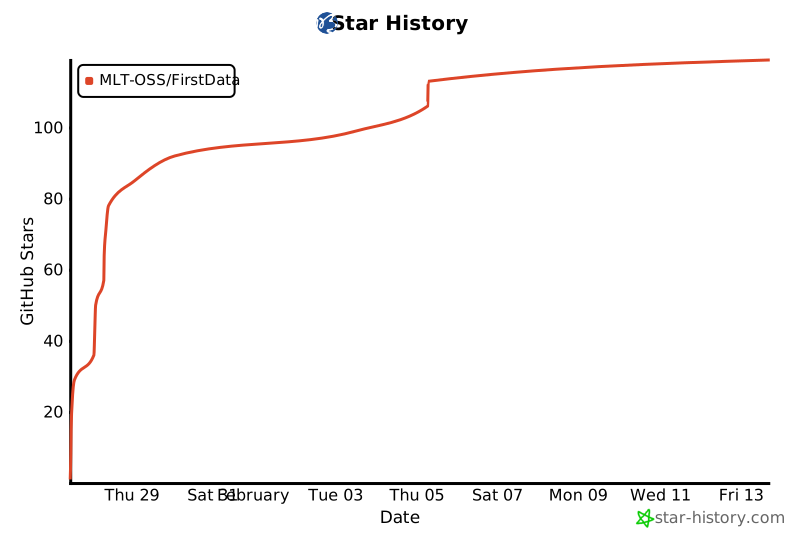](https://www.star-history.com/#MLT-OSS/FirstData&type=date&legend=top-left)
## 📄 License
This project is open-sourced under the [MIT License](LICENSE).
---
<p align="center">
<strong>打造AI时代的可信底座 | Building the Trusted Foundation for AI Era | 让每一次深度思考都建立在可验证的事实之上 | Every Deep Thought Based on Verifiable Facts</strong><br>
<strong>Building the Trusted Foundation for AI Era | Every Deep Thought Based on Verifiable Facts</strong>
</p>
<p align="center">
<sub>Made with ❤️ by the FirstData Community</sub>
</p>
<p align="center">
<a href="#-为什么选择-firstdata">为什么</a> •
<a href="#-核心优势">核心优势</a> •
<a href="#-数据源概览">数据源概览</a> •
<a href="#-快速开始">快速开始</a> •
<a href="#-如何贡献">如何贡献</a>
</p>



