

内容
# phabricator-mcp
一款封装Phabricator的Conduit API的MCP(模型上下文协议)服务器,使任何MCP客户端都能与Phabricator任务、代码审查、仓库等交互。
## 星级历史
[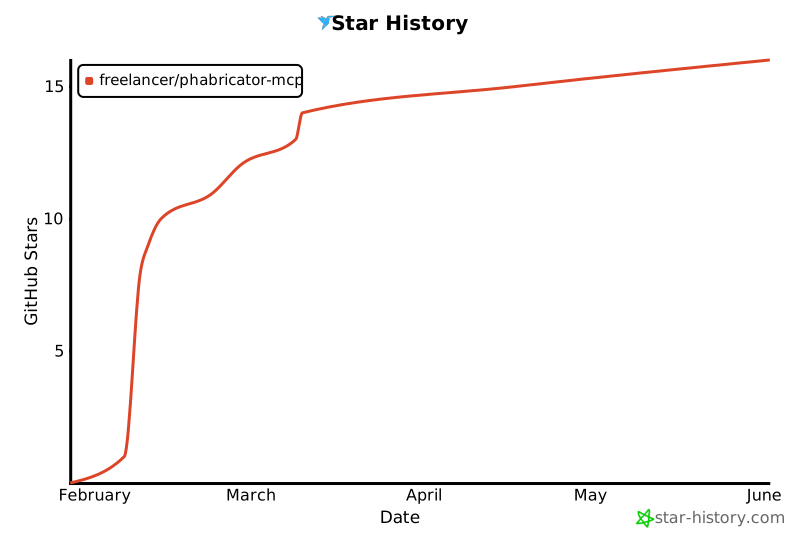](https://star-history.com/#freelancer/phabricator-mcp&Date)
## 安装
### Claude 代码(CLI)
```bash
claude mcp add --scope user phabricator -- npx @freelancercom/phabricator-mcp@latest
```
或使用环境变量(如果不使用 `~/.arcrc`):
```bash
claude mcp add --scope user phabricator \
-e PHABRICATOR_URL=https://phabricator.example.com \
-e PHABRICATOR_API_TOKEN=api-xxxxx \
-- npx @freelancercom/phabricator-mcp@latest
```
`--scope user`标志全局安装服务器,使其在所有项目中可用。
### Codex(OpenAI CLI)
在您的Codex配置文件(`~/.codex/config.json`)中添加:
```json
{
"mcpServers": {
"phabricator": {
"command": "npx",
"args": ["@freelancercom/phabricator-mcp@latest"],
"env": {
"PHABRICATOR_URL": "https://phabricator.example.com",
"PHABRICATOR_API_TOKEN": "api-xxxxxxxxxxxxx"
}
}
}
}
```
### opencode
在您的opencode配置文件(`~/.config/opencode/config.json`)中添加:
```json
{
"mcp": {
"servers": {
"phabricator": {
"command": "npx",
"args": ["@freelancercom/phabricator-mcp@latest"],
"env": {
"PHABRICATOR_URL": "https://phabricator.example.com",
"PHABRICATOR_API_TOKEN": "api-xxxxxxxxxxxxx"
}
}
}
}
}
```
### VS Code with Claude 扩展
在您的VS Code `settings.json`中添加:
```json
{
"claude.mcpServers": {
"phabricator": {
"command": "npx",
"args": ["@freelancercom/phabricator-mcp@latest"],
"env": {
"PHABRICATOR_URL": "https://phabricator.example.com",
"PHABRICATOR_API_TOKEN": "api-xxxxxxxxxxxxx"
}
}
}
}
```
### Cursor
在您的Cursor MCP配置文件(`~/.cursor/mcp.json`)中添加:
```json
{
"mcpServers": {
"phabricator": {
"command": "npx",
"args": ["@freelancercom/phabricator-mcp@latest"],
"env": {
"PHABRICATOR_URL": "https://phabricator.example.com",
"PHABRICATOR_API_TOKEN": "api-xxxxxxxxxxxxx"
}
}
}
}
```
### GitHub Copilot(VS Code)
在您的VS Code `settings.json`中添加:
```json
{
"github.copilot.chat.mcp.servers": {
"phabricator": {
"command": "npx",
"args": ["@freelancercom/phabricator-mcp@latest"],
"env": {
"PHABRICATOR_URL": "https://phabricator.example.com",
"PHABRICATOR_API_TOKEN": "api-xxxxxxxxxxxxx"
}
}
}
}
```
## 升级
默认安装使用 `@freelancercom/phabricator-mcp@latest`,这告诉npx在每次运行时检查更新。不需要采取任何操作。
如果您固定了特定版本(例如 `@freelancercom/phabricator-mcp@1.0.0`)或省略了版本后缀,npx会缓存包并且不会获取新版本。要升级:
```bash
npx clear-npx-cache
```
然后重启您的MCP客户端。
### 从 `github:freelancer/phabricator-mcp` 迁移
如果您之前使用GitHub URL安装,请更新您的配置以使用npm包:
```bash
# 删除旧服务器
claude mcp remove phabricator -s user
# 添加新服务器
claude mcp add --scope user phabricator -- npx @freelancercom/phabricator-mcp@latest
```
对于JSON配置,请在参数中将 `["github:freelancer/phabricator-mcp"]` 替换为 `["@freelancercom/phabricator-mcp@latest"]`。
## 配置
服务器自动从 `~/.arcrc` 读取配置(由 [Arcanist](https://secure.phabricator.com/book/phabricator/article/arcanist/) 创建)。如果您已经设置了 `arc`,则不需要额外的配置。
或者,设置环境变量(优先级高于 `.arcrc`):
- `PHABRICATOR_URL` - Phabricator 实例 URL
- `PHABRICATOR_API_TOKEN` - Conduit API令牌
您可以在Phabricator实例中从 **设置 > Conduit API令牌** 获取API令牌。
### 推荐:允许只读工具权限
默认情况下,Claude Code将提示您每次调用Phabricator工具时获取权限。建议允许列出只读工具,以便它们在无需提示的情况下运行,同时将写操作(创建、编辑、评论)保留在确认步骤之后。
在您的 `~/.claude/settings.json` 中添加:
```json
{
"permissions": {
"allow": [
"mcp__phabricator__phabricator_task_search",
"mcp__phabricator__phabricator_task_status_search",
"mcp__phabricator__phabricator_task_priority_search",
"mcp__phabricator__phabricator_revision_search",
"mcp__phabricator__phabricator_diff_search",
"mcp__phabricator__phabricator_diff_raw",
"mcp__phabricator__phabricator_revision_paths",
"mcp__phabricator__phabricator_repository_search",
"mcp__phabricator__phabricator_commit_search",
"mcp__phabricator__phabricator_repository_browse",
"mcp__phabricator__phabricator_repository_file_content",
"mcp__phabricator__phabricator_branch_search",
"mcp__phabricator__phabricator_tag_search",
"mcp__phabricator__phabricator_repository_file_history",
"mcp__phabricator__phabricator_repository_code_search",
"mcp__phabricator__phabricator_user_whoami",
"mcp__phabricator__phabricator_user_search",
"mcp__phabricator__phabricator_project_search",
"mcp__phabricator__phabricator_column_search",
"mcp__phabricator__phabricator_paste_search",
"mcp__phabricator__phabricator_document_search",
"mcp__phabricator__phabricator_blog_search",
"mcp__phabricator__phabricator_blog_post_search",
"mcp__phabricator__phabricator_file_search",
"mcp__phabricator__phabricator_file_info",
"mcp__phabricator__phabricator_buildable_search",
"mcp__phabricator__phabricator_build_search",
"mcp__phabricator__phabricator_build_target_search",
"mcp__phabricator__phabricator_build_log_search",
"mcp__phabricator__phabricator_build_plan_search",
"mcp__phabricator__phabricator_owners_search",
"mcp__phabricator__phabricator_feed_query",
"mcp__phabricator__phabricator_conpherence_search",
"mcp__phabricator__phabricator_conpherence_read",
"mcp__phabricator__phabricator_audit_query",
"mcp__phabricator__phabricator_phid_lookup",
"mcp__phabricator__phabricator_phid_query",
"mcp__phabricator__phabricator_transaction_search",
"mcp__phabricator__phabricator_version"
]
}
}
```
要允许列出所有工具,包括写操作,请使用 `"mcp__phabricator__*"` 代替。
## 可用工具
### 任务管理(Maniphest)
| 工具 | 描述 |
|------|-------------|
| `phabricator_task_search` | 搜索任务并过滤(状态、指派者、项目等) |
| `phabricator_task_create` | 创建新任务 |
| `phabricator_task_edit` | 编辑现有任务 |
| `phabricator_task_add_comment` | 添加评论到任务 |
| `phabricator_task_status_search` | 列出实例上所有可用的任务状态 |
| `phabricator_task_priority_search` | 列出实例上所有可用的任务优先级 |
### 代码审查(Differential)
| 工具 | 描述 |
|------|-------------|
| `phabricator_revision_search` | 搜索代码审查修订 |
| `phabricator_revision_edit` | 编辑修订(接受、拒绝、放弃、添加审查者、评论等) |
| `phabricator_revision_inline_comment` | 在差异的特定行上创建内联评论 |
| `phabricator_diff_raw` | 获取差异ID的原始差异/补丁内容 |
| `phabricator_diff_search` | 搜索差异(修订内的代码更改快照) |
| `phabricator_revision_paths` | 获取修订的更改文件路径列表 |
### 仓库(Diffusion)
| 工具 | 描述 |
|------|-------------|
| `phabricator_repository_search` | 搜索仓库 |
| `phabricator_commit_search` | 搜索提交 |
| `phabricator_repository_browse` | 浏览仓库目录树 |
| `phabricator_repository_file_content` | 读取仓库中的文件内容 |
| `phabricator_branch_search` | 列出仓库中的分支 |
| `phabricator_tag_search` | 列出仓库中的标签 |
| `phabricator_repository_file_history` | 获取文件路径的提交历史 |
| `phabricator_repository_code_search` | 搜索仓库中的文件内容(grep) |
| `phabricator_repository_edit` | 创建或编辑Diffusion仓库 |
### 用户
| 工具 | 描述 |
|------|-------------|
| `phabricator_user_whoami` | 获取当前认证用户 |
| `phabricator_user_search` | 搜索用户 |
### 项目
| 工具 | 描述 |
|------|-------------|
| `phabricator_project_search` | 搜索项目 |
| `phabricator_project_edit` | 创建或编辑项目 |
| `phabricator_column_search` | 搜索工作板列 |
### 剪贴板
| 工具 | 描述 |
|------|-------------|
| `phabricator_paste_search` | 搜索剪贴板 |
| `phabricator_paste_create` | 创建剪贴板 |
| `phabricator_paste_edit` | 编辑现有剪贴板 |
### 维基(Phriction)
| 工具 | 描述 |
|------|-------------|
| `phabricator_document_search` | 搜索维基文档 |
| `phabricator_document_create` | 创建新维基文档 |
| `phabricator_document_edit` | 编辑维基文档标题或内容 |
| `phabricator_document_add_comment` | 添加评论到维基文档 |
### 博客(Phame)
| 工具 | 描述 |
|------|-------------|
| `phabricator_blog_search` | 搜索Phame博客 |
| `phabricator_blog_edit` | 创建或编辑Phame博客 |
| `phabricator_blog_post_search` | 搜索博客帖子 |
| `phabricator_blog_post_create` | 创建新博客帖子 |
| `phabricator_blog_post_edit` | 编辑现有博客帖子 |
| `phabricator_blog_post_add_comment` | 添加评论到博客帖子 |
### 交易
| 工具 | 描述 |
|------|-------------|
| `phabricator_transaction_search` | 搜索任何对象上的交易(评论、状态更改等) |
### 文件
| 工具 | 描述 |
|------|-------------|
| `phabricator_file_upload` | 上传文件并获取ID以嵌入描述/评论中使用 `{F<id>}` |
| `phabricator_file_search` | 搜索文件 |
| `phabricator_file_info` | 获取文件元数据(名称、大小、MIME类型、URI) |
### 构建(Harbormaster)
| 工具 | 描述 |
|------|-------------|
| `phabricator_buildable_search` | 搜索可构建对象(修订/提交与构建) |
| `phabricator_build_search` | 搜索构建(CI/构建结果) |
| `phabricator_build_target_search` | 搜索构建目标(单个构建步骤) |
| `phabricator_build_log_search` | 搜索构建日志(构建步骤的输出) |
| `phabricator_build_command` | 向Harbormaster报告构建状态(通过、失败、工作) |
| `phabricator_build_plan_search` | 搜索构建计划(CI管道配置) |
### 代码所有权(Owners)
| 工具 | 描述 |
|------|-------------|
| `phabricator_owners_search` | 搜索代码所有权包 |
### 活动 Feed
| 工具 | 描述 |
|------|-------------|
| `phabricator_feed_query` | 查询活动 Feed(最近的任务更新、修订更改、提交等) |
### 聊天(Conpherence)
| 工具 | 描述 |
|------|-------------|
| `phabricator_conpherence_search` | 搜索聊天室/线程 |
| `phabricator_conpherence_create` | 创建新的聊天室/线程 |
| `phabricator_conpherence_edit` | 编辑聊天室(重命名、管理参与者) |
| `phabricator_conpherence_read` | 读取聊天线程中的消息 |
| `phabricator_conpherence_send` | 向聊天线程发送消息 |
### 审计
| 工具 | 描述 |
|------|-------------|
| `phabricator_audit_query` | 搜索提交审计请求 |
### PHID 实用程序
| 工具 | 描述 |
|------|-------------|
| `phabricator_phid_lookup` | 按名称查找PHID(例如“T123”,“@username”) |
| `phabricator_phid_query` | 获取有关PHID的详细信息 |
### 服务器
| 工具 | 描述 |
|------|-------------|
| `phabricator_version` | 获取正在运行的phabricator-mcp服务器的版本 |
## 用法
连接后,只需要求您的AI助手以自然语言执行Phabricator任务:
**任务**
- “显示我的已分配任务”
- “在项目Backend中创建一个名为‘修复登录错误’的任务”
- “在T12345上添加评论,说明修复已准备好进行审查”
- “关闭任务T12345”
- “有哪些可用于事件任务的自定义字段?”
- “在T12345上设置开始日期和根原因类别”
- “使T456成为T123的子任务”
- “上传此截图并将其添加到T789的描述中”
**代码审查**
- “显示我的打开的差异”
- “D6789的状态是什么?”
- “审查D6789中的代码更改”
- “在D6789中添加@alice作为审查者”
- “接受D6789”
- “在D6789的src/index.ts的第42行留下内联评论”
**仓库和构建**
- “在Backend仓库中显示src/config.ts的内容”
- “浏览主仓库中的/src目录”
- “D6789的构建是否通过?”
- “显示D6789的构建日志”
- “谁拥有/src/auth/中的代码?"
**搜索和查找**
- “查找用户john.doe”
- “搜索名称中包含‘backend’的项目”
- “搜索作者为alice的提交”
- “查找T123和D456”
- “显示D6789上的评论”
**维基和剪贴板**
- “查找有关部署的维基页面”
- “创建一个包含此错误日志的剪贴板”
**博客**
- “搜索有关发行说明的博客帖子”
- “在工程博客上创建一个新草稿博客帖子,标题为‘Q1更新’”
- “发布博客帖子J42”
- “在博客帖子J15上添加评论”
根据您的请求会自动调用适当的工具。
## 开发
```bash
git clone https://github.com/freelancer/phabricator-mcp.git
cd phabricator-mcp
npm install
npm run build
npm run dev # 监视模式
```
### 架构
- `src/index.ts` - 入口点,MCP服务器,stdio传输
- `src/config.ts` - 配置加载器(读取 `~/.arcrc` 或环境变量)
- `src/client/conduit.ts` - Phabricator Conduit API客户端
- `src/tools/*.ts` - 每个Phabricator应用程序的工具实现
## 许可证
MIT
MCP 配置
以下是此 MCP Server 的配置信息,可直接复制到 Cursor 或其他 MCP 客户端中使用。
mcp.json
连接信息
猜你喜欢
暂无推荐服务器