Content
# FieldFlow
FieldFlow turns OpenAPI-described REST endpoints into selectively filtered tools. It generates Pydantic models and FastAPI routes that forward requests to the upstream API and return only the fields the caller asks for. An optional MCP layer exposes those generated OpenAPI tools to Model Context Protocol clients such as Claude Desktop.
[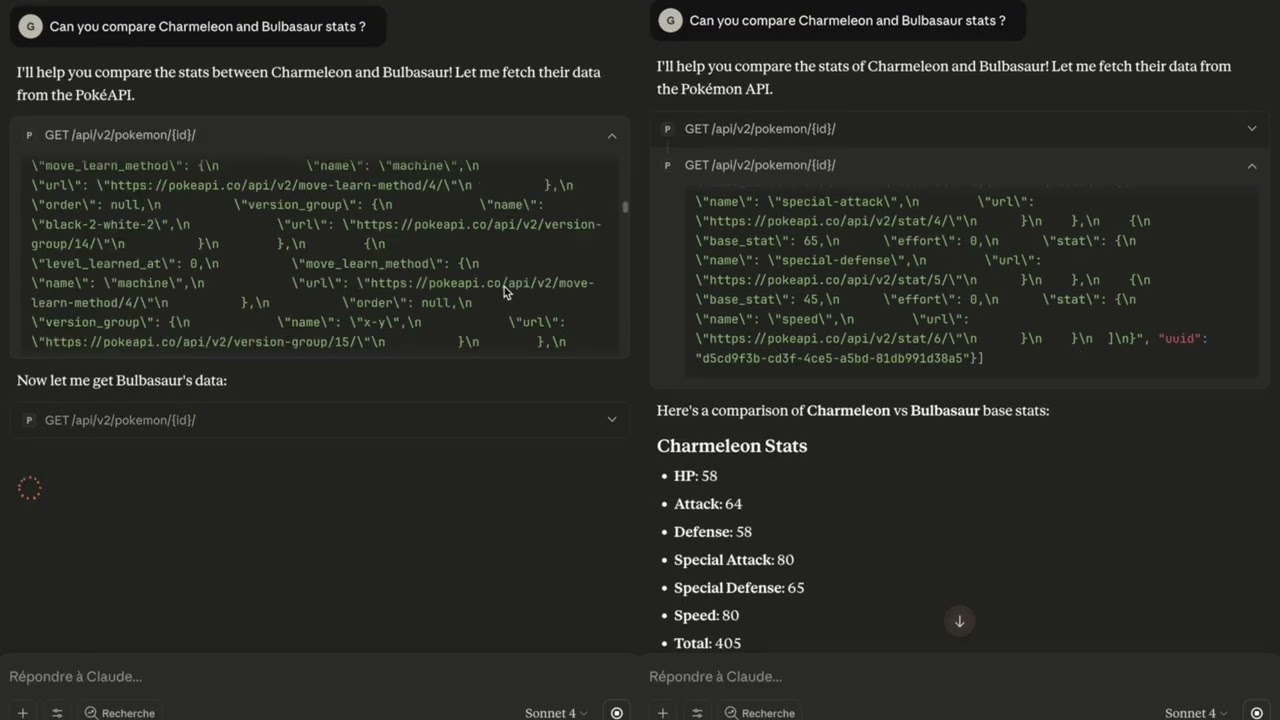](https://www.youtube.com/watch?v=-pgy0FICWpQ)
## Features
- Discovers endpoints and schemas from OpenAPI 3.0 JSON or YAML files.
- Builds request/response Pydantic models dynamically, preserving aliases and
optional fields.
- Generates FastAPI routes that accept parameters plus an optional `fields`
list to slice responses.
- Proxies requests with `httpx`, automatically formatting URL paths and query
parameters.
- Works with any OpenAPI-compliant spec, including nested schemas and refs.
## What FieldFlow Supports Today
FieldFlow currently has two supported application modes:
1. `fieldflow serve-http` exposes generated HTTP tool endpoints from an OpenAPI spec.
2. `fieldflow-mcp` exposes the same generated OpenAPI tools through MCP over stdio.
FieldFlow does not yet wrap arbitrary third-party MCP servers. That direction is planned around MCP tools that expose structured `outputSchema`, but it is not part of the current release.
## Project Layout
```
fieldflow/
config.py # Environment-based settings
http_app.py # FastAPI app factory
openapi_loader.py # JSON/YAML loader with PyYAML fallback
proxy.py # Async HTTP proxy that filters responses to requested fields
spec_parser.py # Schema parser and dynamic Pydantic model generator
tooling.py # FastAPI router builder for tool endpoints
fieldflow_mcp/
server.py # MCP server wrapper built on FastMCP
cli.py # CLI entry point for the MCP server
examples/
jsonplaceholder_openapi.yaml # Minimal sample spec
pokeapi_openapi.yaml # Larger spec for stress-testing
```
## Quickstart
```bash
python -m venv .venv
source .venv/bin/activate
pip install --upgrade pip
pip install -e '.[mcp]' # zsh users: quote to avoid globbing
fieldflow serve-http --reload
```
OpenAPI specs are resolved from `FIELD_FLOW_OPENAPI_SPEC_PATH`. If the spec
includes a `servers` entry the first URL is used; otherwise set
`FIELD_FLOW_TARGET_API_BASE_URL`.
### Environment Variables
| Variable | Description | Default |
| --- | --- | --- |
| `FIELD_FLOW_OPENAPI_SPEC_PATH` | Path to the OpenAPI JSON/YAML file | `examples/jsonplaceholder_openapi.yaml` |
| `FIELD_FLOW_TARGET_API_BASE_URL` | Upstream REST API base URL (overrides spec `servers`) | _derived from spec_ |
### Authentication
FieldFlow supports secure API authentication through environment variables. All credentials are handled securely with automatic sanitization in logs and error messages.
#### Simple Authentication
```bash
# Bearer token (OAuth 2.0, JWT)
export FIELDFLOW_AUTH_TYPE=bearer
export FIELDFLOW_AUTH_VALUE=your-token-here
# API Key
export FIELDFLOW_AUTH_TYPE=apikey
export FIELDFLOW_AUTH_HEADER=X-API-Key # Optional, defaults to X-API-Key
export FIELDFLOW_AUTH_VALUE=your-api-key-here
# Basic authentication
export FIELDFLOW_AUTH_TYPE=basic
export FIELDFLOW_AUTH_VALUE=base64-encoded-credentials
```
#### OpenAPI Security Schemes
When your OpenAPI spec defines security schemes, FieldFlow automatically uses them:
```yaml
components:
securitySchemes:
BearerAuth:
type: http
scheme: bearer
ApiKeyAuth:
type: apiKey
in: header
name: X-API-Key
```
With security schemes, provide credentials using the scheme name:
```bash
export FIELDFLOW_AUTH_BEARERAUTH_VALUE=your-bearer-token
export FIELDFLOW_AUTH_APIKEYAUTH_VALUE=your-api-key
```
**Security features:**
- Credentials are never logged or stored
- Auth headers are sanitized in all error messages
- Memory-safe handling with immediate credential clearing
- Environment-only configuration (no hardcoded secrets)
## Example Tool Calls
### JSONPlaceholder (default)
Fetch only selected fields for a user:
```bash
curl -X POST http://127.0.0.1:8000/tools/get_user_info \
-H "Content-Type: application/json" \
-d '{"user_id": 1, "fields": ["name", "email"]}'
```
List posts for a user, reducing each item to `id` and `title`:
```bash
curl -X POST http://127.0.0.1:8000/tools/list_posts \
-H "Content-Type: application/json" \
-d '{"userId": 1, "fields": ["id", "title"]}'
```
### Nested field selectors
Request deeply nested data with a JSONPath-lite syntax tailored for LLMs:
- Use dots (`damage_relations.double_damage_from`) to traverse objects.
- Append `[]` to map over every element in a list (`moves[].move.name`).
- Mix top-level and nested selectors in the same request; missing branches are skipped.
Example with the PokeAPI spec:
```bash
curl -X POST http://127.0.0.1:8000/tools/pokemon_read \
-H "Content-Type: application/json" \
-d '{"id": 150, "fields": ["name", "types[].type.name", "stats.attack.base_stat"]}'
```
The proxy trims everything except Mewtwo's name, each type name, and the attack stat. Invalid selectors (for example `moves[0].move`) return a 422 error before the upstream API is called.
### PokeAPI
Switch to the richer PokeAPI specification:
```bash
export FIELD_FLOW_OPENAPI_SPEC_PATH=examples/pokeapi_openapi.yaml
fieldflow serve-http --reload
```
List the first few abilities:
```bash
curl -X POST http://127.0.0.1:8000/tools/ability_list \
-H "Content-Type: application/json" \
-d '{"limit": 5, "fields": ["results"]}'
```
Query a single ability by ID:
```bash
curl -X POST http://127.0.0.1:8000/tools/ability_read \
-H "Content-Type: application/json" \
-d '{"id": 65, "fields": ["name", "effect_entries"]}'
```
FastAPI automatically publishes documentation at
[http://127.0.0.1:8000/docs](http://127.0.0.1:8000/docs), letting you explore
and invoke the generated tool endpoints interactively.
## Command Line
Use the bundled CLI for a streamlined experience:
```bash
# Run the HTTP proxy
fieldflow serve-http --host 127.0.0.1 --port 8000
# Run the MCP server over stdio (ideal for Claude Desktop)
fieldflow-mcp
```
### Reduce Noisy CLI Output (`fieldflow-cli`)
`fieldflow-cli` wraps any JSON-emitting CLI (`gh`, `gcloud`, `kubectl`, `aws`,
…) and returns only the fields you project. The wrapped command runs once,
but the model only ever sees the reduced payload — which is how you keep
noisy `list` / `get` / `describe` / `logs` output out of your context window.
**Example — open PRs on a GitHub repo:**
```bash
# 1. Inspect the shape (writes a compact manifest to .fieldflow/inspect/)
fieldflow-cli inspect -- \
gh pr list --repo mnfst/manifest --state open \
--json number,title,author,createdAt,isDraft,additions,deletions,changedFiles,labels,body \
--limit 100
# 2. Re-run with just the fields you actually need
fieldflow-cli \
--field "[].number" \
--field "[].title" \
--field "[].author.login" \
--field "[].createdAt" \
--field "[].isDraft" \
--field "[].additions" \
--field "[].deletions" \
--field "[].changedFiles" \
--field "[].labels[].name" \
-- \
gh pr list --repo mnfst/manifest --state open \
--json number,title,author,createdAt,isDraft,additions,deletions,changedFiles,labels,body \
--limit 100
```
On a real run against `mnfst/manifest` (26 open PRs), this dropped the
payload from **23,722 tokens to 2,779** — an **88% reduction**, mostly by
stripping PR `body` markdown.
**Example — Cloud Run error logs:**
```bash
fieldflow-cli \
--field "[].timestamp" \
--field "[].severity" \
--field "[].httpRequest.requestUrl" \
--field "[].jsonPayload.message" \
--max-items 25 \
-- \
gcloud logging read \
'resource.type="cloud_run_revision" AND severity>=ERROR' \
--project=my-project --freshness=24h --limit=2000 --format=json
```
The wrapped command must already support JSON output (`gh --json …`,
`gcloud --format=json`, `kubectl -o json`, `aws --output json`). If the
projection is too narrow, broaden it and rerun. The older
`fieldflow run-cli …` form still works, but `fieldflow-cli …` is the
intended direct wrapper.
### Claude Code Skill (one-step install)
This repo ships a Claude Code skill that teaches the agent **when** to reach
for `fieldflow-cli` automatically — on noisy `gh`, `gcloud`, `kubectl`, `aws`
commands, but not on trivial local ones. Install it with a symlink so it
stays in sync with the repo:
```bash
mkdir -p ~/.claude/skills
ln -s "$(pwd)/.agents/skills/fieldflow-cli" ~/.claude/skills/fieldflow-cli
```
Or copy it if you prefer a snapshot:
```bash
cp -r .agents/skills/fieldflow-cli ~/.claude/skills/
```
That's it — next time Claude Code starts, the `fieldflow-cli` skill is
available and will be invoked on qualifying JSON CLI commands.
The skill source lives at
[`.agents/skills/fieldflow-cli/SKILL.md`](.agents/skills/fieldflow-cli/SKILL.md).
An OpenAI-agent variant is also provided under
[`.agents/skills/fieldflow-cli/agents/openai.yaml`](.agents/skills/fieldflow-cli/agents/openai.yaml).
## Testing
Install the development dependencies and run the same checks used in CI:
```bash
pip install -e '.[dev,mcp]'
ruff check fieldflow fieldflow_mcp tests
black --check fieldflow fieldflow_mcp tests
mypy fieldflow fieldflow_mcp
pytest
python -m build
python -m pip check
```
## MCP Integration
To connect the server to Claude Desktop:
1. Install with the MCP extra (`pip install -e '.[mcp]'`).
2. Claude Desktop launches configured MCP servers on startup, so there is no need to run `fieldflow-mcp` manually.
3. Open Claude Desktop > Settings > Developer > Modify Config, then paste a configuration that points to the FieldFlow server (see `claude_config_example/claude_desktop_config.json`).
4. For additional details, review the Model Context Protocol guide: https://modelcontextprotocol.io/docs/develop/connect-local-servers.
5. Claude will automatically list the generated tools and can invoke them during chats once the config is saved.
## Contributing
Contributions are welcome! Please read [CONTRIBUTING.md](CONTRIBUTING.md) for
instructions on setting up a development environment and submitting changes.
## License
This project is licensed under the [MIT License](LICENSE).



