Content
## Control Gemini Web Version through CDP for AI Image Generation, Conversation, Image Extraction, and Other Automated Operations.
<!-- PROJECT SHIELDS -->
<div align="center">
<a href="https://github.com/WJZ-P/gemini-skill/graphs/contributors">
<img src="https://img.shields.io/github/contributors/WJZ-P/gemini-skill.svg?style=flat-square" alt="Contributors" style="height: 30px">
</a>
<a href="https://github.com/WJZ-P/gemini-skill/network/members">
<img src="https://img.shields.io/github/forks/WJZ-P/gemini-skill.svg?style=flat-square" alt="Forks" style="height: 30px">
</a>
<a href="https://github.com/WJZ-P/gemini-skill/stargazers">
<img src="https://img.shields.io/github/stars/WJZ-P/gemini-skill.svg?style=flat-square" alt="Stargazers" style="height: 30px">
</a>
<a href="https://github.com/WJZ-P/gemini-skill/issues">
<img src="https://img.shields.io/github/issues/WJZ-P/gemini-skill.svg?style=flat-square" alt="Issues" style="height: 30px">
</a>
<a href="https://github.com/WJZ-P/gemini-skill/blob/main/LICENSE">
<img src="https://img.shields.io/github/license/WJZ-P/gemini-skill.svg?style=flat-square" alt="License" style="height: 30px">
</a>
</div>
<br>
<!-- PROJECT LOGO -->
<p align="center">
<a href="https://github.com/WJZ-P/gemini-skill/">
<img src="markdown/gemini-color.svg" alt="Logo" width="96" height="96">
</a>
</p>
<h1 align="center">Gemini Skill</h1>
<p align="center">
<a href="#-usage">Quick Start</a>
·
<a href="https://github.com/WJZ-P/gemini-skill/issues">Report Bug</a>
·
<a href="https://github.com/WJZ-P/gemini-skill/issues">Request Feature</a>
</p>
<p align="center">
<a href="./README.en.md">English</a> |
</p>
<br>
<p align="center">
<a href="https://www.bilibili.com/video/BV1e54y1z7XM">
<img src="markdown/home.png" alt="纯蓝">
</a>
</p>
<h2 align="center">
</h2>
## Table of Contents
- [Features](#-features)
- [Architecture](#️-architecture)
- [Installation](#-installation)
- [Configuration](#️-configuration)
- [Usage](#-usage)
- [MCP Server List](#-mcp-server-list)
- [Daemon Lifecycle](#-daemon-lifecycle)
- [Project Structure](#-project-structure)
- [Precautions](#️-precautions)
- [To Do List](#-to-do-list)
- [License](#-license)
<br>
<!-- EXAMPLE -->
<p align="center">
<img src="./markdown/example.png" alt="Gemini Image Generation Example" width="100%">
</p>
<p align="center"><em>▲ Automatically Generate Memes through AI Conversation</em></p>
<br>
## ✨ Features
| | Feature | Description |
|:---:|------|------|
| 🎨 | **AI Image Generation** | Send prompt to automatically generate images, supporting high-definition original image download |
| 💬 | **Text Conversation** | Engage in multi-turn conversations with Gemini |
| 🖼️ | **Image Upload** | Upload reference images to generate new images based on the references |
| 📥 | **Image Extraction** | Extract images from conversations, supporting base64 and CDP full-size downloads |
| 🔄 | **Conversation Management** | Create new conversations, temporary conversations, switch models, and navigate to historical conversations |
| 🧹 | **Automatic Watermark Removal** | Automatically remove Gemini watermarks from downloaded images |
| 🤖 | **MCP Server** | Standard MCP protocol interface, callable by any MCP client |
<br>
## 🏗️ Architecture
```
┌─────────────────────────────────────────────────────┐
│ MCP Client (AI) │
│ Claude / CodeBuddy / ... │
└──────────────────────┬──────────────────────────────┘
│ stdio (JSON-RPC)
▼
┌─────────────────────────────────────────────────────┐
│ mcp-server.js (MCP Protocol Layer) │
│ Register all MCP tools and orchestrate call flow │
└──────────────────────┬──────────────────────────────┘
│
▼
┌─────────────────────────────────────────────────────┐
│ index.js → browser.js (Connection Layer) │
│ ensureBrowser() → Automatically launch Daemon → CDP direct connection │
└──────────┬──────────────────────────────┬───────────┘
│ HTTP (acquire/status) │ WebSocket (CDP)
▼ ▼
┌──────────────────────┐ ┌─────────────────────────┐
│ Browser Daemon │ │ Chrome / Edge │
│ (Independent background process) │
│ daemon/server.js │───▶│ gemini.google.com │
│ ├─ engine.js │ │ │
│ ├─ handlers.js │ └─────────────────────────┘
│ └─ lifecycle.js │
│ Idle destruction every 30 minutes │
└──────────────────────┘
```
**Core Design Concepts:**
- **Daemon Mode** — Browser process managed by an independent Daemon, ensuring the browser does not close after MCP calls, and automatically releasing resources after 30 minutes of inactivity.
- **On-demand Startup** — Daemon will automatically launch if not running when an MCP tool is called.
- **Stealth Anti-scraping** — Using `puppeteer-extra-plugin-stealth` to bypass website detection.
- **Separation of Duties** — `mcp-server.js` (protocol layer) → `gemini-ops.js` (operation layer) → `browser.js` (connection layer) → `daemon/` (process management).
<br>
## 📦 Installation
### Prerequisites
- **Node.js** ≥ 18
- **Chrome / Edge / Chromium** — Install any of these browsers on your system (or specify the path via `BROWSER_PATH`).
- Ensure you are logged into a Google account in the browser (Gemini requires login).
### Install Dependencies
```bash
git clone https://github.com/WJZ-P/gemini-skill.git
cd gemini-skill
npm install
```
<br>
## ⚙️ Configuration
All configurations are set through environment variables or `.env` files. A `.env` template is provided in the project root directory for direct modification.
**Configuration Priority:** `process.env` > `.env.development` > `.env` > default code values.
> `.env.development` is not tracked by git and is suitable for storing local private configurations (e.g., browser paths).
### Browser Configuration
| Variable | Default Value | Description |
|------|--------|------|
| `BROWSER_PATH` | Auto-detection | Path to the browser executable, supporting Chrome / Edge / Chromium. If not set, the system-installed browser will be detected by priority. |
| `BROWSER_DEBUG_PORT` | `40821` | CDP remote debugging port. Multiple skills (e.g., douyin-upload-mcp-skill) sharing the same port will share the same browser instance. |
| `BROWSER_HEADLESS` | `false` | Whether to run in headless mode. It is recommended to set to `false` for the first use to facilitate Google account login. |
| `BROWSER_USER_DATA_DIR` | Auto-resolution | Browser user data directory, saving login state, cookies, etc. If not set, it will auto-resolve: `~/.wjz_browser_data` → browser default directory. |
| `BROWSER_PROTOCOL_TIMEOUT` | `60000` | CDP protocol timeout (milliseconds). Long operations like image generation may require an appropriate increase. |
### Daemon Configuration
| Variable | Default Value | Description |
|------|--------|------|
| `DAEMON_PORT` | `40225` | Daemon HTTP service port |
| `DAEMON_TTL_MS` | `1800000` | Idle timeout (milliseconds), defaulting to 30 minutes. Automatically closes the browser and exits the Daemon after timeout, and automatically restarts on the next call. |
### Other Configurations
| Variable | Default Value | Description |
|------|--------|------|
| `OUTPUT_DIR` | `./gemini-image` | Image output directory |
### About OpenClaw Browser Reuse
OpenClaw's default CDP port is **18800**. If you wish to reuse the browser session started by OpenClaw, you can set `BROWSER_DEBUG_PORT` to `18800`:
```env
BROWSER_DEBUG_PORT=18800
```
**However, note that** the browser session provided by OpenClaw **does not integrate Stealth anti-scraping plugins**, which may not be as effective in anti-detection as the browser instances maintained by this project. This project uses `puppeteer-extra-plugin-stealth` to provide complete anti-scraping protection (hiding webdriver flags, simulating real browser fingerprints, etc.), which can better evade website automation detection.
**Recommendation:** Unless you have special requirements, it is recommended to use the default port `40821` and let the project manage the browser instance for the best anti-scraping effect.
<br>
## 🚀 Usage
### Method 1: As MCP Server (Recommended)
Add the following to your MCP client configuration file:
```json
{
"mcpServers": {
"gemini": {
"command": "node",
"args": ["<absolute project path>/src/mcp-server.js"]
}
}
}
```
After starting, AI can call all tools through the MCP protocol.
### Method 2: Command Line Startup
```bash
# Start MCP Server (stdio mode for AI client calls)
npm run mcp
# Start Browser Daemon separately (usually not needed, MCP will automatically launch)
npm run daemon
# Run Demo example
npm run demo
```
### Method 3: As Library Call
```javascript
import { createGeminiSession, disconnect } from './src/index.js';
const { ops } = await createGeminiSession();
// Image generation
const result = await ops.generateImage('Draw a cute kitten', { fullSize: true });
console.log('Image saved to:', result.filePath);
// Disconnect (do not close the browser, let Daemon continue to manage)
disconnect();
```
<br>
## 🔧 MCP Server List
### Core Image Generation
| Tool Name | Description | Main Parameters |
|--------|------|----------|
| `gemini_generate_image` | Complete image generation process (takes 60~120s) | `prompt`, `newSession`, `referenceImages`, `fullSize`, `timeout` |
### Conversation Management
| Tool Name | Description | Main Parameters |
|--------|------|----------|
| `gemini_new_chat` | Create a new blank conversation | None |
| `gemini_temp_chat` | Enter temporary conversation mode | None |
| `gemini_navigate_to` | Navigate to a specified Gemini URL (e.g., historical conversations) | `url`, `timeout` |
### Model and Conversation
| Tool Name | Description | Main Parameters |
|--------|------|----------|
| `gemini_switch_model` | Switch model (pro/quick/think) | `model` |
| `gemini_send_message` | Send text and wait for a response (takes 10~60s) | `message`, `timeout` |
### Image Operations
| Tool Name | Description | Main Parameters |
|--------|------|----------|
| `gemini_upload_images` | Upload images to the input box | `images` |
| `gemini_get_images` | Get all image metadata in the conversation | None |
| `gemini_extract_image` | Extract image base64 and save locally | `imageUrl` |
| `gemini_download_full_size_image` | Download full-size high-definition images | `index` |
| `gemini_share_latest_image` | Create a public share link for the image and return `https://gemini.google.com/share/...` | `index`, `timeout`, `copyToClipboard`, `closeDialog` |
### Text Responses
| Tool Name | Description | Main Parameters |
|--------|------|----------|
| `gemini_get_all_text_responses` | Get all text responses | None |
| `gemini_get_latest_text_response` | Get the latest text response | None |
### Diagnostics and Management
| Tool Name | Description | Main Parameters |
|--------|------|----------|
| `gemini_check_login` | Check Google login status | None |
| `gemini_probe` | Probe page element status | None |
| `gemini_reload_page` | Refresh the page | `timeout` |
| `gemini_browser_info` | Get browser connection information | None |
<br>
## 🔄 Daemon Lifecycle
```
Initial MCP call
│
├─ Daemon not running → Automatically spawn (detached + unref)
│ → Polling wait for readiness (up to 15s)
│
├─ GET /browser/acquire → Launch/reuse browser + reset 30-minute countdown
│
├─ MCP tool execution completed → disconnect() (disconnect WebSocket, do not close browser)
│
├─ Another call within 30 minutes → Reset countdown (renewal)
│
└─ No usage for 30 minutes → Close browser + close HTTP service + exit process
(Automatically restart on the next call)
```
**Daemon API Endpoints:**
| Endpoint | Description |
|------|------|
| `GET /browser/acquire` | Obtain browser connection (will renew) |
| `GET /browser/status` | Query browser status (does not renew) |
| `POST /browser/release` | Actively destroy browser |
| `GET /health` | Daemon health check |
<br>
## 📁 Project Structure
```
gemini-skill/
├── src/
│ ├── index.js # Unified Entrance
│ ├── mcp-server.js # MCP Protocol Service (Registers All Tools)
│ ├── gemini-ops.js # Gemini Page Operations (Core Logic)
│ ├── operator.js # Underlying DOM Operation Encapsulation
│ ├── browser.js # Browser Connector (面向 Skill)
│ ├── config.js # Unified Configuration Center
│ ├── util.js # Utility Functions
│ ├── watermark-remover.js # Image Watermark Removal (Based on sharp)
│ ├── demo.js # Usage Example
│ ├── assets/ # Static Resources
│ └── daemon/ # Browser Daemon (Independent Process)
│ ├── server.js # HTTP Microservice Entrance
│ ├── engine.js # Browser Engine (launch/connect/terminate)
│ ├── handlers.js # API Routing Processor
│ └── lifecycle.js # Lifecycle Control (Lazy Destruction Countdown)
├── references/ # Reference Documents
├── SKILL.md # AI Invocation Specification (MCP Client Reads)
├── package.json
└── .env # Environment Configuration (Need to Create Manually)
```
<br>
## ⚠️ Notes
1. **Login Required for First Use** — The first time you run it, the browser will open the Gemini page, please manually complete the Google account login. The login state will be saved in `userDataDir`, and subsequent use does not require repeated login.
2. **Do Not Run Multiple Instances Simultaneously** — The same CDP port can only have one browser instance, otherwise, it will cause port conflicts.
3. **Windows Server Attention** — Although path normalization and Safe Browsing bypass are built-in, it is still recommended to check:
- Chrome/Edge are correctly installed
- The output directory has write permissions
- The firewall does not block localhost communication
4. **Image Generation Takes Longer** — Usually 60~120 seconds, MCP client's `timeoutMs` is recommended to be set to ≥ 180000 (3 minutes).
<br>
## 📝 To Do List
- [x] **MCP Protocol Full Tool Registration**
- [x] **Daemon Process Self-Start on Demand**
- [x] **High-Definition Original Image CDP Download**
- [x] **Automatic Watermark Removal**
- [x] **Reference Image Upload & Image Generation**
- [x] **History Session Navigation**
- [ ] **Multi-Browser Instance Parallel Support**
- [ ] **Support Music Generation**
- [ ] **Support Video Generation**
<br>
## 📄 License
This project is signed with the MIT license, please refer to [LICENSE](https://github.com/WJZ-P/gemini-skill/blob/main/LICENSE)
## LINUX DO
This project supports the [LINUX DO](https://linux.do) community
<br>
## If you find it useful, please give it a ⭐!
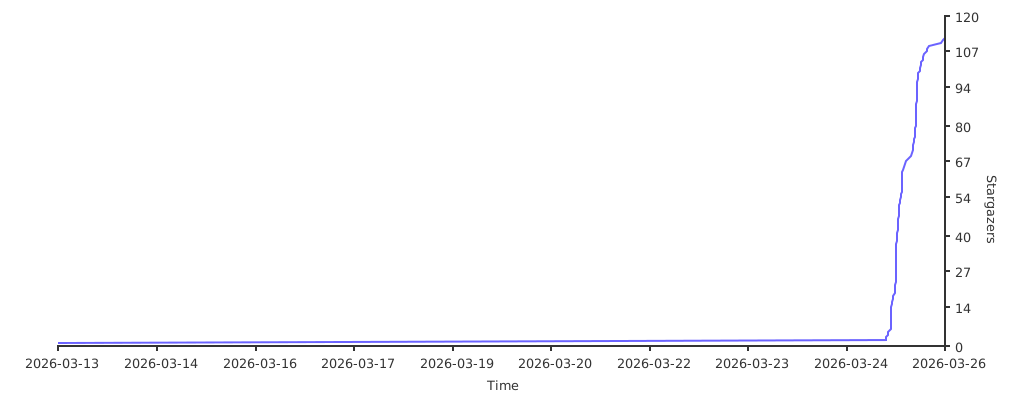
## ⭐ Star History
[](https://starchart.cc/WJZ-P/gemini-skill)



