Content
# Anything Analyzer
[English](README.en.md)
> **Web, desktop applications, terminal commands, Python scripts, mobile apps — no matter where the traffic comes from, capture it and let AI automatically reverse analyze.**
[](https://www.electronjs.org/)
[](https://react.dev/)
[](https://www.typescriptlang.org/)
[](LICENSE)
<img alt="Anything Analyzer Screenshot" src="https://github.com/user-attachments/assets/87f24186-ea00-4a03-9634-4d7af4b224d4" />
---
## Why Use Anything Analyzer?
Traditional tools each manage one aspect: DevTools only looks at browsers, Fiddler/Charles only act as proxies, Wireshark can't see HTTPS. After capturing packets, you still need to manually flip through hundreds of requests and analyze them manually.
**Anything Analyzer is different — full-scenario packet capture + AI automatic analysis:**
```
Web Desktop App Terminal Script Mobile/IoT
Chrome Postman curl/wget Python App / Mini Program
│ Electron │ Node.js │
│ │ │ │ │
▼ ▼ ▼ ▼ ▼
┌──────────┐ ┌─────────────────────────────────────────────────────┐
│ Embedded │ │ MITM Proxy (port 8888) │
│ Browser │ │ System Proxy / Manual Specify / Wi-Fi Proxy │
└─────┬─────┘ └──────────────────────┬──────────────────────────────┘
│ │
└──────────┬───────────────────┘
▼
┌─────────────────┐
│ Unified Session │ ← All sources of requests converge into one session
└────────┬────────┘
▼
┌─────────────────┐
│ AI Intelligent │ ← One-click generation protocol reverse / security audit / encryption analysis report
└─────────────────┘
```
---
## Three Core Capabilities
### 1. Full-Scenario Packet Capture — Anything, Not Just Browsers
| Capture Object | How to Capture | Typical Scenarios |
|---------|--------|---------|
| **Web** | Embedded browser direct operation | Website API reverse, OAuth login, front-end encryption |
| **Desktop App** | MITM proxy + system proxy | Postman, Electron app, game client |
| **Terminal Command** | MITM proxy + environment variable | curl, wget, httpie |
| **Script Program** | MITM proxy + code configuration | Python requests, Node.js fetch, Go http |
| **Mobile / Tablet** | MITM proxy + Wi-Fi proxy | iOS/Android App, Mini Program, H5 |
| **IoT / Other Devices** | MITM proxy + gateway proxy | Smart home, embedded device HTTP communication |
All sources of requests **converge into one Session**, AI analysis handles them together.
### 2. AI Intelligent Analysis — Not Just Packet Capture, But Automatic Protocol Understanding
- **Two-Stage Analysis** — Phase 1 intelligent noise filtering → Phase 2 focused in-depth analysis
- **5 Analysis Modes** — Automatic identification / API reverse / security audit / performance analysis / JS encryption reverse
- **JS Hook Injection** — Automatic intercept fetch, XHR, crypto.subtle, CryptoJS, SM2/3/4 and other encryption calls
- **Encryption Code Extraction** — Automatically extract encryption-related code snippets from JS files
- **Streaming Output + Multi-Round Q&A** — Report real-time streaming display, can continue to ask questions about details
### 3. MCP Ecosystem Integration — Packet Capture Tool for AI Agents
- **MCP Client** — Access external MCP Server (stdio + StreamableHTTP), expand AI analysis capabilities
- **Built-in MCP Server** — Expose packet capture and analysis capabilities as MCP tools, can be directly called by Claude Desktop, Cursor, etc.
---
## Usage Scenarios
| Scenario | Traffic Source | What You Get |
|------|---------|-------------|
| **Reverse Website API** | Embedded browser | API endpoint documentation + authentication process + Python reproduction code |
| **Reverse App Protocol** | Mobile Wi-Fi proxy | App's hidden API + request signature logic |
| **JS Encryption Reverse** | Embedded browser + JS Hook | Encryption algorithm identification + process restoration + Python implementation |
| **Security Audit** | Browser + proxy hybrid | Token leakage, CSRF/XSS vulnerability, sensitive data exposure |
| **Debug CLI Tool** | Terminal curl/httpie | Complete request/response record + AI interpretation of each step |
| **Debug Microservice** | Script + environment variable proxy | Service call chain + authentication flow analysis |
---
## Anything Analyzer — Instructions
[Instructions](USAGE.md)
---
## Quick Start
### Download and Install
Download the installation package for the corresponding platform from [Releases](https://github.com/Mouseww/anything-analyzer/releases):
| Platform | File |
|------|------|
| Windows | `Anything-Analyzer-Setup-x.x.x.exe` |
| macOS (Apple Silicon) | `Anything-Analyzer-x.x.x-arm64.dmg` |
| macOS (Intel) | `Anything-Analyzer-x.x.x-x64.dmg` |
| Linux | `Anything-Analyzer-x.x.x.AppImage` |
### Capture Web — Embedded Browser
1. **Configure LLM** — Settings → LLM, fill in API Key (support OpenAI / Anthropic / any compatible API)
2. **New Session** — Input name and target URL
3. **Operate and Capture** — Operate the website in the embedded browser, click Start Capture
4. **AI Analysis** — Stop capturing, click Analyze, select analysis mode
### Capture App/Terminal/Mobile — MITM Proxy
1. Settings → MITM Proxy → **Install CA Certificate**
2. **Enable Proxy** (default port `8888`)
3. Configure proxy according to the scenario:
```bash
# ---- Terminal Command ----
curl -x http://127.0.0.1:8888 https://api.example.com/data
# ---- Python Script ----
proxies = {"http": "http://127.0.0.1:8888", "https": "http://127.0.0.1:8888"}
requests.get("https://api.example.com/data", proxies=proxies)
# ---- Node.js ----
HTTP_PROXY=http://127.0.0.1:8888 HTTPS_PROXY=http://127.0.0.1:8888 node app.js
# ---- System Global (Desktop App Automatically Goes through Proxy)----
# Settings to enable «Set as System Proxy»
# ---- Mobile / Tablet ----
# Wi-Fi Settings → HTTP Proxy → Manual → Enter computer IP + port 8888
# Then use mobile browser to access proxy address to download and install CA certificate
```
4. New Session (URL can be left blank) → Start Capture → External application traffic automatically converges
<details>
<summary>CA Certificate Detailed Description</summary>
- Certificate storage: `%APPDATA%/anything-analyzer/certs/` (Windows) / `~/Library/Application Support/anything-analyzer/certs/` (macOS)
- First installation requires administrator privileges (Windows UAC / macOS password)
- Settings can uninstall, regenerate or export certificate at any time
- Root CA valid for 10 years, child certificate for 825 days (compliant with Apple requirements)
- MITM proxy is **read-only capture**, does not modify request/response content
- WebSocket traffic tunnel forwarding, no decryption
- Single body limit 1MB, binary content automatically skipped
</details>
---
## All Features
<details>
<summary>Expand to view complete feature list</summary>
**Packet Capture Engine**
- Full network capture — CDP Fetch intercept, all HTTP requests/responses (including headers, body)
- MITM proxy — Built-in HTTPS man-in-the-middle proxy, automatically issue TLS certificate, cache by domain LRU
- Dual-channel capture — Browser CDP + MITM proxy, converge into the same session
- SSE / WebSocket identification — Automatically detect streaming communication and WebSocket upgrade requests
- Storage snapshot — Regularly collect Cookie, localStorage, sessionStorage changes
- Domain filtering — Request list grouped by domain, support partial match search
- Request source marking — Distinguish «CDP» and «proxy» sources
- Export request — Original request data exported as JSON file
**Browser**
- Multi-tab — Support pop-up window automatically captured as internal tab (OAuth process friendly)
- Tab protection — Prevent `window.close()` from closing tab, last tab unexpectedly destroyed automatically restored
- One-click clear environment — Cookies, localStorage, sessionStorage, cache one-click clear
**AI Analysis**
- Two-stage analysis — Phase 1 intelligent filtering → Phase 2 in-depth analysis, AI on-demand view request details
- Manual multi-select analysis — Check specified requests directly analyze, skip pre-filtering
- Custom Prompt template — Built-in multiple templates, support customization
- Streaming output + Q&A — Report real-time display, support multi-round dialogue
**System**
- System proxy integration — One-click set as system proxy (Windows registry / macOS networksetup / Linux gsettings)
- CA certificate management — Install / uninstall / regenerate / export, cross-platform support
- Global proxy — Support SOCKS5/HTTP/HTTPS proxy
- Automatic update — Built-in electron-updater
- Dark theme — Modern interface based on Ant Design
</details>
---
## Build from Source
```bash
git clone https://github.com/MouseWW/anything-analyzer.git
cd anything-analyzer
pnpm install
pnpm dev # Development mode
pnpm test # Run test
pnpm build && npx electron-builder --win # Build Windows installation package
```
> macOS release instructions: Automatic update relies on **signed and notarized** installation package. Before releasing mac version, please configure `CSC_LINK`, `CSC_KEY_PASSWORD`, `APPLE_ID`, `APPLE_APP_SPECIFIC_PASSWORD`, `APPLE_TEAM_ID` in repository Secrets, otherwise `ShipIt` cannot install updates.
**Environment Requirements:** Node.js >= 18 · pnpm · Visual Studio Build Tools (Windows)
## Tech Stack
| Layer | Technology |
|-------|-----------|
| Framework | Electron 35 + electron-vite |
| Frontend | React 19 + Ant Design 5 + TypeScript |
| Database | better-sqlite3 (local SQLite) |
| Protocol | Chrome DevTools Protocol (CDP) |
| Proxy | Built-in MITM HTTPS proxy (node-forge TLS) |
| AI | OpenAI / Anthropic / Custom LLM (Chat Completions + Responses API) |
| AI Extension | MCP Client (stdio + StreamableHTTP) + Built-in MCP Server |
<details>
<summary>Project Structure</summary>
```
src/
├── main/ # Electron main process
│ ├── ai/ # AI analysis pipeline (two-stage scheduling, prompt, LLM routing)
│ ├── capture/ # Packet capture engine (CDP Fetch + JS Hook + storage snapshot)
│ ├── cdp/ # Chrome DevTools Protocol management
│ ├── proxy/ # MITM proxy (CA management, certificate issuance, system proxy)
│ ├── mcp/ # MCP Client + built-in MCP Server
│ ├── db/ # SQLite data layer
│ └── session/ # Session lifecycle management
├── preload/ # Context bridge + Hook injection script
├── renderer/ # React UI (components + Hooks)
└── shared/ # Shared type definitions
```
</details>
---
This project `does not have` the following capabilities:
- Does not have the capability of [**illegal acquisition of computer data**].
- Does not have the capability of [**illegal modification of computer data**].
- Does not have the capability of [**illegal control of computer system**].
- Does not have the capability of [**destroying computer system**].
- Does not have [**built-in AI model**] (AI model configured by the user, please use in compliance with the "Interim Measures for the Management of Generative Artificial Intelligence Services")
**Please do not use this tool for any behavior that violates Chinese laws!!!!!**
---
Thanks to everyone on [LinuxDo](https://linux.do/) for their support!
---
## Sponsorship and Acknowledgment (the following services are all daily needs!)
| | |
|:---:|---|
| <a href="https://bloome.im/app?ref=Mouseww&utm_medium=github&utm_source=Mouseww-anything-analyzer-ivor-202607"><img src="resources/bloome-home.png" width="260" alt="Bloome"></a> | Want to use AI to analyze data? Bloome lets multiple AI agents (Claude, ChatGPT, DeepSeek, etc.) collaborate in one conversation — no setup, runs in the cloud, can be used on web and mobile devices, and you can share configured agents with your entire team.<br>👉 Try Bloome: **[Bloome_im](https://bloome.im/app?ref=Mouseww&utm_medium=github&utm_source=Mouseww-anything-analyzer-ivor-202607)** |
| <a href="https://doloffer.com/friend/Pa34D0CG"><img src="resources/doloffer-logo.png" width="180" alt="Doloffer"></a> | **[Doloffer](https://doloffer.com/friend/Pa34D0CG)** — GPT / Claude **genuine** membership subscription, much cheaper than the official price, I use it myself, highly recommended.<br>📖 [User Guide](https://github.com/Doloffer-g/guide) \| 🎁 Discount code: `Al8888` (enjoy 9% discount) |
| <a href="https://www.swiftproxy.net/?code=BYQBRGQD3"><img width="1024" height="300" alt="3b3d9abc849f8249e00730b5c6e1ffd0" src="https://github.com/user-attachments/assets/d59e0196-0091-4a45-862e-f5b21775fdb0"></a> | **[Swiftproxy](https://www.swiftproxy.net/?code=BYQBRGQD3)** — High-quality residential proxy service, covering 190+ countries, with 80 million+ dynamic residential IP, supporting high anonymity, stable connection, traffic never expires, and providing free testing. Suitable for data collection, AI automation, browser simulation, and various data analysis scenarios. \| 🎁 Discount code: `PROXY90` (enjoy 9% discount) |
---
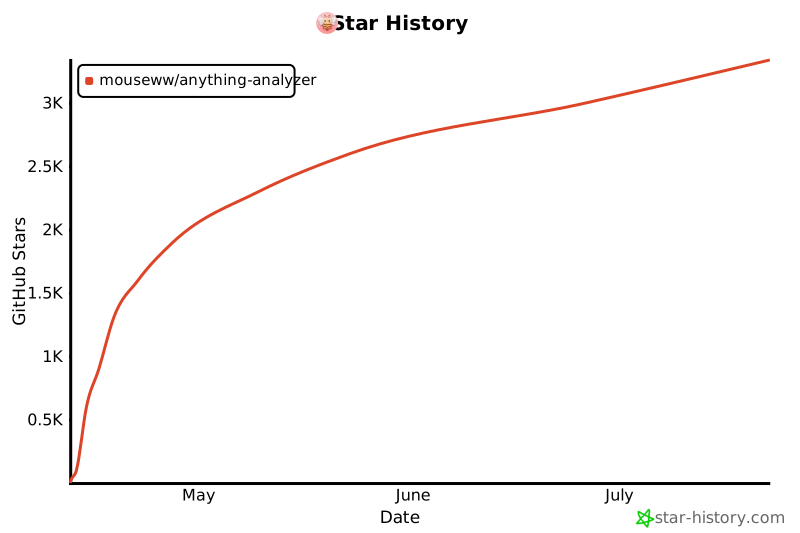
## Star History
[](https://www.star-history.com/?repos=Mouseww%2Fanything-analyzer&type=date&legend=top-left)
## License
MIT
Penguin communication group:
1091466461



