内容
<div align="center">
<img src="https://raw.githubusercontent.com/mahimailabs/voicegateway/main/docs/assets/banner.svg" alt="VoiceGateway" width="100%" />
<p>
<a href="https://voicegateway.mahimai.ca/docs"><img src="https://raw.githubusercontent.com/mahimailabs/voicegateway/main/docs/assets/badges/docs.svg" height="30" alt="文档"/></a>
<a href="https://pypi.org/project/voicegateway"><img src="https://raw.githubusercontent.com/mahimailabs/voicegateway/main/docs/assets/badges/pypi.svg" height="30" alt="PyPI"/></a>
<img src="https://raw.githubusercontent.com/mahimailabs/voicegateway/main/docs/assets/badges/python.svg" height="30" alt="Python 3.11+"/">
<a href="https://docs.livekit.io/agents"><img src="https://raw.githubusercontent.com/mahimailabs/voicegateway/main/docs/assets/badges/livekit.svg" height="30" alt="LiveKit Agents 1.x"/></a>
<a href="LICENSE"><img src="https://raw.githubusercontent.com/mahimailabs/voicegateway/main/docs/assets/badges/license.svg" height="30" alt="MIT License"/></a>
</p>
[**文档**](https://voicegateway.mahimai.ca/docs) · [**快速开始**](#快速开始) · [**控制面板**](#控制面板) · [**集群收集器**](#集群收集器) · [**MCP**](#从编码代理管理-MCP)
</div>
```python
from livekit.agents import AgentSession
from voicegateway import inference # 唯一更改的行
session = AgentSession(
stt=inference.STT("deepgram/nova-3"),
llm=inference.LLM("openai/gpt-4o-mini"),
tts=inference.TTS("cartesia/sonic-3"),
)
# 每个调用都记录:提供商、模型、令牌、$成本、延迟、会话 ID
```
适用于 [LiveKit Agents](https://docs.livekit.io/agents) 的成本和质量可观察性层。使用 `voicegateway.inference` 进行 VoiceGateway 管理的插件,或使用 `voicegateway.attach(session)` 观察现有的 LiveKit STT/LLM/TTS 插件。模态感知单元会计(音频分钟、令牌、字符)与 [voice-prices](https://github.com/mahimailabs/voice-prices) 中的 LLM、STT 和 TTS 价格相互核对,并与您的实际提供商发票进行核对,只需一个命令即可完成。自托管。您的密钥。数据不会离开您的基础设施。
## 为什么选择 VoiceGateway
语音 AI 供应商隐藏了三个数字。VoiceGateway 公开它们,每个调用都会显示。
- **它是否有效?** STT → LLM → TTS 环路的延迟 p50/p95、中断率、静音时间、对话超时:这些指标是文本堆栈永远不需要思考的。
- **它的成本是多少?** STT 按音频秒数计费,LLM 按令牌计费,TTS 按字符计费。每个调用都按模态细分,总计到分。`voicegw reconcile` 检查记录的数字与您的实际提供商发票。
- **如何使其更便宜?** 根据提供商的综合 STT + LLM + TTS 延迟预算进行路由,按调用类型切换模型,按租户分配成本,以便代理客户端仅看到他们自己的使用情况。
构建没有语音组件的纯文本 LLM 应用?[LiteLLM](https://docs.litellm.ai/) 更合适。查看 [决策树](https://voicegateway.mahimai.ca/docs/guide/decision-tree)。
## 功能
| 功能 | 它为您提供 |
| :----------------------------- | :---------------------------------------------------------------------------------------- |
| **LiveKit 云端对等性** | `livekit.agents.inference` 的替代品。您的密钥,您的配置 |
| **语音对话指标** | 每分钟成本、延迟 p50/p95、中断、静音时间、对话超时 |
| **对话回放** | 审查任何过去的调用:STT 分段、LLM 令牌、TTS 帧,附带时间戳和成本 |
| **终端 UI** | `voicegw tui` 打开一个 vim-key Textual UI,用于 SSH 登录检查 |
| **多租户归属** | 每租户成本、团队范围的 API 密钥、适用于代理的准备 |
| **跨模态路由** | 根据综合延迟预算路由,按项目排程,白标品牌 |
| **语音特定防护** | STT 中的实时 PII 检测、提示注入检测、合规性钩子 |
| **守护进程优先入职** | Curl-bash 安装、OS 守护进程、五问向导、`voicegw doctor` |
| **集群收集器** | 一行安装程序。N 个代理推送到一个收集器。按代理、项目、租户划分成本 |
完整的发布历史记录:[CHANGELOG.md](CHANGELOG.md)。
## 快速开始
```bash
# 单节点:本地 SQLite + 控制面板,位于 http://localhost:8080
pip install "voicegateway[cloud,dashboard]"
voicegw init && voicegw serve
```
将上述代码片段中的三个 `inference` 行添加到您的代理中,每个调用都会被跟踪。提供商插件会模块化安装(`pip install "voicegateway[deepgram,openai,cartesia]"`)。完整的额外功能矩阵、零安装 [uvx](https://uvx.sh) 路径和 OS 守护进程安装程序(LaunchAgent / systemd / Scheduled Task)都在 [get-started docs](https://voicegateway.mahimai.ca/docs/get-started) 中。Python 3.11+。
## 控制面板
`http://localhost:8080` 上的自托管 Web UI。捆绑。无需 SaaS 帐户。数据不会离开您的堆栈。
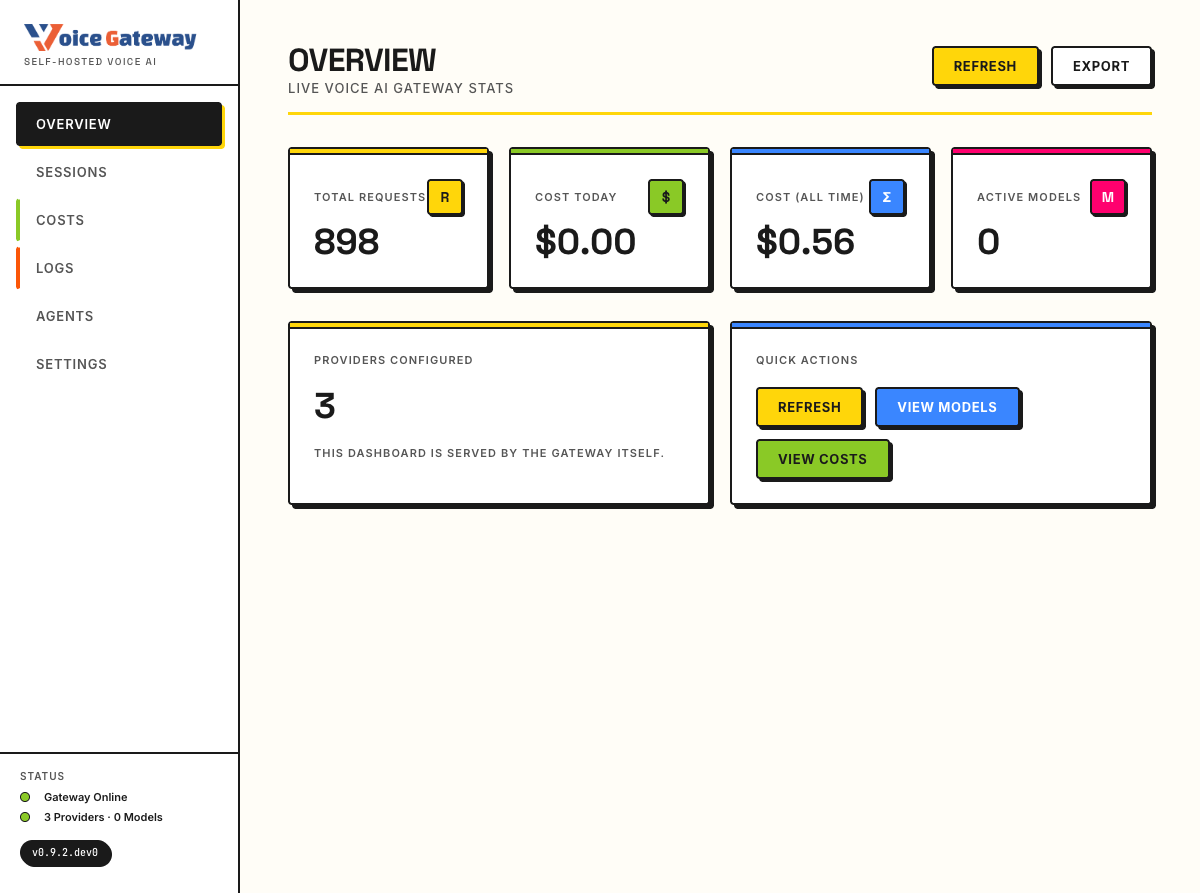
概览、成本(按提供商/模型/项目/租户、延迟 p50/p95)、会话(回放、路由决策、预算超额)、日志、代理和设置。可以为每个项目设置白标:上传徽标、设置强调色和产品名称,整个 UI 都会更改。
## 集群收集器
在您的 VPS 上运行一个共享的收集器。您的所有代理都将遥测数据推送到它:一个仪表板,一个成本视图,涵盖所有代理。
```bash
curl -fsSL https://voicegateway.mahimai.ca/collector.sh | bash
```
该脚本安装 Docker(如果需要),生成并持久化密钥,固定镜像版本,并在返回前进行容器健康检查。将您的代理指向它:
```python
from voicegateway.services.sinks import RemoteCollectorSink
sink = RemoteCollectorSink(
collector_url="https://collector.example.com",
api_key="<your-ingest-key>",
)
```
SQLite 和 Postgres 后端,以及 Caddy 的 HTTPS:[集群收集器文档 →](https://voicegateway.mahimai.ca/docs/deployment/vps)
## 从编码代理管理(MCP)
VoiceGateway 附带一个一流的 [Model Context Protocol](https://modelcontextprotocol.io) 服务器。Claude Code、Cursor、Codex 和 Cline 通过自然语言配置提供商、创建项目、检查成本和跟踪日志。
```bash
pipx inject voicegateway "voicegateway[mcp]"
claude mcp add voicegateway --command "voicegw mcp --transport stdio"
```
22 种工具涵盖可观察性、提供商、模型和项目。破坏性操作(`delete_*`)需要明确的 `confirm=True` 在预览后。带有身份验证和完整工具列表的远程 HTTP/SSE 传输:[MCP 参考 →](https://voicegateway.mahimai.ca/docs/mcp/)
## 支持的提供商
11 种提供商,涵盖云端和本地。可混合搭配使用。
| 模态 | 云端 | 本地 |
| :------------------- | :-------------------------------------------- | :---------------------- |
| **STT** | Deepgram、OpenAI Whisper、AssemblyAI、Groq | `faster-whisper` |
| **LLM** | OpenAI、Anthropic、Groq | Ollama(任何兼容的) |
| **TTS** | Cartesia、ElevenLabs、Deepgram Aura-2、OpenAI | Kokoro、Piper |
| **VAD** \* | Silero | Silero |
| **对话检测器** \* | LiveKit MultilingualModel | 无 |
\* 直接在 LiveKit `AgentSession` 上配置,不受 VoiceGateway 封装。11 提供商数量涵盖 STT、LLM 和 TTS。
每个模型的 ID:[配置/提供商](https://voicegateway.mahimai.ca/docs/configuration/providers)。添加提供商大约需要 10 步:[贡献/添加提供商](https://voicegateway.mahimai.ca/docs/contributing/adding-a-provider)。
## 架构
```mermaid
flowchart TB
A[LiveKit 代理] --> B[voicegateway.inference]
B --> C[路由器]
C --> D[云端提供商]
C --> E[本地提供商]
B --> F[中间件管道]
F --> F1[成本跟踪器]
F --> F2[延迟监视器]
F --> F3[防护]
F --> F4[多租户归属]
F --> G[(SQLite · 加密)]
G --> H[控制面板 UI]
G --> I[MCP 服务器]
I --> J[Claude Code · Cursor · Codex]
```
全异步。模块化提供商安装仅拉取您需要的组件。YAML 配置文件带有 `${ENV_VAR}` 替换。底层的 SQLite 具有可移植性,使用 Fernet 进行加密存储。[架构深入解析 →](https://voicegateway.mahimai.ca/docs/architecture/)
## 部署
<details>
<summary><b>Docker Compose</b> (Postgres + 收集器)</summary>
```yaml
services:
postgres:
image: postgres:16-alpine
environment:
POSTGRES_USER: voicegw
POSTGRES_PASSWORD: ${VOICEGW_PG_PASSWORD}
POSTGRES_DB: voicegw
volumes:
- voicegw-pgdata:/var/lib/postgresql/data
restart: unless-stopped
collector:
image: mahimairaja/voicegateway:0.9.2
ports:
- "8080:8080"
environment:
VOICEGW_DB_URL: postgresql+asyncpg://voicegw:${VOICEGW_PG_PASSWORD}@postgres/voicegw
volumes:
- ./voicegw.yaml:/app/voicegw.yaml:ro
depends_on: [postgres]
restart: unless-stopped
volumes:
voicegw-pgdata:
```
```bash
docker compose up -d
```
</details>
对于生产环境,[集群收集器安装程序](#集群收集器) 为您处理密钥、镜像固定和健康检查。
## 贡献
```bash
git clone https://github.com/mahimailabs/voicegateway
cd voicegateway
pip install -e ".[all,dashboard,mcp,dev]"
pytest
```
在打开 PR 之前,请阅读 [CONTRIBUTING.md](CONTRIBUTING.md) 和 [CODE_OF_CONDUCT.md](CODE_OF_CONDUCT.md)。安全问题通过 [SECURITY.md](SECURITY.md) 中的披露流程处理,而不是公开的问题。
## 社区
[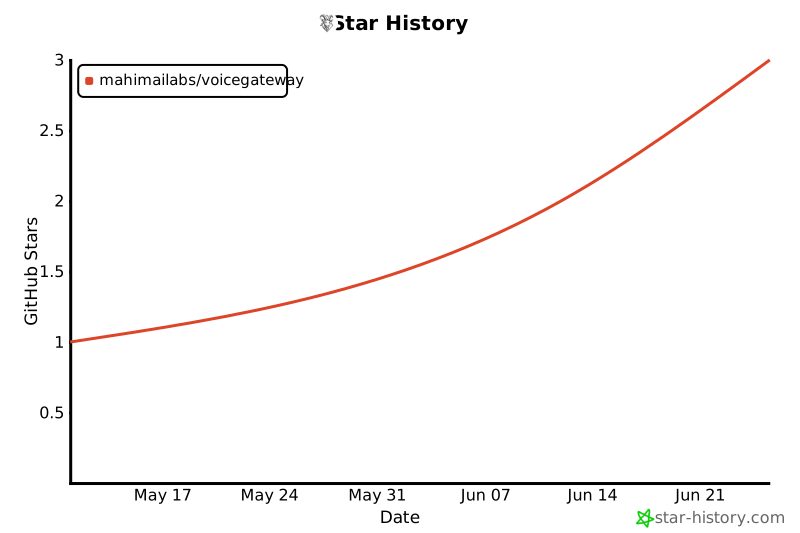](https://star-history.com/#mahimailabs/voicegateway&Date)
<a href="https://github.com/mahimailabs/voicegateway/graphs/contributors">
<img src="https://contrib.rocks/image?repo=mahimailabs/voicegateway&max=40&columns=10&anon=0" alt="贡献者" />
</a>
## 许可证
[MIT](LICENSE)。 fork 它,发布它。
由 [Mahimai Raja](https://mahimai.dev) 构建,[Mahimai AI](https://mahimai.ca) 的创始人,在公开状态下。基于 [LiveKit Agents](https://github.com/livekit/agents)、[FastAPI](https://fastapi.tiangolo.com/)、[Pydantic](https://docs.pydantic.dev/) 和 [voice-prices](https://github.com/mahimailabs/voice-prices)。
 MCP 市场
