

Content
<div align="center" id="trendradar">
<a href="https://github.com/sansan0/TrendRadar" title="TrendRadar">
<img src="/_image/banner.jpg" alt="TrendRadar Banner" width="50%">
</a>
🚀 Fastest <strong>30 seconds</strong> deployment of hot spot assistant - Say goodbye to invalid brushing, only see the news information you really care about
<a href="https://trendshift.io/repositories/14726" target="_blank"><img src="https://trendshift.io/api/badge/repositories/14726" alt="sansan0%2FTrendRadar | Trendshift" style="width: 250px; height: 55px;" width="250" height="55"/></a>
[](https://github.com/sansan0/TrendRadar/stargazers)
[](https://github.com/sansan0/TrendRadar/network/members)
[](LICENSE)
[](https://github.com/sansan0/TrendRadar)
[](https://github.com/sansan0/TrendRadar)
[](https://work.weixin.qq.com/)
[](https://telegram.org/)
[](#)
[](https://www.feishu.cn/)
[](#)
[](https://github.com/binwiederhier/ntfy)
[](https://github.com/sansan0/TrendRadar)
[](https://sansan0.github.io/TrendRadar)
[](https://hub.docker.com/r/wantcat/trendradar)
[](https://modelcontextprotocol.io/)
</div>
> This project aims to be lightweight and easy to deploy
## 📑 Quick Navigation
<div align="center">
| [🎯 Core Features](#-core-features) | [🚀 Quick Start](#-quick-start) | [🐳 Docker Deployment](#-docker-deployment) | [🤖 AI Analysis Zone](#-ai-analysis-zone) |
|:---:|:---:|:---:|:---:|
| [📝 Update Log](#-update-log) | [🔌 MCP Client](#-mcp-client) | [❓ Q\&A and Common Issues](#-q-and-a-and-common-issues) | [⭐ Project Related](#-project-related) |
</div>
- Thanks to contributors who **patiently provide feedback**, every piece of feedback makes the project more perfect 😉;
- Thanks to viewers who **star the project**, **fork** as you wish, **star** as you wish, and it's a great support for open source spirit 😍;
- Thanks to readers who **follow the official account**, your messages, likes, shares, and recommendations make the content more engaging 😎.
<details>
<summary>👉 Click to view <strong>Acknowledgments List</strong> (currently <strong>🔥49🔥</strong> contributors)</summary>
### Data Support
This project uses the API interface provided by [newsnow](https://github.com/ourongxing/newsnow) to obtain multi-platform data
### Promotion and Assistance
> Thanks to the following platforms and individuals for their recommendations (in chronological order)
- [Cool Shell](https://mp.weixin.qq.com/s/fvutkJ_NPUelSW9OGK39aA) - Open source software recommendation platform
- [LinuxDo Community](https://linux.do/) - A gathering place for tech enthusiasts
- [Ruanyifeng's Weekly](https://github.com/ruanyf/weekly) - A influential weekly in the tech circle
### Audience Support
> Thanks to **financial supporters** for their contributions. Your generosity has turned into snacks and drinks next to the keyboard, accompanying every iteration of the project
| Supporter | Amount | Date | Remarks |
| :-------------------------: | :----: | :----: | :-----------------------: |
| *Main | 1 | 2025.11.10 | |
| *Liao | 10 | 2025.11.09 | |
| *Jie | 5 | 2025.11.08 | |
| *Dian | 8.80 | 2025.11.07 | Development is not easy, support it |
| Q*Q | 6.66 | 2025.11.07 | Thanks for open source! |
| C*e | 1 | 2025.11.05 | |
| Peter Fan | 20 | 2025.10.29 | |
| M*n | 1 | 2025.10.27 | Thanks for open source |
| *Xu | 8.88 | 2025.10.23 | Teacher, a newbie, struggled for a few days and couldn't get it done, seeking guidance |
| Eason | 1 | 2025.10.22 | Haven't figured it out yet, but you're doing a good job |
| P*n | 1 | 2025.10.20 | |
| *Jie | 1 | 2025.10.19 | |
| *Xu | 1 | 2025.10.18 | |
| *Zhi | 1 | 2025.10.17 | |
| *😀 | 10 | 2025.10.16 | Like |
| **Jie | 10 | 2025.10.16 | |
| *Xiao | 10 | 2025.10.16 | |
| *Ji | 5 | 2025.10.14 | TrendRadar |
| J*d | 1 | 2025.10.14 | Thanks for your tool, it's great... |
| *H | 1 | 2025.10.14 | |
| Na*O | 10 | 2025.10.13 | |
| *Yuan | 1 | 2025.10.13 | |
| P*g | 6 | 2025.10.13 | |
| Ocean | 20 | 2025.10.12 | ...it's really great!!! Small white level can use it directly... |
| **Pei | 5.2 | 2025.10.2 | github-yzyf1312: Open source forever |
| *Chen | 3 | 2025.9.23 | Keep going, it's great |
| *🍍 | 10 | 2025.9.21 | |
| E*f | 1 | 2025.9.20 | |
| *Ji | 1 | 2025.9.20 | |
| z*u | 2 | 2025.9.19 | |
| **Hao | 5 | 2025.9.17 | |
| *Hao | 1 | 2025.9.15 | |
| T*T | 2 | 2025.9.15 | Like |
| *Jia | 10 | 2025.9.10 | |
| *X | 1.11 | 2025.9.3 | |
| *Biao | 20 | 2025.8.31 | From Lao Tong, thanks |
| *Xia | 1 | 2025.8.30 | |
| 2*D | 88 | 2025.8.13 Afternoon | |
| 2*D | 1 | 2025.8.13 Morning | |
| S*o | 1 | 2025.8.05 | Support it |
| *Xia | 10 | 2025.8.04 | |
| x*x | 2 | 2025.8.03 | TrendRadar, great project, like |
| *Yuan | 1 | 2025.8.01 | |
| *Xie | 5 | 2025.8.01 | |
| *Meng | 0.1 | 2025.7.30 | |
| **Long | 10 | 2025.7.29 | Support it |
</details>
## ✨ Core Features
### **Hotspot Aggregation**
- Zhihu
- Douyin
- Bilibili Hot Search
- Wall Street Journal
- Tieba
- Baidu Hot Search
- Caijing She Hot
- Pengpai News
- Phoenix.com
- Today’s Headlines
- Weibo
Default monitoring of 11 mainstream platforms, can also add extra platforms
<details>
<summary><strong>👉 Custom Monitoring Platform</strong></summary>
<br>
The news data of this project comes from [newsnow](https://github.com/ourongxing/newsnow). You can click on the [website](https://newsnow.busiyi.world/), click on [More], and check if there is a platform you want.
For specific additions, visit [project source code](https://github.com/ourongxing/newsnow/tree/main/server/sources), and modify the `platforms` configuration in the `config/config.yaml` file according to the file name:
```yaml
platforms:
- id: "toutiao"
name: "Today’s Headlines"
- id: "baidu"
name: "Baidu Hot Search"
- id: "wallstreetcn-hot"
name: "Wall Street Journal"
# Add more platforms...
```
If you don't know how, just copy others' sorted [platform configuration](https://github.com/sansan0/TrendRadar/issues/95)
</details>
### **Intelligent Push Strategy**
**Three push modes**:
| Mode | Applicable Users | Push Timing | Display Content | Applicable Scenarios |
|------|----------|----------|----------|----------|
| **Daily Summary**<br/>`daily` | 📋 Enterprise Managers/Ordinary Users | Push at regular intervals (default hourly push) | All matching news<br/>+ New news area | Daily summary<br/>Comprehensive understanding of daily hot trends |
| **Current List**<br/>`current` | 📰 Self-Media/Content Creators | Push at regular intervals (default hourly push) | Current list matching news<br/>+ New news area | Real-time hot tracking<br/>Understand current hottest content |
| **Incremental Monitoring**<br/>`incremental` | 📈 Investors/Traders | Push only when new | New matching frequency word news | Avoid repetitive information interference<br/>High-frequency monitoring scenarios |
**Additional Function - Push Time Window Control** (optional):
This function is independent of the above three push modes and can be used with any mode:
- **Time Window Limitation**: Set the push time range (e.g., 09:00-18:00 or 20:00-22:00), push only within the specified time
- **Push Frequency Control**:
- Multiple pushes within the window: Push every time the window is executed
- Daily push: Push only once within the time window (suitable for daily summary or current list mode)
- **Typical Scenarios**:
- Work time push: Receive messages only during working hours (09:00-18:00)
- Evening summary push: Receive a summary at a fixed time in the evening (e.g., 20:00-22:00)
- Avoid disturbance: Prevent push notifications during non-working hours
> Note: This function is disabled by default and needs to be manually enabled in `config/config.yaml` by setting `push_window.enabled`
### **Accurate Content Filtering**
Set personal keywords (e.g., AI, BYD, education policy), only push relevant hotspots, and filter out irrelevant information
- Supports ordinary words, must words (+), and filter words (!) three syntaxes, see [frequency_words.txt configuration tutorial]
- Word group management, independent statistics of different theme hotspots
> You can also not filter and push all hotspots, see [historical updates] in v2.0.1
<details>
<summary><strong>👉 frequency_words.txt Configuration Tutorial</strong></summary>
<br>
Configure monitoring keywords in the `frequency_words.txt` file, supporting three syntaxes and word group functions.
The more keywords are at the front, the higher the news priority. You can adjust the keyword order according to your attention
| Syntax Type | Symbol | Effect | Example | Matching Logic |
|---------|------|------|------|---------|
| **Ordinary Words** | None | Basic matching | `Huawei` | Contains any one |
| **Must Words** | `+` | Limit scope | `+Mobile` | Must contain simultaneously |
| **Filter Words** | `!` | Exclude interference | `!Advertisement` | Contains then directly exclude |
### 📋 Basic Syntax Description
#### 1. **Ordinary Keywords** - Basic Matching
```txt
Huawei
OPPO
Apple
```
**Effect:** News titles containing **any one of them** will be captured
#### 2. **Must Words** `+Vocabulary` - Limit Scope
```txt
Huawei
OPPO
+Mobile
```
**Effect:** Must contain both ordinary words **and** must words to be captured
#### 3. **Filter Words** `!Vocabulary` - Exclude Interference
```txt
Apple
Huawei
!Fruits
!Price
```
**Effect:** News containing filter words will be **directly excluded**, even if they contain keywords
### 🔗 Word Group Function - Important Role of Empty Lines
**Core Rule:** Use **empty lines** to separate different word groups, and each group has independent statistics
#### Example Configuration:
```txt
iPhone
Huawei
OPPO
+Release
A-Share
Shanghai Stock Exchange
Shenzhen Stock Exchange
+Rise and Fall
!Prediction
World Cup
European Cup
Asian Cup
+Match
```
#### Phrase Explanation and Matching Effect:
**Group 1 - New Mobile Phone Category:**
- Keywords: iPhone, Huawei, OPPO
- Must-include word: release
- Effect: Must include mobile phone brand name and "release"
**Matching Examples:**
- ✅ "iPhone 15 officially released with price announced" ← Has "iPhone" + "release"
- ✅ "Huawei Mate60 series release conference live" ← Has "Huawei" + "release"
- ✅ "OPPO Find X7 release time confirmed" ← Has "OPPO" + "release"
- ❌ "iPhone sales hit a new high" ← Has "iPhone" but lacks "release"
**Group 2 - Stock Market Trends:**
- Keywords: A-share, Shanghai Stock Exchange, Shenzhen Stock Exchange
- Must-include word: rise and fall
- Filter word: prediction
- Effect: Includes stock market-related words, "rise and fall", but excludes "prediction"
**Matching Examples:**
- ✅ "A-share market analysis with significant rise and fall today" ← Has "A-share" + "rise and fall"
- ✅ "Shanghai Stock Exchange index rise and fall reasons explained" ← Has "Shanghai Stock Exchange" + "rise and fall"
- ❌ "Expert predicts A-share market trend" ← Has "A-share" + "rise and fall" but includes "prediction"
- ❌ "A-share transaction volume hits a new high" ← Has "A-share" but lacks "rise and fall"
**Group 3 - Football Events:**
- Keywords: World Cup, European Cup, Asian Cup
- Must-include word: match
- Effect: Must include cup name and "match"
**Matching Examples:**
- ✅ "World Cup group stage match results" ← Has "World Cup" + "match"
- ✅ "European Cup final match time" ← Has "European Cup" + "match"
- ❌ "World Cup tickets go on sale" ← Has "World Cup" but lacks "match"
### 🎯 Configuration Tips
#### 1. **From Loose to Strict Configuration Strategy**
```txt
# Step 1: Test with broad keywords
Artificial Intelligence
AI
ChatGPT
# Step 2: Add must-include words to limit after finding mismatches
Artificial Intelligence
AI
ChatGPT
+technology
# Step 3: Add filter words after finding interfering content
Artificial Intelligence
AI
ChatGPT
+technology
!advertisement
!training
```
#### 2. **Avoid Overly Complex Configuration**
❌ **Not recommended:** A phrase includes too many words
```txt
Huawei
OPPO
Apple
Samsung
vivo
OnePlus
Meizu
+mobile phone
+release
+sales
!counterfeit
!repair
!second-hand
```
✅ **Recommended:** Split into multiple precise phrases
```txt
Huawei
OPPO
+new product
Apple
Samsung
+release
mobile phone
sales
+market
```
</details>
### **Hot Trend Analysis**
Real-time tracking of news heat changes, allowing you to know not only "what's trending" but also "how trends evolve"
- **Timeline tracking**: Records the complete time span from the first appearance to the last appearance of each piece of news
- **Heat change**: Statistics on the ranking changes and frequency of news in different time periods
- **New detection**: Real-time identification of new trending topics, marked with 🆕 for first-time reminders
- **Sustainability analysis**: Distinguishes between one-time trending topics and in-depth news that continues to ferment
- **Cross-platform comparison**: Compares the ranking performance of the same news on different platforms to see differences in media attention
> No longer miss the complete development process of important news, from topic emergence to peak discussion, fully grasped
<details>
<summary><strong>👉 Push Format Description</strong></summary>
<br>
📊 Hot Word Statistics
🔥 [1/3] AI ChatGPT : 2 articles
1. [Baidu Hot Search] 🆕 ChatGPT-5 officially released [**1**] - 09:15 (1 time)
2. [Today's Headlines] AI chip concept stocks surge [**3**] - [08:30 ~ 10:45] (3 times)
━━━━━━━━━━━━━━━━━━━
📈 [2/3] BYD Tesla : 2 articles
1. [Weibo] 🆕 BYD monthly sales hit a record [**2**] - 10:20 (1 time)
2. [Douyin] Tesla price reduction promotion [**4**] - [07:45 ~ 09:15] (2 times)
━━━━━━━━━━━━━━━━━━━
📌 [3/3] A-share Stock Market : 1 article
1. [Wall Street Insights] A-share mid-day review analysis [**5**] - [11:30 ~ 12:00] (2 times)
🆕 Newly added hot news (2 articles)
**Baidu Hot Search** (1 article):
1. ChatGPT-5 officially released [**1**]
**Weibo** (1 article):
1. BYD monthly sales hit a record [**2**]
Update time: 2025-01-15 12:30:15
## **Message Format Description**
| Format element | Example | Meaning | Note |
| ------------- | --------------------------- | ------------ | --------------------------------------- |
| 🔥📈📌 | 🔥 [1/3] AI ChatGPT | Heat level | 🔥High heat (≥10 articles) 📈Medium heat (5-9 articles) 📌Ordinary heat (<5 articles) |
| [Serial number/total] | [1/3] | Ranking position | Current phrase ranking among all matched phrases |
| Frequency phrase | AI ChatGPT | Keyword phrase | Phrase from configuration file, title must contain one of the words |
| : N articles | : 2 articles | Matched quantity | Total number of news articles matched by the phrase |
| [Platform name] | [Baidu Hot Search] | Source platform | Platform where the news comes from |
| 🆕 | 🆕 ChatGPT-5 officially released | Newly added mark | First appearance in this round of crawling |
| [**Number**] | [**1**] | High ranking | Ranking ≤ threshold, displayed in red and bold |
| [Number] | [7] | Ordinary ranking | Ranking > threshold, displayed normally |
| - Time | - 09:15 | First time | Time when the news was first discovered |
| [Time~Time] | [08:30 ~ 10:45] | Duration | Time range from first appearance to last appearance |
| (N times) | (3 times) | Frequency | Total times appearing during monitoring |
| **Newly added area** | 🆕 **Newly added hot news** | New topic summary | Newly added hot topics in this round |
</details>
### **Personalized Hotspot Algorithm**
No longer be led by algorithms from various platforms, TrendRadar re-organizes trending searches across the web:
- **Emphasize high-ranking news** (60%): Prioritize news with high rankings on each platform
- **Focus on sustained topics** (30%): Repeatedly appearing news is more important
- **Consider ranking quality** (10%): Not only frequent appearances but also often ranking high
> Combine trending searches from various platforms, re-sort according to your concerned heat, and adjust these three ratios for suitable scenarios
<details>
<summary><strong>👉 Hotspot Weight Adjustment</strong></summary>
<br>
Current default configuration is balanced
### Two Core Scenarios
**Real-time Hotspot Tracking**:
```yaml
weight:
rank_weight: 0.8 # Focus on ranking
frequency_weight: 0.1 # Less concerned about sustainability
hotness_weight: 0.1
```
**Applicable人群**: Self-media bloggers, marketing personnel, users who want to quickly understand current hot topics
**In-depth Topic Tracking**:
```yaml
weight:
rank_weight: 0.4 # Moderately consider ranking
frequency_weight: 0.5 # Emphasize daily sustainability
hotness_weight: 0.1
```
**Applicable人群**: Investors, researchers, news workers, users who need in-depth trend analysis
### Adjustment method
1. **Three numbers must add up to 1.0**
2. **Increase the important one**: If ranking is important, increase rank_weight; if sustainability is important, increase frequency_weight
3. **Suggest adjusting by 0.1-0.2 each time**, observe the effect
The core idea is to prioritize speed and timeliness, increase ranking weight, and pursue depth and stability, increase frequency weight.
</details>
### **Multi-channel Real-time Push**
Supports **Enterprise WeChat** (+ WeChat push solution), **Feishu**, **DingTalk**, **Telegram**, **Email**, **ntfy**, messages directly to mobile phones and email
### **Multi-end Adaptation**
- **GitHub Pages**: Automatically generates a beautiful web report, adapts to PC and mobile devices
- **Docker deployment**: Supports multi-architecture containerized operation
- **Data persistence**: HTML/TXT multi-format historical record saving
### **AI Intelligent Analysis (v3.0.0 Newly Added)**
Based on MCP (Model Context Protocol) protocol AI dialogue analysis system, let you use natural language to deeply dig into news data
- **Conversational query**: Ask questions in natural language, such as "query yesterday's hotspots on Zhihu", "analyze recent heat trends of Bitcoin"
- **13 analysis tools**: Cover basic query, intelligent retrieval, trend analysis, data insight, sentiment analysis, etc.
- **Multi-client support**: Cherry Studio (GUI configuration), Claude Desktop, Cursor, Cline, etc.
- **In-depth analysis capability**:
- Topic trend tracking (heat change, life cycle, explosion detection, trend prediction)
- Cross-platform data comparison (activity statistics, keyword co-occurrence)
- Intelligent summary generation, similar news search, historical association retrieval
> Bid farewell to manually browsing data files, AI assistant helps you understand the story behind the news in seconds
### **Zero Technical Threshold Deployment**
GitHub one-click Fork for use, no programming required.
> 30-second deployment: GitHub Pages (web browsing) supports one-click save as an image, share with others at any time
>
> 1-minute deployment: Enterprise WeChat (mobile notification)
**💡 Tip:** Want a **real-time update** web version? After forking, go to your repository Settings → Pages and enable GitHub Pages. [Effect Preview](https://sansan0.github.io/TrendRadar/).
### **Reduce APP Dependence**
From being "controlled by algorithm recommendations" to "actively obtaining the information you want"
**Applicable人群**: Investors, self-media people, enterprise public relations, ordinary users concerned about current events
**Typical scenarios**: Stock investment monitoring, brand public opinion tracking, industry dynamic attention, life information acquisition
| Github Pages Effect (mobile adaptation, email push effect) | Feishu push effect |
|:---:|:---:|
|  |  |
## 📝 Update Log
>**Upgrade instructions**:
- **Note**: Do not update this project through **Sync fork**, suggest checking [Historical Updates], and clearly understand the specific [upgrade method] and [functional content]
- **Minor version update**: From v2.x to v2.y, replace the `main.py` code in your forked repository with this project's file
- **Major version upgrade**: From v1.x to v2.y, suggest deleting the existing fork and re-forking, which is more convenient and avoids configuration conflicts
### 2025/10/26 - mcp-v1.0.1
**MCP module update:**
- Fix date query parameter passing error
- Unify time parameter format for all tools
### 2025/10/31 - v3.0.4
- Solve the error caused by Feishu pushing content that is too long and implement batch pushing
<details>
<summary><strong>👉 Historical Updates</strong></summary>
### 2025/10/23 - v3.0.3
- Expand ntfy error message display range
### 2025/10/21 - v3.0.2
- Fix ntfy push encoding issue
### 2025/10/20 - v3.0.0
**Major update - AI analysis function上线** 🤖
- **Core function**:
- Add AI analysis server based on MCP (Model Context Protocol)
- Support 13 intelligent analysis tools: basic query, intelligent retrieval, advanced analysis, system management
- Natural language interaction: query and analyze news data through dialogue
- Multi-client support: Claude Desktop, Cherry Studio, Cursor, Cline, etc.
- **Analysis capability**:
- Topic trend analysis (heat tracking, life cycle, explosion detection, trend prediction)
- Data insight (platform comparison, activity statistics, keyword co-occurrence)
- Sentiment analysis, similar news search, intelligent summary generation
- Historical related news retrieval, multi-mode search
- **Update note**:
- This is an independent AI analysis function, not affecting existing push functions
- Optional use, no need to upgrade existing deployment
### 2025/10/15 - v2.4.4
- **Update content**:
- Fix ntfy push encoding issue + 1
- Fix push time window judgment problem
- **Update note**:
- Suggest [minor version upgrade]
### 2025/10/10 - v2.4.3
> Thanks to [nidaye996](https://github.com/sansan0/TrendRadar/issues/98) for discovering experience issues
- **Update content**:
- Refactor "silent push mode" to "push time window control", improve function understanding
- Clearly define push time window as an optional additional function, can be used with three push modes
- Improve comments and document description, make function positioning clearer
- **Update note**:
- This is just a refactoring, no need to upgrade
### 2025/10/8 - v2.4.2
- **Update content**:
- Fix ntfy push encoding issue
- Fix missing configuration file issue
- Optimize ntfy push effect
- Add GitHub page image segment export function
- **Update note**:
- Suggest [major version update]
### 2025/10/2 - v2.4.0
**Newly added ntfy push notification**
- **Core function**:
- Support ntfy.sh public service and self-hosted server
- **Usage scenarios**:
- Suitable for users pursuing privacy (support self-hosted)
- Cross-platform push (iOS, Android, Desktop, Web)
- No need to register an account (public server)
- Open-source and free (MIT protocol)
- **Update note**:
- Suggest [major version update]
### 2025/09/26 - v2.3.2
- Fix the issue that email notification configuration check was missed ([#88](https://github.com/sansan0/TrendRadar/issues/88))
**Fix description**:
- Solved the problem that even with correct email notification configuration, the system still prompts "no webhook configured"
### 2025/09/22 - v2.3.1
- **Newly added email push function**, support sending hot news reports to mailbox
- **Intelligent SMTP recognition**: Automatically identify Gmail, QQ mailbox, Outlook, Netease mailbox and other 10+ mailbox service providers configuration
- **HTML beautiful format**: Mail content adopts the same HTML format as the web version, with beautiful layout and mobile adaptation
- **Batch sending support**: Support multiple recipients, separated by commas to send to multiple people at the same time
- **Custom SMTP**: Customizable SMTP server and port
- Fix Docker build network connection issue
**Usage instructions**:
- Applicable scenarios: Suitable for users who need email archiving, team sharing, and timing reports
- Supported mailboxes: Gmail, QQ mailbox, Outlook/Hotmail, 163/126 mailbox, Sina mailbox, Sohu mailbox, etc.
**Update note**:
- This update has more content, if you want to upgrade, suggest [major version upgrade]
### 2025/09/17 - v2.2.0
- Add one-click save news image function, let you easily share hotspots
**Usage instructions**:
- Applicable scenarios: When you turn on the web version function (GitHub Pages) according to the tutorial
- Usage method: Open the web link with your mobile phone or computer, click the "Save as image" button at the top of the page
- Actual effect: The system will automatically make a beautiful image of the current news report and save it to your mobile phone album or computer desktop
- Sharing convenience: You can directly send the image to friends, post it to the circle of friends, or share it to the work group, so that others can also see the important information you find
### 2025/09/13 - v2.1.2
- Solve the Feishu push capacity limit issue (adopt batch pushing)
### 2025/09/04 - v2.1.1
- Fix the problem that Docker cannot run normally on certain architectures
- Officially release the official Docker image wantcat/trendradar, support multi-architecture
- Optimize Docker deployment process, no need for local build to quickly use
### 2025/08/30 - v2.1.0
**Core improvement**:
- **Push logic optimization**: Change from "push every time execution" to "controllable push within a time window"
- **Time window control**: Can set push time range to avoid disturbing during non-working hours
- **Optional push frequency**: Support single push or multiple pushes within a time period
**Update note**:
- This function is disabled by default, need to manually enable push time window control in config.yaml
- Upgrade requires updating main.py and config.yaml files
### 2025/08/27 - v2.0.4
- This version is not a function fix but an important reminder
- Please properly keep webhooks confidential, do not expose them publicly, and do not put them in config.yaml
- If you have exposed webhooks or put them in config.yaml, suggest deleting and regenerating
### 2025/08/06 - v2.0.3
- Optimize GitHub page web version effect for mobile device use
### 2025/07/28 - v2.0.2
- Refactor code
- Solve the problem of version number prone to omission and modification
### 2025/07/27 - v2.0.1
**Fix issues**:
1. Execution exception issue of Docker shell script caused by CRLF line ending
2. Logic issue when frequency_words.txt is empty, causing news sending to be empty
- Fix and adjust: When you choose frequency_words.txt to be empty, **push all news**, but limited by message push size, please make adjustments
- Scheme 1: Close mobile push, only choose GitHub Pages deployment (this is the best scheme to obtain complete information, and reorder hot searches according to your **custom hotspot algorithm**)
- Scheme 2: Reduce push platforms, prioritize **Enterprise WeChat** or **Telegram**, these two push have batch push function (because batch push affects push experience, and only these two platforms have a small amount of push capacity, so had to do batch push function, but at least ensure complete information)
- Scheme 3: Combine with scheme 2, mode selection current or incremental can effectively reduce one-time push content
### 2025/07/17 - v2.0.0
**Major refactoring**:
- Configuration management refactoring: All configurations are now managed through `config/config.yaml` file (main.py still not split, for convenience of copying and upgrading)
- Running mode upgrade: Support three modes - `daily` (daily summary), `current` (current list), `incremental` (incremental monitoring)
- Docker support: Complete Docker deployment solution, support containerized operation
**Configuration file description**:
- `config/config.yaml` - Main configuration file (application settings, crawler configuration, notification configuration, platform configuration, etc.)
- `config/frequency_words.txt` - Keyword configuration (monitoring vocabulary settings)
### 2025/07/09 - v1.4.1
**Function addition**: Increase incremental push (configure FOCUS_NEW_ONLY in main.py header), the switch only cares about new topics rather than sustained heat, and only sends notifications when new content appears.
**Fix issues**: Occasional layout anomalies caused by special symbols in news itself.
</details>
### 2025/06/23 - v1.3.0
There are length limits for push messages in Enterprise WeChat and Telegram. To address this, I have adopted a method of splitting messages for pushing. For development documentation, please refer to [Enterprise WeChat](https://developer.work.weixin.qq.com/document/path/91770) and [Telegram](https://core.telegram.org/bots/api).
### 2025/06/21 - v1.2.1
In versions prior to this, not only did `main.py` require copying and replacement, but `crawler.yml` also needed to be copied and replaced.
https://github.com/sansan0/TrendRadar/blob/master/.github/workflows/crawler.yml
### 2025/06/19 - v1.2.0
> Thanks to Claude Research for organizing the APIs of various platforms, which allowed me to quickly complete the adaptation of each platform (although the code has more redundancy~)
1. Supports Telegram, Enterprise WeChat, and DingTalk push channels, with support for multi-channel configuration and simultaneous pushing.
### 2025/06/18 - v1.1.0
> **200 stars⭐**, continuing to help everyone~ Recently, under my "encouragement", many people have liked, shared, and recommended my public account, which I have seen in the background data. Many have become long-time fans (I've been running my public account for just over a month, although it was registered seven or eight years ago, haha, I guess you could say I got on the bus early but started the engine late). However, because you didn't leave a message or send me a private message, I couldn't respond and thank you one by one. I'm thanking you all here!
1. An important update: I added weights, and the news you see now are the hottest and most concerning ones appearing at the top.
2. Updated documentation usage, because many functions have been recently updated, and my previous usage documentation was simple (see the complete tutorial below ⚙️ frequency_words.txt).
### 2025/06/16 - v1.0.0
1. Added a new version update reminder for the project, which is turned on by default. If you want to turn it off, you can change `True` to `False` in `main.py` for `"FEISHU_SHOW_VERSION_UPDATE"`.
### 2025/06/13+14
1. Removed compatible code. If you forked before, directly copying the code will show abnormalities on that day (it will return to normal the next day).
2. Added a new news display at the bottom of Feishu and HTML.
### 2025/06/09
**100 stars⭐**, writing a small function to help everyone~
Added a ["must-have word" feature](https://github.com/sansan0/TrendRadar/blob/master/docs/faq.md#%E5%BF%85%E9%A1%BB%E8%AF%8D) to `frequency_words.txt` using the `+` symbol.
1. The syntax for must-have words is as follows:
If both Tang Seng and Zhu Bajie must appear in the title, the news will be included in the push.
```
+Tang Seng
+Zhu Bajie
```
2. The priority of filter words is higher:
If the filter word matches "Tang Seng chanting scriptures", even if "Tang Seng" is in the must-have words, it will not be displayed.
```
+Tang Seng
!Tang Seng chanting scriptures
```
### 2025/06/02
1. **Webpage** and **Feishu messages** support direct jumping to detailed news on mobile devices.
2. Optimized display effect + 1.
### 2025/05/26
1. Optimized the display effect of Feishu messages.
<table>
<tr>
<td align="center">
Before optimization<br>
<img src="_image/before.jpg" alt="Feishu message interface - before optimization" width="400"/>
</td>
<td align="center">
After optimization<br>
<img src="_image/after.jpg" alt="Feishu message interface - after optimization" width="400"/>
</td>
</tr>
</table>
## 🚀 Quick Start
> After configuration, news data will be updated one hour later. If you want to speed up, you can refer to [Step 4] to manually test the configuration effect.
1. **Fork this project** to your GitHub account
- Click the "Fork" button in the upper right corner of this page.
2. **Set GitHub Secrets (select the platform you need)**:
In your forked repository, go to `Settings` > `Secrets and variables` > `Actions` > `New repository secret`, and configure one or more notification platforms as needed:
You can configure multiple platforms at the same time, and the system will send notifications to all configured platforms.
The effect is similar to the figure below. One name corresponds to one secret. After saving, you can't see the secret when you re-edit it, which is normal.
<img src="_image/secrets.png" alt="GitHub Secrets"/>
<details>
<summary> <strong>👉 WeChat Robot</strong> ( easiest to configure )</summary>
<br>
**GitHub Secret Configuration:**
- Name: `WEWORK_WEBHOOK_URL`
- Value: Your WeChat robot Webhook address
**Robot Setting Steps:**
#### Mobile Setting:
1. Open the WeChat App and enter the target internal group chat.
2. Click the "..." button in the upper right corner and select "Message Push".
3. Click "Add" and enter "TrendRadar".
4. Copy the Webhook address, click Save, and copy the content to configure to the above GitHub Secret.
#### PC Setting Process is Similar
</details>
<details>
<summary> <strong>👉 Feishu Robot</strong> ( message display is most friendly )</summary>
<br>
**GitHub Secret Configuration:**
- Name: `FEISHU_WEBHOOK_URL`
- Value: Your Feishu robot Webhook address (the link starts with https://www.feishu.cn/flow/api/trigger-webhook/********)
There are two options. **Option 1** is simple to configure, and **Option 2** is complex (but stable to push).
**Option 1:**
> For some people, there are additional operations, otherwise, it will report "system error". You need to search for the robot on your mobile and then enable the Feishu robot app. (This suggestion comes from netizens and can be referenced)
1. Open https://botbuilder.feishu.cn/home/my-command in your computer browser.
2. Click "Create a new robot command".
3. Click "Select Trigger", scroll down, and click "Webhook Trigger".
4. You will see the "Webhook Address". Copy this link to a local notepad for now and continue with the next operation.
5. Place the following content in the "Parameter" and click "Complete".
```json
{
"message_type": "text",
"content": {
"total_titles": "{{content}}",
"timestamp": "{{content}}",
"report_type": "{{content}}",
"text": "{{content}}"
}
}
```
6. Click "Select Action" > "Send a message through the official robot".
7. Fill in the message title as "TrendRadar Hotspot Monitoring".
8. The key part is, click the + button, select "Webhook Trigger", and arrange according to the picture below.

9. After completing the configuration, copy the Webhook address from step 4 to the `FEISHU_WEBHOOK_URL` in GitHub Secrets.
<br>
**Option 2:**
1. Open https://botbuilder.feishu.cn/home/my-app in your computer browser.
2. Click "Create a new robot app".
3. After entering the created app, click "Process Involved" > "Create Process" > "Select Trigger".
4. Scroll down and click "Webhook Trigger".
5. You will see the "Webhook Address". Copy this link to a local notepad for now and continue with the next operation.
6. Place the following content in the "Parameter" and click "Complete".
```json
{
"message_type": "text",
"content": {
"total_titles": "{{content}}",
"timestamp": "{{content}}",
"report_type": "{{content}}",
"text": "{{content}}"
}
}
```
7. Click "Select Action" > "Send a Feishu message", select "Group message", and then click the input box below, and click "My managed group" (if you don't have a group, you can create one on the Feishu app).
8. Fill in the message title as "TrendRadar Hotspot Monitoring".
9. The key part is, click the + button, select "Webhook Trigger", and arrange according to the picture below.

10. After completing the configuration, copy the Webhook address from step 5 to the `FEISHU_WEBHOOK_URL` in GitHub Secrets.
</details>
<details>
<summary> <strong>👉 DingTalk Robot</strong></summary>
<br>
**GitHub Secret Configuration:**
- Name: `DINGTALK_WEBHOOK_URL`
- Value: Your DingTalk robot Webhook address
**Robot Setting Steps:**
1. **Create a Robot (only PC side supports)**:
- Open the DingTalk PC client and enter the target group chat.
- Click the group setting icon (⚙️) and flip down to find "Robot" and click on it.
- Select "Add Robot" > "Custom".
2. **Configure the Robot**:
- Set the robot name.
- **Security Settings**:
- **Custom Keywords**: Set "hotspot".
3. **Complete the Setting**:
- Check the service terms agreement and click "Complete".
- Copy the obtained Webhook URL.
- Configure the URL to `DINGTALK_WEBHOOK_URL` in GitHub Secrets.
**Note**: The mobile end can only receive messages and cannot create a new robot.
</details>
<details>
<summary> <strong>👉 Telegram Bot</strong></summary>
<br>
**GitHub Secret Configuration:**
- Name: `TELEGRAM_BOT_TOKEN` - Your Telegram Bot Token
- Name: `TELEGRAM_CHAT_ID` - Your Telegram Chat ID
**Robot Setting Steps:**
1. **Create a Robot**:
- Search for `@BotFather` in Telegram (pay attention to the case, with a blue badge and similar 37849827 monthly users, which is the official one, and some fake official accounts need to be identified).
- Send the `/newbot` command to create a new robot.
- Set the robot name (must end with "bot", it is easy to encounter duplicate names, so you have to think of different names).
- Obtain the Bot Token (format: `123456789:AAHfiqksKZ8WmR2zSjiQ7_v4TMAKdiHm9T0`).
2. **Get Chat ID**:
**Method 1: Get through the official API**
- Send a message to your robot first.
- Visit: `https://api.telegram.org/bot<Your Bot Token>/getUpdates`.
- Find the number in `"chat":{"id":number}` in the returned JSON.
**Method 2: Use a third-party tool**
- Search for `@userinfobot` and send `/start`.
- Get your user ID as Chat ID.
3. **Configure to GitHub**:
- `TELEGRAM_BOT_TOKEN`: Fill in the Bot Token obtained in step 1.
- `TELEGRAM_CHAT_ID`: Fill in the Chat ID obtained in step 2.
</details>
<details>
<summary> <strong>👉 Email Push</strong> (supports all mainstream mailboxes)</summary>
<br>
- Precautions: To prevent the email group sending function from being **abused**, the current group sending is that all recipients can see each other's email addresses, which is suitable for acquaintances to exchange information.
- For reference only: Please adjust according to the actual situation. The mailbox has not been verified one by one, and it is configured according to the SMTP standard.
**GitHub Secret Configuration:**
- Name: `EMAIL_FROM` - Sender's email address.
- Name: `EMAIL_PASSWORD` - Email password or authorization code.
- Name: `EMAIL_TO` - Recipient's email address (multiple recipients are separated by English commas) can also be the same as EMAIL_FROM, sending to yourself.
- Name: `EMAIL_SMTP_SERVER` - SMTP server address (optional, leave blank to automatically identify).
- Name: `EMAIL_SMTP_PORT` - SMTP port (optional, leave blank to automatically identify).
**Common Mailbox Settings:**
#### QQ Mailbox:
1. Log in to QQ Mailbox web version > Settings > Account.
2. Enable POP3/SMTP service.
3. Generate authorization code (16 letters).
4. Fill in the authorization code in `EMAIL_PASSWORD`, not the QQ password.
#### Gmail:
1. Enable two-step verification.
2. Generate application-specific password.
3. Fill in the application-specific password in `EMAIL_PASSWORD`.
#### 163/126 Mailbox:
1. Log in to the web version > Settings > POP3/SMTP/IMAP.
2. Enable SMTP service.
3. Set client authorization code.
4. Fill in the authorization code in `EMAIL_PASSWORD`.
<br>
**Advanced Configuration**:
If the automatic identification fails, you can manually configure SMTP:
- `EMAIL_SMTP_SERVER`: such as smtp.gmail.com.
- `EMAIL_SMTP_PORT`: such as 587 (TLS) or 465 (SSL).
<br>
**Multi-Recipient Settings**:
- EMAIL_TO="user1@example.com,user2@example.com,user3@example.com".
</details>
<details>
<summary> <strong>👉 ntfy Push</strong> (open source and free, supports self-hosting)</summary>
<br>
**Two Usage Methods:**
### Method 1: Free Use (Recommended for Novices) 🆓
**Features**:
- ✅ No need to register an account, use immediately.
- ✅ 250 messages per day (enough for 90% of users).
- ✅ Topic name is "password" (need to choose a name that is not easy to guess).
- ⚠️ Messages are not encrypted, not suitable for sensitive information, but suitable for non-sensitive information in this project.
**Quick Start:**
1. **Download ntfy App**:
- Android: [Google Play](https://play.google.com/store/apps/details?id=io.heckel.ntfy) / [F-Droid](https://f-droid.org/en/packages/io.heckel.ntfy/).
- iOS: [App Store](https://apps.apple.com/us/app/ntfy/id1625396347).
- Desktop: Visit [ntfy.sh](https://ntfy.sh).
2. **Subscribe to Topic** (choose a hard-to-guess name):
```
Suggested format: trendradar-{your name abbreviation}-{random number}
Do not use Chinese.
✅ Good example: trendradar-zs-8492
❌ Bad example: news, alerts (too easy to guess).
```
3. **Configure GitHub Secret**:
- `NTFY_TOPIC`: Fill in the topic name you just subscribed.
- `NTFY_SERVER_URL`: Leave blank (default use ntfy.sh).
- `NTFY_TOKEN`: Leave blank.
4. **Test**:
```bash
curl -d "Test Message" ntfy.sh/your topic name
```
---
### Method 2: Self-Hosting (Complete Privacy Control) 🔒
**Suitable People**: Have a server, pursue complete privacy, and have strong technical capabilities.
**Advantages**:
- ✅ Completely open source (Apache 2.0 + GPLv2).
- ✅ Data is completely under your control.
- ✅ No restrictions.
- ✅ Zero cost.
**One-Click Deployment with Docker**:
```bash
docker run -d \
--name ntfy \
-p 80:80 \
-v /var/cache/ntfy:/var/cache/ntfy \
binwiederhier/ntfy \
serve --cache-file /var/cache/ntfy/cache.db
```
**Configure TrendRadar**:
```yaml
NTFY_SERVER_URL: https://ntfy.yourdomain.com
NTFY_TOPIC: trendradar-alerts # Self-hosting can use a simple name.
NTFY_TOKEN: tk_your_token # Optional: Enable access control.
```
**Subscribe in the App**:
- Click "Use another server".
- Enter your server address.
- Enter the topic name.
- (Optional) Enter login credentials.
---
**Frequently Asked Questions:**
<details>
<summary><strong>Q1: Is the free version enough?</strong></summary>
250 messages per day are enough for most users. Calculated at 30 minutes per crawl, there are about 48 pushes per day, which is enough.
</details>
<details>
<summary><strong>Q2: Is the Topic name really secure?</strong></summary>
If you choose a random and long enough name (such as `trendradar-zs-8492-news`), brute-force cracking is almost impossible:
- ntfy has strict rate limiting (1 request per second).
- 64 character choices (A-Z, a-z, 0-9, _, -).
- 10 random string characters have 64^10 possibilities (need years to crack).
</details>
---
**Recommendations**:
| User Type | Recommended Solution | Reason |
|---------|---------|------|
| Ordinary Users | Method 1 (Free) | Simple and quick, enough. |
| Technical Users | Method 2 (Self-Hosting) | Complete control, no restrictions. |
| High-Frequency Users | Method 3 (Paid) | Check the official website. |
**Related Links**:
- [ntfy Official Documentation](https://docs.ntfy.sh/).
- [Self-Hosting Tutorial](https://docs.ntfy.sh/install/).
- [GitHub Repository](https://github.com/binwiederhier/ntfy).
</details>
3. **Configuration Instructions**:
- **Push Settings**: Configure push mode and notification options in [config/config.yaml](config/config.yaml).
- **Keyword Settings**: Add keywords you care about in [config/frequency_words.txt](config/frequency_words.txt).
- **Adjust Push Frequency**: Please adjust carefully in [.github/workflows/crawler.yml](.github/workflows/crawler.yml), don't be greedy.
**Note**: It is recommended to adjust only the configuration items explicitly stated in the document. Other options are mainly used by the author for testing during development.
4. **Manually Test News Push**:
Here I take my project as an example. You need to go to your **forked** project to test.
1. **Enter Actions**: https://github.com/sansan0/TrendRadar/actions.
2. Find "Hot News Crawler" and click on it. If you can't see the text, refer to [#109](https://github.com/sansan0/TrendRadar/issues/109) to solve it.
3. Click the "Run workflow" button to run and wait for about 1 minute for the data to arrive on your phone.
## 🐳 Docker Deployment
#### Method 1: Quick Experience (One-Line Command)
**Linux/macOS System**:
# Create Configuration Directory and Download Configuration Files
mkdir -p config output
wget https://raw.githubusercontent.com/sansan0/TrendRadar/master/config/config.yaml -P config/
wget https://raw.githubusercontent.com/sansan0/TrendRadar/master/config/frequency_words.txt -P config/
```
Or **Manual Creation**:
1. Create a `config` folder in the current directory
2. Download configuration files:
- Visit https://raw.githubusercontent.com/sansan0/TrendRadar/master/config/config.yaml → Right-click "Save as" → Save to `config\config.yaml`
- Visit https://raw.githubusercontent.com/sansan0/TrendRadar/master/config/frequency_words.txt → Right-click "Save as" → Save to `config\frequency_words.txt`
The completed directory structure should be:
```
Current Directory/
└── config/
├── config.yaml
└── frequency_words.txt
```
```bash
docker run -d --name trend-radar \
-v ./config:/app/config:ro \
-v ./output:/app/output \
-e FEISHU_WEBHOOK_URL="Your Feishu Webhook URL" \
-e DINGTALK_WEBHOOK_URL="Your DingTalk Webhook URL" \
-e WEWORK_WEBHOOK_URL="Your WeWork Webhook URL" \
-e TELEGRAM_BOT_TOKEN="Your Telegram Bot Token" \
-e TELEGRAM_CHAT_ID="Your Telegram Chat ID" \
-e EMAIL_FROM="Your Sender Email" \
-e EMAIL_PASSWORD="Your Email Password or Authorization Code" \
-e EMAIL_TO="Recipient Email" \
-e CRON_SCHEDULE="*/30 * * * *" \
-e RUN_MODE="cron" \
-e IMMEDIATE_RUN="true" \
wantcat/trendradar:latest
```
### Method 2: Using Docker Compose (Recommended)
1. **Create Project Directory and Configuration**:
```bash
# Create directory structure
mkdir -p trendradar/{config,docker}
cd trendradar
# Download configuration files
wget https://raw.githubusercontent.com/sansan0/TrendRadar/master/config/config.yaml -P config/
wget https://raw.githubusercontent.com/sansan0/TrendRadar/master/config/frequency_words.txt -P config/
# Download docker-compose configuration
wget https://raw.githubusercontent.com/sansan0/TrendRadar/master/docker/.env
wget https://raw.githubusercontent.com/sansan0/TrendRadar/master/docker/docker-compose.yml
```
The completed directory structure should be:
```
Current Directory/
├── config/
│ ├── config.yaml
│ └── frequency_words.txt
└── docker/
├── .env
└── docker-compose.yml
```
2. **Configuration Description**:
- `config/config.yaml` - Main application configuration (report mode, push settings, etc.)
- `config/frequency_words.txt` - Keyword configuration (set your concerned hot words)
- `.env` - Environment variable configuration (webhook URLs and cron job)
3. **Start Service**:
```bash
# Pull the latest image and start
docker-compose pull
docker-compose up -d
```
4. **Check Running Status**:
```bash
# View logs
docker logs -f trend-radar
# View container status
docker ps | grep trend-radar
```
### Method 3: Local Build (Developer Option)
If you need to customize and modify the code or build your own image:
```bash
# Clone the project
git clone https://github.com/sansan0/TrendRadar.git
cd TrendRadar
# Modify configuration files
vim config/config.yaml
vim config/frequency_words.txt
# Use build version of docker-compose
cd docker
cp docker-compose-build.yml docker-compose.yml
# Build and start
docker-compose build
docker-compose up -d
```
### Image Update
```bash
# Method 1: Manual update
docker pull wantcat/trendradar:latest
docker-compose down
docker-compose up -d
# Method 2: Use docker-compose update
docker-compose pull
docker-compose up -d
```
### Service Management Commands
```bash
# Check running status
docker exec -it trend-radar python manage.py status
# Manually execute a crawl
docker exec -it trend-radar python manage.py run
# View real-time logs
docker exec -it trend-radar python manage.py logs
# Display current configuration
docker exec -it trend-radar python manage.py config
# Display output files
docker exec -it trend-radar python manage.py files
# View help information
docker exec -it trend-radar python manage.py help
# Restart container
docker restart trend-radar
# Stop container
docker stop trend-radar
# Remove container (retain data)
docker rm trend-radar
```
### Data Persistence
Generated reports and data are saved in the `./output` directory by default, and the data will be retained even if the container is restarted or deleted.
### Troubleshooting
```bash
# Check container status
docker inspect trend-radar
# View container logs
docker logs --tail 100 trend-radar
# Enter container for debugging
docker exec -it trend-radar /bin/bash
# Verify configuration files
docker exec -it trend-radar ls -la /app/config/
```
## 🤖 AI Intelligent Analysis Deployment
TrendRadar v3.0.0 adds AI analysis capabilities based on **MCP (Model Context Protocol)**, allowing you to converse with news data through natural language and perform in-depth analysis. The best prerequisite for using **AI features** is to have already run this project for at least one day (accumulating news data).
### 1. Quick Deployment
Cherry Studio provides a GUI configuration interface, 5-minute quick deployment, and complex one-click installation.
**Graphic deployment tutorial**: Updated to my [public account](#), reply "mcp" to get it.
**Detailed deployment tutorial**: [README-Cherry-Studio.md](README-Cherry-Studio.md)
### 2. Learning and AI Conversation Posture
**Detailed conversation tutorial**: [README-MCP-FAQ.md](README-MCP-FAQ.md)
**Questioning effect**:
> It's not recommended to ask multiple questions at once. If the AI model you choose can't even do the sequential calls in the figure, consider changing one.
<img src="/_image/ai2.png" alt="mcp usage effect diagram 2" width="600">
## 🔌 MCP Client
TrendRadar MCP service supports the standard Model Context Protocol (MCP) protocol and can be connected to various MCP-supported AI clients for intelligent analysis.
### Supported Clients
**Note**:
- Replace `/path/to/TrendRadar` with the actual project path.
- Use double backslashes for Windows paths: `C:\\Users\\YourName\\TrendRadar`
- Remember to restart after saving.
<details>
<summary><b>👉 Claude Desktop</b></summary>
#### Configuration File Method
Edit Claude Desktop's MCP configuration file:
**Windows**:
`%APPDATA%\Claude\claude_desktop_config.json`
**Mac**:
`~/Library/Application Support/Claude/claude_desktop_config.json`
**Configuration content**:
```json
{
"mcpServers": {
"trendradar": {
"command": "uv",
"args": [
"--directory",
"/path/to/TrendRadar",
"run",
"python",
"-m",
"mcp_server.server"
],
"env": {},
"disabled": false,
"alwaysAllow": []
}
}
}
```
</details>
<details>
<summary><b>👉 Cursor</b></summary>
#### Method 1: HTTP Mode (Recommended)
1. **Start HTTP service**:
```bash
# Windows
start-http.bat
# Mac/Linux
./start-http.sh
```
2. **Configure Cursor**:
**Project-level configuration** (recommended):
Create `.cursor/mcp.json` in the project root directory:
```json
{
"mcpServers": {
"trendradar": {
"url": "http://localhost:3333/mcp",
"description": "TrendRadar News Hotspot Aggregation Analysis"
}
}
}
```
**Global configuration**:
Create `~/.cursor/mcp.json` (with the same content)
3. **Usage steps**:
- Save the configuration file and restart Cursor
- View connected tools in "Available Tools"
- Start using: `Search today's "AI" related news`
#### Method 2: STDIO Mode
Create `.cursor/mcp.json`:
```json
{
"mcpServers": {
"trendradar": {
"command": "uv",
"args": [
"--directory",
"/path/to/TrendRadar",
"run",
"python",
"-m",
"mcp_server.server"
]
}
}
}
```
</details>
<details>
<summary><b>👉 VSCode (Cline/Continue)</b></summary>
#### Cline Configuration
Add MCP settings in Cline:
**HTTP mode** (recommended):
```json
{
"trendradar": {
"url": "http://localhost:3333/mcp",
"type": "streamableHttp",
"autoApprove": [],
"disabled": false
}
}
```
**STDIO mode**:
```json
{
"trendradar": {
"command": "uv",
"args": [
"--directory",
"/path/to/TrendRadar",
"run",
"python",
"-m",
"mcp_server.server"
],
"type": "stdio",
"disabled": false
}
}
```
#### Continue Configuration
Edit `~/.continue/config.json`:
```json
{
"experimental": {
"modelContextProtocolServers": [
{
"transport": {
"type": "stdio",
"command": "uv",
"args": [
"--directory",
"/path/to/TrendRadar",
"run",
"python",
"-m",
"mcp_server.server"
]
}
}
]
}
}
```
**Usage example**:
```
Analyze the trend of "Tesla" in the last 7 days
Generate today's hotspot summary report
Search for news related to "Bitcoin" and analyze sentiment
```
</details>
<details>
<summary><b>👉 Claude Code CLI</b></summary>
#### HTTP Mode Configuration
```bash
# 1. Start HTTP service
# Windows: start-http.bat
# Mac/Linux: ./start-http.sh
# 2. Add MCP server
claude mcp add --transport http trendradar http://localhost:3333/mcp
# 3. Verify connection (ensure service is started)
claude mcp list
```
#### Usage example
```bash
# Query news
claude "Search today's hot news on Zhihu, top 10"
# Trend analysis
claude "Analyze the trend of 'artificial intelligence' in the last week"
# Data comparison
claude "Compare the attention of 'Bitcoin' on Zhihu and Weibo"
```
</details>
<details>
<summary><b>👉 MCP Inspector</b>(Debugging Tool)</summary>
<br>
MCP Inspector is an official debugging tool for testing MCP connections:
#### Usage steps
1. **Start TrendRadar HTTP service**:
```bash
# Windows
start-http.bat
# Mac/Linux
./start-http.sh
```
2. **Start MCP Inspector**:
```bash
npx @modelcontextprotocol/inspector
```
3. **Connect in browser**:
- Visit: `http://localhost:3333/mcp`
- Test "Ping Server" function to verify connection
- Check "List Tools" to return 13 tools:
- Basic query: get_latest_news, get_news_by_date, get_trending_topics
- Intelligent search: search_news, search_related_news_history
- Advanced analysis: analyze_topic_trend, analyze_data_insights, analyze_sentiment, find_similar_news, generate_summary_report
- System management: get_current_config, get_system_status, trigger_crawl
</details>
<details>
<summary><b>👉 Other MCP-supported Clients</b></summary>
<br>
Any client that supports Model Context Protocol can connect to TrendRadar:
#### HTTP Mode (Recommended)
**Service address**: `http://localhost:3333/mcp`
**Basic configuration template**:
```json
{
"name": "trendradar",
"url": "http://localhost:3333/mcp",
"type": "http",
"description": "News Hotspot Aggregation Analysis"
}
```
#### STDIO Mode
**Basic configuration template**:
```json
{
"name": "trendradar",
"command": "uv",
"args": [
"--directory",
"/path/to/TrendRadar",
"run",
"python",
"-m",
"mcp_server.server"
],
"type": "stdio"
}
```
**Note**:
- Replace `/path/to/TrendRadar` with the actual project path
- Use backslash escape for Windows paths: `C:\\Users\\...`
- Ensure project dependencies are installed (run setup script)
</details>
## ☕️ Q&A and 1-yuan Likes
> The intention is what matters. The **likes** received are used to boost the developer's enthusiasm for open-source projects. **Likes** have been included in the **Acknowledgments List**.
> I found that everyone is very good at solving problems on their own. This attempt is worth encouraging. However, if you get stuck on a problem for too long, it's recommended to ask questions or leave a message. This way, I can help **you** and also help **more explorers**.
- **GitHub Issues**: Suitable for targeted answers. When asking questions, please provide complete information (screenshots, error logs, system environment, etc.).
- **Public Account Exchange**: Suitable for quick consultations. It's recommended to exchange in the public comment area under relevant articles. If you need to send a private message, please use civilized and polite language 😉.
| Public Account Follow | WeChat Likes | Alipay Likes |
|:---:|:---:|:---:|
| <img src="_image/weixin.png" width="300" title="Silicon Valley Tea Room"/> | <img src="https://cdn-1258574687.cos.ap-shanghai.myqcloud.com/img/%2F2025%2F07%2F17%2F2ae0a88d98079f7e876c2b4dc85233c6-9e8025.JPG" width="300" title="WeChat Pay"/> | <img src="https://cdn-1258574687.cos.ap-shanghai.myqcloud.com/img/%2F2025%2F07%2F17%2F1ed4f20ab8e35be51f8e84c94e6e239b4-fe4947.JPG" width="300" title="Alipay Pay"/> |
### Frequently Asked Questions
<details>
<summary><b>👉 Q1: HTTP Service Cannot Start?</b></summary>
<br>
**Checklist**:
1. Confirm that port 3333 is not occupied:
```bash
# Windows
netstat -ano | findstr :3333
# Mac/Linux
lsof -i :3333
```
2. Check if project dependencies are installed:
```bash
# Re-run the installation script
# Windows: setup-windows.bat or setup-windows-en.bat
# Mac/Linux: ./setup-mac.sh
```
3. View detailed error logs:
```bash
uv run python -m mcp_server.server --transport http --port 3333
```
4. Try custom port:
```bash
uv run python -m mcp_server.server --transport http --port 33333
```
</details>
<details>
<summary><b>👉 Q2: Client Cannot Connect to MCP Service?</b></summary>
<br>
**Solution**:
1. **STDIO Mode**:
- Confirm UV path is correct (run `which uv` or `where uv`)
- Confirm project path is correct and has no Chinese characters
- View client error logs
2. **HTTP Mode**:
- Confirm service has started (visit `http://localhost:3333/mcp`)
- Check firewall settings
- Try using 127.0.0.1 instead of localhost
3. **General Check**:
- Restart client application
- View MCP service logs
- Use MCP Inspector to test connection
</details>
<details>
<summary><b>👉 Q3: Tool Invocation Fails or Returns Error?</b></summary>
<br>
**Possible Causes**:
1. **Data Does Not Exist**:
- Confirm spider has been run (has output directory data)
- Check query date range for data
- View available dates in output directory
2. **Parameter Error**:
- Check date format: `YYYY-MM-DD`
- Confirm platform ID is correct: `zhihu`, `weibo`, etc.
- View tool documentation for parameter description
3. **Configuration Issue**:
- Confirm `config/config.yaml` exists
- Confirm `config/frequency_words.txt` exists
- Check configuration file format is correct
</details>
### Project Related
> **4 Articles**:
- [Leave a comment below the article for easy project author Q&A](https://mp.weixin.qq.com/s/KYEPfTPVzZNWFclZh4am_g)
- [2 months to break 1000 stars, my GitHub project promotion experience](https://mp.weixin.qq.com/s/jzn0vLiQFX408opcfpPPxQ)
- [GitHub fork to run this project precautions](https://mp.weixin.qq.com/s/C8evK-U7onG1sTTdwdW2zg)
- [How to write articles based on this project](https://mp.weixin.qq.com/s/8ghyfDAtQZjLrnWTQabYOQ)
>**AI Development**:
- If you have niche needs, you can develop based on my project, even with zero programming foundation
- All my open-source projects use self-written **AI-assisted software** to improve development efficiency, and this tool is open-source
- **Core Function**: Quickly screen project code and feed it to AI; you only need to supplement personal needs
- **Project Address**: https://github.com/sansan0/ai-code-context-helper
### Other Projects
> 📍 Mao Zedong Footprint Map - Interactive dynamic display of complete trajectory from 1893 to 1976. Welcome to contribute data
- https://github.com/sansan0/mao-map
> Bilibili comment area data visualization analysis software
- https://github.com/sansan0/bilibili-comment-analyzer
<details>
<summary><strong>👉 WeChat Push Notification Scheme</strong></summary>
<br>
> Since this scheme is based on the enterprise WeChat plugin mechanism and the push style is quite different, I temporarily do not plan to include it in the current project
- Fork this project https://github.com/jayzqj/TrendRadar
- Complete the enterprise WeChat push settings above
- Follow the picture operation
- After configuring, you can delete the enterprise WeChat app on your phone
<img src="_image/wework.png" title="github"/>
</details>
### Project Flowchart
```mermaid
flowchart TD
A[👤 User Starts] --> B{🚀 Choose Deployment Method}
B -->|Cloud Deployment| C1[🍴 Fork Project to GitHub]
B -->|Local Deployment| C2[🐳 Docker Deployment]
C1 --> D[⚙️ Configure Notification Channels<br/>Multiple configurations possible]
C2 --> D
D --> E[Choose Notification Method:<br/>📱 Enterprise WeChat 💬 FeiShu 🔔 DingTalk<br/>📟 Telegram 📧 Email]
E --> F[🔑 Fill in Notification Parameters<br/>GitHub Secrets or Environment Variables]
F --> G[📝 Configure Keywords<br/>config/frequency_words.txt<br/>Ordinary/Mandatory/Filter Words!]
G --> H[🎯 Choose Operation Mode<br/>config/config.yaml]
H --> H1[📋 daily - Daily Summary<br/>Timed push of all matching news]
H --> H2[📰 current - Current List<br/>Timed push of latest list]
H --> H3[📈 incremental - Incremental Monitoring<br/>Push only new content]
H1 --> I[Optional: Push Time Window Control<br/>⏰ Limit push time range]
H2 --> I
H3 --> I
I --> J[✅ Configuration Complete]
J --> K[🤖 System Automatic Operation]
K --> L[🕷️ Crawl 11+ Platform Hotspots]
L --> M[🔍 Keyword Screening]
M --> N[⚖️ Weight Algorithm Sorting<br/>Ranking 60% + Frequency 30% + Heat 10%]
N --> O[📊 Generate Report<br/>HTML Webpage + Push Message]
O --> P[📱 Multi-Channel Push Notification]
P --> Q[🎉 Continuously Receive Accurate Push<br/>Bid farewell to information overload]
style A fill:#e3f2fd
style B fill:#f3e5f5
style D fill:#fff3e0
style F fill:#fff9c4
style G fill:#e8f5e9
style H fill:#e0f2f1
style I fill:#fce4ec
style O fill:#e1bee7
style Q fill:#c8e6c9
```
[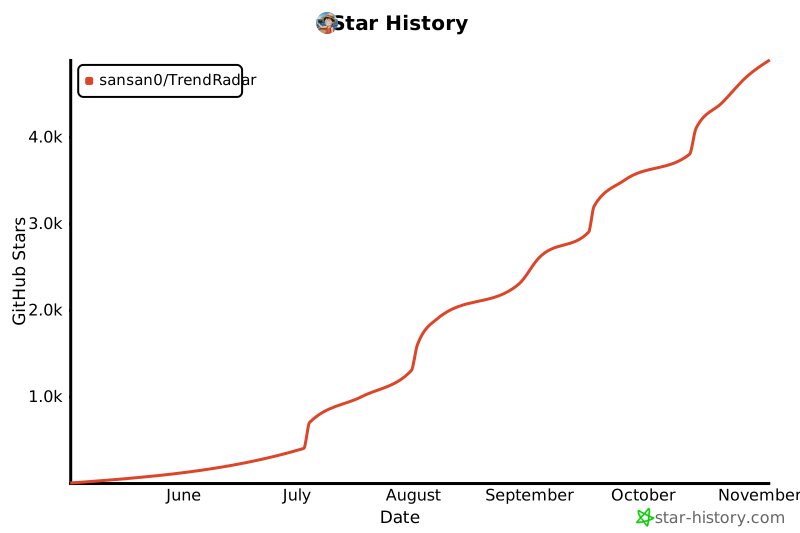](https://www.star-history.com/#sansan0/TrendRadar&Date)
## 📄 License
GPL-3.0 License
---
<div align="center">
[🔝 Back to Top](#trendradar)
</div>
MCP Config
Below is the configuration for this MCP Server. You can copy it directly to Cursor or other MCP clients.
mcp.json
Connection Info
You Might Also Like

cc-switch
All-in-One Assistant for Claude Code, Codex & Gemini CLI across platforms.

awesome-mcp-servers
A collection of MCP servers.

git
A Model Context Protocol server for Git automation and interaction.

oh-my-opencode
Background agents · Curated agents like oracle, librarians, frontend...

TrendRadar
TrendRadar: Your hotspot assistant for real news in just 30 seconds.

Appwrite
Build like a team of hundreds