

内容
<img src=".github/assets/mascot-hero.png" align="right" width="300" alt="ErisPulse" style="margin-left: 24px; margin-bottom: 16px; border-radius: 12px;" />
**中文** | [简体中文](README.zh-CN.md) | [繁體中文](README.zh-TW.md) | [日本語](README.ja.md) | [Русский](README.ru.md)
# ErisPulse
**一次编写,多平台部署**
事件驱动的多平台聊天机器人开发框架
基于 OneBot12 标准接口,一次编写,多平台部署。灵活的插件系统,支持热重载和完整的开发者工具链,适用于从简单聊天机器人到复杂的自动化系统。
<p>
<a href="https://pypi.org/project/ErisPulse/"><img src="https://img.shields.io/pypi/v/ErisPulse?style=for-the-badge&logo=pypi&logoColor=white" alt="PyPI"></a>
<a href="https://pypi.org/project/ErisPulse/"><img src="https://img.shields.io/badge/Python-3.10+-FFD43B?style=for-the-badge&logo=python&logoColor=blue" alt="Python"></a>
<a href="https://hub.docker.com/r/erispulse/erispulse"><img src="https://img.shields.io/badge/Docker-2496ED?style=for-the-badge&logo=docker&logoColor=white" alt="Docker"></a>
<a href="https://github.com/ErisPulse/ErisPulse/blob/main/LICENSE"><img src="https://img.shields.io/badge/License-MIT-blue?style=for-the-badge" alt="License"></a>
<a href="https://github.com/ErisPulse/ErisPulse"><img src="https://img.shields.io/github/stars/ErisPulse/ErisPulse?style=for-the-badge&logo=github&color=brightgreen" alt="Stars"></a>
<a href="https://pepy.tech/project/ErisPulse"><img src="https://img.shields.io/pepy/dt/ErisPulse?style=for-the-badge&color=blue" alt="Downloads"></a>
<a href="https://github.com/astral-sh/ruff"><img src="https://img.shields.io/endpoint?url=https://raw.githubusercontent.com/astral-sh/ruff/main/assets/badge/v2.json&style=for-the-badge" alt="Ruff"></a>
<a href="https://socket.dev/pypi/package/erispulse"><img src="https://img.shields.io/badge/Socket-Secure-2ea043?style=for-the-badge&logo=socket&logoColor=white" alt="Socket"></a>
<a href="https://www.erisdev.com"><img src="https://img.shields.io/badge/文档-erisdev.com-FF6B9D?style=for-the-badge&logo=bookstack&logoColor=white" alt="文档"></a>
<a href="https://deepwiki.com/ErisPulse/ErisPulse"><img src="https://img.shields.io/badge/DeepWiki-ErisPulse-8A2BE2?style=for-the-badge&logo=readthedocs&logoColor=white" alt="DeepWiki"></a>
<a href="https://www.erisdev.com/#market"><img src="https://img.shields.io/badge/模块市场-erisdev.com-C724B1?style=for-the-badge&logo=webpack&logoColor=white" alt="模块市场"></a>
<a href="https://github.com/ErisPulse/ErisPulse/discussions"><img src="https://img.shields.io/badge/GitHub-Discussions-181717?style=for-the-badge&logo=github" alt="讨论"></a>
</p>
<br clear="both">
---
<div align="center">
### 核心特性
</div>
<table>
<tr>
<td width="33%" align="center" valign="top">
<br/>
<img src=".github/assets/icon/icon_event_driven.png.png" width="50" alt="事件驱动架构" />
### 事件驱动架构
基于 OneBot12 标准接口的清晰事件模型,使消息处理逻辑更加直观和高效
</td>
<td width="33%" align="center" valign="top">
<br/>
<img src=".github/assets/icon/icon_cross_platform.png.png" width="50" alt="跨平台兼容性" />
### 跨平台兼容性
编写一次插件模块,即可在所有平台使用,无需为不同平台重复开发
</td>
<td width="33%" align="center" valign="top">
<br/>
<img src=".github/assets/icon/icon_modular.png" width="50" alt="模块化设计" />
### 模块化设计
灵活的插件系统,易于扩展和集成,支持热插拔模块管理
</td>
</tr>
<tr>
<td width="33%" align="center" valign="top">
<br/>
<img src=".github/assets/icon/icon_hot_reload.png" width="50" alt="热重载" />
### 热重载
在开发过程中,无需重启即可重载代码
</td>
<td width="33%" align="center" valign="top">
<br/>
<img src=".github/assets/icon/icon_ai_assist.png" width="50" alt="AI 辅助" />
### AI 辅助
AI 辅助开发,将需求直接转化为可用的模块
</td>
<td width="33%" align="center" valign="top">
<br/>
<img src=".github/assets/icon/icon_lightweight.png" width="50" alt="轻量级与优雅" />
### 轻量级与优雅
直观的 API 设计,使代码如同羽毛般轻盈易读
</td>
</tr>
</table>
---
## 同一份代码,多平台部署
*相同的命令处理器,不同的平台,无需修改任何业务逻辑。*
<table>
<tr>
<td align="center" width="33%">
**Kook**
<img src=".github/assets/demo-kook.png" alt="Kook Demo" />
</td>
<td align="center" width="33%">
**QQ**
<img src=".github/assets/demo-qq.png" alt="QQ Demo" />
</td>
<td align="center" width="33%">
**云乎**
<img src=".github/assets/demo-yunhu.png" alt="云乎 Demo" />
</td>
</tr>
</table>
---
## 生态系统
ErisPulse 不仅仅是一个框架。安装启动,无需从头开始构建。
<table>
<tr>
<td align="center" width="25%">
**框架**
核心运行时
统一事件 & 消息模型
</td>
<td align="center" width="25%">
**控制台**
可视化管理
插件 · 日志 · 配置
[在线演示 →](https://dashdemo.erisdev.com/)
</td>
<td align="center" width="25%">
**AI 构建器**
自然语言 → 可用模块
[立即体验 →](https://www.erisdev.com/#builder)
</td>
<td align="center" width="25%">
**模块市场**
现成可用的插件
[浏览模块 →](https://www.erisdev.com/#market)
</td>
</tr>
<tr>
<td align="center" width="25%">
**适配器**
支持 15+ 平台
</td>
<td align="center" width="25%">
**文档**
[erisdev.com](https://www.erisdev.com)
</td>
<td align="center" width="25%">
**Docker**
多架构支持
`erispulse/erispulse`
</td>
<td align="center" width="25%">
**CLI**
`epsdk` 脚手架工具
</td>
</tr>
</table>
---
## 项目起源
ErisPulse 并非诞生为一个框架。
它起源于 **Amer** —— 一个用于不同平台之间消息互联和同步的项目。
随着更多平台的集成,我们开始维护 **ryunhusdk2** 的异步版本,并逐渐抽象出统一的事件模型和适配器系统。
这些实践最终演变成了今天的 ErisPulse。
它的目标从未改变:
**让开发者专注于业务,而非平台差异。**
---
### 快速开始
#### 一键安装脚本(推荐)
安装脚本将自动检测您的环境(Docker、Python、uv),引导您选择最合适的安装方式,并支持多种语言(中文/英文/日本語/Русский/繁體中文)。
Windows(PowerShell):
```powershell
irm https://get.erisdev.com/install.ps1 -OutFile install.ps1; powershell -ExecutionPolicy Bypass -File install.ps1
```
macOS / Linux:
```bash
curl -fsSL https://get.erisdev.com/install.sh -o install.sh && chmod +x install.sh && ./install.sh
```
<table>
<tr>
<td align="center" width="50%">
**Docker 安装演示**
<video src="https://github.com/user-attachments/assets/a367a466-4678-46a9-b101-073a86388ede" controls width="100%"></video>
</td>
<td align="center" width="50%">
**pip 安装演示**
<video src="https://github.com/user-attachments/assets/a2df4009-dba6-411e-b79d-4454a168d063" controls width="100%"></video>
</td>
</tr>
</table>
#### 使用 Docker(推荐)
```bash
docker pull erispulse/erispulse:latest
```
<details>
<summary>Docker Hub 不可用?</summary>
如果 Docker Hub 无法访问,可以使用 GitHub 容器注册表:
```bash
docker pull ghcr.io/erispulse/erispulse:latest
```
使用 ghcr.io 镜像时,需要修改 `docker-compose.yml` 镜像:
```yaml
image: ghcr.io/erispulse/erispulse:latest
```
</details>
<details>
<summary>快速开始</summary>
```bash
# 下载 docker-compose.yml
curl -O https://raw.githubusercontent.com/ErisPulse/ErisPulse/main/docker-compose.yml
# 设置 Dashboard 登录 token 并启动
ERISPULSE_DASHBOARD_TOKEN=your-token docker compose up -d
```
> 镜像包含 ErisPulse 框架和 Dashboard 管理面板,支持 `linux/amd64` 和 `linux/arm64` 架构。
启动后,访问 `http://<host>:<port>/Dashboard`,使用设置的 token 作为密码登录 Dashboard 管理面板。
</details>
<details>
<summary>使用预发布版本(Dev)</summary>
设置 `ERISPULSE_CHANNEL=dev` 以使用预发布版本:
```bash
# 方法 1:使用环境变量(推荐)
ERISPULSE_CHANNEL=dev ERISPULSE_DASHBOARD_TOKEN=your-token docker compose up -d
# 方法 2:构建 dev 镜像
ERISPULSE_BUILD_TARGET=dev docker compose up -d --build
```
为了在启动时自动更新到最新版本(无论是稳定版还是开发版),请显式设置 `ERISPULSE_UPDATE_ON_START=true`:
```bash
ERISPULSE_CHANNEL=dev ERISPULSE_UPDATE_ON_START=true docker compose up -d
```
您也可以拉取预构建的 dev 镜像:
```bash
docker pull erispulse/erispulse:dev
```
</details>
<details>
<summary>Docker 环境变量</summary>
| 变量 | 默认值 | 描述 |
|----------|---------------|-------------|
| `ERISPULSE_CHANNEL` | `stable` | 版本通道:`stable`(稳定版)或 `dev`(预发布版) |
| `ERISPULSE_UPDATE_ON_START` | `false` | 容器启动时是否自动更新到最新版本(必须显式启用) |
| `ERISPULSE_DASHBOARD_TOKEN` | 空 | Dashboard 登录 token |
| `ERISPULSE_PORT` | `8000` | Dashboard 端口映射 |
| `TZ` | `Asia/Shanghai` | 容器时区 |
> 启用 `ERISPULSE_UPDATE_ON_START=true` 确保即使镜像很旧,容器也会在启动时自动获取最新版本。
</details>
#### 1Panel 应用商店
通过 [1Panel](https://1panel.cn) 应用商店一键安装 ErisPulse,详见 [ErisPulse-1Panel](https://github.com/ErisPulse/ErisPulse-1Panel)。
```bash
bash <(curl -sL https://get-1panel.erisdev.com/install.sh)
```
ErisPulse 已在 1Panel 第三方应用商店中列出,可使用第三方仓库 [okxlin/appstore](https://github.com/okxlin/appstore) 安装。
#### 使用 pip 安装
```bash
pip install ErisPulse
```
> 您也可以使用上述的一键安装脚本,该脚本会自动检测环境并引导配置。
#### 初始化项目
```bash
# 交互式初始化
epsdk init
# 快速初始化(指定项目名称)
epsdk init -q -n my_bot
```
#### 创建您的第一个机器人
创建 `main.py` 文件:
<table>
<tr>
<td width="50%" valign="top">
**命令处理器**
```python
from ErisPulse import sdk
from ErisPulse.Core.Event import command
@command("hello", help="发送问候消息")
async def hello_handler(event):
user_name = event.get_user_nickname() or "friend"
await event.reply(f"Hello, {user_name}!")
@command("ping", help="测试机器人是否在线")
async def ping_handler(event):
await event.reply("Pong! The bot is running normally.")
if __name__ == "__main__":
import asyncio
asyncio.run(sdk.run(keep_running=True))
```
</td>
<td width="50%" valign="top">
**效果说明**
发送 `/hello`
机器人回复:`Hello, {username}!`
---
发送 `/ping`
机器人回复:`Pong! The bot is running normally.`
---
**运行方式```
```bash
epsdk run main.py
# 或在开发模式下
epsdk run main.py --reload
```
</td>
</tr>
</table>
更多详细说明,请参阅:
- [快速开始指南](docs/zh-CN/quick-start.md)
- [入门指南](docs/zh-CN/getting-started/)
#### 多轮对话示例
ErisPulse 拥有强大的内置多轮对话引擎,轻松实现引导操作、信息收集和其他交互场景:
```python
from ErisPulse.Core.Event import command, request
@command("register")
async def register_handler(event):
conv = event.conversation(timeout=60)
await conv.say("欢迎注册!")
# 多步收集用户信息,自动验证
data = await conv.collect([
{"key": "name", "prompt": "请输入您的姓名"},
{"key": "age", "prompt": "请输入您的年龄", "validator": lambda e: e.get_text().strip().isdigit(),
"retry_prompt": "年龄必须是数字,请重新输入"},
])
if data and await conv.confirm(f"确认注册?姓名:{data['name']},年龄:{data['age']}"):
# 使用 SendDSL 发送通知
await sdk.adapter.get(event.get_platform()).Send.To(
"user", event.get_user_id()
).Text(f"注册成功!欢迎 {data['name']}")
# 或 await event.reply("注册成功!")
# 自动处理好友请求
@request.on_friend_request()
async def handle_friend_request(event):
user_name = event.get_user_nickname() or event.get_user_id()
# 同意请求
result = await event.approve()
if result.get("status") == "ok":
await event.reply(f"好友请求已自动同意,欢迎 {user_name}")
```
<details>
<summary>查看更多对话 API(分支 / 选择 / 持久化)</summary>
```python
@command("quiz")
async def quiz_handler(event):
conv = event.conversation(timeout=30)
# 多选题
answer = await conv.choose("谁是 Python 的创造者?", [
"Guido van Rossum",
"James Gosling",
"Dennis Ritchie",
])
if answer == 0:
await conv.say("正确!")
elif answer is None:
await conv.say("超时了,下次再试吧!")
else:
await conv.say("错误,正确答案是 Guido van Rossum")
@command("menu")
async def menu_handler(event):
conv = event.conversation(timeout=60)
# 分支,构建复杂交互流程
@conv.branch("main")
async def main_menu():
await conv.say("=== 主菜单 ===\n1. 个人信息\n2. 设置\n3. 退出")
resp = await conv.wait()
if resp and resp.get_text().strip() == "1":
await conv.goto("profile")
@conv.branch("profile")
async def profile():
await conv.say("姓名:Alice\n0. 返回")
resp = await conv.wait()
if resp and resp.get_text().strip() == "0":
await conv.goto("main")
await conv.start()
```
参阅 [对话多轮交互](docs/zh-CN/advanced/conversation.md)
</details>
---
## 支持的平台
我们欢迎贡献适配器!
| 适配器 | 描述 |
|---------|-------------|
| <img src=".github/assets/adapter_logo/kook.svg" height="20" alt="Kook" /> [Kook](https://github.com/shanfishapp/ErisPulse-KookAdapter) | Kook(开黑啦)即时通讯平台 |
| <img src=".github/assets/adapter_logo/matrix.svg" height="20" alt="Matrix" /> [Matrix](https://github.com/ErisPulse/ErisPulse-MatrixAdapter) | Matrix 去中心化通信协议 |
| <img src=".github/assets/adapter_logo/onebot.png" height="20" alt="OneBot" /> [OneBot11](https://github.com/ErisPulse/ErisPulse-OneBot11Adapter) | OneBot v11 通用机器人协议 |
| <img src=".github/assets/adapter_logo/onebot.png" height="20" alt="OneBot" /> [OneBot12](https://github.com/ErisPulse/ErisPulse-OneBot12Adapter) | OneBot v12 标准协议 |
| <img src=".github/assets/adapter_logo/qqbot.svg" height="20" alt="QQ" /> [QQ](https://github.com/ErisPulse/ErisPulse-QQBotAdapter) | 官方 QQ 机器人平台 |
| <img src=".github/assets/adapter_logo/sandbox.png" height="20" alt="Sandbox" /> [Sandbox](https://github.com/ErisPulse/ErisPulse-SandboxAdapter) | Web 端调试,无需连接真实平台 |
| <img src=".github/assets/adapter_logo/telegram.svg" height="20" alt="Telegram" /> [Telegram](https://github.com/ErisPulse/ErisPulse-TelegramAdapter) | 全球即时通讯平台 |
| <img src=".github/assets/adapter_logo/email.svg" height="20" alt="Email" /> [Email](https://github.com/ErisPulse/ErisPulse-EmailAdapter) | 电子邮件协议适配器,用于发送和接收 |
| <img src=".github/assets/adapter_logo/yunhu.png" height="20" alt="云乎" /> [云乎](https://github.com/ErisPulse/ErisPulse-YunhuAdapter) | 企业级即时通讯平台(机器人集成) |
| <img src=".github/assets/adapter_logo/yunhu.png" height="20" alt="云乎" /> [云乎用户协议](https://github.com/wsu2059q/ErisPulse-YunhuUserAdapter) | 基于云乎用户协议的适配器 |
| [花样咖啡馆](https://github.com/ErisPulse/ErisPulse-Ideaura/) | Allons! \(・ω・) / |
| <img src=".github/assets/adapter_logo/discord.svg" height="20" alt="Discord" /> [Discord](https://github.com/ErisPulse/ErisPulse-DiscordAdapter) | 全球社区交流平台,支持服务器、频道和私信 |
| <img src=".github/assets/adapter_logo/webhook.svg" height="20" alt="Webhook" /> [Webhook](https://github.com/ErisPulse/ErisPulse-WebhookAdapter) | 通用 HTTP 桥接适配器,连接任意系统 |
| <img src=".github/assets/adapter_logo/wechatmp.svg" height="20" alt="WechatMp" /> [微信公众号](https://github.com/ErisPulse/ErisPulse-WechatMpAdapter) | 微信公众号平台 |
参阅 [适配器详情](docs/zh-CN/platform-guide/README.md)
---
### 应用场景
<div align="center">
| 多平台机器人 | 聊天助手 | 自动化工具 | 消息转发 |
|:---:|:---:|:---:|:---:|
| 在多个平台部署具有相同功能的机器人 | 集成 AI 聊天模块,用于娱乐和交互 | 消息通知、任务管理、数据收集 | 跨平台消息同步和转发 |
</div>
---
## 社区
欢迎加入 ErisPulse 社区,与开发者共同建设生态。
### 云乎
群号:`635409929`
加入群聊:
https://yhfx.jwznb.com/share?key=VWJL4fTWXepa&ts=1781889199
### QQ 群
https://qm.qq.com/q/TOwnCmypcy
### Telegram
https://t.me/ErisPulse
---
### 贡献指南
ErisPulse 项目的健康仍需要您的贡献!我们欢迎以各种形式贡献:
1. **报告问题** — 在 [GitHub Issues](https://github.com/ErisPulse/ErisPulse/issues) 提交错误报告
2. **功能请求** — 通过 [社区讨论](https://github.com/ErisPulse/ErisPulse/discussions) 提出新想法
3. **代码贡献** — 阅读 [代码风格](docs/zh-CN/styleguide/) 和 [贡献指南](CONTRIBUTING.md) 后提交 PR
4. **文档改进** — 帮助改进文档和示例代码
[加入社区讨论](https://github.com/ErisPulse/ErisPulse/discussions)
---
## 星历史
[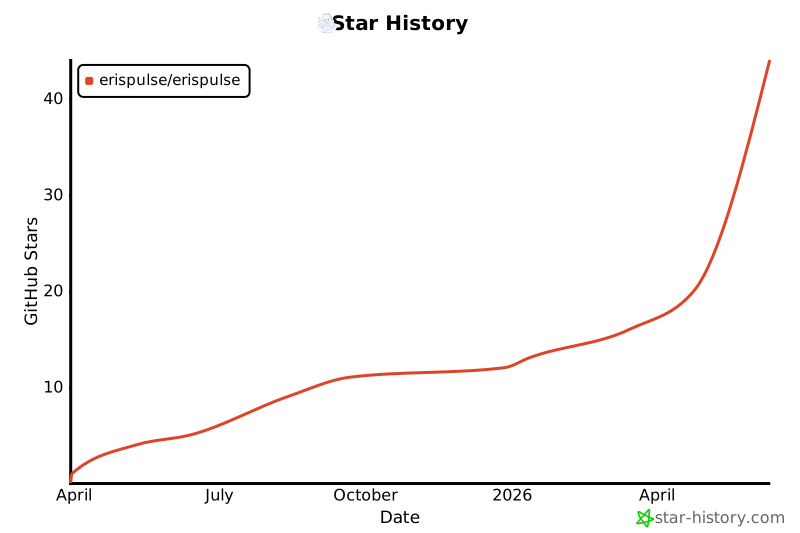](https://star-history.com/#ErisPulse/ErisPulse)
---
<div align="center">
### 致谢
<img src=".github/assets/thanks.png" width="200" alt="Thanks" />
本项目部分代码基于 [sdkFrame](https://github.com/runoneall/sdkFrame)。
核心适配器标准化层参考并受益于 [OneBot12 规范](https://12.onebot.dev/)。
特别感谢云乎生态和社区。
ErisPulse 的早期探索和成长离不开云乎开发者社区的支持。许多想法、适配器和实用经验都源自于此。
我们还要感谢所有为 ErisPulse、OneBot 生态以及开源社区做出贡献的开发者和项目作者。
</div>
连接信息
猜你喜欢
暂无推荐服务器