

内容
<div align="center">
<img src="docs/assets/logo.svg" alt="RepoBrain" width="140"/>
# RepoBrain
### 给你的代码仓库一个大脑 🧠 — ChatGPT for your codebase, 支持 Claude Code, Cursor, Codex, Windsurf 及 4 款以上其他工具。
<sub>前身为 <b>Antigravity Workspace Template</b> — 同一个项目,新名字。</sub>
[](LICENSE)
[](https://python.org/)
[](https://github.com/study8677/repobrain/actions)
[](https://deepwiki.com/study8677/repobrain)
[](https://github.com/xiaolai/nlpm-for-claude)
[](https://github.com/study8677/repobrain/stargazers)
<br/>
<img src="https://img.shields.io/badge/Claude_Code-✓-D97757?style=flat-square" alt="Claude Code"/>
<img src="https://img.shields.io/badge/Codex_CLI-✓-412991?style=flat-square" alt="Codex"/>
<img src="https://img.shields.io/badge/Cursor-✓-000000?style=flat-square" alt="Cursor"/>
<img src="https://img.shields.io/badge/Windsurf-✓-06B6D4?style=flat-square" alt="Windsurf"/>
<img src="https://img.shields.io/badge/Gemini_CLI-✓-4285F4?style=flat-square" alt="Gemini CLI"/>
<img src="https://img.shields.io/badge/VS_Code_+_Copilot-✓-007ACC?style=flat-square" alt="VS Code"/>
<img src="https://img.shields.io/badge/Cline-✓-FF6B6B?style=flat-square" alt="Cline"/>
<img src="https://img.shields.io/badge/Aider-✓-8B5CF6?style=flat-square" alt="Aider"/>
<sub>**English** · [中文](README_CN.md) · [Español](README_ES.md)</sub>
<br/><br/>
<img src="docs/assets/demo.gif" alt="rb-ask demo — ask your codebase, get grounded answers with file paths and line numbers" width="800"/>
</div>
<br/>
<div align="center">
<p><strong>🚀 实测推荐:</strong> <a href="https://teamorouter.com/?i=e188641773">TeamoRouter</a> —— 非广告,我自己在 Codex、Claude Code 等 AI 编程工具里高强度使用:一个 API Key 接入 Claude、GPT-5.5 等,模型价格方便调整,价格优惠,并没有掺水的情况。接入指南见 <a href="https://github.com/xixiaoyao/openrouter-api-key">openrouter-api-key</a>。</p>
</div>
<br/>
<div align="center">
<a href="https://doloffer.com">
<img src="docs/assets/doloffer-banner.png" alt="DolOffer - GPT and Claude membership recharge, official subscriptions with after-sales support" width="800"/>
</a>
<sub><b>Sponsored placement:</b> <a href="https://doloffer.com">DolOffer</a> (<a href="https://github.com/Doloffer-g/guide">GitHub project</a>) offers discounted GPT and Claude membership recharge, official subscriptions, and after-sales support. Use code <code>AI8888</code> for 10% off.</sub><br/>
<sub><b>Disclaimer:</b> This is a paid sponsor placement. DolOffer services, pricing, availability, and support are provided by DolOffer; please review their terms before purchase.</sub>
</div>
<br/>
<div align="center">
<img src="docs/assets/before_after.svg" alt="Before vs After RepoBrain" width="800"/>
</div>
<br/>
```bash
# 1 — 安装(Claude Code 插件市场)
/plugin marketplace add study8677/repobrain
/plugin install repobrain@repobrain
# 2 — 选择 LLM 提供商,构建知识库
/repobrain:rb-setup
/repobrain:rb-refresh
# 3 — 提问任意问题,获得基于代码的答案
/repobrain:rb-ask "How does auth work?"
```
> 注意:插件/包 ID 仍为 `repobrain`;未来版本中将迁移。
> **99% 事实准确率 · 2.1 倍于 Codex CLI 速度 · 支持任意 AI IDE.**
> [头对头基准测试 ↓](#head-to-head-eval-repobrain-vs-codex-cli-vs-claude-code-2026-05-09)
> Codex CLI 用户 — 移除 `repobrain:` 前缀;相同的四条斜杠命令也适用于 Codex CLI。
---
## 为什么选择 RepoBrain?
**跨 IDE 的代码仓库知识引擎,用于基于代码库的 Q&A.** 相同的 `.repobrain/` 知识层被每个 IDE 读取;一个引擎,所有主机。
> AI 代理的能力上限 = **其可读取的上下文质量.**
`rb-refresh` 部署了一个多代理集群,自动读取代码 — 每个模块都有自己的代理,生成知识文档。`rb-ask` 将问题路由到正确的代理,基于实际代码的答案,带有文件路径和行号。
**不要让 Claude Code / Codex 进行整个代码仓库的 `grep`,而是给它一个代码仓库的 ChatGPT.**
```
传统方法: RepoBrain 方法:
CLAUDE.md = 5000 行文档 Claude Code 调用 ask_project("how does auth work?")
代理读取所有内容,遗忘大部分 路由器 → 模块代理读取实际源代码,返回准确答案
幻觉率持续高 基于实际代码,文件路径和 git 历史记录
```
<details>
<summary><b>RepoBrain 修复的四种具体故障模式</b> — 点击展开</summary>
| 问题 | 没有 RepoBrain | 有 RepoBrain |
|:--------|:-------------------|:-----------------|
| 代理遗忘编码风格 | 重复相同的纠正 | 读取 `.repobrain/conventions.md` — 首次正确 |
| 新代码库上手 | 代理猜测架构 | `rb-refresh` → 模块代理自我学习 |
| 在 IDE 之间切换 | 每个 IDE 都有不同的规则 | 一个 `.repobrain/` 文件夹 — 每个 IDE 都读取它 |
| 提问 "X 如何工作?" | 代理读取随机文件 | `ask_project` MCP → 路由器路由到负责的模块代理 |
架构是 **文件 + 直播 Q&A 引擎**,而不是插件。可移植到任意 IDE、任意 LLM,无供应商锁定。
</details>
---
## 头对头评估:RepoBrain vs Codex CLI vs Claude Code (2026-05-09)
三个真实世界的 Python 代码库的非对称基准测试 — `fastapi/fastapi`、`psf/requests`、`fastapi/sqlmodel` — 每个工具提问 **相同的 36 个问题**,分为三个难度等级。所有三个工具都使用 `gpt-5.5`,具有高推理能力;Codex 和 Claude 具有对工作空间的完全读取权限。Codex 是评分工具(4 轴 0–3 评分标准,分数经实际源码验证)。
| 问题类型 | RepoBrain | Codex CLI | Claude Code |
|:---|:---:|:---:|:---:|
| 15 个事实查询 | **179/180 (99%)** | 179/180 (99%) | 178/180 (99%) |
| 12 个综合问题(项目/架构游览) | 116/144 (81%) | **144/144 (100%)** | 136/144 (94%) |
| 9 个审计/安全问题 | **105/108 (97%)** | 104/108 (96%) | 98/108 (91%) |
**综合事实 + 审计(24 个单元格):RepoBrain 284/288,Codex 283/288,Claude 276/288.** RepoBrain 略胜两家 — 在每次提问的延迟都低于 Codex。
**延迟** (平均每问时钟时间,相同代理):
| 问题类型 | RepoBrain | Codex | Claude |
|:---|:---:|:---:|:---:|
| 事实 | **56s** | 119s | 42s |
| 审计 | 160s | 177s | **100s** |
RepoBrain **比 Codex 快 2.1 倍,事实准确率持平**,而在审计方面与 Codex 持平,但正确率略高。Claude 在审计方面最快,但正确率低 7 个百分点。
<details>
<summary><b>本次基准测试中代码库的变更</b> — 引擎修复驱动的数字变化</summary>
两个引擎修复在基准测试期间落地,均提交在此分支:
1. `_ask_with_agent_md` 现将项目级文档(`conventions.md`、`module_registry.md`、`map.md`、`structure.md`)纳入其回答提示中。删除了“模块知识不包括项目范围的约定”拒绝模式。
2. 结构化事实答案代理现在在运行时绑定 `search_code`、`read_file`、`list_directory`、`read_file_metadata`、`search_by_type`,因此 LLM 可以 grep 和读取实际源代码,而不是改述知识图谱。
完整报告(数据、方法论、每个单元格的表格、注意事项):[`artifacts/benchmark-2026-05-09/REPORT.md`](artifacts/benchmark-2026-05-09/REPORT.md).
</details>
---
## 快速开始
**适用于 Claude Code / Codex CLI 的插件安装** (推荐 — 引擎 CLI 在首次会话期间自动安装):
```bash
# Claude Code
/plugin marketplace add study8677/repobrain
/plugin install repobrain@repobrain
/repobrain:rb-setup # 交互式:选择 LLM 提供商,粘贴 API 密钥,写入 .env
/repobrain:rb-refresh # 首次刷新自动创建 .repobrain/
/repobrain:rb-ask "这个项目如何工作?"
# Codex CLI(手动引擎安装 — Codex 钩子尚不支持)
pipx install "git+https://github.com/study8677/repobrain.git#subdirectory=engine"
codex plugin marketplace add study8677/repobrain
/rb-setup
/rb-refresh
/rb-ask "这个项目如何工作?"
```
Codex 自动从插件的 `commands/` 目录发现斜杠命令,因此相同的四个命令在不使用 `repobrain:` 命名空间前缀的情况下也适用。原始 CLI 调用(`rb-refresh --workspace .`、`rb-ask "..." --workspace .`)也仍然有效。如果您的 Codex 构建支持 MCP,请单独注册 `rb-mcp --workspace <project>`。
<details>
<summary><b>选项 B — 手动安装:引擎 + CLI via pip</b></summary>
```bash
# 1. 安装引擎 + CLI
pip install "git+https://github.com/study8677/repobrain.git#subdirectory=cli"
pip install "git+https://github.com/study8677/repobrain.git#subdirectory=engine"
# 2. 配置 .env 文件,任意 OpenAI 兼容的 API 密钥
cd my-project
cat > .env <<EOF
OPENAI_BASE_URL=https://your-endpoint/v1
OPENAI_API_KEY=your-key
OPENAI_MODEL=your-model
RB_ASK_TIMEOUT_SECONDS=120
EOF
# 3. 构建知识库(模块代理自我学习每个模块)
rb-refresh --workspace .
# 4. 提问
rb-ask "这个项目中的身份验证如何工作?"
# 5. (可选)注册为 Claude Code 的 MCP 服务器
claude mcp add repobrain rb-mcp -- --workspace $(pwd)
```
</details>
<details>
<summary><b>选项 C — 仅上下文文件(任意 IDE,无 LLM)</b></summary>
```bash
pip install git+https://github.com/study8677/repobrain.git#subdirectory=cli
rb init my-project && cd my-project
# IDE 入口文件引导至 AGENTS.md;动态知识位于 .repobrain/
```
</details>
请参阅 [INSTALL.md](INSTALL.md) 以获取完整详细信息和故障排除。
---
## 斜杠命令
相同的四个斜杠命令适用于 **Claude Code** 和 **Codex CLI**。Claude 将它们命名为 `/repobrain:<name>`;Codex 自动发现 `commands/` 并显示裸 `/<name>` 形式。不需要重新训练 — 两个主机上的流程相同。
| Claude Code | Codex CLI | 用途 |
|---|---|---|
| `/repobrain:rb-setup` | `/rb-setup` | 首次设置 — 选择 LLM 提供商,写入 `.env` |
| `/repobrain:rb-refresh [quick]` | `/rb-refresh [quick]` | 构建 / 增量刷新项目知识库 |
| `/repobrain:rb-ask <question>` | `/rb-ask <question>` | 代码库上的路由 Q&A |
| `/repobrain:rb-init <name>` | `/rb-init <name>` | 从此模板构建新的多代理代码库 |
典型的首次会话是 **rb-setup → rb-refresh → rb-ask**。
<details>
<summary><b>每个斜杠命令实际执行的操作</b></summary>
### `rb-setup` — 首次配置
运行此命令 **每个项目一次**,在安装插件后。交互式选择 LLM 提供商(OpenAI / DeepSeek / Groq / 阿里灵积 / NVIDIA NIM / Ollama 本地 / 任意 OpenAI 兼容的端点),然后写入项目根目录下的 `.env` 文件,包含 `OPENAI_BASE_URL`、`OPENAI_API_KEY`、`OPENAI_MODEL`、`RB_ASK_TIMEOUT_SECONDS`。它还可以编写显式本地 Codex 主机运行器配置,用于实验的无 API 密钥 `rb-ask`。还确保 `.env` 被加入 `.gitignore`。跳过它,如果您已经有一个有效的 `.env` 文件。
### `rb-refresh` — 构建 / 刷新知识库
部署多代理集群来读取代码:每个模块都有自己的代理,它在 `.repobrain/agents/*.md` 下生成知识文档,以及 `map.md` 路由索引。安装后运行,在代码发生重大变化后,或 `rb-ask` 返回过时答案时运行。第一个刷新自动创建 `.repobrain/` — 不需要单独的 init 步骤。传递 `quick` 进行增量更新,`failed-only` 仅重新运行以前失败的模块。
时间:小型仓库几分钟,大型仓库更长时间。需要 `rb-setup` 已完成。完整的 LLM 刷新需要 API 密钥/OpenAI 兼容的提供商;本地主机运行模式可以使用 `RB_REFRESH_SCAN_ONLY=1 rb-refresh --workspace .` 扫描工件。
### `rb-ask` — 路由 Q&A
**此插件存在的主要原因**。将您的问题路由到正确的模块代理(以及适用时 GitAgent),然后返回基于实际源代码的答案,带有文件路径和行号。用法:`where is X defined/handled?`,“为什么 Y 这样做?”,“auth flow flow flow flow flow flow flow flow flow flow flow flow flow flow flow flow flow flow flow flow flow flow flow flow flow flow flow flow flow flow flow flow flow flow flow flow flow flow flow flow flow flow flow flow flow flow flow flow flow flow flow flow flow flow flow flow flow flow flow flow flow flow flow flow flow flow flow flow flow flow flow flow flow flow flow flow flow flow flow flow flow flow flow flow flow flow flow flow flow flow flow flow flow flow flow flow flow flow flow flow flow flow flow flow flow flow flow flow flow flow flow flow flow flow flow flow flow flow flow flow flow flow flow flow flow flow flow flow flow flow flow flow flow flow flow flow flow flow flow flow flow flow flow flow flow flow flow flow flow flow flow flow flow flow flow flow flow flow flow flow flow flow flow flow flow flow flow flow flow flow flow flow flow flow flow flow flow flow flow flow flow flow flow flow flow flow flow flow flow flow flow flow flow flow flow flow flow flow flow flow flow flow flow flow flow flow flow flow work?”,“how does auth work?”,“auth” ...”。
知识库知识文档。`rb-ask` 前缀用于 `conventions.md`、`module_registry.md`、`map.md`、`structure.md`、`structure.md`。使用它 **在手动 grep 或阅读文件之前 — 比手动 grep 或阅读文件更快、更准确。**。问题的好问题形状:“哪里定义/处理?”,“为什么这样做?”,“身份验证流程如何工作?”,“什么依赖模块 Z?”。
需要知识库 — 如果您看到“no index” 或空答案,请先运行 `rb-refresh`。
### `rb-init` — 搭建新的多代理代码库
**创建** 新项目从 RepoBrain 模板构建。两种模式:`quick`(快速搭建,干净复制)和 `full`(添加运行时配置文件,`.env` 文件,任务文件,沙盒配置,`git init`)。这是用于 **新建仓库** — 您 **不** 需要在现有项目中 `rb-refresh`。
> 插件还捆绑了 `agent-repo-init` 技能(`rb-init` 调用的后端,Codex / Claude ),以及可选的 `rb-mcp` MCP 服务器(`ask_project` + `refresh_project`)用于工具式集成。
</details>
---
## 支持矩阵
| 层级 | 通道 | 合同 |
|:------|:---------|:---------|
| 原生插件 | Claude Code,Codex CLI | 捆绑的斜杠命令,用于 `rb-setup`、`rb-refresh`、`rb-ask` 和 `rb-init`。 |
| 兼容 IDE | Cursor, Windsurf, Gemini CLI, VS Code + Copilot, Cline, Aider | 使用共享上下文文件、`rb`/`rb-*` CLI 入口点或 MCP 客户端。 |
| 高级工具集成 | `rb-mcp` | 暴露 `ask_project` 和 `refresh_project` 用于主机调用 MCP 工具。 |
| 工作区启动 | `rb-init`、`rb init` | 启动新仓库或将可移植的代理上下文注入现有仓库。 |
当前原生插件是主要的安装路径。其他环境通过相同的仓库知识工件支持,而不是单独的主机特定插件包。
---
## 架构(TL;DR)
```
rb init 将上下文文件注入任何项目 (--force 覆盖)
│
▼
.repobrain/ 共享知识库 — 每个 IDE 都从这里读取
│
├──► rb-refresh 动态多代理自我学习 → 模块知识文档 + 结构图
├──► rb-ask 路由器 → 模块代理 Q&A,具有实时代码证据
└──► rb-mcp 可选 MCP 服务器 → IDE 工具集成
```
**动态多代理集群** — 在 `rb-refresh` 期间,文件按导入图、目录共定位和文件名前缀分组。每个子代理获得 ~30K 个令牌的聚焦相关代码预加载(无需工具调用),并编写 **全面的 Markdown 知识文档** 至 `agents/*.md`。大型模块 → 多个代理文档(每个组 1 个,无合并)。全局 API 速率控制防止速率限制。**完全与语言无关** — 采用纯目录结构 — 无需 `__init__.py` 或任何语言特定标记。
**GitAgent** — 分析 git 历史记录的专用代理 — 谁更改了什么以及原因。
**NLPM 审计反馈** — 由 [NLPM](https://github.com/xiaolai/nlpm-for-claude) 改进,[xiaolai](https://github.com/xiaolai) 的自然语言编程 linter。
<details>
<summary><b>详细流程及内部原理</b></summary>
### `rb-refresh` — 多代理自我学习(8 步流程)
```bash
rb-refresh --workspace my-project
```
1. 扫描代码库(语言、框架、结构)
2. 多代理流水线生成 `conventions.md`
3. 生成 `structure.md` — 语言无关的文件树,带有行数
4. 构建知识图谱 (`knowledge_graph.json` + mermaid)
5. 编写文档/数据/媒体索引
6. **LLM 全上下文分析** — 将文件按导入图 + 目录 + 前缀分组,预加载到上下文 (~30K 令牌/子代理),过滤掉构建工件。每个子代理读取完整源代码,输出 **全面 Markdown 知识文档** (`agents/*.md`)。大型模块生成多个代理文档(按组 1 个,无合并)。全局 API 速率控制防止速率限制。**完全与语言无关** — 适用于任何编程语言。
7. `RefreshGitAgent` 分析 git 历史记录,生成 `_git_insights.md`
8. **地图代理** 读取所有代理文档 → 生成 `map.md`(模块路由索引,带有描述和关键主题)
### `rb-ask` — 基于路由器的 Q&A
```bash
rb-ask "How does auth work in this project?"
```
路由器读取 `map.md` → 选择模块 → 读取 `agents/*.md` → LLM 回答,带有代码引用。多个代理文档并行读取,然后合成器在答案时合并。
### `rb-init` — 脚手架一个新代码库
```bash
rb-init "my-project"
```
创建 **新的** 项目从 RepoBrain 模板。两种模式:`quick`(快速脚手架,干净复制)和 `flow`(添加运行时配置文件,`.env` 文件,任务文件,沙盒配置,`git init`)。这是用于 **新建仓库** — 您 **不** 需要在现有项目中 `rb-refresh`。
> 插件还捆绑了 `agent-repo-init` 技能(`rb-init` 调用它的后端,Codex / Claude ),以及可选的 `rb-mcp` MCP 服务器(`ask_project` + `refresh_project`)用于工具式集成。
</details>
---
## IDE 兼容性
架构编码在 **文件** 中 — 任何读取项目文件的代理都能受益:
| IDE | 配置文件 |
|:----|:------------|
| Cursor | `.cursorrules` |
| Claude Code | `CLAUDE.md` |
| Windsurf | `.windsurfrules` |
| VS Code + Copilot | `.github/copilot-instructions.md` |
| Gemini CLI / Codex | `AGENTS.md` |
| Cline | `.clinerules` |
| Google Antigravity | `.repobrain/rules.md` |
所有这些文件都由 `rb init` 生成:`AGENTS.md` 是单一的行为规则手册,IDE 特定文件是薄引导文件,而 `.repobrain/` 存储共享的动态项目上下文。
---
## 高级功能
<details>
<summary><b>MCP 服务器 — 为你的代码库提供 ChatGPT</b></summary>
Claude Code 可以调用 `ask_project` 作为实时工具 — 由动态多代理集群支持:路由器将问题路由到正确的 ModuleAgent,返回带有文件路径和行号的答案。
**设置:**
```bash
# 安装引擎
pip install "git+https://github.com/study8677/repobrain.git#subdirectory=engine"
# 刷新知识库(ModuleAgents 自学习每个模块)
rb-refresh --workspace /path/to/project
# 在 Claude Code 中注册为 MCP 服务器
claude mcp add repobrain rb-mcp -- --workspace /path/to/project
```
**向 Claude Code 公开的工具:**
| 工具 | 功能 |
|:-----|:-------------|
| `ask_project(question)` | 路由器 → ModuleAgent/GitAgent 回答代码库问题。返回文件路径 + 行号。 |
| `refresh_project(quick?)` | 在重大更改后重建知识库。ModuleAgents 重新学习代码。 |
</details>
<details>
<summary><b>MCP 集成(消费者)— 让代理调用外部工具</b></summary>
`MCPClientManager` 允许你的代理连接到外部 MCP 服务器(GitHub、数据库等),自动发现和注册工具。
```json
// mcp_servers.json
{
"servers": [
{
"name": "github",
"transport": "stdio",
"command": "npx",
"args": ["-y", "@modelcontextprotocol/server-github"],
"enabled": true
}
]
}
```
在 `.env` 中设置 `MCP_ENABLED=true` 以使配置的服务器可用,并仅在你希望 `rb-ask` 自动连接这些外部服务器时设置 `RB_ALLOW_MCP=true`。_stdio MCP 服务器继承进程环境和配置的 `env` 值,因此将启用的服务器视为本地权限代码。
</details>
<details>
<summary><b>沙盒 — 可配置的代码执行环境</b></summary>
| 变量 | 默认值 | 选项 |
|:---------|:--------|:--------|
| `SANDBOX_TYPE` | `local` | `local` · `microsandbox` |
| `SANDBOX_TIMEOUT_SEC` | `30` | 秒 |
| `RB_RETRIEVAL_MODE` | `compact` | `off` · `compact` · `full` |
默认沙盒适用于受信任的本地工作区,不适用于不受信任的代码隔离。检索图文件在写入磁盘之前会编辑常见的机密,但 `full` 模式仍可以保留源代码片段。参见 [沙盒文档](docs/zh/SANDBOX.md)。
</details>
<details>
<summary><b>CLI 命令参考</b></summary>
| 命令 | 功能 | 是否需要 LLM? |
|:--------|:-------------|:-----------:|
| `rb init <dir>` | 注入认知架构模板 | 否 |
| `rb init <dir> --force` | 重新注入,覆盖现有文件 | 否 |
| `rb refresh --workspace <dir>` | CLI 便捷包装器,围绕知识中心刷新管道 | 是 |
| `rb ask "question" --workspace <dir>` | CLI 便捷包装器,围绕路由项目 Q&A 流程 | 是,或本地 Codex 主机运行器 |
| `rb-refresh` | 代码库的多代理自学习,生成模块知识文档 + `conventions.md` + `structure.md` | 是 |
| `rb-ask "question"` | 路由器 → ModuleAgent/GitAgent 路由 Q&A | 是,或本地 Codex 主机运行器 |
| `rb-mcp --workspace <dir>` | **启动 MCP 服务器** — 向 Claude Code 公开 `ask_project` + `refresh_project` | 是 |
| `rb report "message"` | 将发现内容记录到 `.repobrain/memory/` | 否 |
| `rb log-decision "what" "why"` | 记录架构决策 | 否 |
`rb ask` / `rb refresh` 在 `cli/` 和 `engine/` 都安装时可用。`rb-ask` / `rb-refresh` 是仅限引擎的入口点。
</details>
<details>
<summary><b>两个软件包,一个工作流 — 仓库布局</b></summary>
```
repobrain/
├── cli/ # rb CLI — 轻量级,可 pip 安装
│ └── templates/ # .cursorrules, CLAUDE.md, .repobrain/, ...
└── engine/ # 多代理引擎 + 知识中心
└── repobrain_engine/
├── _cli_entry.py # rb-ask / rb-refresh / rb-mcp + python -m dispatch
├── config.py # Pydantic 配置
├── hub/ # ★ 核心:多代理集群
│ ├── agents.py # 路由器 + ModuleAgent + GitAgent
│ ├── contracts.py # Pydantic 模型:声明,证据,刷新状态
│ ├── ask_pipeline.py # agent.md + 图富集的 ask
│ ├── refresh_pipeline.py # LLM 驱动的刷新 → 代理/*.md + map.md
│ ├── ask_tools.py
│ ├── scanner.py # 多语言项目扫描
│ ├── module_grouping.py # 智能功能性文件分组
│ ├── structure.py
│ ├── knowledge_graph.py
│ ├── retrieval_graph.py
│ └── mcp_server.py
├── mcp_client.py # MCP 消费者(连接外部工具)
├── memory.py # 持久交互内存
├── tools/ # MCP 查询工具 + 扩展
├── skills/ # 技能加载器
└── sandbox/ # 代码执行(本地 / 微沙盒)
```
**CLI** (`pip install .../cli`) — 零 LLM 依赖。注入模板,离线记录报告和决策。
**引擎** (`pip install .../engine`) — 仓库知识运行时。支持 `rb-ask`、`rb-refresh`、`rb-mcp`。使用 `rb-setup` 编写的 OpenAI 兼容端点(OpenAI、DeepSeek、Groq、DashScope、NVIDIA NIM、Ollama 或自定义)。实验性本地模式可以设置 `RB_HOST_RUNNER=codex`,因此 `rb-ask` 通过用户的本地 `codex login` 运行,而不是 API 密钥;这适用于个人/本地使用,不是有托管产品后端。
**技能打包:**
- `engine/repobrain_engine/skills/graph-retrieval/` — 用于结构和调用路径推理的图定向检索工具。
- `engine/repobrain_engine/skills/knowledge-layer/` — 用于语义上下文整合的项目知识层工具。
对于此仓库的本地开发:
```bash
python3 -m venv venv
source venv/bin/activate
pip install -e ./cli -e './engine[dev]'
pytest engine/tests cli/tests
```
</details>
---
## 文档
| | |
|:--|:--|
| 🇬🇧 英文 | **[`docs/en/`](docs/en/)** |
| 🇨🇳 中文 | **[`docs/zh/`](docs/zh/)** |
| 🇪🇸 西班牙语 | **[`docs/es/`](docs/es/)** |
---
## 贡献
想法也是贡献!打开一个 [问题](https://github.com/study8677/repobrain/issues) 来报告错误,建议功能或提出架构。
## 贡献者
<table>
<tr>
<td align="center" width="20%">
<a href="https://github.com/Lling0000">
<img src="https://github.com/Lling0000.png" width="80" /><br/>
<b>⭐ Lling0000</b>
</a><br/>
<sub><b>主要贡献者</b> · 创意建议 · 项目管理员 · 项目构思与反馈</sub>
</td>
<td align="center" width="20%">
<a href="https://github.com/h13181278389">
<img src="https://github.com/h13181278389.png" width="80" /><br/>
<b>h13181278389</b>
</a><br/>
<sub><b>核心贡献者</b> · 感谢您对 RepoBrain 的支持、反馈和贡献</sub>
</td>
<td align="center" width="20%">
<a href="https://github.com/flyw1015">
<img src="https://github.com/flyw1015.png" width="80" /><br/>
<b>flyw1015</b>
</a><br/>
<sub><b>核心贡献者</b> · 感谢您对 RepoBrain 的支持、反馈和贡献</sub>
</td>
<td align="center" width="20%">
<a href="https://github.com/devalexanderdaza">
<img src="https://github.com/devalexanderdaza.png" width="80" /><br/>
<b>Alexander Daza</b>
</a><br/>
<sub>沙盒 MVP · OpenSpec 工作流 · 技术分析文档 · PHILOSOPHY</sub>
</td>
<td align="center" width="20%">
<a href="https://github.com/chenyi">
<img src="https://github.com/chenyi.png" width="80" /><br/>
<b>Chen Yi</b>
</a><br/>
<sub>第一个 CLI 原型 · 753 行重构 · DummyClient 提取 · 快速启动文档</sub>
</td>
</tr>
<tr>
<td align="center" width="20%">
<a href="https://github.com/Subham-KRLX">
<img src="https://github.com/Subham-KRLX.png" width="80" /><br/>
<b>Subham Sangwan</b>
</a><br/>
<sub>动态工具和上下文加载 (#4) · 多代理群集协议 (#3)</sub>
</td>
<td align="center" width="20%">
<a href="https://github.com/shuofengzhang">
<img src="https://github.com/shuofengzhang.png" width="80" /><br/>
<b>shuofengzhang</b>
</a><br/>
<sub>内存上下文窗口修复 · MCP 关闭时优雅处理 (#28)</sub>
</td>
<td align="center" width="20%">
<a href="https://github.com/goodmorning10">
<img src="https://github.com/goodmorning10.png" width="80" /><br/>
<b>goodmorning10</b>
</a><br/>
<sub>增强的 <code>rb ask</code> 上下文加载 — 添加了 CONTEXT.md、AGENTS.md 和 memory/*.md 作为上下文源 (#29)</sub>
</td>
<td align="center" width="20%">
<a href="https://github.com/abhigyanpatwari">
<img src="https://github.com/abhigyanpatwari.png" width="80" /><br/>
<b>Abhigyan Patwari</b>
</a><br/>
<sub><code>rb ask</code> 的代码知识图集成 — 符号搜索、调用图和影响分析</sub>
</td>
<td align="center" width="20%">
<a href="https://github.com/BBear0115">
<img src="https://github.com/BBear0115.png" width="80" /><br/>
<b>BBear0115</b>
</a><br/>
<sub>技能打包和 KG 检索增强 · 多语言 README 同步 (#30)</sub>
</td>
</tr>
<tr>
<td align="center" width="20%">
<a href="https://github.com/SunkenCost">
<img src="https://github.com/SunkenCost.png" width="80" /><br/>
<b>SunkenCost</b>
</a><br/>
<sub><code>rb clean</code> 命令 · <code>__main__</code> 入口点保护 (#37)</sub>
</td>
<td align="center" width="20%">
<a href="https://github.com/aravindhbalaji04">
<img src="https://github.com/aravindhbalaji04.png" width="80" /><br/>
<b>Aravindh Balaji</b>
</a><br/>
<sub>围绕 <code>AGENTS.md</code> 的统一指令界面 (#41)</sub>
</td>
</tr>
<tr>
<td align="center" width="20%">
<a href="https://github.com/xiaolai">
<img src="https://github.com/xiaolai.png" width="80" /><br/>
<b>xiaolai</b>
</a><br/>
<sub><a href="https://github.com/xiaolai/nlpm-for-claude">NLPM</a> 审计反馈 · 技能前置修复 · 依赖关系审查 (#51, #52, #53)</sub>
</td>
</tr>
</table>
## 星级历史
[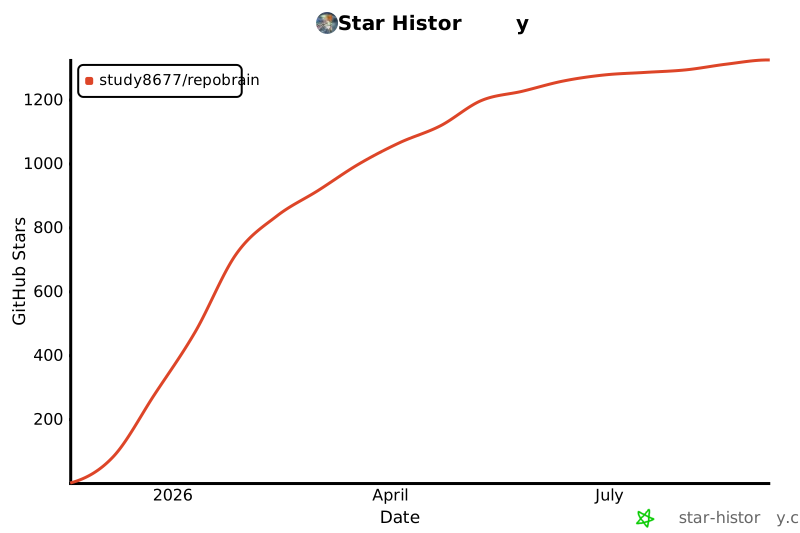](https://star-history.com/#study8677/repobrain&Date)
## 许可证
MIT 许可证。详情请参见 [LICENSE](LICENSE)。
---
<div align="center">
**[📚 完整文档 →](docs/zh/)**
*为 AI 原生开发时代而构建*
友善链接: [LINUX DO](https://linux.do/)
</div>
连接信息
猜你喜欢
暂无推荐服务器