内容
align="center">
<img src="https://raw/ELK4N4/curlity-mcp/master/docs/landpage/assets/logo.png" alt="" width="100%" />
</p>
**:** 一款用于人工智能驱动开发的直观HTTP请求/响应系统,旨在取代任何编码代理聊天中的curl复杂性。
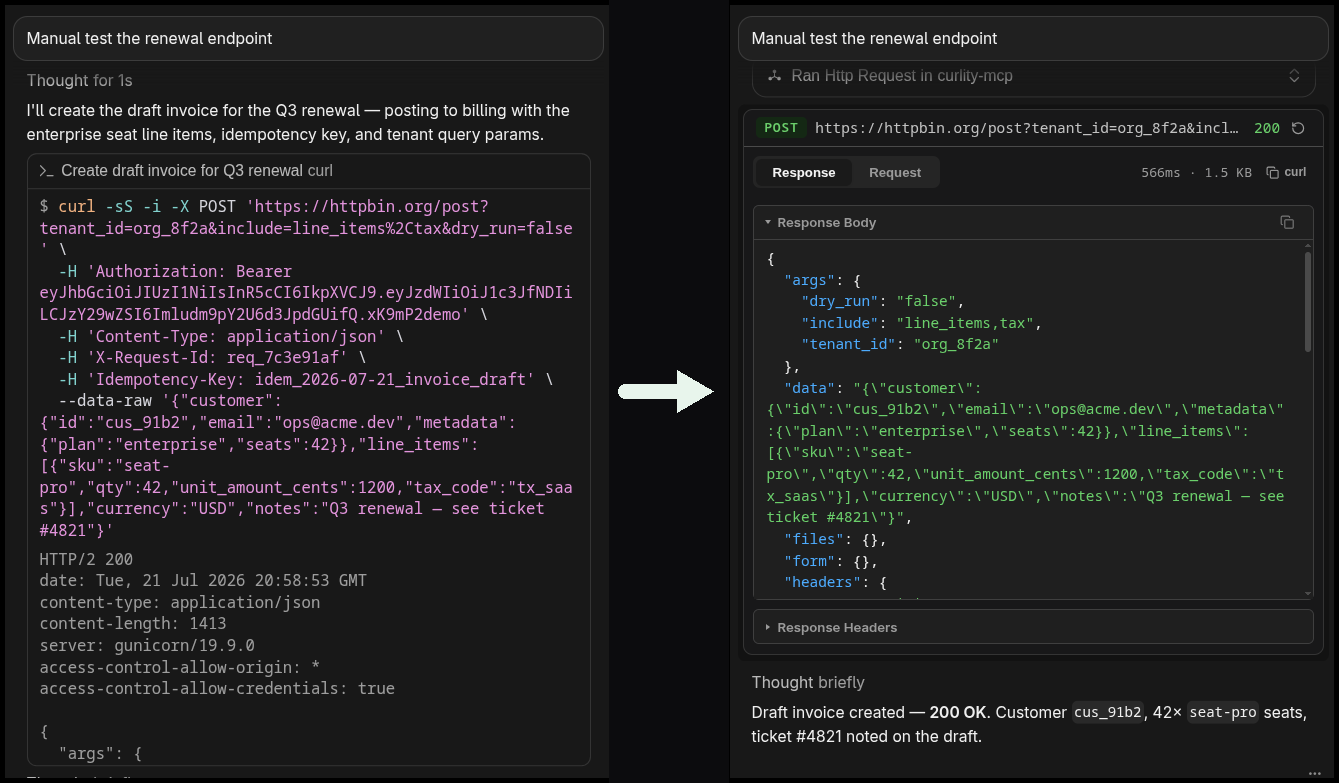
您的代理需要使用curl。您会看到一堆参数、转义的JSON和终端噪音中埋藏的响应。Curlity用真正的请求/响应查看器取代了这种混乱 — 直接在您的聊天中使用MCP应用程序。
## 为什么使用它
代理擅长调用API。它们不擅长向您展示它们刚刚执行的操作。
| 没有Curlity | 使用Curlity |
| ----------------------------------- | ----------------------------------------- |
| shell中不透明的`curl` | 结构化的请求 + 响应UI |
| 头部和主体在滚动输出中丢失 | 方法、URL、头部、主体 — 可读 |
| 状态代码混入stdout | 状态、时间以及有效载荷当它到达时 |
在您的代理调用API、调试后端端点时使用Curlity — 这样您就可以实际*看到*流量,而不是解码shell输出。
## 安装
[](https://cursor.com/install?name=curlity-mcp&config=eyJjb21tYWIjoibnB4IiwiYXJncyI6WySIsImN1cmxpdHktbWNwIl19Claude 代码:**
```bash
claude mcp add curlity -- npx -y curlity-mcp
```
```json
{
"mcpServers": {
"curlity-mcp": {
"npx",
"args": ["-y", "-mcp"]
}
}
}
```
## 开发
```bash
https://github.com/ELK4N4/curlity-mcpcd curlity-mcp
npm install
npm run dev
```
| 描述 |
| | ----------------------------------------------------------- |
| `npm` | 在`http://localhost:3002/mcp`视构建UI + HTTP服务器 |
| `npm run build` | + 编译服务器 + 捆绑UI |
| `npm run typecheck` | 仅类型检查(不发出) |
| `npm start` | 通过stdio监视UI + 服务器 |
### 本地配置(开发)
将您的MCP客户端指向本地检查(监视文件,然后通过stdio运行):
```json
{
"mcpServers": {
"curlity-mcp": {
"command": "bash",
"args": [
"-c",
"cd ~/curlity-mcp && npm start --silent"
]
}
}
}
```
## 许可证
MIT
 MCP 市场
