

内容
# LokalBoards
[](https://nuxt.com)
[](https://socket.io)
[](https://github.com/florian-strasser/LokalBoards/blob/master/LICENSE)
[](https://github.com/florian-strasser/LokalBoards/releases)
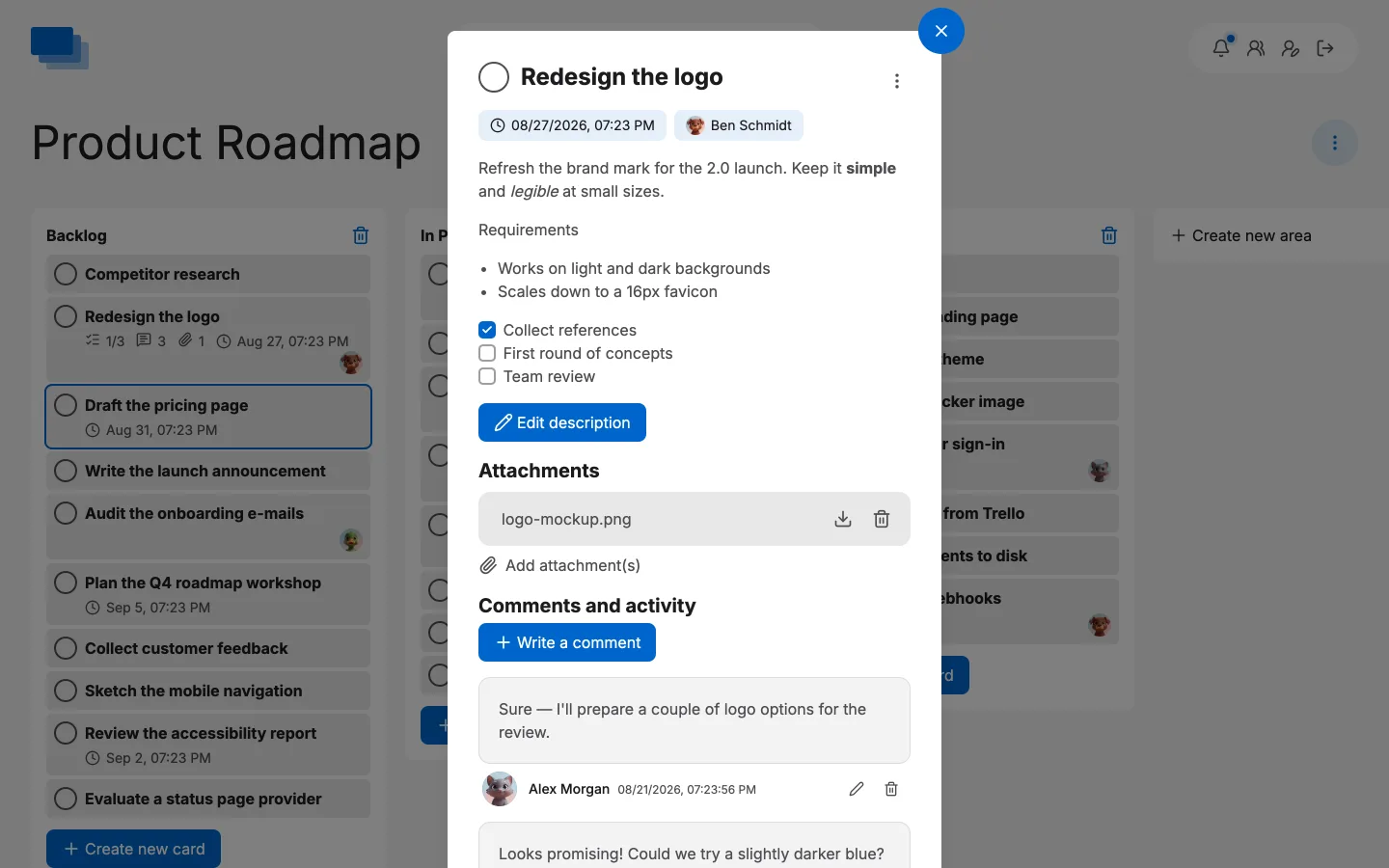
LokalBoards is an open-source (MIT License), self-hosted Kanban board system. It allows users to create boards, invite collaborators, and manage Kanban cards. It also includes admin features for user management. All data is stored in your own database, with no reliance on external services.
We support real-time multiplayer updates. When you edit a card, area, or rename it, the changes are instantly reflected for all users viewing the board. Comments on cards are also updated in real-time across all browsers. This is powered by an internal Socket.IO integration.
LokalBoards is currently available in the following languages: English (EN), German (DE), French (FR), Spanish (ES), Italian (IT), Dutch (NL), Polish (PL), Ukrainian (UK), Portuguese (PT), and Czech (CS).
## AI agents (MCP)
LokalBoards isn't only for humans — it ships a built-in [Model Context Protocol](https://modelcontextprotocol.io) server (`/mcp`) so AI agents can read and manage boards on a user's behalf. An agent authenticates with an API key (create one under **Settings → API keys**, as **full-access** or **read-only**), or — for clients that only speak OAuth, such as ChatGPT's custom connectors — by sending you to your own instance to sign in and allow it (**Settings → Connected apps**). Either way it can search and filter cards, create/update/move/delete them, write comments, assign members and set due dates. Card descriptions and comments are stored as **Markdown** — the format agents work in natively — and are rendered safely.
Agents and people can share a board safely:
- **Give an agent its own account.** Admins can mark a user as an **AI agent**, so its actions are clearly attributed and it shows a bot badge on the board.
- **Claiming is atomic.** An agent claims a card before working on it, so two agents — or an agent and a person — never do the same task twice.
- **See who's around.** Live avatars on the board tiles — and in the card modal — show who currently has each card open, human or agent.
- **Webhooks wake automations.** An MCP agent can't be pushed to, so subscribe a webhook (**Settings → Webhooks**) and have your automation start a run when a board changes. Subscriptions are per user *and* per board, so on a shared instance everyone wires up their own without touching anyone else's.
See **[AGENTS.md](AGENTS.md)** for connection details, the agent work loop, the full tool list, and examples.
## Single sign-on
Sign people in against the identity provider your organisation already runs —
**Entra ID, Google Workspace, Okta, Keycloak, Authentik, Auth0, ADFS,
Shibboleth**, or anything else that speaks **OpenID Connect** or **SAML 2.0**.
A handful of environment variables, one button on the sign-in page, and no
separate password to look after.
Accounts are created on first sign-in, and anyone already using the instance is
linked to their existing account by e-mail address, so a team adopting SSO keeps
its boards. Optionally restrict it to your own e-mail domains, refuse anyone
without an account here, or read the administrator role from a group claim in
your directory.
It is MIT-licensed like the rest of it — there is no edition to buy. See the
**[single sign-on guide](https://www.lokalboards.com/docs/single-sign-on)** for
provider-by-provider setup.
## Install
To install LokalBoards, follow these steps:
### Clone the Repository
```bash
git clone https://github.com/florian-strasser/LokalBoards
cd LokalBoards
```
### Install Dependencies
```bash
npm install
```
Use Node.js 22 and npm 11; the lockfile is generated with npm 11.
### Configure Environment Variables
Create a `.env` file (and optionally a `.env.local` file for local development) with the following settings. Adjust the values to match your database and email configuration.
```dotenv
# App Name
NUXT_APP_NAME=LokalBoards
NUXT_BOARDS_URL=http://localhost:3000
NUXT_LANGUAGE=en
NUXT_PUBLIC_PRIVACY_URL=https://www.yourdomain.com/privacy-policy/
# How long archived boards, areas and cards are kept before they are deleted
# for good. 30 days by default; 0 keeps them for ever.
NUXT_ARCHIVE_RETENTION_DAYS=30
# DB
NUXT_MYSQL_HOST=localhost
NUXT_MYSQL_USER=root
NUXT_MYSQL_PASSWORD=root1234
NUXT_MYSQL_DATABASE=root
# Set NUXT_MYSQL_SSL=true if your database requires a TLS connection
# (common for managed/external MySQL). Optionally set
# NUXT_MYSQL_SSL_REJECT_UNAUTHORIZED=false if its certificate can't be
# verified against a public CA.
# Email Configuration
NUXT_EMAIL_HOST=mail.yourserver.de
NUXT_EMAIL_PORT=465
NUXT_EMAIL_SECURE=true
NUXT_EMAIL_USER=contact@yourdomain.com
NUXT_EMAIL_PASS=password1234
# Single sign-on (optional) — any OpenID Connect provider: Entra ID, Google
# Workspace, Okta, Keycloak, Authentik, Auth0. Register
# <NUXT_BOARDS_URL>/api/auth/sso/callback as the redirect URI with your
# provider. See the guide: https://www.lokalboards.com/docs/single-sign-on
NUXT_SSO_ENABLED=false
NUXT_SSO_ISSUER=https://login.example.com/realms/company
NUXT_SSO_CLIENT_ID=lokalboards
NUXT_SSO_CLIENT_SECRET=change-me
NUXT_SSO_LABEL=Single sign-on
# …or SAML 2.0, for providers that speak that instead. Give your provider
# <NUXT_BOARDS_URL>/api/auth/saml/metadata, or the entity id and ACS URL by
# hand. Both protocols can be on at once.
NUXT_SAML_ENABLED=false
NUXT_SAML_ENTRY_POINT=https://idp.example.com/sso
NUXT_SAML_IDP_CERT=MIIDdzCCAl+gAwIBAgIEb...
NUXT_SAML_LABEL=SAML single sign-on
```
### Build the Application
```bash
npx nuxt build
```
Move the builded app from /.output to your favorite hosting solution, that is able to run a nodejs app.
### Run the Application
```bash
node ./server/index.mjs
```
## Run with Docker
Prebuilt images are published on Docker Hub:
**https://hub.docker.com/r/florianstrasser/lokalboards**
The image carries a MySQL server of its own, so a single `docker run` gives you
a working instance with nothing else to install. Point `NUXT_MYSQL_HOST` at a
database and it uses that one instead, leaving its own MySQL unstarted — which
is the better arrangement for anything long-lived, since a separate database can
be backed up, upgraded and monitored on its own schedule.
Either way the tables are created automatically on first start. Configure the
app through the environment variables described in
[Configure Environment Variables](#configure-environment-variables).
### Pull the image
```bash
docker pull florianstrasser/lokalboards:latest
```
### Run the container
Put your settings in a `.env` file (see the variables above) and start the
container. The app listens on port `3000`. Two volumes are worth mounting:
uploaded files live in `/app/public/uploads`, and — if you are using the
built-in database — its data lives in `/var/lib/mysql`:
```bash
docker run -d \
--name lokalboards \
--env-file .env \
-p 3000:3000 \
-v lokalboards_uploads:/app/public/uploads \
-v lokalboards_database:/var/lib/mysql \
florianstrasser/lokalboards:latest
```
Leave `NUXT_MYSQL_HOST` empty (or unset) to use the built-in database. A
password for it is generated on first start and kept next to the data, so there
is nothing to choose; the server only ever listens on the container's loopback
interface.
Then open `http://localhost:3000` (or whatever you set as `NUXT_BOARDS_URL`).
#### Health check
The app exposes a public `GET /api/health` endpoint that returns `200` with
`{ "status": "ok", "database": "ok" }` when the app is running and can reach its
database, or `503` if the database is unreachable. The Docker image already
declares a `HEALTHCHECK` against it, so `docker ps` / orchestrators show the
container's health automatically — no extra configuration needed.
### Run with Docker Compose
Two compose files ship with the repository:
| File | What it does |
| --- | --- |
| [`docker-compose.yml`](docker-compose.yml) | One container with its own database inside it. The quick start. |
| [`docker-compose.external-db.yml`](docker-compose.external-db.yml) | The app and a MySQL service side by side. Better for anything long-lived. |
```bash
cp .env.example .env # set NUXT_BOARDS_URL and your SMTP details
docker compose up -d
```
Or, with the database as its own service:
```bash
docker compose -f docker-compose.external-db.yml up -d
```
### How configuration is applied
LokalBoards reads its configuration from **environment variables at runtime** —
there is no need to rebuild the image to change settings. Provide them in any of
these ways:
- Real environment variables — `docker run --env-file .env …`, the compose
`environment:` block above, or your hosting panel's env-var settings.
- A mounted `.env` file at `/app/.env` (e.g. `-v /path/to/.env:/app/.env:ro`).
The container entrypoint loads it on start; real environment variables always
take precedence over the file.
> Note: the production server does **not** auto-read a project `.env` the way the
> dev server does — that is why the entrypoint loads `/app/.env` explicitly. The
> `.env` used during development is excluded from the image (`.dockerignore`), so
> no secrets are baked into the build.
## Install with Nix
On a machine with Nix, there is nothing to clone and nothing to install first:
```bash
nix run github:florian-strasser/LokalBoards
```
The repository is a flake, covering `x86_64-linux`, `aarch64-linux`,
`x86_64-darwin` and `aarch64-darwin`. It still needs a MySQL 8 and the same
environment variables as above — the flake packages the application, not a
database. Run it from a writable directory: uploads are resolved relative to the
working directory and the Nix store is read-only.
The same flake carries a NixOS module for running it as a systemd service. See
the [Nix guide](https://www.lokalboards.com/docs#nix-and-nixos) for that, and
for which parts of it have been tested and which have not.
## Backup and Restore
LokalBoards keeps all its state in two places, so a complete backup is just
these two:
1. **The MySQL database** — boards, cards, comments, users, sessions, API keys,
etc. (Attachment file contents are also stored in the database.)
2. **The uploads directory** — `/app/public/uploads`, where uploaded images are
written.
### Back up
The quickest way needs no shell: an administrator's **Users › ⋮ › Export all
data** downloads one zip with every board as JSON, the uploaded files, and
`database.sql` — the whole database, restorable with the `mysql` command below.
A scheduled job can fetch the same zip from `/api/data/export` with an
administrator's API key.
From the command line instead — database (adjust host/user/database to your
config):
```bash
mysqldump -h "$NUXT_MYSQL_HOST" -u "$NUXT_MYSQL_USER" -p "$NUXT_MYSQL_DATABASE" \
> lokalboards-backup.sql
```
For the Docker Compose setup, dump from the `db` service:
```bash
docker compose exec db \
mysqldump -u lokalboards -p lokalboards > lokalboards-backup.sql
```
Uploads — copy the mounted directory or the named volume:
```bash
# Bind mount / host path:
cp -r /path/to/uploads lokalboards-uploads-backup
# Docker named volume (e.g. `lokalboards_uploads`):
docker run --rm -v lokalboards_uploads:/data -v "$PWD":/backup busybox \
tar czf /backup/lokalboards-uploads-backup.tar.gz -C /data .
```
### Restore
```bash
# Database:
mysql -h "$NUXT_MYSQL_HOST" -u "$NUXT_MYSQL_USER" -p "$NUXT_MYSQL_DATABASE" \
< lokalboards-backup.sql
# Uploads (named volume):
docker run --rm -v lokalboards_uploads:/data -v "$PWD":/backup busybox \
sh -c "cd /data && tar xzf /backup/lokalboards-uploads-backup.tar.gz"
```
Restoring into an empty database is fine — on startup the app creates any
missing tables and applies migrations, then your dump fills in the data. Take
backups while the app is stopped (or use a consistent dump) to avoid capturing a
write mid-flight.
## Contribute
LokalBoards is maintained as a solo project without any monetary incentives. Contributions are highly encouraged! If you encounter any issues or have suggestions for improvements, feel free to open a pull request. See [CONTRIBUTING.md](CONTRIBUTING.md) for how to set up a dev environment, run the tests, and what's expected of a pull request.
### Running Locally for Development
To run the application locally for development:
```bash
npm run dev
```
Or, if you have a custom `.env.local` file:
```bash
npx nuxt dev --dotenv .env.local
```
### Building Locally
To build the application locally:
```bash
npx nuxt build --dotenv .env.local
```
连接信息
猜你喜欢
暂无推荐服务器