

内容
# harken
**Your agent cannot listen to audio. harken fixes that — locally.**
[](https://github.com/montezuma-p/harken/actions/workflows/ci.yml)
[](https://crates.io/crates/harken)
[](#license)
An [MCP](https://modelcontextprotocol.io) server that transcribes WhatsApp
voice notes, meeting recordings — any audio — so your agent can read them.
One 13 MB binary powered by
[whisper.cpp](https://github.com/ggml-org/whisper.cpp), fully offline: no
Python, no ffmpeg, no API key, nothing leaves the machine. The same binary is
also a [batch CLI](#the-cli) and a [Claude Code Agent Skill](#the-agent-skill--claude-code).
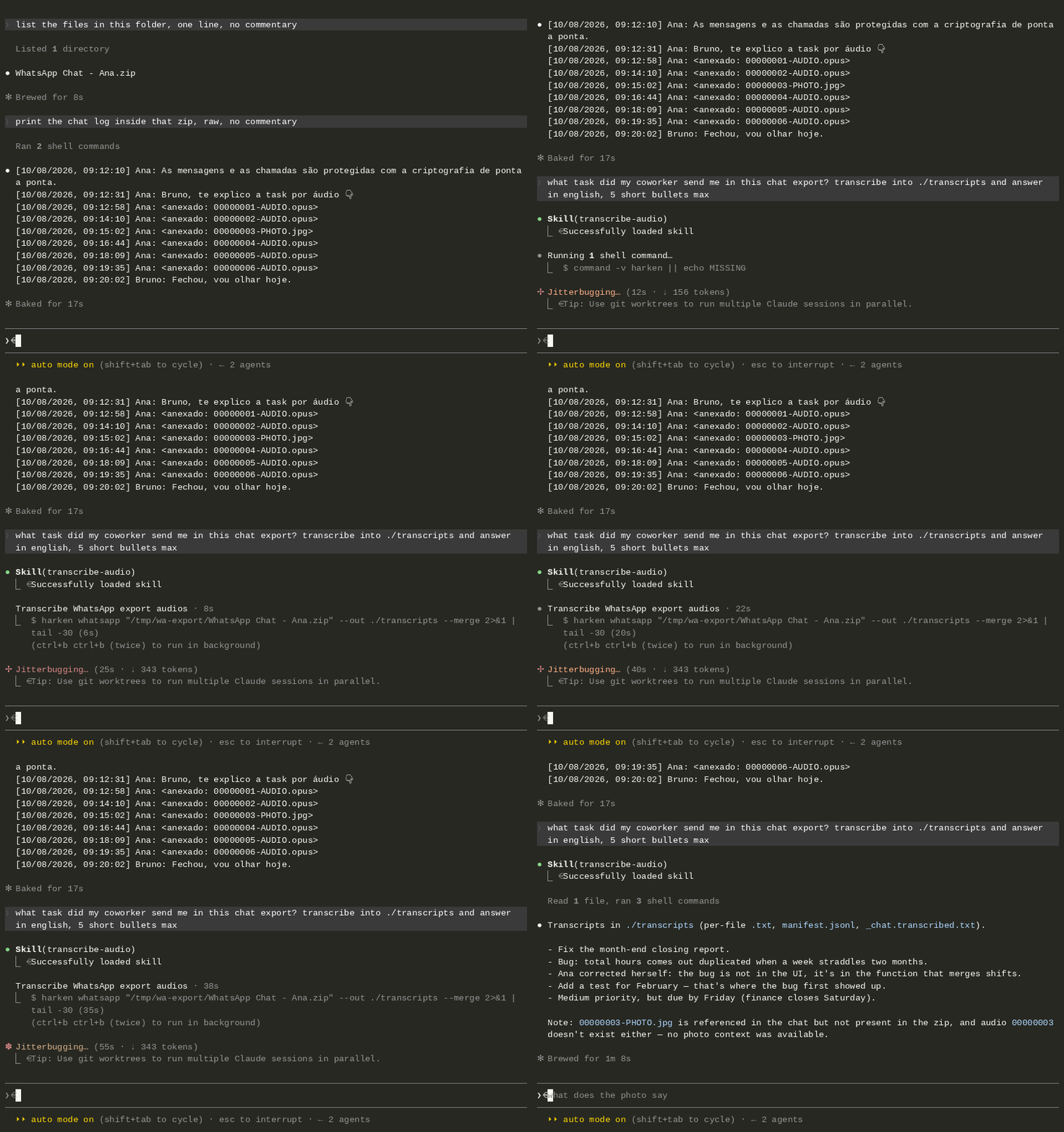
*Five Portuguese voice notes explaining one task — transcribed on CPU, read by
the agent, and answered in five bullets. Nothing left the machine.*
## Quickstart — give your agent ears
Install the binary (Linux/macOS; [more options](#install)):
```bash
curl --proto '=https' --tlsv1.2 -LsSf https://github.com/montezuma-p/harken/releases/latest/download/harken-installer.sh | sh
```
Wire it into your MCP client:
```bash
claude mcp add harken -- harken mcp
```
or, in a project `.mcp.json` (Claude Code) / `claude_desktop_config.json`
(Claude Desktop):
```json
{
"mcpServers": {
"harken": { "command": "harken", "args": ["mcp"] }
}
}
```
That is the whole setup. Three tools appear — `transcribe_file`,
`transcribe_whatsapp_export` and `transcribe_status` — and any MCP client can
use them: Claude Code, Claude Desktop, Cursor, Windsurf. Hand the agent an
`.opus`, an `.mp3`, a whole WhatsApp chat-export zip; it transcribes locally
and reads the text. `transcribe_status` lets the agent check the model cache,
language and device without transcribing anything (it never touches the
network) — including whether the startup download is still in flight, so a
call that would simply wait is not mistaken for one that would stall.
The server speaks the current MCP revision, **2026-07-28** (stateless, with
`server/discover`), and still answers the `initialize` handshake of 2025-06-18
and older — so it works with clients on either side of that change.
Model, language and device are fixed per server instance (`harken mcp --model
medium --lang auto`) with the same defaults as the CLI (`small`, `pt`, `cpu`) —
run two entries for two languages. On startup the server downloads an uncached
model in the background (~466 MB for `small`) while it already answers
`initialize`/`tools/list`; a tool call arriving mid-download waits for it. To
skip even that first-call wait, pre-warm the cache once:
```bash
harken warm # or: harken warm --model medium
```
## Why
A coworker explains one task in five voice notes of 1–2 minutes each. That is
ten minutes you have to sit through in order — and at the end you still cannot
search it, quote it, or paste the one sentence that mattered into a ticket.
One 30-second note? Just listen to it. `harken` is for the rest:
- **Agents cannot listen.** You cannot hand an `.opus` to Claude. Through the
MCP server (or the Agent Skill), the agent transcribes the notes locally,
reads them, and picks up the task context on its own — including the
correction buried halfway through the notes.
- **Volume.** Five notes in a row, a folder of meeting recordings, a whole
WhatsApp chat export — one command, one model load, one folder of text.
- **Text is random-access.** Grep it, skim it, quote it, diff it. Audio at 2x
is still serial — you cannot ctrl-F a voice note.
Voice notes, meeting recordings, and WhatsApp PTT audio are also often
sensitive, so none of the above costs you privacy. Everything runs on your own
machine: no audio and no transcript ever leaves the device, no API key, no
upload step, no cloud dependency, CPU by default — no GPU required.
## The Agent Skill — Claude Code
Beyond the MCP tools, `harken` ships an
[Agent Skill](.claude/skills/transcribe-audio/SKILL.md) that teaches Claude
Code when and how to transcribe audio locally instead of reaching for a cloud
API. Install it as a plugin:
```
/plugin marketplace add montezuma-p/harken
/plugin install harken@harken
```
The skill invokes the `harken` binary and knows how to install it with the
one-liner above if it is missing. (Alternatively: clone the repo and the
project-scoped skill in `.claude/skills/` is picked up automatically, or
copy/symlink `.claude/skills/transcribe-audio/` into `~/.claude/skills/`.)
## The CLI
The same engine, batch-first — point it at files, folders, globs, or a
WhatsApp chat-export zip:

```bash
# One file → ./transcripts/voice-note.txt
harken voice-note.opus
# A whole folder, recursively; globs work too
harken ~/Downloads/meeting-recordings/
harken "recordings/*.m4a" --out ./out --format srt
# Every voice note in a WhatsApp export ("Export chat" → with media)
harken whatsapp "WhatsApp Chat with Maria.zip"
# Only a date range, plus a merged chat log with each transcript inlined
harken whatsapp export.zip --from 2026-07-01 --to 2026-07-15 --merge
```
Flags (both modes): `--out DIR` (default `./transcripts`, or
`./<zip-stem>-transcripts` for exports), `--model` (default `small`), `--lang`
(default `pt`; `auto` to detect), `--format` (`txt`/`json`/`srt`/`md`),
`--device` (default `cpu`), `--force` (re-transcribe existing outputs).
WhatsApp mode adds `--from`/`--to` (`YYYY-MM-DD`, inclusive) and `--merge`,
which writes `_chat.transcribed.txt`: the full original chat with each voice
note's transcript inlined right under its message. Both iOS and Android export
formats are auto-detected, including day-first vs month-first Android dates.
Every file gets `<out>/<stem>.<format>`, and a running `manifest.jsonl`
records one line per transcription. Progress goes to stderr; the exit code is
`1` if any file failed (skips don't count), `2` for input errors.
> **Privacy note:** output files — transcripts and `manifest.jsonl` — contain
> the full transcribed text. Keep your output dirs out of version control.
## Install
One-liner (Linux/macOS):
```bash
curl --proto '=https' --tlsv1.2 -LsSf https://github.com/montezuma-p/harken/releases/latest/download/harken-installer.sh | sh
```
Windows (PowerShell):
```powershell
powershell -ExecutionPolicy Bypass -c "irm https://github.com/montezuma-p/harken/releases/latest/download/harken-installer.ps1 | iex"
```
Other options:
```bash
cargo binstall harken # prebuilt binary via cargo-binstall
cargo install harken --locked # build from source (needs Rust 1.88+, cmake + a C++ toolchain)
```
> Building from source with CMake >= 4 and no system libopus? The vendored
> opus tree declares an old CMake minimum; prepend
> `CMAKE_POLICY_VERSION_MINIMUM=3.5` to the `cargo install` line.
Prebuilt binaries and default source builds target AVX2/FMA/F16C (Intel Haswell,
AMD Excavator, or newer). Building for the machine you are on, and want its full
instruction set? Prepend `HARKEN_NATIVE=1` to the `cargo install` line.
If you are building from a git checkout, initialize the vendored whisper.cpp
submodule first:
```bash
git clone --recurse-submodules https://github.com/montezuma-p/harken
# or, if you already cloned it:
git submodule update --init --recursive
```
## Models & hardware
`--model` accepts a [whisper.cpp ggml model](https://huggingface.co/ggerganov/whisper.cpp)
name or a path to a local `.bin` file:
- `small` (default, ~466 MB) — good accuracy/speed tradeoff on CPU; fine
for most voice notes and casual recordings.
- `medium` (~1.5 GB) — noticeably better accuracy (accents, background
noise, technical vocabulary), at a real CPU time cost.
- Quantized variants — append `-q5_0`, `-q5_1`, or `-q8_0` to any name
(e.g. `small-q5_1`, ~182 MB): ~60% smaller download, marginal quality
loss.
- Also: `tiny`, `base`, `large-v1`, `large-v2`, `large-v3`,
`large-v3-turbo`, and the `.en` English-only variants.
With the default model, an hour of audio transcribes in ~22 minutes on a
2017 desktop CPU — no GPU involved. Measured on an Intel i5-7400 (4 threads),
10 minutes of synthetic Portuguese speech, single run, GNU `time -v`, model
download excluded (reproduce with `make bench`):
| Model | Wall time (10 min audio) | Speed | Peak RAM |
|---|---|---|---|
| `tiny` | 42 s | 14.2x realtime | 360 MB |
| `small` (default) | 3 min 40 s | 2.7x realtime | 912 MB |
| `small-q5_1` | 3 min 13 s | 3.1x realtime | 628 MB |
| `medium` | 9 min 54 s | 1.0x realtime | 2.0 GB |
Table measured on v0.3.1. The v0.4.0 engine (in-repo FFI instead of
`whisper-rs`) came out within 3% of it in a controlled A/B on the same machine —
five interleaved pairs, `small` — so these numbers still describe the current
build. Single-run figures drift more than that between sessions, which is why
the comparison was done interleaved rather than by re-running the table.
The chosen model is downloaded once, on first use, to
`~/.cache/harken/models`. Subsequent runs reuse the cached model with no
network access.
CPU is the safe default everywhere — and today it is also the only backend:
no shipped binary compiles GPU support, so passing `--device` with anything
other than `cpu` prints a warning and runs on CPU. GPU offload
(Metal/CUDA/Vulkan) would require building from source with a modified
`build.rs`; none of the release targets do.
## Development
```bash
make check # fmt + clippy + tests + cargo-audit + cargo-machete
```
Tests never load a real Whisper model — the transcription engine is a
trait, and the suite runs against a fake, so it is instant and offline.
Architecture map: [docs/ARCHITECTURE.md](docs/ARCHITECTURE.md).
## License
Licensed under either of
- Apache License, Version 2.0 ([LICENSE-APACHE](LICENSE-APACHE) or
<https://www.apache.org/licenses/LICENSE-2.0>)
- MIT license ([LICENSE-MIT](LICENSE-MIT) or
<https://opensource.org/licenses/MIT>)
at your option.
Bundles [whisper.cpp](https://github.com/ggml-org/whisper.cpp) (MIT) as the
pinned submodule at `vendor/whisper.cpp`, compiled into the binary — see
[its license](vendor/whisper.cpp/LICENSE).
Unless you explicitly state otherwise, any contribution intentionally
submitted for inclusion in the work by you, as defined in the Apache-2.0
license, shall be dual licensed as above, without any additional terms or
conditions.
连接信息
猜你喜欢
暂无推荐服务器