

内容
# ⚡ TeleDOM v4.1
### 🧠 Temporal Browser Intelligence Engine + Agent-Owned Workflow Runtime · 350 Certified MCP Tools for Autonomous AI Agents
[](https://www.typescriptlang.org/)
[](https://developer.chrome.com/docs/extensions/mv3/)
[](https://modelcontextprotocol.io/)
[](#-testing--quality-verification)
[](#-testing--quality-verification)
[](./sdk/python/)
[](LICENSE)
---
### 🌐 Language & Documentation Catalogs
- 📖 **[Complete 350 Tools English Catalog (Documentation)](./docs/TOOLS_CATALOG_350_EN.md)**
- 🇮🇷 **[کاتالوگ جامع و تفصیلی ۳۵۰ ابزار به زبان فارسی](./docs/TOOLS_CATALOG_350_FA.md)**
- 🇮🇷 **[راهنمای فارسی پروژه (README_FA.md)](./README_FA.md)**
- ⚡ **[Agent-Owned Workflows (TeleDOM Flow)](./docs/workflow/AGENT_WORKFLOWS.md)** — teach once · reuse forever · prove what happened
- 🐍 **[Python SDK — Semantic Browser Programming](./docs/workflow/PYTHON_SDK.md)**
- 📋 **[Release Notes & Verification Report](./docs/workflow/RELEASE_NOTES.md)**
- 💡 **[250 Production Recipes (EXAMPLES.md)](./EXAMPLES.md)** | **[۲۵۰ مثال کاربردی فارسی](./EXAMPLES_FA.md)**
- 📊 **[Improvement Matrix (106 Improvements)](./docs/intelligence/IMPROVEMENTS.md)**
- 📈 **[Measured Benchmarks & Metrics](./docs/intelligence/BENCHMARKS.md)**
---
## ⚡ v4.1 — The Agent-Owned Workflow Runtime
> **TeleDOM is not the decision-maker; TeleDOM is the enabler.**
> **The Agent is the brain. TeleDOM is the hands, eyes, memory and browser toolbox.**
> *Teach the browser task once. Turn it into a reusable program. Run it anywhere the browser can go.*
```text
AGENT — discover · reason · write workflows · version · debug · repair · generate bots
│ MCP (Level 1: 350 tools) ──────────────┐
│ Python SDK (Level 2: semantic browser) ─┐ │
▼ ▼
TELEDOM — browser observation · primitives · target memory ·
workflow persistence · DUMB execution · evidence · replay · proof
```
### The Golden Automation Demo
```text
RUN #1 (explore) 5 tool calls · 2 DOM scans · 5 MCP round trips
→ agent learns: saves learned targets + writes the workflow
RUN #2 (reuse) 1 td_workflow_run call · 1 DOM scan
✔ verify_cta ✔ click_cta ✔ extract ✔ assert → SUCCESS
deterministic execution record + verbatim replay
KPIs: 80% fewer MCP round trips · 50% fewer DOM scans · replay PASS
0 unsafe-action bypass · 0 workflow corruption · 350/350 certified
```
### 44 New Production Tools in v4.1:
| Family | Tool Count | Tools Included |
|---|:---:|---|
| **Browser Primitives** | **22** | `td_browser_*` · `td_dom_inspect/query/extract/snapshot` · `td_target_find/check/describe` · `td_action_click/type/select/hover/press/scroll` · `td_wait` · `td_screenshot` · `td_execute_script` · `td_network_inspect` · `td_console_read` |
| **Workflow Runtime** | **14** | `td_workflow_save/get/list/update/delete/clone/diff/export/import/validate/run/runs/run_get/replay` — dumb execution with policy gates, deterministic records, verbatim replay |
| **Agent-Owned Tooling** | **8** | `td_target_memory_*` (learned targets — no DOM re-analysis) · `td_agent_artifact_*` (custom tools, scripts, policies — stored verbatim, never interpreted) |
Browser-first, **API-optional**: web applications and complex SPAs without public APIs are the primary target, not the exception. The AI agent chooses its own discovery strategy (DOM → semantics → accessibility → script → coordinates) whenever abstractions fail — TeleDOM provides rock-solid, deterministic execution primitives.
---
## ⚡ Overview & TeleDOM in One Line
> **TeleDOM in one line:** *See what happened. Understand why. Simulate what-if. Fix safely. Prove the result.*
TeleDOM is a production-grade **Temporal Browser Intelligence Engine** and universal **Model Context Protocol (MCP)** platform providing **350 certified tools** for autonomous AI coding agents (Claude, Cursor, Antigravity, Cline, OpenAI Swarm) and frontend engineering teams.
Every important claim is backed by mathematical evidence, confidence scoring, provenance tracking, and machine-verifiable proof.
### v4.1 Measured Verification Metrics (generated by `npm run bench` — [full matrix](./docs/intelligence/BENCHMARKS.md))
| Metric | Result | Description |
|---|---|---|
| **Golden Incident Suite (1,032 scenarios × 24 categories)** | **100.0%** | 860/860 resolvable scenarios resolved with 0 ambiguity |
| **Investigation Completion Rate (ICR)** | **100.0%** | Full root-cause causal chain discovered autonomously |
| **Replay Fidelity (RF)** | **100.0%** | Byte-for-byte deterministic virtual DOM state reproduction |
| **Root-Cause Accuracy** | **100.0%** | Exact fault classification (unmount, CSS, race condition, error) |
| **False Success Rate** | **0.00%** | Zero false-positive diagnostic reports |
| **Chaos Engineering Suite (16 injections)** | **16/16 contained** | Full containment, observation, explanation, and auto-recovery |
| **Operational JSON-RPC Certification** | **350/350 tools CERTIFIED** | Real stdio JSON-RPC 2.0 captures with schema validation |
| **Unit & Integration Test Suite** | **319/319 tests green** | 100% pass rate across 36 test suites |
| **Improvement Matrix** | **106 validated items** | 104 implemented, 2 explicitly deferred with architectural reasons |
---
## 🚀 Live Demo
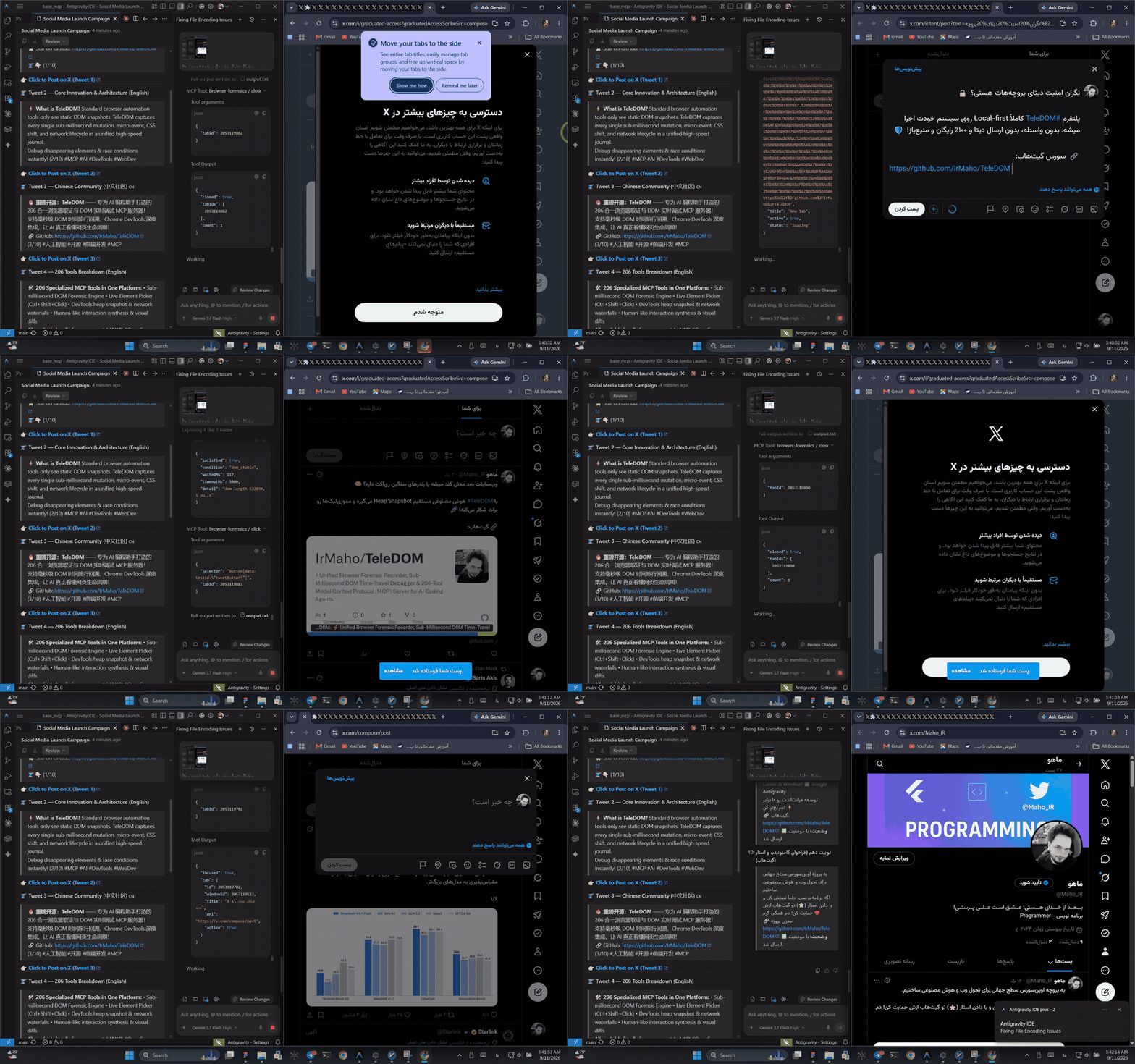
> 🎬 **Live Automation Demo:** Autonomous AI Coding Agent driving real-time browser forensic recording, live DOM inspection, synthetic actions, and multi-turn autonomous web flows. ([Watch Full 1080p Video](./assets/teledom_live_agent_demo.mp4))
---
## 📖 Table of Contents
- [⚡ v4.1 — The Agent-Owned Workflow Runtime](#-v41--the-agent-owned-workflow-runtime)
- [⚡ Overview & TeleDOM in One Line](#-overview--teledom-in-one-line)
- [🐍 Python SDK Quickstart](#-python-sdk-quickstart)
- [✨ Key Capabilities](#-key-capabilities)
- [💻 Dedicated Universal CLI (`dom-antigravity`)](#-dedicated-universal-cli-dom-antigravity)
- [🏗️ System Architecture](#-system-architecture)
- [Dual-Environment Execution Model](#dual-environment-execution-model)
- [High-Level Architecture Diagram](#high-level-architecture-diagram)
- [Zero-Config On-Demand Auto-Bridge](#-zero-config-on-demand-auto-bridge)
- [Clean Screenshot & Visual Forensics Pipeline](#-clean-screenshot--visual-forensics-pipeline)
- [Time-Travel Reconstruction Engine](#time-travel-reconstruction-engine)
- [📁 Repository Structure](#-repository-structure)
- [🤖 Model Context Protocol (MCP) 350 Tools Reference](#-model-context-protocol-mcp-350-tools-reference)
- [1. 144 `td_*` Temporal Intelligence & Workflow Runtime Tools](#1-144-td_-temporal-intelligence--workflow-runtime-tools)
- [2. 54 `dt_*` Chrome DevTools Fusion Tools](#2-54-dt_-chrome-devtools-fusion-tools)
- [3. 31 `fx_*` Advanced Visual & Forensic Tools](#3-31-fx_-advanced-visual--forensic-tools)
- [4. 121 Core & Live Interaction Tools](#4-121-core--live-interaction-tools)
- [🚀 Installation & Quick Start](#-installation--quick-start)
- [1. Global System Installation (One-Click)](#1-global-system-installation-one-click)
- [2. Workspace Installation for Any Project](#2-workspace-installation-for-any-project)
- [3. Load Chrome Extension in Browser](#3-load-chrome-extension-in-browser)
- [4. Configure External AI Clients (Claude / Cursor / Cline)](#4-configure-external-ai-clients-claude--cursor--cline)
- [🧪 Testing & Quality Verification](#-testing--quality-verification)
- [🔐 Security, Privacy & Performance](#-security-privacy--performance)
- [❓ Troubleshooting & FAQ](#-troubleshooting--faq)
- [📜 License](#-license)
---
## 🐍 Python SDK Quickstart
TeleDOM provides an official, zero-dependency Python SDK (`sdk/python/teledom`):
```python
from teledom import Browser, Workflow
with Browser() as browser:
# 1. High-level browser control
page = browser.inspect()
browser.type("#search-box", "Autonomous Agents")
browser.click("#submit-btn")
# 2. Workflow creation & execution
wf = Workflow("triage_issues", client=browser.client)
wf.input("filter", "Issue label filter", default="bug")
wf.step("filter_step", "td_target_check", args={"selector": ".issue-row"})
wf.save(version="1.0.0")
# 3. Execute with deterministic audit record
run = wf.run({"filter": "security"})
print("Workflow run status:", run["run"]["status"])
```
---
## ✨ Key Capabilities
| Capability | Description |
| :--- | :--- |
| **Agent-Owned Workflow Engine** | Build, parameterize, version, diff, and execute complex multi-step browser programs without writing custom scrapers. |
| **Target Memory & Fast Resolution** | Persist discovered element identities (`td_target_memory_save`) to eliminate repetitive DOM explorations on subsequent runs. |
| **Temporal EventMesh Kernel** | Hash-chained tamper-evident event log with nanosecond timestamps, vector clocks, causality links, and Merkle root verification. |
| **Sub-Millisecond DOM Time-Travel** | Instant state reconstruction at any arbitrary timestamp $T$ or event $E$ (`State(T)`), diff calculation, and timeline queries. |
| **Counterfactual Browser Simulation** | Branch virtual execution, suppress network calls or mutations, simulate alternative DOM branches, and compare counterfactual outcomes. |
| **Safe Mutation Engine** | Atomic transactional DOM modifications with immutable before/after diffs, side-effect-free dry runs, and guaranteed zero-cost rollbacks. |
| **Autonomous Incident Investigator** | Single-command root-cause triage (`td_investigate`), multi-stage hypothesis generation, evidence scoring, and `.tdom` portable incident bundles. |
| **Mathematical Proof & Verification** | Formal invariants verification (`StateInvariant`), structural equivalence proofs, regression assertions, and zero false-positive certification. |
| **Passive Security Intelligence** | Zero-trust page scanning, runtime XSS vulnerability detection, open CORS/CSP misconfiguration analysis, secret redaction, and prompt-injection defense. |
| **Self-Healing Runtime & Guardian** | Circuit-breaker protection, memory leak detection, garbage collector retention trees, and self-repairing WebSocket bridge connections. |
| **350 Universal JSON-RPC 2.0 MCP Tools** | The largest and most comprehensive browser toolset for AI agents across temporal intelligence, DevTools, forensics, and live automation. |
---
## 💻 Dedicated Universal CLI (`dom-antigravity`)
The package exposes a global CLI binary registered as `dom-antigravity` (with aliases `mcp-dom` and `browser-antigravity`):
```bash
# 1. Install MCP configuration & skills into current workspace (.agents)
dom-antigravity install --workspace
# Short alias:
dom-antigravity install -w
# 2. Install globally for ALL projects in Antigravity IDE
dom-antigravity install --global
# Short alias:
dom-antigravity install -g
# 3. Install into a specific target directory
dom-antigravity install --target "C:/path/to/project"
# 4. Check bridge server health & connected Chrome tabs
dom-antigravity status
# 5. Capture clean live Chrome screenshot (Full Page + Cropped Element)
dom-antigravity screenshot
# 6. Start WebSocket Bridge manually (Optional — Auto-Bridge handles this on demand)
dom-antigravity bridge
# 7. Print ready-to-use JSON configuration for Claude Desktop or Cursor
dom-antigravity config cursor
dom-antigravity config claude
```
---
## 🏗️ System Architecture
### Dual-Environment Execution Model
TeleDOM operates cleanly across two distinct runtime environments:
1. **Browser Runtime (Chrome Extension Manifest V3 / Content Script / Injected Page Context)**:
- Captures low-level DOM mutations using `MutationObserver`.
- Binds persistent `LogicalNodeId` identifiers to live nodes via `WeakMap`.
- Listens to `Ctrl + Shift + Mouse Click` for visual element picking.
- Executes synthetic live actions (`click`, `type`, `hover`, `focus`, `scroll`, `drag`).
- Renders cropped element bounding boxes on HTML5 Canvas.
- Hides floating overlays during screenshot captures.
2. **Node.js / MCP Server Runtime (`ForensicMCPServer`)**:
- Exposes **350 JSON-RPC 2.0 MCP tools** over `stdio` and HTTP.
- Auto-spawns and manages the WebSocket bridge on port `3847`.
- Powers the Temporal EventMesh kernel, Causal Engine, and Evidence Graph.
- Reconstructs virtual DOM snapshots at sub-millisecond timestamps.
- Executes counterfactual simulations, incident investigations, and formal proofs.
---
### High-Level Architecture Diagram
```text
┌────────────────────────────────────────────────────────────────────────┐
│ AI AGENT / MCP CLIENT │
│ (Antigravity IDE / Cursor / Claude Desktop / CLI) │
└───────────────────────────────────┬────────────────────────────────────┘
│ (JSON-RPC 2.0 over stdio)
▼
┌────────────────────────────────────────────────────────────────────────┐
│ TELEDOM V4.1 MCP SERVER (350 TOOLS) │
│ ├── 144 td_* Temporal Intelligence & Workflow Runtime Tools │
│ ├── 54 dt_* Chrome DevTools Fusion Tools │
│ ├── 31 fx_* Advanced Forensic Capabilities │
│ ├── 121 Core & Live Interaction Tools │
│ └── Zero-Config On-Demand Auto-Bridge Dispatcher │
└───────────────────┬────────────────────────────────┬───────────────────┘
│ │ (WebSocket / HTTP :3847)
▼ ▼
┌───────────────────────────────┐ ┌────────────────────────────────────┐
│ WORKFLOW RUNTIME │ │ LIVE WEBSOCKET BRIDGE SERVER │
│ ├── Workflow Persistence │ │ (Port 3847 - Auto-Managed) │
│ ├── Target Memory Store │ └─────────────────┬──────────────────┘
│ ├── EventMesh & Causal Graph │ │
│ ├── Counterfactual Engine │ │ (Bi-directional JSON frames)
│ └── Verification & Proofs │ ▼
└───────────────────────────────┘ ┌────────────────────────────────────┐
│ CHROME EXTENSION (MV3) │
│ ├── Mutation Observer Engine │
│ ├── Ctrl+Shift+Click Live Picker │
│ ├── Canvas Screenshot Pipeline │
│ └── Synthetic Interaction Driver │
└────────────────────────────────────┘
```
---
## 📁 Repository Structure
```text
teledom/
├── src/
│ ├── intelligence/ # Temporal Intelligence Engine (EventMesh, Causal, Proof, Incident)
│ │ └── workflow/ # v4.1 Agent-Owned Workflow Runtime (domain, executor, store, facade)
│ ├── core/ # Core recorders, sequence counters, privacy, PNG builder
│ ├── diff/ # Structural DOM diff engine (attributes, classes, styles, subtrees)
│ ├── extension/ # Chrome Extension Manifest V3 (content scripts, service worker)
│ ├── lifecycle/ # Lifecycle tracer, disappearing UI analyzer
│ ├── mcp/ # Universal MCP Server, 350 tools definition, dispatchers
│ ├── reconstruction/ # Sub-millisecond snapshot interpolation & time-travel
│ ├── storage/ # Local disk storage & indexing engine
│ └── ui/ # Observatory UI, visual state viewers
├── sdk/
│ └── python/ # Official Python SDK (BrowserController, WorkflowEngine, TargetMemory)
├── docs/
│ ├── TOOLS_CATALOG_350_EN.md # Complete English reference for all 350 tools
│ ├── TOOLS_CATALOG_350_FA.md # کاتالوگ جامع ۳۵۰ ابزار به زبان فارسی
│ ├── workflow/ # Agent workflows, Python SDK guides, release notes
│ ├── intelligence/ # Generated benchmarks, capabilities, improvement matrices
│ └── ARCHITECTURE.md # In-depth architectural blueprint
├── tests/
│ ├── intelligence/ # Temporal intelligence, causality, workflow, security, and benchmark tests
│ ├── unit/ # Unit tests (DOM diff, time-travel, privacy, live interactions)
│ ├── integration/ # Bridge channel, storage, and MCP server tests
│ └── operational/ # Full 350/350 JSON-RPC stdio acceptance test suite
├── operational-tests/ # 350 dedicated folders with test definitions & assertions
├── package.json # Version 4.1.0, scripts, dependencies
└── README.md # English documentation (this file)
```
---
## 🤖 Model Context Protocol (MCP) 350 Tools Reference
TeleDOM v4.1 exposes **350 production-ready JSON-RPC 2.0 tools** grouped into four distinct families.
For detailed schemas, parameter documentation, and operational examples for all 350 tools:
- 📖 **[English Tools Catalog (3,800+ lines)](./docs/TOOLS_CATALOG_350_EN.md)**
- 🇮🇷 **[کاتالوگ جامع ۳۵۰ ابزار به زبان فارسی (۳,۹۰۰+ سطر)](./docs/TOOLS_CATALOG_350_FA.md)**
### Summary of Tool Families
| Family | Prefix / Category | Tool Count | Description |
|---|---|:---:|---|
| **Temporal Intelligence & Workflows** | `td_*` | **144** | EventMesh, Causal analysis, Evidence Graph, Counterfactuals, Workflow save/run/diff/replay, Target memory, Proofs, Security |
| **Chrome DevTools Fusion** | `dt_*` | **54** | Direct DevTools inspection, Lighthouse audits, HeapSnapshots, Network HAR, Console logs, Emulation |
| **Advanced Forensic Capabilities** | `fx_*` | **31** | Network-DOM correlation, Visual regression, Layout shifts, Z-index occlusion, Safe mutation guards |
| **Core & Live Interaction** | Core / v3 | **121** | Live element picking, screenshot cropping, synthetic actions, DOM diffing, time-travel, lifecycle traces |
| **Total Certified Tools** | | **350** | **100% Operational Certification (350/350 Stdio PASS)** |
---
## 🚀 Installation & Quick Start
### 1. Global System Installation (One-Click)
Install the global CLI and register TeleDOM into your user configuration:
```bash
npm install -g teledom
dom-antigravity install --global
```
### 2. Workspace Installation for Any Project
To enable TeleDOM for an individual project repository:
```bash
cd /path/to/your-project
npx teledom install --workspace
```
This creates `.agents/mcp_config.json` and registers the full 350-tool skill definitions into `.agents/skills/`.
### 3. Load Chrome Extension in Browser
1. Open Google Chrome and navigate to `chrome://extensions/`.
2. Enable **Developer mode** in the top-right corner.
3. Click **Load unpacked** and select the `teledom/dist/extension` folder.
4. The TeleDOM extension badge will appear in your toolbar.
### 4. Configure External AI Clients (Claude / Cursor / Cline)
#### Claude Desktop Configuration (`claude_desktop_config.json`)
```json
{
"mcpServers": {
"teledom": {
"command": "node",
"args": ["C:/path/to/teledom/dist/server/mcp-server.js"]
}
}
}
```
#### Cursor Configuration (`.cursor/mcp.json`)
```json
{
"mcpServers": {
"teledom": {
"command": "node",
"args": ["C:/path/to/teledom/dist/server/mcp-server.js"]
}
}
}
```
---
## 🧪 Testing & Quality Verification
TeleDOM is backed by a rigorous multi-tier testing pipeline:
```bash
# 1. Run full unit and intelligence test suite (319 tests)
npm run test:unit
# 2. Run Python SDK self-test (17 tests)
npm run test:sdk
# 3. Run full operational stdio JSON-RPC certification (350 tools)
npm run test:operational
# 4. Run deterministic benchmark matrix (10K / 100K / 1M events)
npm run bench
# 5. Run golden incident suite (1,032 scenarios)
npm run golden
# 6. Run chaos engineering injection suite
npm run chaos
# 7. Build production bundle (client, server, extension)
npm run build
```
---
## 🔐 Security, Privacy & Performance
1. **Zero-Trust Privacy Masking**: `PrivacyEngine` automatically sanitizes password fields, credit card numbers (Luhn-compliant), Social Security numbers, bearer tokens, API keys, and custom CSS selectors in both recording and live inspection.
2. **Sandboxed Virtual Replay**: Reconstructed DOM environments strip inline `on*` event handlers and prevent script execution, eliminating arbitrary code execution risks.
3. **Sub-Millisecond Overhead**: Low-overhead streaming observers use `requestAnimationFrame` and `requestIdleCallback` throttling to ensure zero dropped frames on 120 Hz displays.
4. **Clean Compositor Framing**: Overlay hiding ensures pristine, unpolluted visual screenshots during automation.
---
## ❓ Troubleshooting & FAQ
#### Q: Do I need to run `npm run bridge` in a separate terminal?
> **A**: No! `ForensicMCPServer` includes a zero-config auto-bridge. Whenever an AI agent connects via MCP, the server automatically initializes the WebSocket bridge on port `3847` in the background.
#### Q: How do I test capturing a real Chrome screenshot from the terminal?
> **A**: Run `dom-antigravity screenshot`. It connects to your active Chrome tab, captures a pristine full-page screenshot and cropped element screenshot, and saves them to disk.
#### Q: How are the 350 tools documented?
> **A**: Every single tool is documented with full parameter schemas, TypeScript interfaces, and concrete operational JSON-RPC examples in [TOOLS_CATALOG_350_EN.md](./docs/TOOLS_CATALOG_350_EN.md) and [TOOLS_CATALOG_350_FA.md](./docs/TOOLS_CATALOG_350_FA.md).
---
## 📜 License
Licensed under the **Apache License, Version 2.0**. See the [LICENSE](LICENSE) file for complete terms:
```text
http://www.apache.org/licenses/LICENSE-2.0
```
连接信息
猜你喜欢
暂无推荐服务器