

内容
<div align="center">
<img src="https://raw.githubusercontent.com/arach/arc/main/public/arc-mark.svg" alt="Arc" width="52" height="52" />
# Arc
### Architecture diagrams as code.
Arc turns typed, diffable config into clean, themeable architecture diagrams.
Design in the visual studio, render with React, or export as **TypeScript, JSON,
SVG, PNG, GIF, MP4, or crisp ASCII** — with a CLI, generated JSON Schema,
Mermaid import, and an MCP server so AI agents can author diagrams too. The diagram lives with
the system it describes.
[](https://www.npmjs.com/package/@arach/arc)
[](./LICENSE)
[](./src/types/diagram.ts)
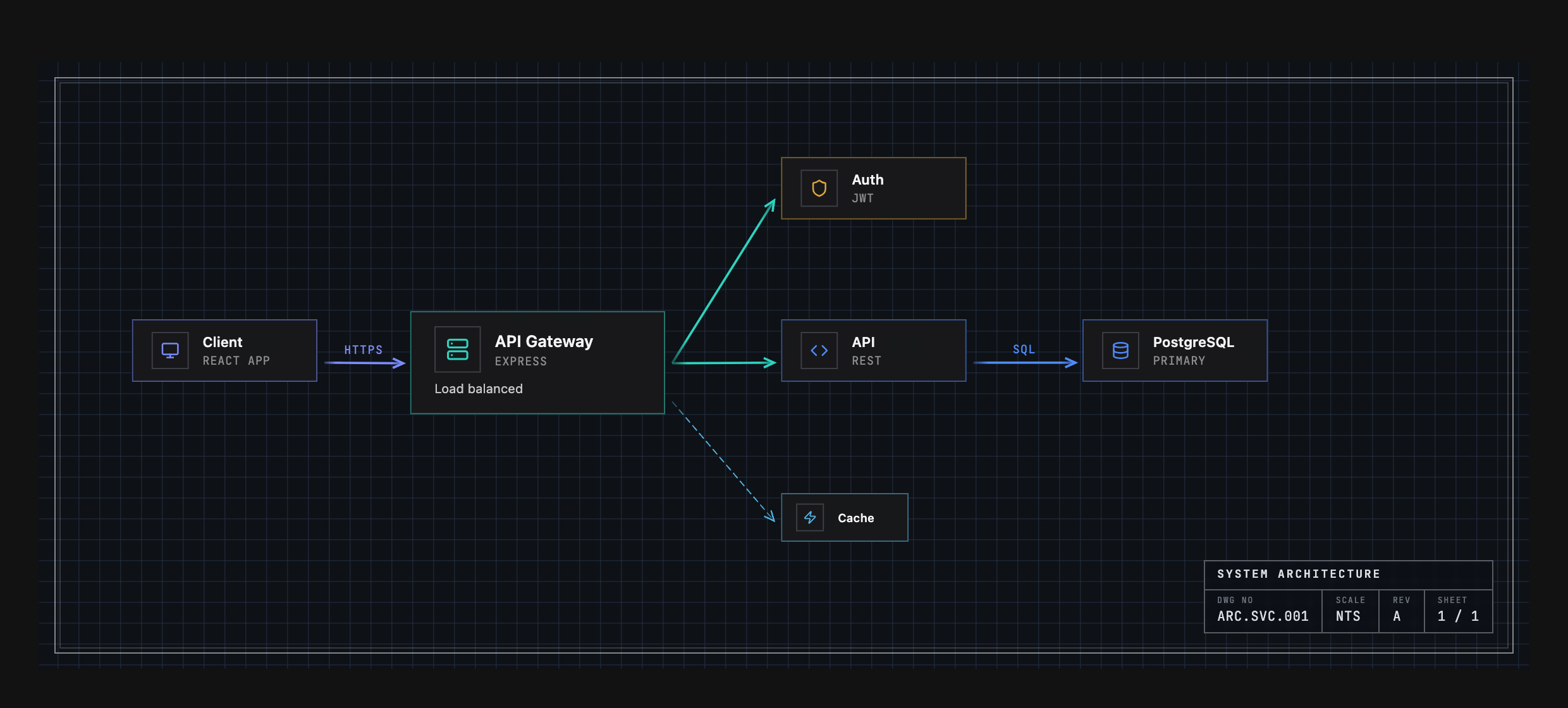
<sub>Not a screenshot of a drawing tool — that's the config in <a href="#example-output">Example Output</a>, rendered by <code><ArcDiagram /></code> in the Engineering theme.</sub>
</div>
---
## Install
```bash
npm install @arach/arc
# or: bun add @arach/arc · pnpm add @arach/arc · yarn add @arach/arc
```
`react` and `react-dom` are peer dependencies. Arc bundles its icon renderer and
has no production dependencies of its own.
## Quick Start
Render any diagram config as a polished, interactive component:
```tsx
import { ArcDiagram } from '@arach/arc'
import type { ArcDiagramData } from '@arach/arc'
export function Architecture() {
return (
<ArcDiagram
data={diagram} // your ArcDiagramData (see below)
theme="default" // eleven themes, each with light & dark
mode="dark" // light · dark
defaultZoom="fit" // auto-fit to the container
/>
)
}
```
You get pan/zoom, hover highlighting, light/dark modes, and eleven color themes
out of the box.
### Key props
| Prop | Type | Notes |
|------|------|-------|
| `data` | `ArcDiagramData` | The diagram config (required) — see [Example Output](#example-output). |
| `theme` | `'default' \| 'warm' \| 'cool' \| 'mono' \| 'engineering' \| 'workbench' \| 'tactical' \| 'command' \| 'spacex' \| 'claude' \| 'codex'` | Palette + drafting grammar (grid, frame, type). |
| `mode` | `'light' \| 'dark'` | Appearance. |
| `frame` | `'hairline' \| 'inset' \| 'brackets' \| 'ticks' \| 'cropmarks' \| 'corners' \| 'sheet' \| 'none'` | Override the theme's edge treatment. |
| `interactive` | `boolean` | Pan/zoom controls. |
| `defaultZoom` | `number \| 'fit'` | Initial zoom, or `'fit'` to auto-fit (`maxFitZoom` caps it). |
| `showControls` / `showMinimap` | `boolean` | Zoom controls / minimap for read-only chrome. |
| `hoverEffects` | `boolean \| { dim, lift, glow, highlightEdges }` | Hover highlighting (granular). |
| `label` | `string` | Override the bottom-left label. |
## The Studio
Prefer to design visually? Arc ships a full drag-and-drop **studio** — infinite
canvas, floating toolbar, reusable connector styles, live properties panel, and
a minimap. Try the [hosted studio](https://hudsonkit.com/arc), or clone the repo and
open it locally:
```bash
git clone https://github.com/arach/arc && cd arc
bun install && bun dev # → http://localhost:5188/editor
```
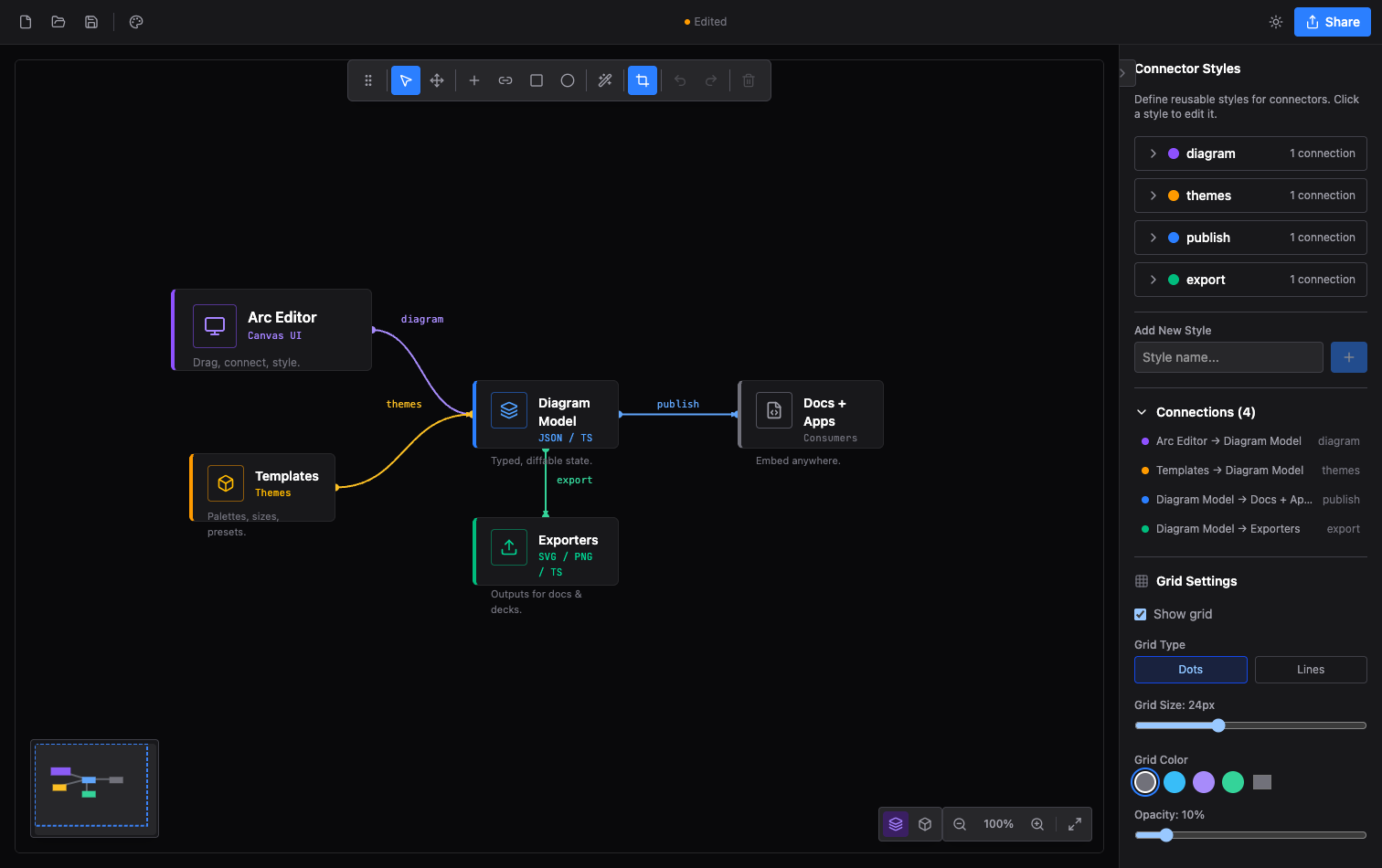
Design on the canvas, then **Export** to TypeScript, JSON, SVG, PNG, or a
shareable link — and drop the result straight into `<ArcDiagram />`.
## Features
- **`<ArcDiagram />` player** - Interactive React renderer with pan/zoom, hover highlighting, minimap, and light/dark modes
- **Eleven themes** - Drafting grammars (grid, frame, type, geometry), each with light & dark palettes
- **Visual studio** - Drag-and-drop editor with anchors, connector styles, groups, images, and templates
- **Typed schema** - `ArcDiagramData` TypeScript types plus a generated draft-07 JSON Schema with coded diagnostics
- **Semantic node kinds** - `frontend`, `database`, `queue`, `gateway`… supply default icon + color
- **Flow animations** - `flows[]` send directional packets across connectors; SVG animates via SMIL and the CLI/MCP can render deterministic GIF/MP4 artifacts
- **CLI** - `arc check`, `arc diff`, `arc render`, `arc bench`, `arc schema`, and `arc-ascii`
- **MCP server** - `@arach/arc-mcp` gives AI agents validate/layout/render/diff tools over stdio
- **Mermaid** - Native sequence-diagram player and flowchart import via `@arach/arc-viewer`
- **Isometric** - `ArcDiagramIsometric` for 3D diagrams, plus `@arach/arc-iso` for vanilla JS
- **ASCII renderer** - The same document as precise box-drawing text for terminals and docs
- **Exports** - TypeScript, JSON, SVG, PNG, GIF, MP4, ASCII, and shareable links
- **Zero runtime dependencies** - React is the only peer
## Native Mermaid Sequences
`@arach/arc-viewer` turns canonical Mermaid `sequenceDiagram` source into a
typed Arc document and a native, interactive React player—without embedding the
generic Mermaid runtime.
```bash
npm install @arach/arc-viewer
```
```tsx
import { ArcMermaidPlayer } from '@arach/arc-viewer'
const source = `sequenceDiagram
participant App
participant API
App->>API: Load architecture
API-->>App: Typed diagram`
export function Sequence() {
return <ArcMermaidPlayer source={source} mode="light" />
}
```
Existing Mermaid flowcharts and state diagrams can also be projected into
`ArcDiagramData`:
```ts
import { importMermaid } from '@arach/arc-viewer'
const { diagram, warnings, unsupported } = importMermaid(source)
```
This compatibility adapter is intentionally lossy. Use the native Mermaid APIs
above when sequence semantics must remain intact. See
[Mermaid architecture projection](./docs/mermaid-import.md) for the supported
grammar and diagnostic contract.
## Themes
One diagram, several drafting grammars. The nodes and palette stay the same —
what changes is the grid system, edge treatment, type, and geometry. Here's
Arc's own architecture rendered three ways:
<div align="center">
<img src="https://raw.githubusercontent.com/arach/arc/main/public/theme-engineering.png" alt="Arc's architecture in the Engineering theme" width="840" />
<br/>
<sub><strong>Engineering</strong> — graph grid, drawing-sheet border, title block, uppercase mono</sub>
<br/><br/>
<img src="https://raw.githubusercontent.com/arach/arc/main/public/theme-workbench.png" alt="Arc's architecture in the Workbench theme" width="840" />
<br/>
<sub><strong>Workbench</strong> — dot grid, hairline frame, soft corners</sub>
<br/><br/>
<img src="https://raw.githubusercontent.com/arach/arc/main/public/theme-tactical.png" alt="Arc's architecture in the Tactical theme" width="840" />
<br/>
<sub><strong>Tactical</strong> — crosshair grid, corner brackets, hard edges</sub>
</div>
Plus `default`, `warm`, `cool`, `mono`, `command`, `spacex`, `claude`, and
`codex` — eleven in all, each with light and dark modes.
## Example Output
Arc stores diagrams as plain, typed data — the same config that renders the
diagram at the top of this README:
```typescript
const diagram: ArcDiagramData = {
layout: { width: 850, height: 340 },
nodes: {
client: { x: 40, y: 130, size: 'm' },
gateway: { x: 220, y: 130, size: 'l' },
auth: { x: 460, y: 40, size: 'm' },
api: { x: 460, y: 140, size: 'm' },
cache: { x: 460, y: 240, size: 's' },
db: { x: 680, y: 140, size: 'm' },
},
nodeData: {
client: { icon: 'Monitor', name: 'Client', subtitle: 'React App', color: 'violet' },
gateway: { icon: 'Server', name: 'API Gateway', subtitle: 'Express', description: 'Load balanced', color: 'emerald' },
auth: { icon: 'Shield', name: 'Auth', subtitle: 'JWT', color: 'amber' },
api: { icon: 'Code', name: 'API', subtitle: 'REST', color: 'blue' },
cache: { icon: 'Zap', name: 'Cache', color: 'sky' },
db: { icon: 'Database', name: 'PostgreSQL', subtitle: 'Primary', color: 'blue' },
},
connectors: [
{ from: 'client', to: 'gateway', fromAnchor: 'right', toAnchor: 'left', style: 'https' },
{ from: 'gateway', to: 'auth', fromAnchor: 'right', toAnchor: 'left', style: 'internal' },
{ from: 'gateway', to: 'api', fromAnchor: 'right', toAnchor: 'left', style: 'internal' },
{ from: 'gateway', to: 'cache', fromAnchor: 'bottomRight', toAnchor: 'left', style: 'cache' },
{ from: 'api', to: 'db', fromAnchor: 'right', toAnchor: 'left', style: 'sql' },
],
connectorStyles: {
https: { color: 'violet', strokeWidth: 2, label: 'HTTPS' },
internal: { color: 'emerald', strokeWidth: 2 },
cache: { color: 'sky', strokeWidth: 1, dashed: true },
sql: { color: 'blue', strokeWidth: 2, label: 'SQL' },
},
}
```
## ASCII Renderer
The same diagram renders as precise monospace text — for READMEs, CLI output, or anywhere you can't embed a React component:
```
┌──────────────────┐
│ ◆ Auth │
┌▶│ JWT │
│ └──────────────────┘
│
┌──────────────────┐ ╔═════════════════════════╗ │
│ ◆ Client │ ║ ◆ API Gateway ║ │ ┌──────────────────┐ ┌──────────────────┐
│ React App │─┐ ║ Express ║ │ │ ◆ API │ SQL │ ◆ PostgreSQL │
│ │ └▶║ Load balanced ║─┴▶│ REST │──────▶│ Primary │
└──────────────────┘ ║ ║╌┐ └──────────────────┘ └──────────────────┘
╚═════════════════════════╝ ╎
╎
╎ ┌───────────┐
└▶│ ◆ Cache │
└───────────┘
```
### Programmatic
```typescript
import { renderAscii } from '@arach/arc'
const ascii = renderAscii(diagram) // Unicode box-drawing
const plain = renderAscii(diagram, { charset: 'ascii' }) // +-- style
const narrow = renderAscii(diagram, { maxWidth: 80 }) // Auto-scale to 80 cols
```
### CLI
```bash
arc schema # generated draft-07 JSON Schema
arc check diagram.json # coded diagnostics, human-readable
arc check diagram.json --json --strict # machine output; fail on warnings too
arc diff base.json head.json # structural DiagramDelta JSON
arc diff base.json head.json --summary # human-readable counts
arc render diagram.json --out diagram.svg --json
arc render diagram.json --out flow.mp4 --duration 4 --fps 12
arc bench benchmarks/ # score outputs/ against each case's expect.json
arc-ascii diagram.json --charset ascii --max-width 80
```
`arc check` exits non-zero when error-severity diagnostics remain; `--strict`
also fails on warnings. `arc diff` validates both inputs before diffing.
`arc render` validates, writes SVG/PNG/GIF/MP4 to a temp file, atomically
replaces the target, and emits a receipt with source/output SHA-256 hashes;
invalid diagrams leave an existing artifact untouched. GIF/MP4 renders sample
`flows` deterministically through Chrome and encode with ffmpeg (`ARC_CHROME` /
`ARC_FFMPEG` override discovery). `arc bench` is the first-pass benchmark —
see `benchmarks/README.md`; each case is a plain-language `prompt.md` plus an
`expect.json` of required nodes/edges, and candidates are scored on validity,
semantic coverage, direction, size, and renderability.
### Visual regression
```bash
bun run visual # compare renders to visual/golden/ (exit 1 on diff)
bun run visual:update # rewrite goldens after an intentional render change
bun run visual -- --png # also compare Chrome-rasterized PNGs (non-strict)
```
Cases and variants live in `visual/manifest.json` — see `visual/README.md`.
## MCP server
[`@arach/arc-mcp`](https://www.npmjs.com/package/@arach/arc-mcp) exposes Arc's
toolchain over the Model Context Protocol — AI agents can author, validate,
lay out, render (ASCII/SVG/PNG/GIF/MP4/HTML), and diff diagrams from any MCP client:
```bash
claude mcp add --scope project arc -- npx -y @arach/arc-mcp
# or: devin mcp add arc -- npx -y @arach/arc-mcp
```
Tools include `validate_diagram`, `auto_layout`, `diff_diagram`, `render_svg`,
`render_png`, `render_animation`, `render_html`, `render_ascii`,
`diagram_to_typescript`, and `editor_handoff` — plus the JSON Schema,
generation skill, and LLM briefing as MCP resources.
## Isometric diagrams
`ArcDiagramIsometric` renders architecture in 3D isometric space — tiers,
floors, and nodes on a grid instead of an x/y canvas. For non-React
environments, [`@arach/arc-iso`](https://www.npmjs.com/package/@arach/arc-iso)
provides the same renderer as vanilla JS.
### Retro print material
Set `material: 'retro-print'` on an isometric `DiagramConfig` for mineral inks,
warm paper, and deterministic stipple. It works in the React diagram and static
SVG renderer. Omit the option (or use `'standard'`) to keep the existing finish.
React technical styles such as blueprint and cyanotype take precedence over
the material setting.
## Styling
Arc ships a compiled stylesheet — import it once in your app entry:
```ts
import '@arach/arc/arc.css'
```
`react` and `react-dom` (18+) are the only peer dependencies; no Tailwind setup
is required.
## Packages
- **`@arach/arc`** — this package: `<ArcDiagram />`, `<ArcDiagramIsometric />`, the studio, `arc` CLI, ASCII renderer
- **[`@arach/arc-viewer`](https://www.npmjs.com/package/@arach/arc-viewer)** — native Mermaid sequence diagrams + Mermaid import for React
- **[`@arach/arc-iso`](https://www.npmjs.com/package/@arach/arc-iso)** — standalone isometric renderer for vanilla JS and the browser
- **[`@arach/arc-mcp`](https://www.npmjs.com/package/@arach/arc-mcp)** — MCP server: diagram tools for AI agents
## Tech Stack
- React 19
- Vite 7
- TailwindCSS 4
- Lucide React (icons)
## License
[MIT](./LICENSE)
连接信息
猜你喜欢
暂无推荐服务器