内容
<p align="center">
<img src="docs/logo.svg" width="88" height="88" alt="">
</p>
<h1 align="center">mcpspan</h1>
<p align="center">
<strong>Open-source, self-hosted analytics for MCP servers.</strong><br>
See which tools, resources and prompts get used, by which client,<br>
how fast they answer, and why they fail.
</p>
Add one line to your MCP server, run the dashboard with `docker compose up`,
and nothing ever leaves your machine.
## Features
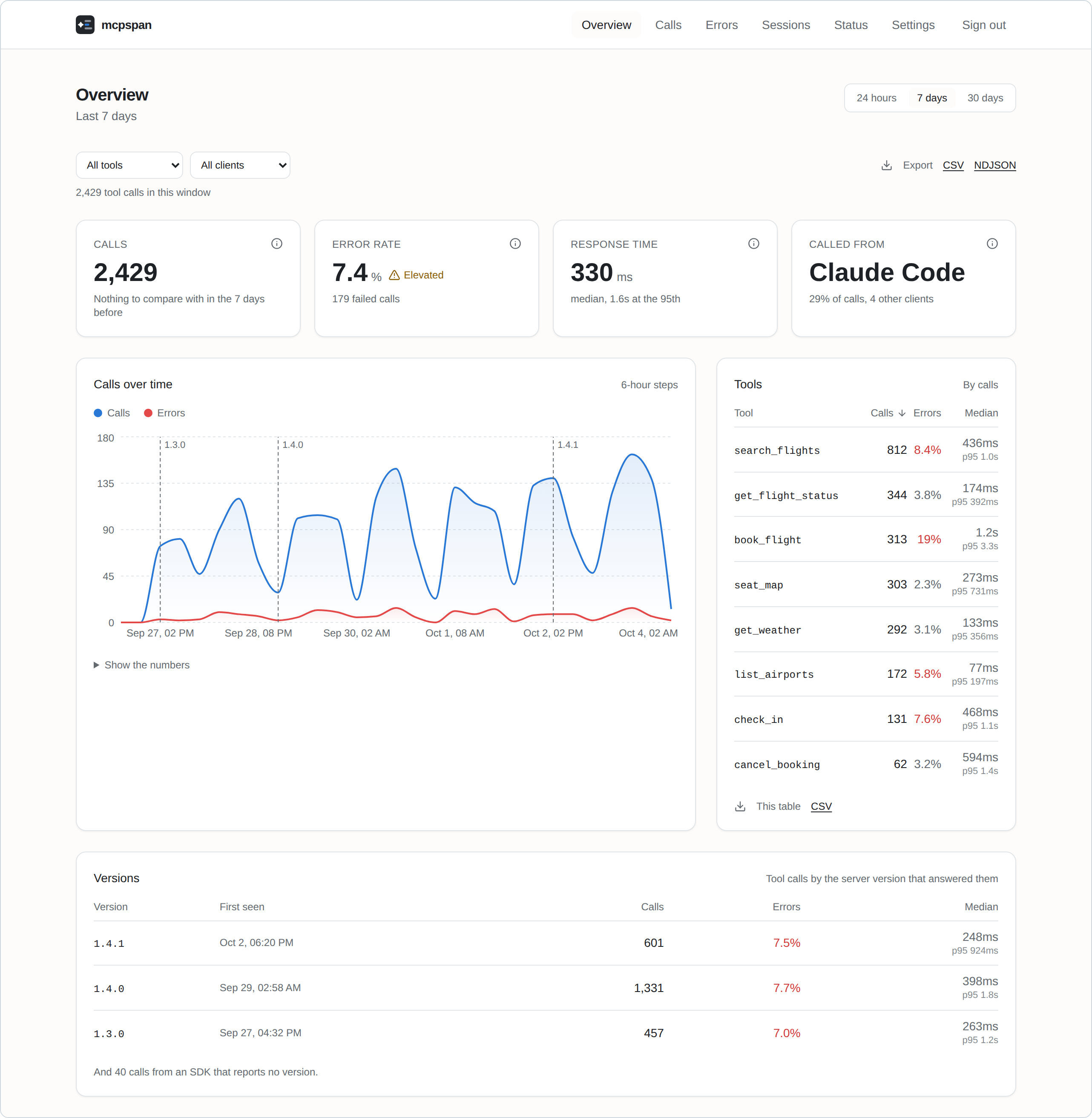
- **Every call, from every client.** Tool calls, resource reads and prompt
gets, with the client that made them: Claude, Claude Code, Cursor, ChatGPT
and the rest.
- **Response times that mean something.** Median and 95th percentile per tool,
and the full distribution, so a cache hit and a slow path do not hide
inside one average.
- **Failures, told apart.** A handler that threw, a tool that answered with an
error, arguments the server refused, and tools that agents asked for but
your server does not have.
- **Sessions.** Each connection's calls, step by step, as the agent made them.
- **Releases.** Every call carries the version of your server that answered
it; the charts mark where each release began and compare it with the one
before.
- **Alerts** to Slack, Discord or any webhook, when errors climb or a server
goes quiet, for a whole server or one tool.
- **Your data, yours to take.** CSV and NDJSON exports of anything you can
see, and forwarding to OpenTelemetry for Grafana, Datadog, Honeycomb and the
like.
- **Private by design.** Parameter values never leave your server's process,
and nothing is sent anywhere you did not set up yourself.
<table>
<tr>
<td width="50%"><strong>Every call</strong>, of every kind, filtered by outcome<br><img src="https://raw.githubusercontent.com/mcpspan/.github/main/assets/screenshot-calls.png" alt="The list of calls"></td>
<td width="50%"><strong>Failures, told apart</strong>, with what went wrong<br><img src="https://raw.githubusercontent.com/mcpspan/.github/main/assets/screenshot-errors.png" alt="Failed calls"></td>
</tr>
<tr>
<td><strong>Sessions</strong>, step by step<br><img src="https://raw.githubusercontent.com/mcpspan/.github/main/assets/screenshot-session.png" alt="One session's calls in order"></td>
<td><strong>One call</strong>, and everything recorded about it<br><img src="https://raw.githubusercontent.com/mcpspan/.github/main/assets/screenshot-call.png" alt="A failed call in detail"></td>
</tr>
</table>
## Quick start
You need Docker.
```sh
git clone https://github.com/mcpspan/mcpspan.git
cd mcpspan
docker compose up -d
```
Open **http://localhost:6270** and create your account. You get an API key
for your first server, and the Settings page shows the line to add to it, in
its language.
## Connect your MCP server
TypeScript, on the official MCP SDK:
```sh
npm install mcpspan
```
```ts
import { instrument } from 'mcpspan';
instrument(server, {
apiKey: process.env.MCPSPAN_API_KEY,
endpoint: 'http://localhost:6271', // your mcpspan installation
});
```
Register your tools as you always have: every one is measured, and each
returns and fails exactly as it did before.
Eight languages, the same features in each:
| Language | MCP SDKs | Install | Guide |
|---|---|---|---|
| TypeScript | official SDK, v1 and v2 | `npm install mcpspan` | [packages/mcpspan](packages/mcpspan/README.md) |
| Python | official SDK, FastMCP | `pip install mcpspan` | [packages/mcpspan-python](packages/mcpspan-python/README.md) |
| Go | official Go SDK, mcp-go | `go get github.com/mcpspan/mcpspan/packages/mcpspan-go/mcpsdk` | [packages/mcpspan-go](packages/mcpspan-go/README.md) |
| C# / .NET | official C# SDK | `dotnet add package McpSpan` | [packages/mcpspan-dotnet](packages/mcpspan-dotnet/README.md) |
| Java / Kotlin | official Java SDK | `com.mcpspan:mcpspan-java-sdk` | [packages/mcpspan-jvm](packages/mcpspan-jvm/README.md) |
| Rust | rmcp | `cargo add mcpspan` | [packages/mcpspan-rust](packages/mcpspan-rust/README.md) |
| Ruby | official Ruby SDK | `gem install mcpspan` | [packages/mcpspan-ruby](packages/mcpspan-ruby/README.md) |
| PHP | Laravel MCP, official PHP SDK | `composer require mcpspan/mcpspan` | [packages/mcpspan-php](packages/mcpspan-php/README.md) |
Every SDK behaves the same way, set out in [one contract](docs/sdk-contract.md)
and checked by [one test suite](conformance/README.md) in every language.
## Running it
Settings are optional: copy `.env.example` to `.env` to change ports, how long
data is kept, or the address your MCP servers reach the API at.
[docs/self-hosting.md](docs/self-hosting.md) covers the rest: the account and
password reset, several servers, settings, exports, OpenTelemetry, and
backups.
## Contributing
See [CONTRIBUTING.md](CONTRIBUTING.md).
## Licence
MIT. See [LICENSE](LICENSE).
 MCP 市场