Content
# Annapurna Kitchen Assistant (MCP Starter for Puch AI)
<div align="center">
<a href="https://tinyurl.com/annapurna-bot" style="text-decoration:none;">
<img src="https://img.shields.io/badge/Chat%20on%20WhatsApp-25D366?style=for-the-badge&logo=whatsapp&logoColor=white" alt="Chat on WhatsApp"/>
</a>
</div>
- 🌐 **Website:** to get more info visit [https://annapurna.hawkaii.me](https://annapurna.hawkaii.me)
- 🎬 **Demo:**
[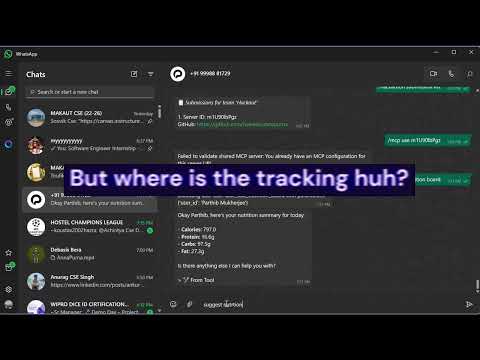](https://youtu.be/uxZUkDU_gno?si=cx8ju_32rViGNdMn)
Annapurna is a WhatsApp-based kitchen assistant powered by Puch AI and Gemini. It helps users manage their pantry, scan grocery bills, get smart recipe suggestions, and track nutrition—all through simple image and text interactions. This project is a Model Context Protocol (MCP) server starter, ready to connect with Puch AI and extend with your own tools.
---
## 🚀 How I Deployed This Project on Railway
Deploying this WhatsApp MCP project to the cloud was a breeze, thanks to Railway’s one-click deployment and my custom template. Here’s exactly how I did it, so you can follow the same steps!
### Why Railway?
I chose [Railway](https://railway.app/) because it lets me deploy, manage, and scale my Python backend and PostgreSQL database with zero DevOps hassle. It’s perfect for keeping my WhatsApp AI bot online 24/7, and the dashboard makes everything super easy to monitor and update.
---
### 🛠️ My Deployment Steps
#### 1. Created a Railway Template
I built a custom Railway template for this project, which you can use too:
[](https://railway.com/deploy/whatsapp-mcp)
Just click the button above, or visit [https://railway.com/deploy/whatsapp-mcp](https://railway.com/deploy/whatsapp-mcp), and Railway will guide you through the setup.
#### 2. Connected My GitHub Repo
Railway asked me to link my GitHub account and select this project’s repository. It automatically detected the Python backend and set up the build environment for me.
#### 3. Set Up Environment Variables
Following my own `railway.md` and `.env.example`, I added all the required secrets and API keys in the Railway dashboard:
```env
AUTH_TOKEN=your_secret_token
VISION_KEY=your_azure_vision_key
VISION_ENDPOINT=your_azure_vision_endpoint
GEMINI_API_KEY=your_gemini_api_key
DATABASE_URL=postgresql+asyncpg://username:password@host:port/dbname
```
> **Tip:** You’ll get the `DATABASE_URL` after adding the PostgreSQL plugin in the next step.
#### 4. Added a PostgreSQL Database
Railway makes it super simple to add a database:
- I clicked “Add Plugin” and chose **PostgreSQL**.
- Railway generated a secure `DATABASE_URL` for me, which I copied into my environment variables.
#### 5. Deployed with One Click
With everything set, I hit **Deploy** in the dashboard. The logs showed `🚀 Starting MCP server...`—and just like that, my backend was live!
#### 6. Connected to WhatsApp via Puch AI
I made sure my [Puch AI](https://puch.ai/) account was set up and linked to my WhatsApp number. Then, I used the public Railway URL as my webhook/backend endpoint in Puch AI.
#### 7. Monitored and Scaled
Railway’s dashboard let me watch logs, check metrics, and scale the app as needed. If I ever need to redeploy or roll back, it’s just a click away.
---
### 💡 Why This Approach Rocks
- **Personalized:** I built and tested this template myself, so you know it works!
- **Zero DevOps:** No server headaches—Railway handles everything.
- **Fast Iteration:** I can update code, redeploy, and see changes instantly.
- **Secure:** All secrets and API keys are managed in the dashboard.
---
**Want to try it yourself?**
Just use my template: [https://railway.com/deploy/whatsapp-mcp](https://railway.com/deploy/whatsapp-mcp)
If you get stuck, check out my `railway.md` for more tips, or reach out!
---
## Architecture
```mermaid
graph TB
%% User Interfaces
WA[📱 WhatsApp User]
WEB[🌐 Web App<br/><i>Coming Soon</i>]
MOB[📱 Mobile App<br/><i>Future</i>]
%% Middleware Layer
PUCH[🤖 Puch AI Agent<br/>Message Router]
%% Backend Services
MCP[🔧 MCP Server<br/>FastMCP + Bearer Auth]
API[🔌 REST API<br/><i>Future</i>]
%% Core Tools
subgraph "🛠️ MCP Tools"
OCR[📄 Grocery Bill OCR<br/>Azure Vision]
NUT[🥗 Nutrition Tracker<br/>Gemini AI]
REC[👨🍳 Recipe Suggestions<br/>Gemini AI]
INV[📦 Inventory Manager]
VAL[✅ Validation Tool]
end
%% External APIs
subgraph "🌍 External APIs"
AZURE[☁️ Azure AI Vision<br/>OCR Service]
GEMINI[🧠 Google Gemini<br/>LLM for Nutrition & Recipes]
end
%% Database
DB[(🗄️ PostgreSQL Database<br/>Users, Nutrition, Inventory)]
%% Connections
WA --> PUCH
WEB -.-> API
MOB -.-> API
PUCH --> MCP
API -.-> MCP
MCP --> OCR
MCP --> NUT
MCP --> REC
MCP --> INV
MCP --> VAL
OCR --> AZURE
NUT --> GEMINI
REC --> GEMINI
NUT --> DB
INV --> DB
VAL --> DB
%% Dark Theme Styling
classDef future fill:#2a2a2a,stroke:#888,stroke-width:2px,color:#ccc,stroke-dasharray: 5 5
classDef external fill:#1a365d,stroke:#4299e1,stroke-width:2px,color:#90cdf4
classDef core fill:#2d3748,stroke:#805ad5,stroke-width:2px,color:#d6bcfa
classDef data fill:#1a202c,stroke:#68d391,stroke-width:2px,color:#9ae6b4
classDef user fill:#2c5282,stroke:#63b3ed,stroke-width:2px,color:#bee3f8
classDef middleware fill:#744210,stroke:#f6ad55,stroke-width:2px,color:#fbd38d
class WEB,MOB,API future
class AZURE,GEMINI external
class MCP,OCR,NUT,REC,INV,VAL core
class DB data
class WA user
class PUCH middleware
```
---
## Features
- **Grocery Bill OCR**: Scan grocery bills (image upload) and extract purchased items using Azure AI Vision OCR. Inventory is persistent per user in PostgreSQL.
- **Smart Inventory Management**: Automatically update your pantry/inventory from grocery bills (PostgreSQL-backed).
- **AI-Powered Recipe Suggestions**: Get creative, healthy dish ideas based on your available ingredients (Gemini-powered).
- **Nutrition Tracker**: Log foods, extract nutrition facts via Gemini, and view your nutrition scoreboard (calories, protein, carbs, fat) — all data stored in PostgreSQL.
- **WhatsApp Integration**: Designed for seamless use with Puch AI's WhatsApp bot.
- **Bearer Token Authentication**: Secure, Puch-compatible authentication.
- **PostgreSQL Database**: All user data is stored in a PostgreSQL database for reliability and scalability.
- **🆕 REST API Server**: FastAPI-based REST API server exposing all features as HTTP endpoints (port 8005).
---
## 🔌 REST API Server
In addition to the MCP server (port 8086), this project now includes a **FastAPI REST API server** (port 8005) that exposes all nutrition tracking features as HTTP endpoints.
### Starting the API Server
```bash
# Activate virtual environment
source .venv/bin/activate
# Run the API server
python api/main.py
```
The API server will start on `http://0.0.0.0:8005` with:
- **📝 Interactive API Docs**: http://localhost:8005/docs (Swagger UI)
- **📖 Alternative Docs**: http://localhost:8005/redoc (ReDoc)
- **💚 Health Check**: http://localhost:8005/health
### API Endpoints
| Endpoint | Method | Description |
|----------|--------|-------------|
| `GET /health` | GET | Health check endpoint |
| `POST /nutrition` | POST | Get nutrition info for food using Gemini AI |
| `POST /nutrition/board` | POST | Get user's cumulative nutrition totals |
| `POST /recipes/suggest` | POST | Get 3 dish suggestions from ingredients |
| `POST /nutrition/lock` | POST | Log a custom dish with nutrition data |
| `POST /ocr/grocery-bill` | POST | Extract items from grocery bill image (OCR) |
### Example API Usage
#### 1. Health Check
```bash
curl http://localhost:8005/health
```
Response:
```json
{
"status": "ok",
"timestamp": "2026-01-26T12:00:00",
"service": "Nutrition Tracker API"
}
```
#### 2. Get Nutrition Information
```bash
curl -X POST http://localhost:8005/nutrition \
-H "Content-Type: application/json" \
-d '{
"user_id": "user123",
"food": "chicken breast",
"amount": 200
}'
```
Response:
```json
{
"calories": 330,
"protein": 62,
"carbs": 0,
"fat": 7
}
```
#### 3. Get Nutrition Board (User Totals)
```bash
curl -X POST http://localhost:8005/nutrition/board \
-H "Content-Type: application/json" \
-d '{
"user_id": "user123"
}'
```
Response:
```json
{
"user_id": "user123",
"calories": 1850.5,
"protein": 120.3,
"carbs": 180.2,
"fat": 65.8
}
```
#### 4. Suggest Dishes from Ingredients
```bash
curl -X POST http://localhost:8005/recipes/suggest \
-H "Content-Type: application/json" \
-d '{
"ingredients": ["eggs", "spinach", "cheese"]
}'
```
Response:
```json
{
"dishes": [
"Spinach and Cheese Omelette (2 eggs, 100g spinach, 50g cheese)",
"Cheesy Spinach Scrambled Eggs (3 eggs, 80g spinach, 40g cheese)",
"Spinach Frittata with Cheese (4 eggs, 120g spinach, 60g cheese)"
]
}
```
#### 5. Lock a Dish (Log Custom Nutrition)
```bash
curl -X POST http://localhost:8005/nutrition/lock \
-H "Content-Type: application/json" \
-d '{
"user_id": "user123",
"dish": "Spinach Omelette",
"nutrition": {
"calories": 250,
"protein": 18,
"carbs": 5,
"fat": 15
}
}'
```
Response:
```json
{
"timestamp": "2026-01-26T12:30:00",
"user_id": "user123",
"food": "Spinach Omelette",
"amount": 1,
"nutrition": {
"calories": 250,
"protein": 18,
"carbs": 5,
"fat": 15
}
}
```
#### 6. Scan Grocery Bill (OCR)
```bash
# First, encode your image to base64
IMAGE_BASE64=$(base64 -w 0 grocery_bill.jpg)
curl -X POST http://localhost:8005/ocr/grocery-bill \
-H "Content-Type: application/json" \
-d "{
\"user_id\": \"user123\",
\"image_base64\": \"$IMAGE_BASE64\"
}"
```
Response:
```json
{
"items": [
"Banana",
"Milk",
"Bread",
"Eggs",
"Chicken Breast"
]
}
```
### Testing the API
A test script is provided for quick testing:
```bash
# Make sure the API server is running first
./test_api.sh
```
This will test all endpoints and display the results.
### Running Both Servers
You can run both the MCP server (port 8086) and the API server (port 8005) simultaneously:
```bash
# Terminal 1: Start MCP server
source .venv/bin/activate
python mcp-bearer-token/mcp_starter.py
# Terminal 2: Start API server
source .venv/bin/activate
python api/main.py
```
Both servers share the same PostgreSQL database and business logic.
### API Authentication
The REST API currently has **no authentication** (open API). This is suitable for:
- Development and testing
- Internal/private networks
- Trusted environments
For production use, consider adding authentication (API keys, JWT tokens, etc.).
---



